
【转载】用OCTAVE实现一元线性回归的梯度下降算法
原文地址:http://www.cnblogs.com/KID-XiaoYuan/p/7247481.html
STEP1 PLOTTING THE DATA
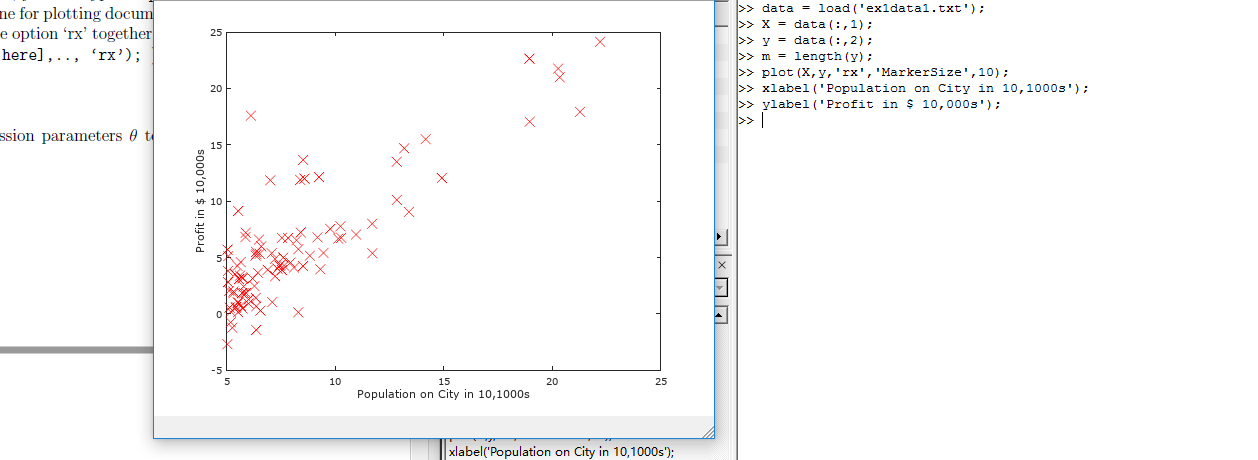
在处理数据之前,我们通常要了解数据,对于这次的数据集合,我们可以通过离散的点来描绘它,在一个2D的平面里把它画出来。
ex1data1.txt
我们把ex1data1中的内容读取到X变量和y变量中,用m表示数据长度。
|
1
2
3
4
|
data = load('ex1data1.txt');X = data(:,1);y = data(:,2);m = length(y); |
接下来通过图像描绘出来。
|
1
2
3
|
plot(x,y,'rx','MakerSize',10);ylabel('Profit in $10,000s');xlabel('Population of City in 10,000s'); |
现在我们得到图像如图所示,就是原始的数据的直观表示。
STEP2 GRADIENT DESCENT
现在,我们通过梯度下降法对参数θ进行线性回归。
依照我们之前所得出步骤方法

迭代更新
计算θ值函数:
|
1
2
3
4
5
6
7
8
9
10
11
12
13
14
15
16
17
18
19
20
21
22
23
|
function J = computeCost(X, y, theta)%COMPUTECOST Compute cost for linear regression% J = COMPUTECOST(X, y, theta) computes the cost of using theta as the% parameter for linear regression to fit the data points in X and y% Initialize some useful valuesm = length(y); % number of training examples% You need to return the following variables correctlyJ = 0;% ====================== YOUR CODE HERE ======================% Instructions: Compute the cost of a particular choice of theta% You should set J to the cost.J = sum((X * theta - y).^2) / (2*m); % X(79,2) theta(2,1)% =========================================================================end |
接下来是梯度下降函数
|
1
2
3
4
5
6
7
8
9
10
11
12
13
14
15
16
17
18
19
20
21
22
23
24
25
26
27
28
29
30
31
32
33
|
function [theta, J_history] = gradientDescent(X, y, theta, alpha, num_iters)%GRADIENTDESCENT Performs gradient descent to learn theta% theta = GRADIENTDESENT(X, y, theta, alpha, num_iters) updates theta by% taking num_iters gradient steps with learning rate alpha% Initialize some useful valuesm = length(y); % number of training examplesJ_history = zeros(num_iters, 1);theta_s=theta;for iter = 1:num_iters % ====================== YOUR CODE HERE ====================== % Instructions: Perform a single gradient step on the parameter vector % theta. % % Hint: While debugging, it can be useful to print out the values % of the cost function (computeCost) and gradient here. % theta(1) = theta(1) - alpha / m * sum(X * theta_s - y); theta(2) = theta(2) - alpha / m * sum((X * theta_s - y) .* X(:,2)); % 必须同时更新theta(1)和theta(2),所以不能用X * theta,而要用theta_s存储上次结果。 theta_s=theta; % ============================================================ % Save the cost J in every iteration J_history(iter) = computeCost(X, y, theta);endJ_historyend |
绘图函数:
|
1
2
3
4
5
6
7
8
9
10
11
12
13
14
15
16
17
18
19
20
21
22
23
24
25
26
27
28
|
function plotData(x, y)%PLOTDATA Plots the data points x and y into a new figure% PLOTDATA(x,y) plots the data points and gives the figure axes labels of% population and profit.% ====================== YOUR CODE HERE ======================% Instructions: Plot the training data into a figure using the% "figure" and "plot" commands. Set the axes labels using% the "xlabel" and "ylabel" commands. Assume the% population and revenue data have been passed in% as the x and y arguments of this function.%% Hint: You can use the 'rx' option with plot to have the markers% appear as red crosses. Furthermore, you can make the% markers larger by using plot(..., 'rx', 'MarkerSize', 10);figure; % open a new figure windowplot(x, y, 'rx', 'MarkerSize', 10); % Plot the dataylabel('Profit in $10,000s'); % Set the y axis labelxlabel('Population of City in 10,000s'); % Set the x axis label % ============================================================end |
根据以上函数,我们进行线性回归:
|
1
2
3
4
5
6
7
8
9
10
11
12
13
14
15
16
17
18
19
20
21
22
23
24
25
26
27
28
29
30
31
32
33
34
35
36
37
38
39
40
41
42
43
44
45
46
47
48
49
50
51
52
53
54
55
56
57
58
59
60
61
62
63
64
65
66
67
68
69
70
71
72
73
74
75
76
77
78
79
80
81
82
83
84
85
86
87
88
89
90
91
92
93
94
95
96
97
98
99
100
101
102
103
104
105
106
107
108
109
110
111
112
113
114
115
116
117
118
119
120
|
<br>%% Machine Learning Online Class - Exercise 1: Linear Regression% Instructions% ------------%% This file contains code that helps you get started on the% linear exercise. You will need to complete the following functions% in this exericse:%% warmUpExercise.m% plotData.m% gradientDescent.m% computeCost.m% gradientDescentMulti.m% computeCostMulti.m% featureNormalize.m% normalEqn.m%% For this exercise, you will not need to change any code in this file,% or any other files other than those mentioned above.%% x refers to the population size in 10,000s% y refers to the profit in $10,000s%%% ==================== Part 1: Basic Function ====================% Complete warmUpExercise.mfprintf('Running warmUpExercise ... \n');fprintf('5x5 Identity Matrix: \n');warmUpExercise()fprintf('Program paused. Press enter to continue.\n');pause;%% ======================= Part 2: Plotting =======================fprintf('Plotting Data ...\n')data = load('ex1data1.txt');X = data(:, 1); y = data(:, 2);m = length(y); % number of training examples% Plot Data% Note: You have to complete the code in plotData.mplotData(X, y);fprintf('Program paused. Press enter to continue.\n');pause;%% =================== Part 3: Gradient descent ===================fprintf('Running Gradient Descent ...\n')X = [ones(m, 1), data(:,1)]; % Add a column of ones to xtheta = zeros(2, 1); % initialize fitting parameters% Some gradient descent settingsiterations = 1500;alpha = 0.01;% compute and display initial costcomputeCost(X, y, theta)% run gradient descenttheta = gradientDescent(X, y, theta, alpha, iterations);% print theta to screenfprintf('Theta found by gradient descent: ');fprintf('%f %f \n', theta(1), theta(2));% Plot the linear fithold on; % keep previous plot visibleplot(X(:,2), X*theta, '-')legend('Training data', 'Linear regression')hold off % don't overlay any more plots on this figure% Predict values for population sizes of 35,000 and 70,000predict1 = [1, 3.5] *theta;fprintf('For population = 35,000, we predict a profit of %f\n',... predict1*10000);predict2 = [1, 7] * theta;fprintf('For population = 70,000, we predict a profit of %f\n',... predict2*10000);fprintf('Program paused. Press enter to continue.\n');pause;%% ============= Part 4: Visualizing J(theta_0, theta_1) =============fprintf('Visualizing J(theta_0, theta_1) ...\n')% Grid over which we will calculate Jtheta0_vals = linspace(-10, 10, 100);theta1_vals = linspace(-1, 4, 100);% initialize J_vals to a matrix of 0'sJ_vals = zeros(length(theta0_vals), length(theta1_vals));% Fill out J_valsfor i = 1:length(theta0_vals) for j = 1:length(theta1_vals) t = [theta0_vals(i); theta1_vals(j)]; J_vals(i,j) = computeCost(X, y, t); endend% Because of the way meshgrids work in the surf command, we need to% transpose J_vals before calling surf, or else the axes will be flippedJ_vals = J_vals';% Surface plotfigure;surf(theta0_vals, theta1_vals, J_vals)xlabel('\theta_0'); ylabel('\theta_1');% Contour plotfigure;% Plot J_vals as 15 contours spaced logarithmically between 0.01 and 100contour(theta0_vals, theta1_vals, J_vals, logspace(-2, 3, 20))xlabel('\theta_0'); ylabel('\theta_1');hold on;plot(theta(1), theta(2), 'rx', 'MarkerSize', 10, 'LineWidth', 2); |

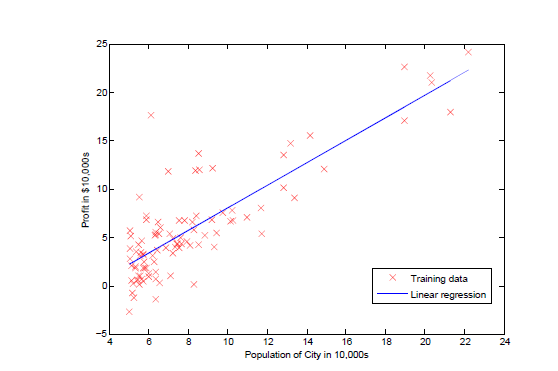
如图所示,绘制出线性回归函数。
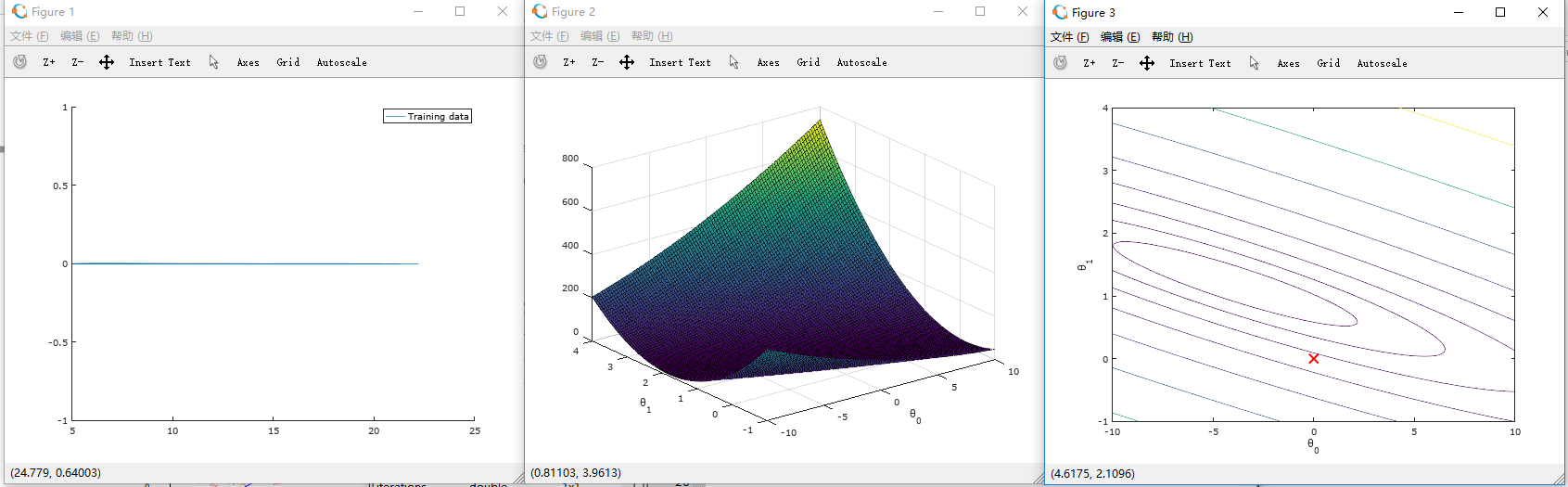
这时所绘制2D等高线图梯度下降表面图:
|
1
2
3
4
5
6
7
8
9
10
11
12
13
14
15
16
17
18
19
20
21
22
23
24
25
26
27
28
29
30
31
32
33
34
35
36
37
38
39
40
41
42
43
44
45
46
47
48
49
50
51
52
53
54
55
56
57
58
59
60
61
62
63
64
65
66
67
68
69
70
71
72
73
74
75
76
77
78
79
80
81
82
83
84
85
86
87
88
89
90
91
92
93
94
95
96
97
98
99
100
101
102
103
104
105
106
107
108
109
110
111
112
113
114
115
116
117
118
119
120
121
122
123
124
125
126
127
128
129
130
131
132
133
134
135
136
137
138
139
140
141
142
143
144
145
146
147
148
149
150
151
152
153
154
155
156
157
158
159
160
161
162
163
164
165
166
167
168
169
170
171
172
173
174
175
176
177
178
179
180
181
182
183
184
185
186
187
188
189
190
191
192
193
194
195
196
197
198
199
200
201
202
203
204
205
206
207
208
209
210
211
212
213
214
215
216
217
218
219
220
221
222
223
224
225
226
227
228
229
230
231
232
233
234
235
236
237
238
239
240
241
242
243
244
245
246
247
248
249
250
251
252
253
254
255
256
257
258
259
260
261
262
263
264
265
266
267
268
269
270
271
|
function [X_norm, mu, sigma] = featureNormalize(X)%FEATURENORMALIZE Normalizes the features in X% FEATURENORMALIZE(X) returns a normalized version of X where% the mean value of each feature is 0 and the standard deviation% is 1. This is often a good preprocessing step to do when% working with learning algorithms.% You need to set these values correctlyX_norm = X;mu = zeros(1, size(X, 2)); % mean value 均值 size(X,2) 列数sigma = zeros(1, size(X, 2)); % standard deviation 标准差% ====================== YOUR CODE HERE ======================% Instructions: First, for each feature dimension, compute the mean% of the feature and subtract it from the dataset,% storing the mean value in mu. Next, compute the% standard deviation of each feature and divide% each feature by it's standard deviation, storing% the standard deviation in sigma.%% Note that X is a matrix where each column is a% feature and each row is an example. You need% to perform the normalization separately for% each feature.%% Hint: You might find the 'mean' and 'std' functions useful.% mu = mean(X); % mean value sigma = std(X); % standard deviation X_norm = (X - repmat(mu,size(X,1),1)) ./ repmat(sigma,size(X,1),1); % ============================================================endfunction [theta, J_history] = gradientDescentMulti(X, y, theta, alpha, num_iters)%GRADIENTDESCENTMULTI Performs gradient descent to learn theta% theta = GRADIENTDESCENTMULTI(x, y, theta, alpha, num_iters) updates theta by% taking num_iters gradient steps with learning rate alpha% Initialize some useful valuesm = length(y); % number of training examplesJ_history = zeros(num_iters, 1);for iter = 1:num_iters % ====================== YOUR CODE HERE ====================== % Instructions: Perform a single gradient step on the parameter vector % theta. % % Hint: While debugging, it can be useful to print out the values % of the cost function (computeCostMulti) and gradient here. % theta = theta - alpha / m * X' * (X * theta - y); % ============================================================ % Save the cost J in every iteration J_history(iter) = computeCostMulti(X, y, theta);endendfunction J = computeCostMulti(X, y, theta)%COMPUTECOSTMULTI Compute cost for linear regression with multiple variables% J = COMPUTECOSTMULTI(X, y, theta) computes the cost of using theta as the% parameter for linear regression to fit the data points in X and y% Initialize some useful valuesm = length(y); % number of training examples% You need to return the following variables correctlyJ = 0;% ====================== YOUR CODE HERE ======================% Instructions: Compute the cost of a particular choice of theta% You should set J to the cost.J = sum((X * theta - y).^2) / (2*m); % =========================================================================endfunction [theta] = normalEqn(X, y)%NORMALEQN Computes the closed-form solution to linear regression% NORMALEQN(X,y) computes the closed-form solution to linear% regression using the normal equations.theta = zeros(size(X, 2), 1);% ====================== YOUR CODE HERE ======================% Instructions: Complete the code to compute the closed form solution% to linear regression and put the result in theta.%% ---------------------- Sample Solution ----------------------theta = pinv( X' * X ) * X' * y;% -------------------------------------------------------------% ============================================================end%% Machine Learning Online Class% Exercise 1: Linear regression with multiple variables%% Instructions% ------------%% This file contains code that helps you get started on the% linear regression exercise.%% You will need to complete the following functions in this% exericse:%% warmUpExercise.m% plotData.m% gradientDescent.m% computeCost.m% gradientDescentMulti.m% computeCostMulti.m% featureNormalize.m% normalEqn.m%% For this part of the exercise, you will need to change some% parts of the code below for various experiments (e.g., changing% learning rates).%%% Initialization%% ================ Part 1: Feature Normalization ================%% Clear and Close Figuresclear ; close all; clcfprintf('Loading data ...\n');%% Load Datadata = load('ex1data2.txt');X = data(:, 1:2);y = data(:, 3);m = length(y);% Print out some data pointsfprintf('First 10 examples from the dataset: \n');fprintf(' x = [%.0f %.0f], y = %.0f \n', [X(1:10,:) y(1:10,:)]');fprintf('Program paused. Press enter to continue.\n');pause;% Scale features and set them to zero meanfprintf('Normalizing Features ...\n');[X mu sigma] = featureNormalize(X); % 均值0,标准差1% Add intercept term to XX = [ones(m, 1) X];%% ================ Part 2: Gradient Descent ================% ====================== YOUR CODE HERE ======================% Instructions: We have provided you with the following starter% code that runs gradient descent with a particular% learning rate (alpha).%% Your task is to first make sure that your functions -% computeCost and gradientDescent already work with% this starter code and support multiple variables.%% After that, try running gradient descent with% different values of alpha and see which one gives% you the best result.%% Finally, you should complete the code at the end% to predict the price of a 1650 sq-ft, 3 br house.%% Hint: By using the 'hold on' command, you can plot multiple% graphs on the same figure.%% Hint: At prediction, make sure you do the same feature normalization.%fprintf('Running gradient descent ...\n');% Choose some alpha valuealpha = 0.01;num_iters = 8500;% Init Theta and Run Gradient Descenttheta = zeros(3, 1);[theta, J_history] = gradientDescentMulti(X, y, theta, alpha, num_iters);% Plot the convergence graphfigure;plot(1:numel(J_history), J_history, '-b', 'LineWidth', 2);xlabel('Number of iterations');ylabel('Cost J');% Display gradient descent's resultfprintf('Theta computed from gradient descent: \n');fprintf(' %f \n', theta);fprintf('\n');% Estimate the price of a 1650 sq-ft, 3 br house% ====================== YOUR CODE HERE ======================% Recall that the first column of X is all-ones. Thus, it does% not need to be normalized.price = [1 (([1650 3]-mu) ./ sigma)] * theta ;% ============================================================fprintf(['Predicted price of a 1650 sq-ft, 3 br house ' ... '(using gradient descent):\n $%f\n'], price);fprintf('Program paused. Press enter to continue.\n');pause;%% ================ Part 3: Normal Equations ================fprintf('Solving with normal equations...\n');% ====================== YOUR CODE HERE ======================% Instructions: The following code computes the closed form% solution for linear regression using the normal% equations. You should complete the code in% normalEqn.m%% After doing so, you should complete this code% to predict the price of a 1650 sq-ft, 3 br house.%%% Load Datadata = csvread('ex1data2.txt');X = data(:, 1:2);y = data(:, 3);m = length(y);% Add intercept term to XX = [ones(m, 1) X];% Calculate the parameters from the normal equationtheta = normalEqn(X, y);% Display normal equation's resultfprintf('Theta computed from the normal equations: \n');fprintf(' %f \n', theta);fprintf('\n');% Estimate the price of a 1650 sq-ft, 3 br house% ====================== YOUR CODE HERE ======================price = [1 1650 3] * theta ;% ============================================================fprintf(['Predicted price of a 1650 sq-ft, 3 br house ' ... '(using normal equations):\n $%f\n'], price); |
处理前:
处理后:
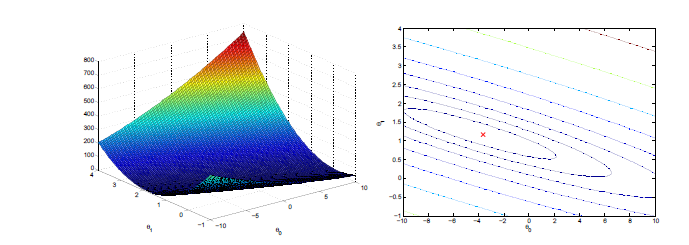
回归过程如图所示:
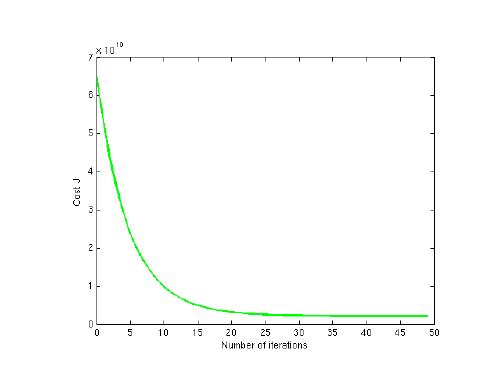
至此,我们通过梯度下降法解决了此问题,我们还可以通过之前所说的数学方法来解决,但是对于数据太大的情况(通常大于10000),我们就会通过梯度下降法来解决了
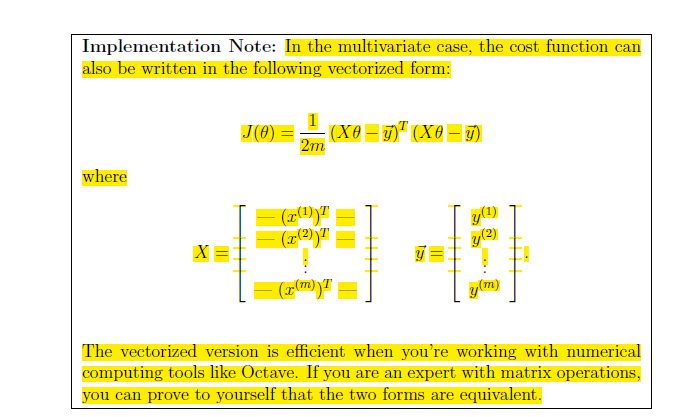
根据以上函数,我们进行线性回归:
【转载】用OCTAVE实现一元线性回归的梯度下降算法的更多相关文章
- 【机器学习】用Octave实现一元线性回归的梯度下降算法
Step1 Plotting the Data 在处理数据之前,我们通常要了解数据,对于这次的数据集合,我们可以通过离散的点来描绘它,在一个2D的平面里把它画出来. 6.1101,17.592 5.5 ...
- 斯坦福机器学习视频笔记 Week1 线性回归和梯度下降 Linear Regression and Gradient Descent
最近开始学习Coursera上的斯坦福机器学习视频,我是刚刚接触机器学习,对此比较感兴趣:准备将我的学习笔记写下来, 作为我每天学习的签到吧,也希望和各位朋友交流学习. 这一系列的博客,我会不定期的更 ...
- 梯度下降算法对比(批量下降/随机下降/mini-batch)
大规模机器学习: 线性回归的梯度下降算法:Batch gradient descent(每次更新使用全部的训练样本) 批量梯度下降算法(Batch gradient descent): 每计算一次梯度 ...
- Python实现——一元线性回归(梯度下降法)
2019/3/25 一元线性回归--梯度下降/最小二乘法_又名:一两位小数点的悲剧_ 感觉这个才是真正的重头戏,毕竟前两者都是更倾向于直接使用公式,而不是让计算机一步步去接近真相,而这个梯度下降就不一 ...
- 梯度下降法及一元线性回归的python实现
梯度下降法及一元线性回归的python实现 一.梯度下降法形象解释 设想我们处在一座山的半山腰的位置,现在我们需要找到一条最快的下山路径,请问应该怎么走?根据生活经验,我们会用一种十分贪心的策略,即在 ...
- 回归分析法&一元线性回归操作和解释
用Excel做回归分析的详细步骤 一.什么是回归分析法 "回归分析"是解析"注目变量"和"因于变量"并明确两者关系的统计方法.此时,我们把因 ...
- R语言解读一元线性回归模型
转载自:http://blog.fens.me/r-linear-regression/ 前言 在我们的日常生活中,存在大量的具有相关性的事件,比如大气压和海拔高度,海拔越高大气压强越小:人的身高和体 ...
- machine learning 之 导论 一元线性回归
整理自Andrew Ng 的 machine learnig 课程 week1. 目录: 什么是机器学习 监督学习 非监督学习 一元线性回归 模型表示 损失函数 梯度下降算法 1.什么是机器学习 Ar ...
- Machine Learning--week2 多元线性回归、梯度下降改进、特征缩放、均值归一化、多项式回归、正规方程与设计矩阵
对于multiple features 的问题(设有n个feature),hypothesis 应该改写成 \[ \mathit{h} _{\theta}(x) = \theta_{0} + \the ...
随机推荐
- 在jquery事件中修改Angular的model
HTML代码如下 <!DOCTYPE html> <html ng-app="qm"> <body> <input type=" ...
- JavaScript_3_输出
1. JavaScript通常用于操作HTML元素,可以使用getElementById(id)方法. JavaScript由Web浏览器来执行. 2. document.write()仅仅向文档输出 ...
- C基础练习题
1.下面有关C程序操作过程的说法中,错误的是______. A.C源程序经过编译,得到的目标文件即为可执行文件 B.C源程序的链接实质上是将目标代码文件和库函数等代码进行连接的过程 C.C源程序不能通 ...
- MovieReview—Kingsman THE SECRET SERVICE(王牌特工之特工学院)
Brain Storming Mr. Valentine's Day see excess human beings as the Earth's virus and try to e ...
- Oracle RAC Brain Split Resolution
大约是一周前,一位资深的Oracle工程师向我和客户介绍RAC中脑裂的处理过程,据他介绍脑裂发生时通过各节点对voting disk(投票磁盘)的抢夺,那些争抢到(n/2+1)数量voting dis ...
- UVALive 3026 Period (KMP算法简介)
kmp的代码很短,但是不太容易理解,还是先说明一下这个算法过程吧. 朴素的字符串匹配大家都懂,但是效率不高,原因在哪里? 匹配过程没有充分利用已经匹配好的模版的信息,比如说, i是文本串当前字符的下标 ...
- MySql面试题、知识汇总、牛客网SQL专题练习
点击名字直接跳转到链接: Linux运维必会的100道MySql面试题之(一) Linux运维必会的100道MySql面试题之(二) Linux运维必会的100道MySql面试题之(三) Linux运 ...
- CornerStone使用跳坑总结
Cornerstone是专门为Mac用户设计的Subversion(SVN)的控制,使版本控制更加透明.cornerstone根Xcode相比,能够更好的忽略文件,所以除了项目经理第一次初始化项目的时 ...
- java基础—面向对象2
一.JAVA类的定义
- ES6_Promise 对象 阮一锋
Promise的含义 promise是异步编程的一种解决方法,比传统的回调函数和事件更合理更强大.他由社区最早提出和实现,ES6将其写进语言标准,统一了用法,原生提供了promise对象.所谓prom ...