
@PropertySource
功能
加载指定的属性文件(*.properties)到 Spring 的 Environment 中。可以配合 @Value 和 @ConfigurationProperties 使用。
- @PropertySource 和 @Value 组合使用,可以将自定义属性文件中的属性变量值注入到当前类的使用@Value注解的成员变量中。
- @PropertySource 和 @ConfigurationProperties 组合使用,可以将属性文件与一个Java类绑定,将属性文件中的变量值注入到该Java类的成员变量中。
源码
package org.springframework.context.annotation;

import java.lang.annotation.Documented;

import java.lang.annotation.ElementType;

import java.lang.annotation.Repeatable;

import java.lang.annotation.Retention;

import java.lang.annotation.RetentionPolicy;

import java.lang.annotation.Target;

import org.springframework.core.io.support.PropertySourceFactory;

@Target(ElementType.TYPE)

@Retention(RetentionPolicy.RUNTIME)

@Documented

@Repeatable(PropertySources.class)

public @interface PropertySource {

    /**

     * 属性源的名称

     */

    String name() default "";

    /**

     * 属性文件的存放路径

     */

    String[] value();

    /**

     * 如果指定的属性源不存在,是否要忽略这个错误

     */

    boolean ignoreResourceNotFound() default false;

    /**

     * 属性源的编码格式

     */

    String encoding() default "";

    /**

     * 属性源工厂

     */

    Class<? extends PropertySourceFactory> factory() default PropertySourceFactory.class;

}
使用示例
属性文件:demo.properties
demo.name=huang

demo.sex=1

demo.type=demo
示例一:@PropertySource + @Value
package com.huang.pims.demo.props;

import org.springframework.beans.factory.annotation.Value;

import org.springframework.context.annotation.PropertySource;

import org.springframework.stereotype.Component;

@Component

@PropertySource(value = {"demo/props/demo.properties"})

public class ReadByPropertySourceAndValue {

    @Value("${demo.name}")

    private String name;

    @Value("${demo.sex}")

    private int sex;

    @Value("${demo.type}")

    private String type;

    @Override

    public String toString() {

        return "ReadByPropertySourceAndValue{" +

                "name='" + name + '\'' +

                ", sex=" + sex +

                ", type='" + type + '\'' +

                '}';

    }

}
示例二:@PropertySource 和 @ConfigurationProperties
package com.huang.pims.demo.props;

import org.springframework.boot.context.properties.ConfigurationProperties;

import org.springframework.context.annotation.PropertySource;

import org.springframework.stereotype.Component;

@Component

@PropertySource(value = {"demo/props/demo.properties"})

@ConfigurationProperties(prefix = "demo")

public class ReadByPropertySourceAndConfProperties {

    private String name;

    private int sex;

    private String type;

    public void setName(String name) {

        this.name = name;

    }

    public void setSex(int sex) {

        this.sex = sex;

    }

    public void setType(String type) {

        this.type = type;

    }

    public String getName() {

        return name;

    }

    public int getSex() {

        return sex;

    }

    public String getType() {

        return type;

    }

    @Override

    public String toString() {

        return "ReadByPropertySourceAndConfProperties{" +

                "name='" + name + '\'' +

                ", sex=" + sex +

                ", type='" + type + '\'' +

                '}';

    }

}
示例测试
package com.huang.pims.demo.runners;

import com.huang.pims.demo.props.*;

import org.slf4j.Logger;

import org.slf4j.LoggerFactory;

import org.springframework.beans.factory.annotation.Autowired;

import org.springframework.boot.CommandLineRunner;

import org.springframework.stereotype.Component;

@Component

public class OutputPropsRunner implements CommandLineRunner {

    private static final Logger LOGGER = LoggerFactory.getLogger(OutputPropsRunner.class);

    @Autowired

    private ReadByPropertySourceAndValue readByPropertySourceAndValue;

    @Autowired

    private ReadByPropertySourceAndConfProperties readByPropertySourceAndConfProperties;

    @Override

    public void run(String... args) throws Exception {

        LOGGER.info(readByPropertySourceAndValue.toString());

        LOGGER.info(readByPropertySourceAndConfProperties.toString());

    }

}
启动项目即可看到效果。
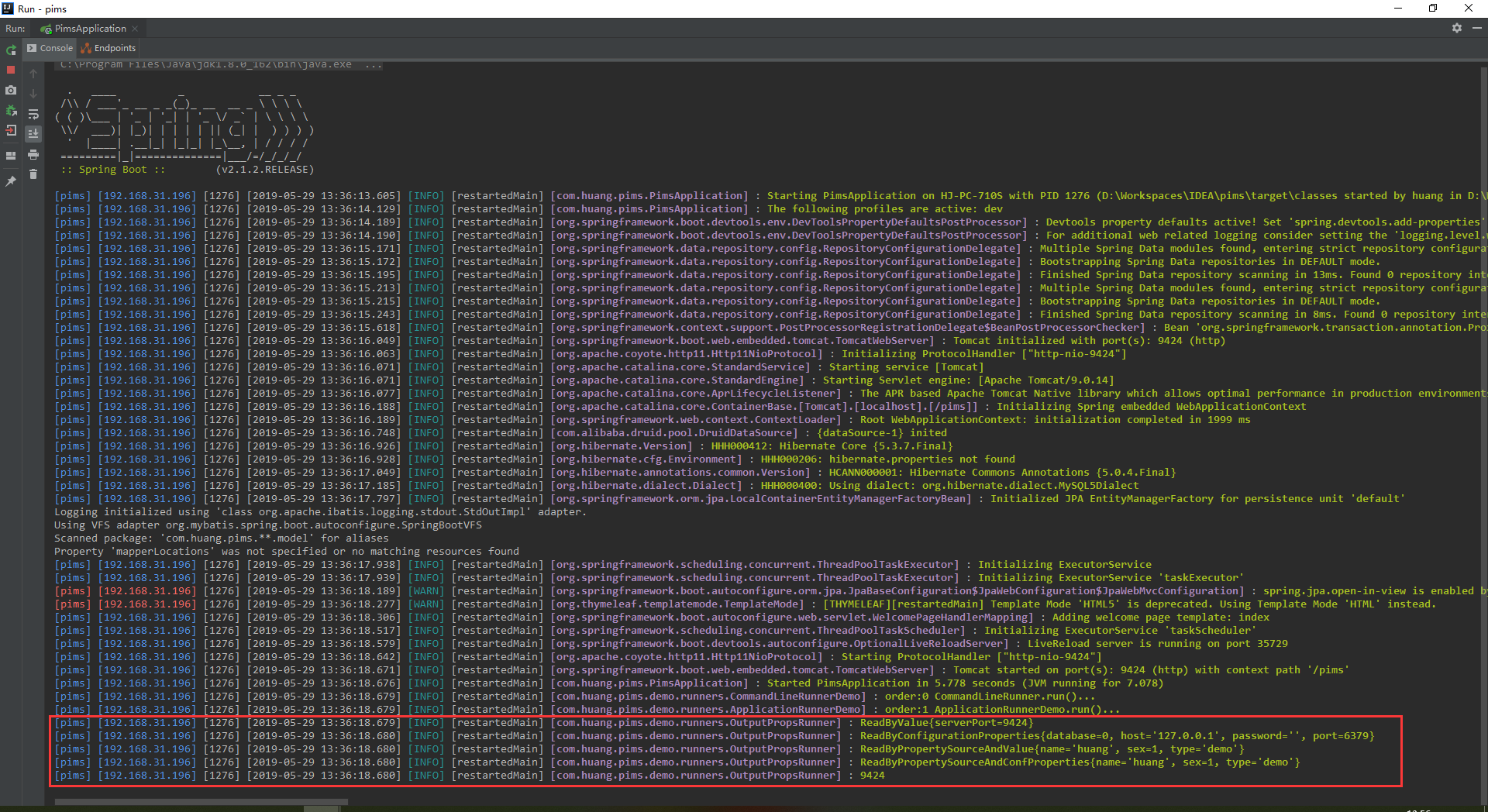
从截图中可以看出,需要读取的属性配置,都已经成功读取出来了。
@PropertySource的更多相关文章
- 【译】Spring 4 @PropertySource和@Value注解示例
前言 译文链接:http://websystique.com/spring/spring-propertysource-value-annotations-example/ 本篇文章将展示如何通过@P ...
- Spring3.1新属性管理API:PropertySource、Environment、Profile
Spring3.1提供了新的属性管理API,而且功能非常强大且很完善,对于一些属性配置信息都应该使用新的API来管理.虽然现在Spring已经到4版本了,这篇文章来的晚点. 新的属性管理API Pro ...
- SpringBoot2 java配置方式 Configuration和PropertySource结合读取配置文件
JdbcConfig.java Configuration是配置文件 PropertySource 引入配置文件 value读取配置文件内容 package cn.itcast.config; imp ...
- SpringBoot入门教程(十八)@value、@Import、@ImportResource、@PropertySource
Spring Boot提倡基于Java的配置.这两篇博文主要介绍springboot 一些常用的注解介绍 v@value 通过@Value可以将外部的值动态注入到Bean中. 添加applicatio ...
- Spring-boot中@ConfigurationProperties,@Value,@PropertySource
1.利用@ConfigurationProperties获取配置的值,@ConfigurationProperties是springboot提供的基于安全类型的配置放置. application.pr ...
- SpringBoot标签之@ConfigurationProperties、@PropertySource注解的使用
当获取主配置文件中属性值时,只需@ConfigurationProperties(prefix = "person")注解来修饰某类,其作用是告诉springBoot,此类中的属性 ...
- Spring读取外部的资源配置文件—@PropertySource和@Value实现资源文件配置
通过@PropertySource可以指定读取的配置文件,通过@Value注解获取值: @PropertySource注解主要是让Spring的Environment接口读取属性配置文件用的,标识在@ ...
- 02、@PropertySource指定配置文件的属性映射到JavaBean属性
零.@PropertySource 功能类似于 <context:property-placeholder location="classpath*:/config/load.prop ...
- 基于spring的PropertySource类实现配置的动态替换
public class ConfigPropertySource extends PropertySource<Properties> implements PriorityOrdere ...
- springboot @PropertySource
@ConfigurationProperties(prefix="person") 默认加载全局配置文件 application.properties或application.ym ...
随机推荐
- Jasper:用户指南 / 设备 / 生命周期管理 / SIM 卡状态
ylbtech-Jasper:用户指南 / 设备 / 生命周期管理 / SIM 卡状态 1.返回顶部 1. SIM 卡状态 每个设备都有一个状态,决定了它能否在网络上建立数据连接,并且会影响设备是否计 ...
- 同时安装Python2与Python3,安装第三方包,老是报错
同时安装Python2与Python3,安装第三方包,老是报错提示Fatal error in launcher: Unable to create process using '"',那可 ...
- 4-数组、指针与字符串1.3-this指针
this指针时一个隐含于每一个类的成员函数中的特殊指针(包括构造函数和析构函数),它用于指向正在被成员函数操作的对象. this指针明确地指出了成员函数当前所操作的数据所属的对象.实际过程是,当通过一 ...
- OVS调试介绍
基本概念 基本命令 ovs-vsctl # ovs-vsctl show 96a55a7e-f49c-4dbe-b359-bafdff2ccad7 Manager "ptcp:6640:92 ...
- HE学业水平考试游记 By cellur925
\(I'm\) \(back\). Day -2 今天高二全体学生开始了愉悦的长达两天半的自习2333. 第一天刚了最不会的地理必修一.以前没发现,其实真的挺有趣的233. 于是用了一天学习了一年的地 ...
- PHP composer 日常使用命令和理解
composer的操作很多很杂,平时大都用不上,正要找又一时半会难找到 日常操作,走起 第一部分 : 安装 composer.json composer init 这个命令创建了一个 composer ...
- spring事物回滚机制 (事务异常回滚,捕获异常不抛出就不会回滚)
当异常被捕获catch的时候,spring的事物则不会回滚 为什么不会滚呢?? spring aop 异常捕获原理:被拦截的方法需显式抛出异常,并不能经任何处理,这样aop代理才能捕获到方法的异常 ...
- JSP 不同版本(转)
转自 http://blog.csdn.net/sunnyyoona/article/details/51076823
- ignoring option MaxPermSize=256m; support was removed in 8.0 - unsupported JVM property
MaxPermSize 在JVM8 中已经被删除. 可以使用 JAVA_OPTS="-Xms1303m -Xmx1303m -XX:MaxPermSize=256m 参考 https://b ...
- cmd 中粘贴复制(转)
1 如右图,右键命令提示符窗口的标题栏,选择属性. 2 选择“编辑选项”里的“快速编辑模式”,并确定之: 3 在弹出的应用选择提示框上选择“保存属性,供以后具有相同标题的窗口使用”: 4 如此你就可以 ...