
【译】Spring 4 @PropertySource和@Value注解示例
前言
译文链接:http://websystique.com/spring/spring-propertysource-value-annotations-example/
本篇文章将展示如何通过@PropertySource 和 @Value注解从配置文件中读取属性值。
同样,我们也会讨论Spring的Environment接口,还会看到使用XML配置和使用注解的对比。
Spring的@PropertySource注解主要是让Spring的Environment接口读取属性配置文件用的,这个注解是标识在@Configuration配置类上的。
Spring的@Value注解可以用在字段和方法上。通常用于从属性配置文件中读取属性值,也可以设置默认值。接下来就让我么看下完整的例子吧。
涉及的技术及开发工具
- Spring 4.0.6.RELEASE
- Maven 3
- JDK 1.6
- Eclipse JUNO Service Release 2
工程结构目录
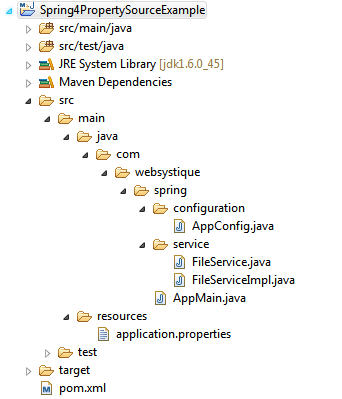
步骤一:往pom.xml中添加依赖
<project xmlns="http://maven.apache.org/POM/4.0.0" xmlns:xsi="http://www.w3.org/2001/XMLSchema-instance"

    xsi:schemaLocation="http://maven.apache.org/POM/4.0.0 http://maven.apache.org/xsd/maven-4.0.0.xsd">

    <modelVersion>4.0.0</modelVersion>

    <groupId>com.websystique.spring</groupId>

    <artifactId>Spring4PropertySourceExample</artifactId>

    <version>1.0.0</version>

    <packaging>jar</packaging>

    <name>Spring4PropertySourceExample</name>

    <properties>

        <springframework.version>4.0.6.RELEASE</springframework.version>

    </properties>

    <dependencies>

        <dependency>

            <groupId>org.springframework</groupId>

            <artifactId>spring-core</artifactId>

            <version>${springframework.version}</version>

        </dependency>

        <dependency>

            <groupId>org.springframework</groupId>

            <artifactId>spring-context</artifactId>

            <version>${springframework.version}</version>

        </dependency>

    </dependencies>

    <build>

        <pluginManagement>

            <plugins>

                <plugin>

                    <groupId>org.apache.maven.plugins</groupId>

                    <artifactId>maven-compiler-plugin</artifactId>

                    <version>3.2</version>

                    <configuration>

                        <source>1.6</source>

                        <target>1.6</target>

                    </configuration>

                </plugin>

            </plugins>

        </pluginManagement>

    </build>

</project>
步骤二:创建Spring配置类
Spring配置类是指用@Configuration注解标注的类,这些类包含了用@Bean标注的方法。这些被@Bean标注的方法可以生产bean并交由spring容器管理。
package com.websystique.spring.configuration;

import org.springframework.context.annotation.Bean;

import org.springframework.context.annotation.ComponentScan;

import org.springframework.context.annotation.Configuration;

import org.springframework.context.annotation.PropertySource;

import org.springframework.context.support.PropertySourcesPlaceholderConfigurer;

@Configuration

@ComponentScan(basePackages = "com.websystique.spring")

@PropertySource(value = { "classpath:application.properties" })

public class AppConfig {

    /*

     * PropertySourcesPlaceHolderConfigurer Bean only required for @Value("{}") annotations.

     * Remove this bean if you are not using @Value annotations for injecting properties.

     */

    @Bean

    public static PropertySourcesPlaceholderConfigurer propertySourcesPlaceholderConfigurer() {

        return new PropertySourcesPlaceholderConfigurer();

    }

}
@PropertySource(value = { “classpath:application.properties” })注解可以让在application.properties文件中定义的属性对Spring Envirronment bean可用,Environment接口提供了getter方法读取单独的属性值。
注意PropertySourcesPlaceholderConfigurer这个bean,这个bean主要用于解决@value中使用的${…}占位符。假如你不使用${…}占位符的话,可以不使用这个bean。
以上的配置使用XML替代的话,如下:
app-config.xml
<?xml version="1.0" encoding="UTF-8"?>

<beans xmlns="http://www.springframework.org/schema/beans"

        xmlns:xsi="http://www.w3.org/2001/XMLSchema-instance"

        xmlns:context="http://www.springframework.org/schema/context"

        xsi:schemaLocation="http://www.springframework.org/schema/beans http://www.springframework.org/schema/beans/spring-beans-4.0.xsd

    http://www.springframework.org/schema/context   http://www.springframework.org/schema/context/spring-context-4.0.xsd">

    <context:component-scan base-package="com.websystique.spring"/>

    <bean class="org.springframework.context.support.PropertySourcesPlaceholderConfigurer">

        <property name="ignoreUnresolvablePlaceholders" value="true"/>

        <property name="locations">

          <list>

            <value>classpath:application.properties</value>

          </list>

        </property>

      </bean>

</beans>
步骤三:创建配置文件
jdbc.driverClassName = com.mysql.jdbc.Driver

jdbc.url = jdbc:mysql://localhost:3306/websystique

jdbc.username = myuser

jdbc.password = mypassword

hibernate.dialect = org.hibernate.dialect.MySQLDialect

hibernate.show_sql = false

hibernate.format_sql = false

sourceLocation = /dev/input
我们将会在service类里使用上面提到的配置方式读取这个配置文件
步骤四:创建服务类
package com.websystique.spring.service;

public interface FileService {

    void readValues();

}
package com.websystique.spring.service;

import org.springframework.beans.factory.annotation.Autowired;

import org.springframework.beans.factory.annotation.Value;

import org.springframework.core.env.Environment;

import org.springframework.stereotype.Service;

@Service("fileService")

public class FileServiceImpl implements FileService {

    @Value("${sourceLocation:c:/temp/input}")

    private String source;

    @Value("${destinationLocation:c:/temp/output}")

    private String destination;

    @Autowired

    private Environment environment;

    public void readValues() {

        System.out.println("Getting property via Spring Environment :"

                + environment.getProperty("jdbc.driverClassName"));

        System.out.println("Source Location : " + source);

        System.out.println("Destination Location : " + destination);

    }

}
这里首先要注意的是Environment bean被Spring自动注入。另外,由于配置了@PropertySoruce注解,Environment bean可以访问指定配置文件里定义的所有属性值。你可以使用getProperty方法得到指定值。
另外一点值得注意的是@Value注解,基本格式如下:
@value("${key:default")

private String var;
以上声明指导spring根据key去属性配置文件查找value,如果没找到,则使用default作为默认值。
注意以上的${…}占位符只有当注册了PropertySourcesPlaceholderConfigurer bean后才能被解析,否则@Value注解会一直将默认值赋值给var。
步骤五:创建Main方法运行程序
package com.websystique.spring;

import org.springframework.context.annotation.AnnotationConfigApplicationContext;

import org.springframework.context.support.AbstractApplicationContext;

import com.websystique.spring.configuration.AppConfig;

import com.websystique.spring.service.FileService;

public class AppMain {

    public static void main(String args[]){

        AbstractApplicationContext  context = new AnnotationConfigApplicationContext(AppConfig.class);

        FileService service = (FileService) context.getBean("fileService");

        service.readValues();

        context.close();

    }

}
运行以上程序,得到如下结果:
Getting property via Spring Environment :com.mysql.jdbc.Driver
Source Location : /dev/input
Destination Location : c:/temp/output
AbstractApplicationContext context = new AnnotationConfigApplicationContext(AppConfig.class);AbstractApplicationContext context = new ClassPathXmlApplicationContext("app-config.xml");工程源码
http://websystique.com/?smd_process_download=1&download_id=796
【译】Spring 4 @PropertySource和@Value注解示例的更多相关文章
- Spring学习(三)——@PropertySource,@ImportResource,@Bean注解
@PropertySource注解是将配置文件中 的值赋值给POJO 项目结构如下 一.创建一个Person.Java文件: import org.springframework.boot.conte ...
- [译]Spring构建微服务
此文为译文,原文地址 介绍 本文通过一个使用Spring.Spring Boot和Spring Cloud的小例子来说明如何构建微服务系统. 我们可以通过数个微服务组合成一个大型系统. 我们可以想象下 ...
- 深入学习Spring框架(二)- 注解配置
1.为什么要学习Spring的注解配置? 基于注解配置的方式也已经逐渐代替xml.所以我们必须要掌握使用注解的方式配置Spring. 关于实际的开发中到底使用xml还是注解,每家公司有着不同的使用习惯 ...
- 循序渐进之Spring AOP(6) - 使用@Aspect注解
前面几节的示例看起来让人沮丧,要记忆如此多的接口.类和继承关系,做各种复杂的配置.好在这些只是一种相对过时的实现方式,现在只需要使用@Aspect注解及表达式就可以轻松的使用POJO来定义切面,设计精 ...
- Spring的bean管理(注解)
前端时间总是用配置文件 内容太多 下面认识一下注解 注解是什么? 1代码里面的特殊标记,使用注解可以完成功能 2注解写法@XXX 3使用注解可以少些很多配置文件 Spring注解开发准备 注解创建准 ...
- J2EE进阶(十三)Spring MVC常用的那些注解
Spring MVC常用的那些注解 前言 Spring从2.5版本开始在编程中引入注解,用户可以使用@RequestMapping, @RequestParam,@ModelAttribute等等这样 ...
- Spring和SpringMVC的常用注解
Spring的部分: 使用注解之前要开启自动扫描功能 其中base-package为需要扫描的包(含子包). <context:component-scan base-package=" ...
- (转)Spring的bean管理(注解方式)
http://blog.csdn.net/yerenyuan_pku/article/details/69663779 Spring的bean管理(注解方式) 注解:代码中的特殊标记,注解可以使用在类 ...
- Spring自动装配----注解装配----Spring自带的@Autowired注解
Spring自动装配----注解装配----Spring自带的@Autowired注解 父类 package cn.ychx; public interface Person { public voi ...
随机推荐
- Module Zero学习目录
Module-Zero是实现了ASP.NET Boilerplate框架抽象概念的模块,对于企业web应用也添加了一些有用的东西: 实现了ASP.NET Identity框架的用户和角色管理. 提供了 ...
- ABP框架 - 会话
文档目录 本节内容: 简介 关于 IAbpSeesion 注入会话 会话属性 用户标识符 简介 如果一个应用需要登录,它就需要知道当前用户在执行的操作.尽管Asp.net自身在展现层提供了Sessio ...
- Android RecyclerView 实现支付宝首页效果
Android RecyclerView 实现支付宝首页效果 [TOC] 虽然我本人不喜欢支付宝的,但是这个网格本身其实还是不错的,项目更新中更改了一个布局为网格模式,类似支付宝.(估计是产品抄袭的= ...
- 修改linux的hosts 后提示“无效的参数”
碰到个问题,修改linux的主机名问题. vim /etc/hosts 192.168.154.129 129192.168.154.132 132192.168.154.133 133 本地ip是1 ...
- 【JAVA面试题系列一】面试题总汇--JAVA基础部分
JAVA基础 基础部分的顺序: 基本语法,类相关的语法,内部类的语法,继承相关的语法,异常的语法 线程的语法,集合的语法,io 的语法,虚拟机方面的语法 每天几道,持续更新!! 1.一个". ...
- angular2系列教程(五)Structural directives、再谈组件生命周期
今天,我们要讲的是structural directives和组件生命周期这两个知识点.structural directives顾名思义就是改变dom结构的指令.著名的内建结构指令有 ngIf, n ...
- Android开发之Activity的创建跳转及传值
在Android系统的江湖中有四大组件:活动(Activity), 服务(Service), 广播接收器(Broadcast Reciver)和内容提供者(Content Provider).今天所介 ...
- 日常css技巧小结(1)--背景透明度改变对内容无影响
刚开始出现的错误,内容会受到背景透明度改变的影响:如图: 代码: <!DOCTYPE html> <html lang="en"> <head> ...
- YYModel 源码解读(二)之NSObject+YYModel.h (3)
本篇主要介绍的是 在真正转之前的几个辅助函数 /** Get number from property. @discussion Caller should hold strong reference ...
- 使用代码向一个普通的类注入Spring的实例
转载请在页首注明作者与原文地址 一:应用场景 什么是普通的类,就是没有@Controller,@Service,@Repository,@Component等注解修饰的类,同时xml文件中,也没有相应 ...