
js 面向对象选项卡
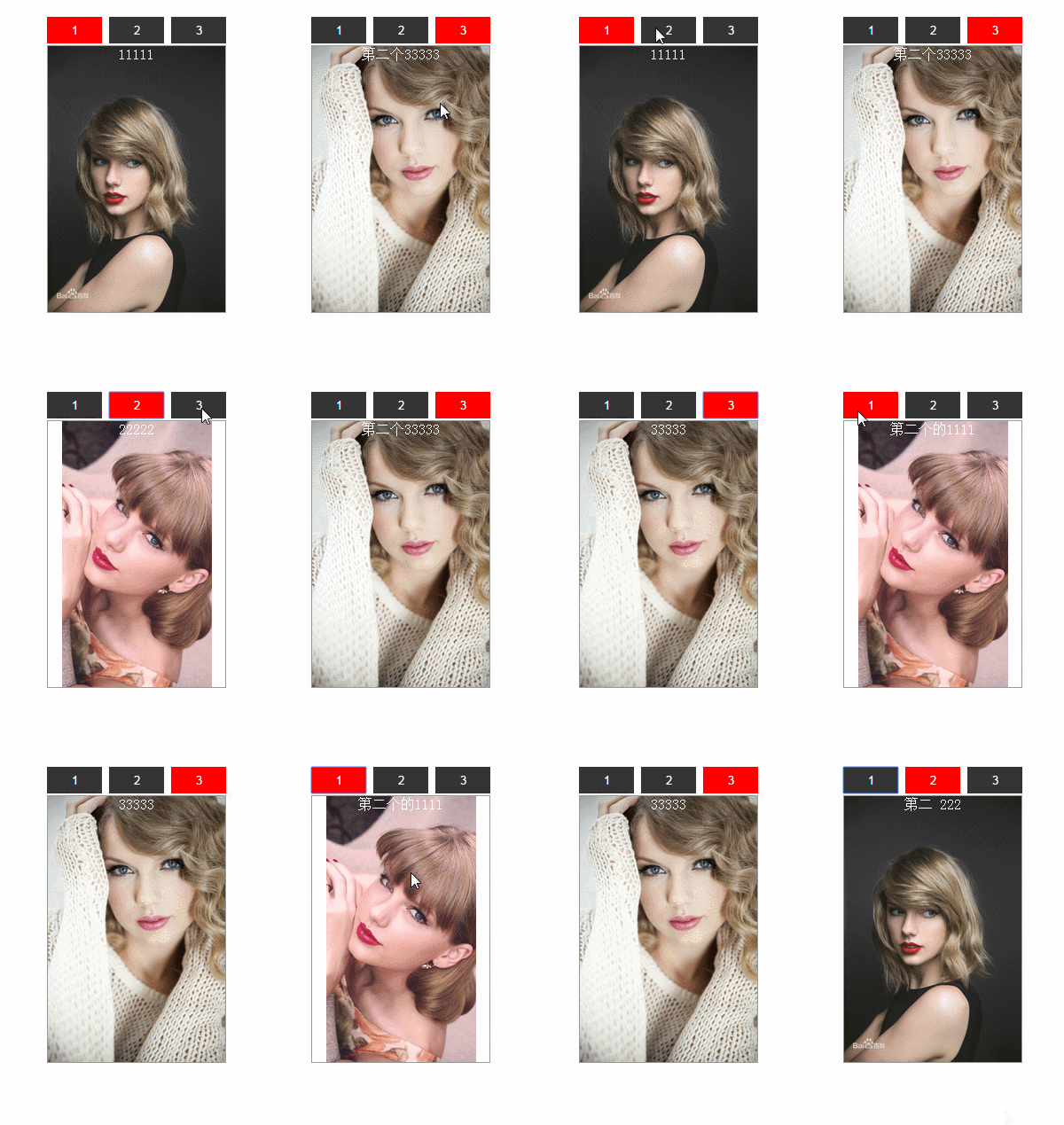
<!DOCTYPE HTML>

<html>

<head>

<meta http-equiv="Content-Type" content="text/html; charset=utf-8">

<title>无标题文档</title>

<style>

*{ margin:0; padding:0;}

#box{ width:500px; height:400px; margin:20px auto;  position:relative;}

#div1,#div2{  position:absolute; top:0; }

#div1 div,#div2 div{ width:200px; height:300px; border:1px #999 solid; display:none; text-align:center; color:#fff;}

#div1 input,#div2 input{ width:62px; height:30px; border:0; color:#fff; background:#333; margin-bottom:2px; }

.active{ background:red !important;}

.bk0{ background:url(../../images/TaylorSwift.jpg) no-repeat center center/contain;}

.bk2{ background:url(../../images/TaylorSwift3.jpg) no-repeat center center/contain;}

.bk3{ background:url(../../images/TaylorSwift4.jpg) no-repeat center center/contain;}

</style>

</head>

<body>

<script>

	  window.onload=function(){

		  var t1=new  Tab('div1');

		 // t1.init();

		  var t2=new  Tab('div2');

		 // t2.init();

		  t2.autoplay();

		  }

	  function Tab(id){

		  this.oParent = document.getElementById(id);

		  this.aInput=this.oParent.getElementsByTagName("input");

		  this.aDiv= this.oParent.getElementsByTagName("div");

		  this.iNow = 0;

		  this.init();  // init 可以直接写在这里 new时候自动初始化

		  }

	  Tab.prototype.init=function(){

		var that=this;

		 for(var i=0;i<this.aInput.length;i++){

			 this.aInput[i].index=i;

			 this.aInput[i].onclick=function(){

				 that.change(this);

				 };

			 }

	   }// init end

	    Tab.prototype.change=function(obj){

			for(var i=0;i<this.aInput.length;i++){

			  this.aInput[i].className='';

			  this.aDiv[i].style.display = 'none';

			 }

			 obj.className='active';

			 this.aDiv[obj.index].style.display = 'block';

		}//change

	     Tab.prototype.autoplay=function(){

			  var This = this;

               setInterval(function(){

              if(This.iNow == This.aInput.length-1){

               This.iNow = 0;

               }

              else{

                This.iNow++;

                }

			  for(var i=0;i<This.aInput.length;i++){

				  This.aInput[i].className = '';

				  This.aDiv[i].style.display = 'none';

			  }

             This.aInput[This.iNow].className = 'active';

             This.aDiv[This.iNow].style.display = 'block';

			 },3000);

		 }

</script>

<div id="box">

    <div id="div1">

        <input class="active" type="button" value="1">

        <input type="button" value="2">

        <input type="button" value="3">

        <div style="display:block"  class="bk0">11111</div>

        <div class="bk3">22222</div>

        <div class="bk2">33333</div>

    </div>

    <div id="div2" style="right:0 !important">

        <input class="active" type="button" value="1">

        <input type="button" value="2">

        <input type="button" value="3">

        <div style="display:block" class="bk3">第二个的1111</div>

        <div class="bk0">第二 222</div>

        <div class="bk2">第二个33333</div>

    </div>

</div>

</body>

</html>
js 面向对象选项卡的更多相关文章
- js面向对象选项卡
window.onload=function() //面向对象 { var tab=new tabSwitch("div1"); var tab=new tabSwitch(&qu ...
- 手写js面向对象选项卡插件
<!DOCTYPE html><html lang="en"><head> <meta charset="UTF-8&qu ...
- 原生js面向对象编程-选项卡(点击)
<!DOCTYPE html> <html> <head lang="en"> <meta charset="UTF-8&quo ...
- js面向对象+一般方法的选项卡
<!DOCTYPE html PUBLIC "-//W3C//DTD XHTML 1.0 Transitional//EN" "http://www.w3.org/ ...
- 原生js面向对象编程-选项卡(自动轮播)
<!DOCTYPE html> <html> <head lang="en"> <meta charset="UTF-8&quo ...
- 第十五节 JS面向对象实例及高级
实例:面向对象的选项卡 把面向过程的程序,改写成面向对象的形式 原则:不能有函数套函数,但可以有全局变量 过程: onload —— 改写成 构造函数,其中window.onload的功能是在页面加载 ...
- js面向对象、创建对象的工厂模式、构造函数模式、原型链模式
JS面向对象编程(转载) 什么是面向对象编程(OOP)?用对象的思想去写代码,就是面向对象编程. 面向对象编程的特点 抽象:抓住核心问题 封装:只能通过对象来访问方法 继承:从已有对象上继承出新的对象 ...
- ES6学习笔记(三):教你用js面向对象思维来实现 tab栏增删改查功能
前两篇文章主要介绍了类和对象.类的继承,如果想了解更多理论请查阅<ES6学习笔记(一):轻松搞懂面向对象编程.类和对象>.<ES6学习笔记(二):教你玩转类的继承和类的对象>, ...
- JS面向对象介绍
JS面向对象介绍 首先面向对象是什么?为什么要使用面向对象. 因为JavaScript对每个创建的对象都会自动设置一个原型(谷歌火狐中是proto),指向它的原型对象prototype,举个例子: f ...
随机推荐
- 移动web性能优化笔记
移动web性能优化 最近看了一些文章,对移动web性能优化方法,做一个简单笔记 笔记内容主要出自 移动H5前端性能优化指南和移动前端系列——移动页面性能优化
- 【剑指offer】面试题26:复制的复杂链条
def copyRandomList(self, head): if None == head: return None phead = head while phead: pnext = phead ...
- hdu2544(自己实现优先队列)
hdu2544 dij水题,用来测试自己实现优先队列对不对 #include <stdio.h> #include <string.h> #include <stdli ...
- struts2 Session拦截器
一:struts2简介 二:拦截器
- Sybase Unwired Platform(SUP) 经常使用资源整理(不断更新中)
提示:建议刚開始学习的人看三个东西,详见以下的详细内容.然后再去看论坛,官方技术支持站点等资源. SUP移动开发平台 中文视频讲座 SUP入门讲座(Wang Jun) SUP系列学习笔记 SUP实验 ...
- ASP.NET 应用程序生命周期
1.请求到达IIS服务器,IIS根据文件后缀找到对应的ISAPI(Internet Server API)扩展来处理,这个配置可在网站属性里的“根目录”选项卡中的“配置”里看到.可以看到,ashx.a ...
- JS判断用户连续输入
方案1 // // $('#element').donetyping(callback[, timeout=1000]) // Fires callback when a user has finis ...
- FileUpload类别FileUpload1.FileName和FileUpload1.PostedFile.FileName差异
FileUpload1.FileName 用来获取client上使用 FileUpload 控件上载的文件的名称.此属性返回的文件名称不包括此文件在client上的路径. FileUpload1.Po ...
- WPF 3D:使用变换中的TranslateTransform3D
原文:WPF 3D:使用变换中的TranslateTransform3D 程序效果: WPF 3D中的TranslateTransform3D应该是所有3D变换中最简单的变换,使用起来非常简单,先定义 ...
- Oracle集合操作函数:Union、Union All、Intersect、Minus
Union.对两个结果集进行并集操作.不包含反复行,同一时候进行默认规则的排序: Union All.对两个结果集进行并集操作,包含反复行.不进行排序: Intersect,对两个结果集进行交集操作. ...