
WPF Application
Application类作为启动的入口,在VS中,通常自动代码为我们继承了Application类,这样做的有点,我还没有理解到,但是我们先学到这个知识点。
为了能够更好的控制整个启动过程,包括得到Active,LoadComplete,Deactive,SessionEnding等事件,可以主动改变程序的入口,即是static void Main(string[] args)方法的所在位置。
我们主动添加一个Program.cs(当然叫别的名字是可以的)的文件,添加Main方法,并在其中修改启动,代码就可以了。说的比较粗略,看代码吧。
Program.cs
 using System;

 namespace LearnWPF

 {

     class Program

     {

         [STAThread]

         public static void Main(string[] args)

         {

             App app = new App();

             myWInd m = new myWInd();

             app.MainWindow = m;

             m.Show();

             app.Run();

         }

     }

 }
App.xaml.cs
 using System;

 using System.Diagnostics;

 using System.Windows;

 namespace LearnWPF

 {

     /// <summary>

     /// Interaction logic for App.xaml

     /// </summary>

     public partial class App : Application

     {

         protected override void OnActivated(EventArgs e)

         {

             base.OnActivated(e);

             Debug.WriteLine("OnActived");

         }

         protected override void OnDeactivated(EventArgs e)

         {

             base.OnDeactivated(e);

             Debug.WriteLine("OnDeactived");

         }

         protected override void OnExit(ExitEventArgs e)

         {

             base.OnExit(e);

             MessageBox.Show("Exiting");

         }

         protected override void OnSessionEnding(SessionEndingCancelEventArgs e)

         {

             base.OnSessionEnding(e);

             MessageBox.Show("you're quitting");

         }

         protected override void OnStartup(StartupEventArgs e)

         {

             base.OnStartup(e);

             MessageBox.Show("Staring");

         }

         protected override void OnLoadCompleted(System.Windows.Navigation.NavigationEventArgs e)

         {

             base.OnLoadCompleted(e);

             MessageBox.Show("completed");

         }

     }

 }
App.xaml 这文件指明了启动的窗口等内容,所以需要相应地修改。
 <!--application 的 class属性可以随便写-->

 <!--application 的 StartupUri属性指明了 启动的窗体-->

 <Application x:Class="muhaha"

              xmlns="http://schemas.microsoft.com/winfx/2006/xaml/presentation"

              xmlns:x="http://schemas.microsoft.com/winfx/2006/xaml">

     <Application.Resources>

     </Application.Resources>

 </Application>
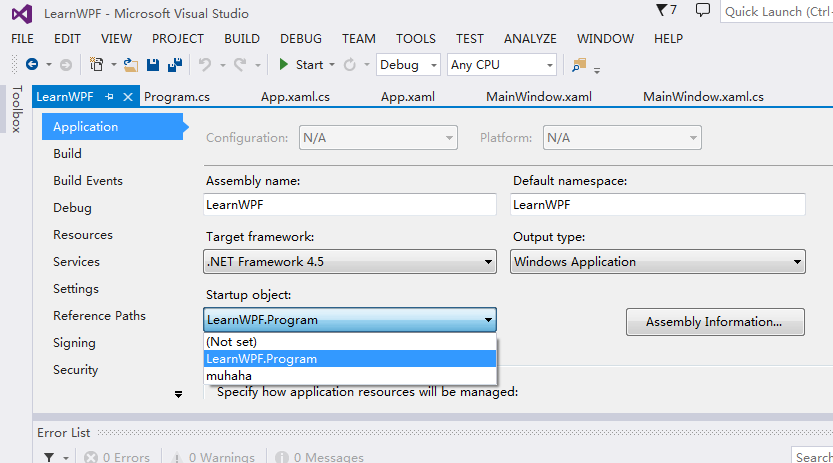
但是,到了这里还是不行的;因为对于App.xaml在自动生成的代码里,会有Main方法入口,因此还需要改变程序的入口,在项目的属性里修改配置。请注意,刚刚添加Program.cs文件后,可能这里不会有,编译一次,就会在这里出现了,如下图所示。
希望能够帮助一些同学。
WPF Application的更多相关文章
- Handling events in an MVVM WPF application
Posted: June 30, 2013 | Filed under: MVVM, WPF, XAML |1 Comment In a WPF application that uses the ...
- 【转】How to view word document in WPF application
How to view word document in WPF application (CSVSTOViewWordInWPF) Introduction The Sample demonstra ...
- Merging a WPF application into a single EXE(WPF应用程序合并成单个Exe文件)
I always dislike handing off little applications to people. Not because I can’t, but because of the ...
- C# WPF Application 下的文件操作
好气哦,电脑好烂,每天花大把的时间在等电脑反应上. 没有钱买新电脑,连组台式机的钱都没有.好气哦. 啊啊啊啊文件操作是什么鬼???C++下我都懵了,C#下好多东西要学!!!我不会!我不会!我不会!!! ...
- 每天翻译一点点: WPF Application Framework (WAF)
ps:http://waf.codeplex.com/wikipage?title=Model-View-ViewModel%20Pattern&referringTitle=Document ...
- WPF Application 类介绍以及怎样修改启动方式
因为想要修改wpf的启动方式,所以研究了下Application类,现把一些有用的属性与大家分享下: 属性: Current 获取当前 AppDomain的 Appl ...
- WPF——Application
Application类处于WPF应用程序的最顶端,main函数就在这个类中. Application类的作用: 截图连接 https://docs.microsoft.com/zh-cn/dotne ...
- vs 编译错误 The name 'InitializeComponent' does not exist in the current context in WPF application
1:文件命名空间的问题 xaml文件和model.cs文件的命名空间 2:csproj 那么它究竟是给谁用的呢?那是给开发工具用的,例如我们在熟悉不过的Visual Studio,以及大家可以没有接触 ...
- WPF Application 执行顺序
public static void Main() { ApplicationClass.App app = new ApplicationClass.App();app.InitializeComp ...
随机推荐
- 基于.NET打造IP智能网络视频监控系统
开源倾情奉献:基于.NET打造IP智能网络视频监控系统(一)开放源代码 开源倾情奉献系列链接 开源倾情奉献:基于.NET打造IP智能网络视频监控系统(一)开放源代码 开源倾情奉献:基于.NET打造 ...
- Python 用POP接收邮件
一.简介 POP(Post Office Protocal)最长用的POP版本是POP3,因此本文是以POP3为主.POP3非常简单,可以用来从邮件服务器上下载邮件,然后删除这些邮件.功能非常有限,后 ...
- [转]Adventures in Xen exploitation
Source:https://www.nccgroup.com/en/blog/2015/02/adventures-in-xen-exploitation/ tl;dr This post is ...
- [NLP自然语言处理]计算熵和KL距离,java实现汉字和英文单词的识别,UTF8变长字符读取
算法任务: 1. 给定一个文件,统计这个文件中所有字符的相对频率(相对频率就是这些字符出现的概率——该字符出现次数除以字符总个数,并计算该文件的熵). 2. 给定另外一个文件,按上述同样的方法计算字符 ...
- ${pageContext.request.contextPath}的作用
刚开始不知道是怎么回事,在网上也查找了一些资料,看了还是晕. 看了另一个大侠的,终于有了点眉目. 那位大侠在博客中这样写道“然后在网上找,更让我郁闷的事,TMD!网上“抄袭”的真多啊!而且扯了一大堆! ...
- jquery以及js实现option左移右移
<table cellspacing="1" width="350px" align="center"> <tr> ...
- 致青春——IT之路
我的IT青春献给了笔试.面试.人事. 笔试 如果去问一个学生最怕的是什么,或许是考试.参加过高考的都知道,高三过的是什么日子,三天一大考,一天一小考. 当时没觉得什么,因为已经麻木了. 走入职场依然要 ...
- SVN中Branch的创建于合并
SVN中Branch的创建于合并 在使用源代码版本控制工具时,最佳实践是一直保持一个主干版本.但是为了应付实际开发中的各种情况,适时的开辟一些分支也是很有必要的.比如在持续开发新功能的同时,需要发布一 ...
- MVC从视图传参到Controller几种方式
简单数组传递 var array = ["aaa", "bbb", "ccc"]; $.ajax({ url:"@Url.Acti ...
- reading words in your computer and changing to female voice, linux festival text2wave saving wav files
on a brand new linux PC, e.g. ubuntu 14.04 amd64 To hear voice sudo apt-get install festival -y then ...