
添加JSON Data到已经存在的JSON文件中
早上在学习《Post model至Web Api创建或是保存数据》http://www.cnblogs.com/insus/p/4343833.html ,如果你第二添加时,json文件得到的数据只能是单笔记录且是最新的。
那需要怎样把新添加的json数据附加至已经存在的数据中去?本篇Insus.NET就是想实现此功能。
想法是先读取json文件的数据转换为数据集存放在内存中,新添加的数据再附加上去,然后再把内存的数据集序列化保存为json文件即可。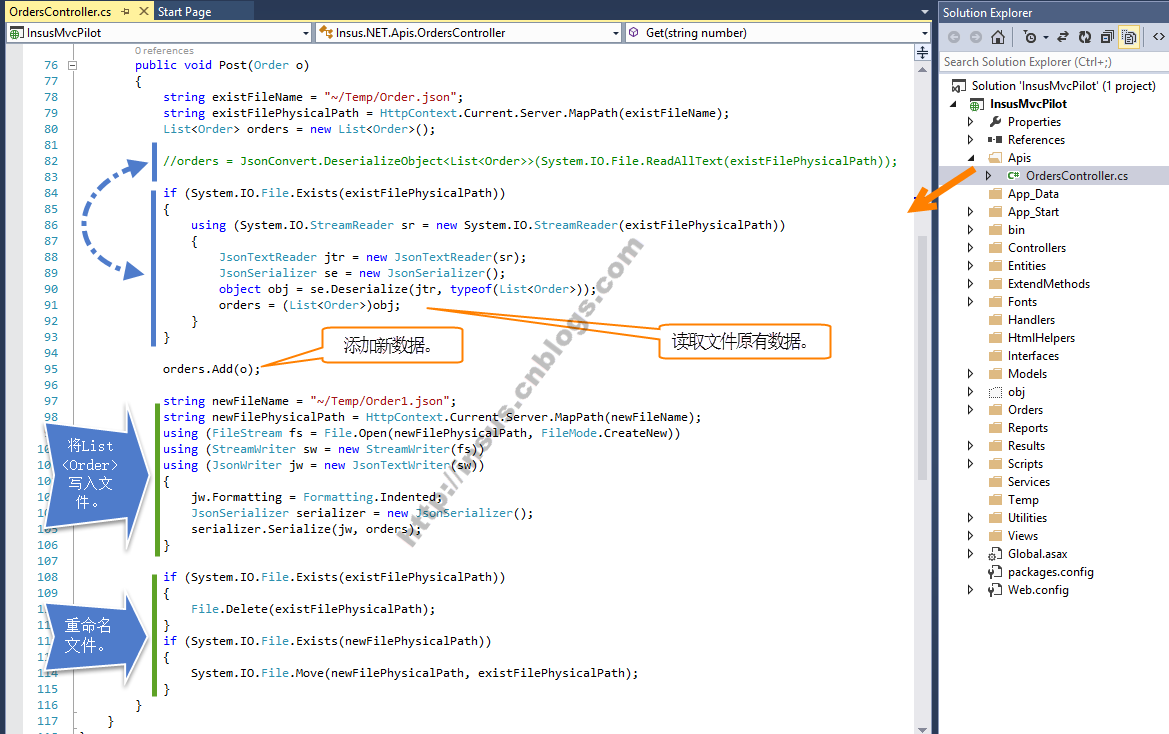
上面代码示例中,有3大部分,第一部分是读取文件中原有数据:
if (System.IO.File.Exists(existFilePhysicalPath))

            {

                using (System.IO.StreamReader sr = new System.IO.StreamReader(existFilePhysicalPath))

                {

                    JsonTextReader jtr = new JsonTextReader(sr);

                    JsonSerializer se = new JsonSerializer();

                    object obj = se.Deserialize(jtr, typeof(List<Order>));

                    orders = (List<Order>)obj;

                }

            }
其实这部分,简单一句代码也可以:
orders = JsonConvert.DeserializeObject<List<Order>>(System.IO.File.ReadAllText(existFilePhysicalPath));
第二部分是将内存中的List<Order>数据序列化之后,存为json文件:
 using (FileStream fs = File.Open(newFilePhysicalPath, FileMode.CreateNew))

            using (StreamWriter sw = new StreamWriter(fs))

            using (JsonWriter jw = new JsonTextWriter(sw))

            {

                jw.Formatting = Formatting.Indented;

                JsonSerializer serializer = new JsonSerializer();

                serializer.Serialize(jw, orders);

            }
第三部分是把新创建的文件重命名为旧文件名:
if (System.IO.File.Exists(existFilePhysicalPath))

            {

                File.Delete(existFilePhysicalPath);

            }

            if (System.IO.File.Exists(newFilePhysicalPath))

            {

                System.IO.File.Move(newFilePhysicalPath, existFilePhysicalPath);

            }
在Orders目录中,新创建一个html网页SaveJsonToExistFile.html: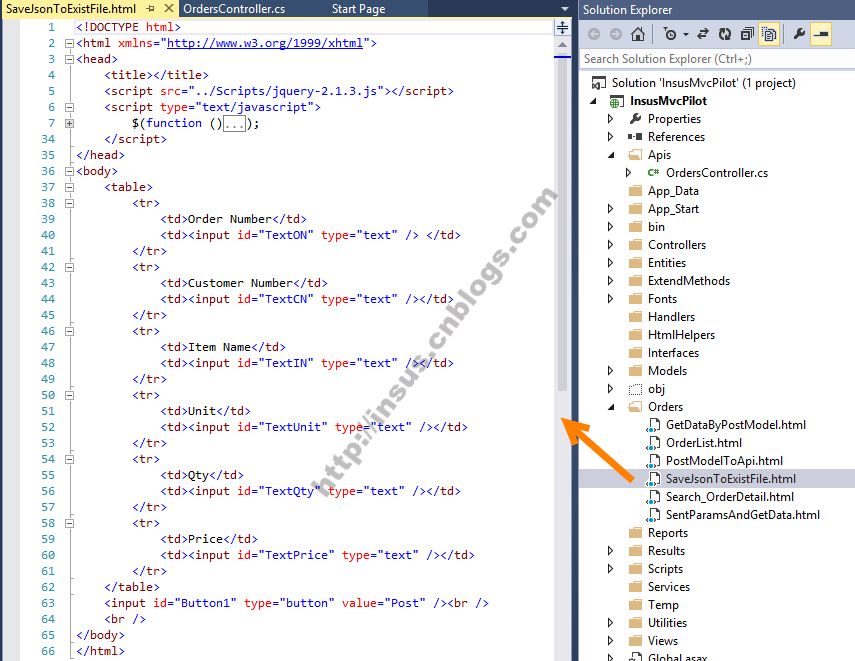
上面收集合的jQuery代码,可以参考下面: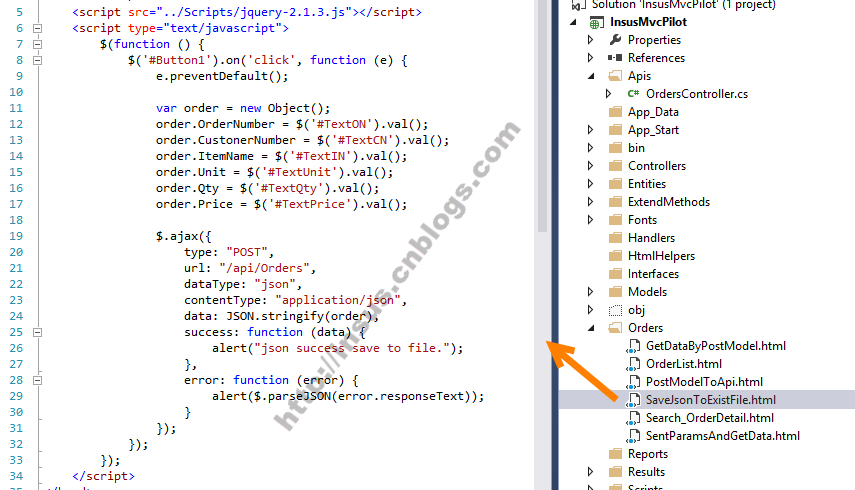
Insus.NET所做的练习,一般最后少不了动画演示:

添加JSON Data到已经存在的JSON文件中的更多相关文章
- Guzzle Unable to parse JSON data: JSON_ERROR_SYNTAX - Syntax error, malformed JSON
项目更新到正式平台时,出现Guzzle(5.3) client get请求出现:Unable to parse JSON data: JSON_ERROR_SYNTAX - Syntax error, ...
- 【转】如何把Json格式字符写进text文件中
http://www.cnblogs.com/insus/p/4306640.html http://json2csharp.chahuo.com/ 本篇一步一步学习怎样把显示于网页的json格式的字 ...
- 如何把Json格式字符写进text文件中
本篇一步一步学习怎样把显示于网页的json格式的字符串写进text文件中,并保存起来.学习到创建model, Entity, 序列化List<object>转换为json,显示于网页上.然 ...
- directly receive json data from javascript in mvc
if you send json data to mvc,how can you receive them and parse them more simply? you can do it like ...
- SQL to JSON Data Modeling with Hackolade
Review: SQL to JSON data modeling First, let’s review, the main way to represent relations in a rela ...
- SyntaxError: JSON.parse: unexpected character at line 1 column 1 of the JSON data错误的解决
记录个报错: 问题描述: 经过服务器生成图片返到前台时,在火狐浏览器中下载图片或打开图片时报错:SyntaxError: JSON.parse: unexpected character at lin ...
- SyntaxError: JSON.parse: bad control character in string literal at line 1 column 16 of the JSON data
JSON.parse转化Json字符串时出现:SyntaxError: JSON.parse: bad control character in string literal at line 1 co ...
- PHP convet class to json data
/********************************************************************* * PHP convet class to json da ...
- json data 解析demo
json data: demo: JsonObject jsonObject= JsonHandle.getAsJsonObject(city_dataInfo).get("data&quo ...
随机推荐
- 【Android自定义控件】支持多层嵌套RadioButton的RadioGroup
前言 非常喜欢用RadioButton+RadioGroup做Tabs,能自动处理选中等效果,但是自带的RadioGroup不支持嵌套RadioButton(从源码可看出仅仅是判断子控件是不是Radi ...
- Android消息机制源码分析
本篇主要介绍Android中的消息机制,即Looper.Handler是如何协同工作的: Looper:主要用来管理当前线程的消息队列,每个线程只能有一个Looper Handler:用来将消息(Me ...
- DIV+CSS实现左侧带三角形的提示框
实现效果
- 一个简单的Java web服务器实现
前言 一个简单的Java web服务器实现,比较简单,基于java.net.Socket和java.net.ServerSocket实现: 程序执行步骤 创建一个ServerSocket对象: 调用S ...
- 今天说一下 tablesample 这个东西
TableSample 平时用得少,基本上就是用于表里面抽样数据来看的. 用法如下 SELECT * FROM tbname TABLESAMPLE SYSTEM (N PERCENT/M Rows) ...
- DateTime , DateTime2 ,DateTimeOffset 之间的小区别
闲来无事列了个表比对一下这3兄弟之间还是有一点差距的╮(╯_╰)╭ DateTime DateTime2 DateTimeOffset 日期范围 1753-01-01到 9999-12-31 00 ...
- c#操作IIS站点
/// <summary> /// 获取本地IIS版本 /// </summary> /// <returns></returns> public st ...
- 损失函数(Loss Function)
转载请注明出自BYRans博客:http://www.cnblogs.com/BYRans/ 线性回归中提到最小二乘损失函数及其相关知识.对于这一部分知识不清楚的同学可以参考上一篇文章<线性回归 ...
- 烂泥:apache性能测试工具ab的应用
本文由秀依林枫提供友情赞助,首发于烂泥行天下. 网站性能压力测试是服务器网站性能调优过程中必不可缺少的一环.只有让服务器处在高压情况下,才能真正体现出软件.硬件等各种设置不当所暴露出的问题. 性能测试 ...
- day 2 Linux目录结构
Linux系统的目录结构的基本介绍: 1)在逻辑上的所有目录(包括目录下的子目录)都在最高级别的目录“/”下. 根(/)目录是Linux系统中所有目录的起始点(顶点),根下面的目录及子目录是一个有层次 ...