
C#——Marshal.StructureToPtr方法简介
目录
Marshal.StructureToPtr方法简介
1. 功能及位置
命名空间:System.Runtime.InteropServices
程序集:mscorlib(在 mscorlib.dll 中)
2. 语法
C++:
3. 参数说明
ptr:指向非托管内存块的指针,必须在调用此方法之前分配该指针。
fDeleteOld:设置为 true 可在执行Marshal.DestroyStructure方法前对 ptr 参数调用此方法。请注意,传递 false 可导致内存泄漏。
4. 异常
条件:structrue参数是泛型类型
5. 备注
6. 举例
using System;

using System.Text;

using System.Runtime.InteropServices;

namespace testStructureToPtr

{

    public static class define  //define some constant

    {

        public const int MAX_LENGTH_OF_IDENTICARDID = ;   //maximum length of identicardid

        public const int MAX_LENGTH_OF_NAME = ;           //maximum length of name

        public const int MAX_LENGTH_OF_COUNTRY = ;        //maximum length of country

        public const int MAX_LENGTH_OF_NATION = ;         //maximum length of nation

        public const int MAX_LENGTH_OF_BIRTHDAY = ;        //maximum length of birthday

        public const int MAX_LENGTH_OF_ADDRESS = ;       //maximum length of address

    }

    public struct PERSON    //person structure

    {

        //MarshalAs:指示如何在托管代码和非托管代码之间封送数据

        //UnmanagedType:指定如何将参数或字段封送到非托管内存块

        [MarshalAs(UnmanagedType.ByValArray, SizeConst = define.MAX_LENGTH_OF_IDENTICARDID)]

        public byte[] identicardid;

        [MarshalAs(UnmanagedType.ByValArray, SizeConst = define.MAX_LENGTH_OF_NAME)]

        public byte[] name;

        [MarshalAs(UnmanagedType.ByValArray, SizeConst = define.MAX_LENGTH_OF_COUNTRY)]

        public byte[] country;

        [MarshalAs(UnmanagedType.ByValArray, SizeConst = define.MAX_LENGTH_OF_NATION)]

        public byte[] nation;

        [MarshalAs(UnmanagedType.ByValArray, SizeConst = define.MAX_LENGTH_OF_BIRTHDAY)]

        public byte[] birthday;

        [MarshalAs(UnmanagedType.ByValArray, SizeConst = define.MAX_LENGTH_OF_ADDRESS)]

        public byte[] address;

    }

    class testProgram

    {

        private static byte _fillChar = ;      //the fill character

        //convert string to byte array in Ascii with length is len

        public static byte[] CodeBytes(string str, int len)

        {

            if (string.IsNullOrEmpty(str))

            {

                str = string.Empty;

            }

            byte[] result = new byte[len];

            byte[] strBytes = Encoding.Default.GetBytes(str);

            //copy the array converted into result, and fill the remaining bytes with 0

            for (int i = ; i < len; i++)

                result[i] = ((i < strBytes.Length) ? strBytes[i] : _fillChar);

            return result;

        }

        //show the person information

        public static void ShowPerson(PERSON person)

        {

            Console.WriteLine("cardid   :" + Encoding.ASCII.GetString(person.identicardid));

            Console.WriteLine("name     :" + Encoding.ASCII.GetString(person.name));

            Console.WriteLine("country  :" + Encoding.ASCII.GetString(person.country));

            Console.WriteLine("nation   :" + Encoding.ASCII.GetString(person.nation));

            Console.WriteLine("birthday :" + Encoding.ASCII.GetString(person.birthday));

            Console.WriteLine("address  :" + Encoding.ASCII.GetString(person.address));

        }

        static void Main(string[] args)

        {

            PERSON person;

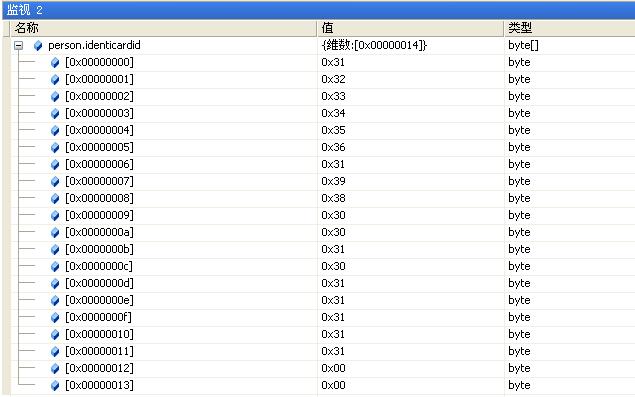
            person.identicardid = CodeBytes("", define.MAX_LENGTH_OF_IDENTICARDID);

            person.name = CodeBytes("jackson", define.MAX_LENGTH_OF_NAME);

            person.country = CodeBytes("China", define.MAX_LENGTH_OF_COUNTRY);

            person.nation = CodeBytes("HanZu", define.MAX_LENGTH_OF_NATION);

            person.birthday = CodeBytes("", define.MAX_LENGTH_OF_BIRTHDAY);

            person.address = CodeBytes("Luoshan Road, Shanghai", define.MAX_LENGTH_OF_ADDRESS);

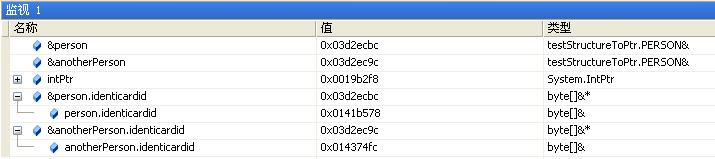
            int nSizeOfPerson = Marshal.SizeOf(person);

            IntPtr intPtr = Marshal.AllocHGlobal(nSizeOfPerson);

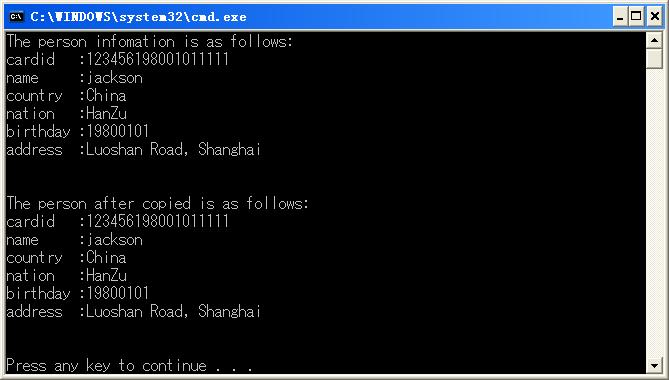
            Console.WriteLine("The person infomation is as follows:");

            ShowPerson(person);

            try

            {

                //将数据从托管对象封送到非托管内存块,该内存块开始地址为intPtr

                Marshal.StructureToPtr(person, intPtr, true);

                //将数据从非托管内存块封送到新分配的指定类型的托管对象anotherPerson

                PERSON anotherPerson = (PERSON)Marshal.PtrToStructure(intPtr, typeof(PERSON));

                Console.WriteLine("The person after copied is as follows:");

                ShowPerson(anotherPerson);

            }

            catch (ArgumentException)

            {

                throw;

            }

            finally

            {

                Marshal.FreeHGlobal(intPtr);    //free tha memory

            }

        }

    }

}

C#——Marshal.StructureToPtr方法简介的更多相关文章
- 网络神器Greasemonkey(油猴子)使用方法简介+脚本分享【转载】
推荐下,觉得这个方法有用, 今天艾薇百科来介绍一下功能强大的Greasemonkey,俗称"油猴子",Greasemonkey可以自由定制网页,实现你想要的各种功能.堪称" ...
- Redis Cluster搭建方法简介22211111
Redis Cluster搭建方法简介 (2013-05-29 17:08:57) 转载▼ Redis Cluster即Redis的分布式版本,将是Redis继支持Lua脚本之后的又一重磅 ...
- Monte Carlo方法简介(转载)
Monte Carlo方法简介(转载) 今天向大家介绍一下我现在主要做的这个东东. Monte Carlo方法又称为随机抽样技巧或统计实验方法,属于计算数学的一个分支,它是在上世纪四十年代 ...
- TabBarController创建及使用方法简介
TabBarController创建及使用方法简介 大致讲解一下TabBarController的创建过程: 首先,我们需要一些视图,如创建UIControllerView类型的view1,view2 ...
- delphi操作文本文件的方法简介
delphi操作文本文件的方法简介减小字体 增大字体 作者佚名来源不详发布时间2008-5-31 10:31:16发布人xuedelphi1 文件类型和标准过程 Delphi同Object ...
- iOS中常用的四种数据持久化方法简介
iOS中常用的四种数据持久化方法简介 iOS中的数据持久化方式,基本上有以下四种:属性列表.对象归档.SQLite3和Core Data 1.属性列表涉及到的主要类:NSUserDefaults,一般 ...
- jQuery的AJAX方法简介及与其他文件$符号冲突的解决办法
一.重要的jQuery AJAX方法简介 $.load(url) 从服务器载入数据 $.get(url,callback) 从服务器请求数据,并执行回调函数 $.post(url,data,callb ...
- FragmentActivity与Fragment两者交互方法简介(转)
FragmentActivity与Fragment两者交互方法简介 分类: Fragment 2014-07-07 18:17 88人阅读 评论(0) 收藏 举报 在Android4.0后很多时候我们 ...
- sleep、yield、join方法简介与用法 sleep与wait区别 多线程中篇(十五)
Object中的wait.notify.notifyAll,可以用于线程间的通信,核心原理为借助于监视器的入口集与等待集逻辑 通过这三个方法完成线程在指定锁(监视器)上的等待与唤醒,这三个方法是以锁( ...
随机推荐
- callback的实现
Callback.h 继承层次 CallBack实现类 基类 第一层子类 第二层子类 第三层子类 SimpleRefCount CallbackImplBase CallbackImpl Functo ...
- SSH框架搭建详解 及 乱码处理
http://www.360doc.com/content/15/1031/21/21693298_509739569.shtml struts 除了struts的mvc外,还有拦截器,国际化,str ...
- sqlplus: error while loading shared libraries: /u01/app/lib/libclntsh.so.11.1
成功安装了Oracle 11g后,使用sqlplus登录数据库时遇到下面错误: [oracle@DB-Server ~]$ sqlplus / as sysdba sqlplus: error w ...
- Linux文件操作常用命令整理
收集.整理日常系统管理或维护当中的,常用到的一些关于文件操作的命令或需求,后续会慢慢补充.完善! 查看.生成指定目录的目录树结构? [root@DB-Server ~]#tree #当前目录 ...
- HTML基础(二)——表单,图片热点,网页划区和拼接
一.表单 <form id="" name="" method="post/get" action="负责处理的服务端&qu ...
- 创建一个Point类,有成员变量x,y,方法getX(),setX(),还有一个构造方 法初始化x和y。创建类主类A来测试它
package com.hanqi.test; public class Point { private int x; private int y; Point(int xx,int yy) { x= ...
- W3School-CSS 边框(border)实例
CSS 边框(border)实例 CSS 实例 CSS 背景实例 CSS 文本实例 CSS 字体(font)实例 CSS 边框(border)实例 CSS 外边距 (margin) 实例 CSS 内边 ...
- 从Mysql数据库中导入导出表结构
1.从Mysql数据库中导入sql表 很简单,只需要一个命令即可搞定:[root@localhost ~]# mysql -uroot -piweb_xxx_mysql iweb < modif ...
- Idea15/16 配置Tomcat
1:我这里使用的是Eclipse创建的项目,导出后导入到Idea中使用 2:Idea导入Eclipse项目 3:Idea项目配置(默认快捷键CTRL+SHIT+ALT+S) 3.1 Project 项 ...
- stm32 加入 USE_STDPERIPH_DRIVER、STM32F10X_HD的原因
初学STM32,在RealView MDK 环境中使用STM32固件库建立工程时,初学者可能会遇到编译不通过的问题.出现如下警告或错误提示: warning: #223-D: function &qu ...