
Appium swipe实现屏幕滑动
在 Appium 中提供 swipe() 方法来模拟用户滑动屏幕。
swipe() 实现过程 是先通过在屏幕上标记两个坐标,然后再从开始坐标移动到结束坐标。
先看下 swipe 方法定义:
    def swipe(self, start_x, start_y, end_x, end_y, duration=None):

        """Swipe from one point to another point, for an optional duration.

        Args:

            start_x (int): x-coordinate at which to start

            start_y (int): y-coordinate at which to start

            end_x (int): x-coordinate at which to stop

            end_y (int): y-coordinate at which to stop

            duration (:obj:`int`, optional): time to take the swipe, in ms.

        Usage:

            driver.swipe(100, 100, 100, 400)

        Returns:

            `appium.webdriver.webelement.WebElement`

        """
start_x:开始坐标 x 轴
start_y:开始坐标 y 轴
end_x:结束坐标 x 轴
end_y:结束坐标 y 轴
duration:开始坐标移动到结束坐标的时间,默认 None
坐标原点位于屏幕左上角
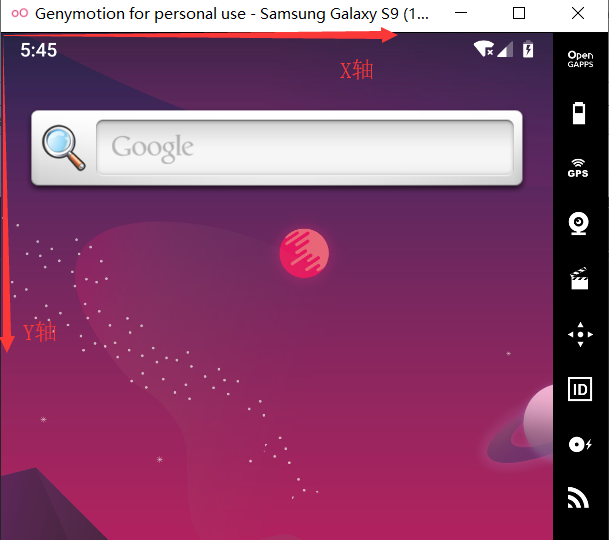
一段简单代码:
from appium import webdriver

desired_caps = {

                'platformName': 'Android',

                'deviceName': '192.168.41.101:5555',

                'platformVersion': '9.0',

                # apk包名

                'appPackage': 'com.gem.tastyfood',

                # apk的launcherActivity

                'appActivity': 'com.gem.tastyfood.LaunchActivity'

                }

if __name__=='__main__':

    driver = webdriver.Remote('http://127.0.0.1:4723/wd/hub', desired_caps)

    x = driver.get_window_size()["width"]

    y = driver.get_window_size()["height"]

    #向左滑动

    driver.swipe(x*0.9,y*0.5,x*0.1,y*0.5,duration=2000)
可以将 左滑、右滑、上滑、下滑 写成方法,方便调用:
from appium import webdriver

desired_caps = {

                'platformName': 'Android',

                'deviceName': '192.168.41.101:5555',

                'platformVersion': '9.0',

                # apk包名

                'appPackage': 'com.gem.tastyfood',

                # apk的launcherActivity

                'appActivity': 'com.gem.tastyfood.LaunchActivity'

                }

# 向左滑动。y轴保持不变,X轴:由大变小

def swipe_left(driver,star_x=0.9,stop_x=0.1,duration=2000):

    x1 = int(x*star_x)

    y1 = int(y*0.5)

    x2 = int(x*stop_x)

    y2 = int(y*0.5)

    driver.swipe(x1,y1,x2,y2,duration)

# 向右滑动。y轴保持不变,X轴:由小变大

def swipe_right(driver,star_x=0.1,stop_x=0.9,duration=2000):

    x1 = int(x*star_x)

    y1 = int(y*0.5)

    x2 = int(x*stop_x)

    y2 = int(y*0.5)

    driver.swipe(x1,y1,x2,y2,duration)

# 向上滑动。x轴保持不变,y轴:由大变小

def swipe_up(driver,star_y=0.9,stop_y=0.1,duration=2000):

    x1 = int(x*0.5)

    y1 = int(y*star_y)

    x2 = int(x*0.5)

    y2 = int(y*stop_y)

    driver.swipe(x1,y1,x2,y2,duration)

# 向下滑动。x轴保持不变,y轴:由小变大

def swipe_down(driver,star_y=0.1,stop_y=0.9,duration=2000):

    x1 = int(x*0.5)

    y1 = int(y*star_y)

    x2 = int(x*0.5)

    y2 = int(y*stop_y)

    driver.swipe(x1,y1,x2,y2,duration)

if __name__=='__main__':

    driver = webdriver.Remote('http://127.0.0.1:4723/wd/hub', desired_caps)

    x = driver.get_window_size()["width"]

    y = driver.get_window_size()["height"]

    swipe_left(driver)

    swipe_right(driver)

    swipe_up(driver)

    swipe_down(driver)
Appium swipe实现屏幕滑动的更多相关文章
- APPium+Python+iOS屏幕滑动方法对比
最近在学习appium自动化,对iOS手机进行滑动操作进行总结: 1.mobile:scroll;该方法在实际使用调用时,会滚动2次.执行时间很长. 向下滚动整个屏幕driver.execute_sc ...
- appium(屏幕滑动)
class handleswipe(): """ 屏幕滑动操作 """ def __init__(self, driver, functio ...
- Appium左右、上下滑动(Java)
网上很多文章都说用swipe来左右滑动,你把代码一贴,结果报错,看半天,原来是java-client中swipe早就被废除了!!!下面介绍一种Java写法来左右上下滑动: 首先,创建一个Swipe类 ...
- 【Android Developers Training】 70. 使用ViewPager实现屏幕滑动
注:本文翻译自Google官方的Android Developers Training文档,译者技术一般,由于喜爱安卓而产生了翻译的念头,纯属个人兴趣爱好. 原文链接:http://developer ...
- Appium 点击屏幕
由于版本变更,appium 点击屏幕方法已经改变, TouchAction action = new TouchAction(driver); Duration duration = Duration ...
- python+Appium自动化:app滑动操作swipe
swipe Appium使用滑动操作用到了swipe方法,定义如下: swipe(self, start_x, start_y, end_x, end_y, duration=None) 从一个点滑动 ...
- 使用python实现appium的屏幕滑动
前些日子写一个滑动手机页面的小脚本,看到大家给的内容都是swipe方法,这里对swipe方法做一个小介绍: Swipe(int start x,int start y,int end x,int y, ...
- 【转】使用python实现appium的屏幕滑动
前些日子写一个滑动手机页面的小脚本,看到大家给的内容都是swipe方法,这里对swipe方法做一个小介绍: Swipe(int start x,int start y,int end x,int y, ...
- Appium Android 屏幕滑动
随机推荐
- SpringMVC跟Struts2的区别
SpringMVC跟Struts2的区别 1.SpringMVC的入口是servlet:Struts2的入口是Filter. 2.SpringMVC性能方面会比Struts2好一点,SpringMVC ...
- SSD与HDD、HHD的区别
SSD与HDD.HHD的区别 HDD机械硬盘 SSD固态硬盘 HHD混合硬盘
- GO的执行原理以及GO命令
Go的执行原理以及Go的命令 一.Go的源码文件 Go 的源码文件分类: 如上图,分为三类: 1.命令源码文件: 声明自己属于 main 代码包.包含无参数声明和结果声明的 main 函数. 命令源码 ...
- css 行内水平均等排布方式
<div class="justify"> <span>测试1</span> <span>测试2</span> < ...
- python中自带的三个装饰器
说到装饰器,就不得不说python自带的三个装饰器: 1.@property 将某函数,做为属性使用 @property 修饰,就是将方法,变成一个属性来使用. class A(): @propert ...
- Flask 教程 第二章:模板
本文翻译自 The Flask Mega-Tutorial Part II: Templates 在Flask Mega-Tutorial系列的第二部分中,我将讨论如何使用模板. 学习完第一章之后,你 ...
- Unity API学习笔记(2)-GameObject的3种Message消息方法
官方文档>GameObject 首先建立测试对象: 在Father中添加两个脚本(GameObejctTest和Target),分别用来发送Message和接受Message: 在其它GameO ...
- linux内核 mtd分区
首先 内核配置需要打开MTD选项 Memory Technology Devices (MTD) ---> 如果是NOR Flash,需要选择Common Flash Interface (CF ...
- 记录MySql错误消息
本章列出了当你用任何主机语言调用MySQL时可能出现的错误.首先列出了服务器错误消息.其次列出了客户端程序消息. B.. 服务器错误代码和消息 服务器错误信息来自下述源文件: · 错误消息信息列在sh ...
- Docker Harbor
简介: Harbor是一个用于存储Docker镜像的企业级Registry服务:本章将介绍如何搭建Harbor Registry! Github官方安装文档: https://github.com/g ...