
使用Runtime的hook技术为tableView实现一个空白缺省页
一、介绍
UITableView和UICollectionView是iOS开发最常用的控件,也是必不可少的控件,这两个控件基本能实现各种各样的界面样式。
它们都是通过代理模式监测数据源的有无对数据进行UI的展示或隐藏。
如果没有数据时,UITableView和UICollectionView可能会展示了一个空白的页面,没有任何提示,逻辑上是没有问题的,但是对于用户而言,显得不够友好。
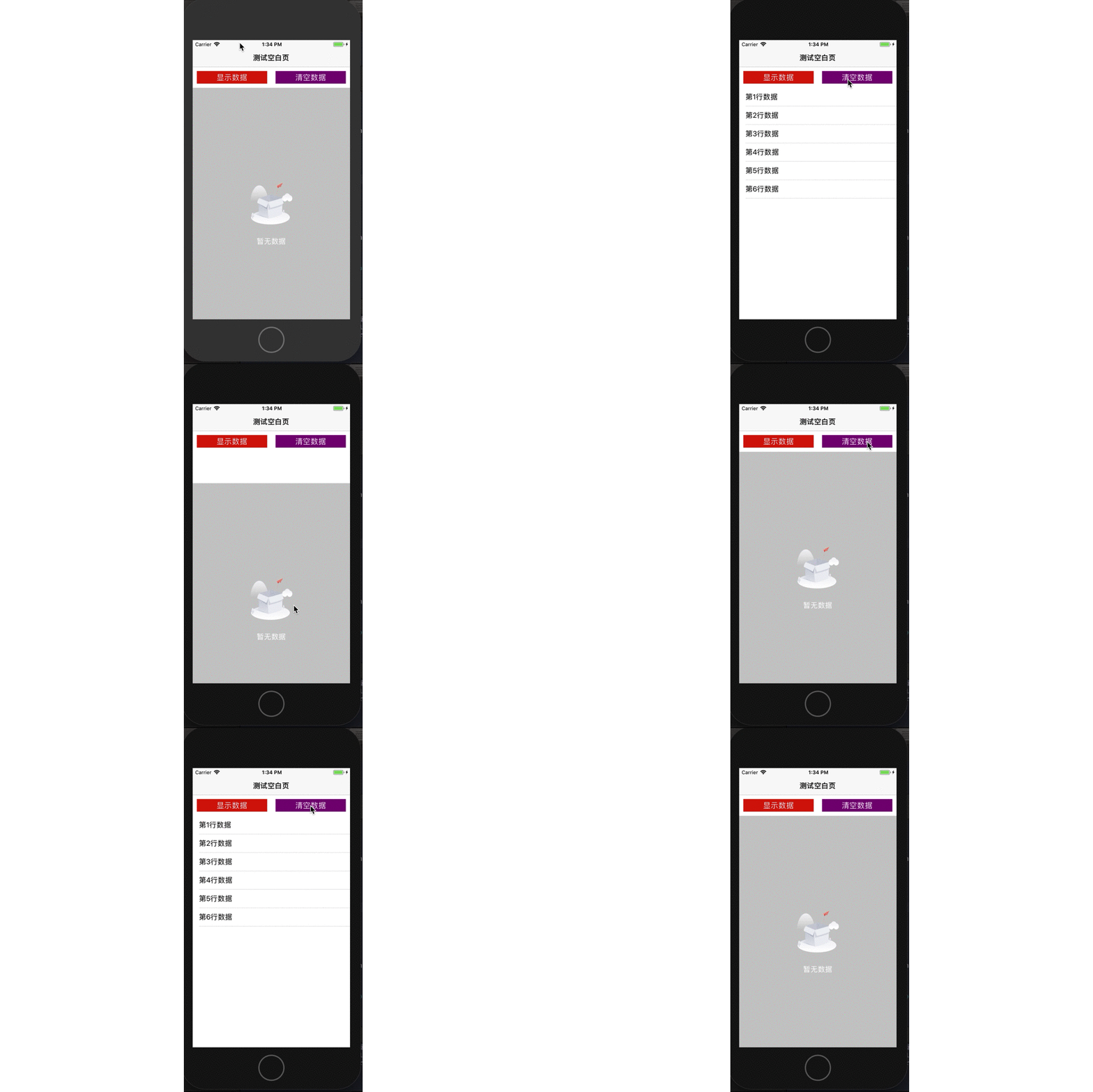
此时,最好做一个优化,也即没有数据时,刷新列表后提供一个缺省页。
给UITableView和UICollectionView添加一个缺省页,实现的方式有很多种,在这里,我首推采用运行时的hook技术来实现,第三方框架DZNEmptyDataSet就是用这个技术。
本文以UITableView为例,UICollectionView实现原理相同。
二、思路
(1)自定义一个缺省页视图NoDataEmptyView,添加图片视图UIImageView和提示文字标签label;
(2)给UITableView创建一个分类UITableView (ReloadData);
(3)在UITableView (ReloadData)分类中的load方法中使用hook技术用自定义的xyq_reloadData方法交换系统的reloadData方法;
(4)在UITableView (ReloadData)分类中使用关联对象的技术关联缺省页视图NoDataEmptyView对象,也即作为属性;
(5)在UITableView (ReloadData)分类中的xyq_reloadData方法中添加缺省页显示或隐藏的逻辑;
(6)在ViewController中刷新数据时正常调用reloadData方法即可达到实现。
三、代码
NoDataEmptyView
//  NoDataEmptyView.h

//  运行时

//

//  Created by 夏远全 on 2019/10/11.

//  Copyright © 2019 北京华樾教育科技有限公司. All rights reserved.

//

#import <UIKit/UIKit.h>

NS_ASSUME_NONNULL_BEGIN

@interface NoDataEmptyView : UIView

@end

NS_ASSUME_NONNULL_END
//

//  NoDataEmptyView.m

//  运行时

//

//  Created by 夏远全 on 2019/10/11.

//  Copyright © 2019 北京华樾教育科技有限公司. All rights reserved.

//

#import "NoDataEmptyView.h"

@interface NoDataEmptyView ()

@property (nonatomic, strong) UIImageView *imageView;

@property (nonatomic, strong) UILabel     *label;

@end

@implementation NoDataEmptyView

-(instancetype)initWithFrame:(CGRect)frame

{

    if (self = [super initWithFrame:frame]) {

        [self setup];

    }

    return self;

}

-(void)setup

{

    self.backgroundColor = [[UIColor lightGrayColor] colorWithAlphaComponent:0.6];

    self.imageView = [[UIImageView alloc] initWithFrame:CGRectMake(, , , )];

    self.imageView.image = [UIImage imageNamed:@"empty_body_kong"];

    self.imageView.center = self.center;

    self.label = [[UILabel alloc] initWithFrame:CGRectMake(, , , )];

    self.label.text = @"暂无数据";

    self.label.textColor = [UIColor whiteColor];

    self.label.textAlignment = NSTextAlignmentCenter;

    self.label.center = CGPointMake(self.imageView.center.x, CGRectGetMaxY(self.imageView.frame)+);

    [self addSubview:self.imageView];

    [self addSubview:self.label];

}

@end
UITableView (ReloadData)
//

//  UITableView+ReloadData.h

//  运行时

//

//  Created by 夏远全 on 2019/10/11.

//  Copyright © 2019 北京华樾教育科技有限公司. All rights reserved.

//

#import <UIKit/UIKit.h>

#import "NoDataEmptyView.h"

NS_ASSUME_NONNULL_BEGIN

@interface UITableView (ReloadData)

@property (nonatomic, strong) NoDataEmptyView *emptyView;

@end

NS_ASSUME_NONNULL_END
//

//  UITableView+ReloadData.m

//  运行时

//

//  Created by 夏远全 on 2019/10/11.

//  Copyright © 2019 北京华樾教育科技有限公司. All rights reserved.

//

#import "UITableView+ReloadData.h"

#import <objc/message.h>

static NSString *const NoDataEmptyViewKey = @"NoDataEmptyViewKey";

@implementation UITableView (ReloadData)

#pragma mark - 交换方法 hook

+(void)load {

    Method originMethod = class_getInstanceMethod(self, @selector(reloadData));

    Method currentMethod = class_getInstanceMethod(self, @selector(xyq_reloadData));

    static dispatch_once_t onceToken;

    dispatch_once(&onceToken, ^{

        method_exchangeImplementations(originMethod, currentMethod);

    });

}

#pragma mark - 刷新数据

-(void)xyq_reloadData {

    [self xyq_reloadData];

    [self fillEmptyView];

}

#pragma mark - 填充空白页

-(void)fillEmptyView {

    NSInteger sections = ;

    NSInteger rows = ;

    id <UITableViewDataSource> dataSource = self.dataSource;

    if ([dataSource respondsToSelector:@selector(numberOfSectionsInTableView:)]) {

        sections = [dataSource numberOfSectionsInTableView:self];

        if ([dataSource respondsToSelector:@selector(tableView:numberOfRowsInSection:)]) {

            for (int i=; i<sections; i++) {

                rows += [dataSource tableView:self numberOfRowsInSection:i];

            }

        }

    }

    if (rows == ) {

        if (![self.subviews containsObject:self.emptyView]) {

            self.emptyView = [[NoDataEmptyView alloc] initWithFrame:self.bounds];

            [self addSubview:self.emptyView];

        }

    }

    else{

        [self.emptyView removeFromSuperview];

    }

}

#pragma mark - 关联对象

-(void)setEmptyView:(NoDataEmptyView *)emptyView {

    objc_setAssociatedObject(self, &NoDataEmptyViewKey, emptyView, OBJC_ASSOCIATION_RETAIN_NONATOMIC);

}

-(NoDataEmptyView *)emptyView {

    return objc_getAssociatedObject(self, &NoDataEmptyViewKey);

}

@end
DataTableViewController
//

//  DataTableViewController.m

//  运行时

//

//  Created by 夏远全 on 2019/10/11.

//  Copyright © 2019 北京华樾教育科技有限公司. All rights reserved.

//

#import "DataTableViewController.h"

#import "UITableView+ReloadData.h"

@interface DataTableViewController ()<UITableViewDataSource>

@property (nonatomic, strong) UITableView    *tableView;

@property (nonatomic, strong) UIButton       *haveDataBtn;

@property (nonatomic, strong) UIButton       *clearDataBtn;

@property (nonatomic, strong) NSMutableArray *dataSource;

@end

@implementation DataTableViewController

#pragma mark - life cycle

- (void)viewDidLoad

{

    [super viewDidLoad];

    [self setupNavigation];

    [self setupSubviews];

}

-(void)setupNavigation

{

    self.title = @"测试空白页";

    self.view.backgroundColor = [UIColor whiteColor];

}

-(void)setupSubviews

{

    [self.view addSubview:self.haveDataBtn];

    [self.view addSubview:self.clearDataBtn];

    [self.view addSubview:self.tableView];

}

#pragma mark - dataSource methods

-(NSInteger)numberOfSectionsInTableView:(UITableView *)tableView {

    return ;

}

-(NSInteger)tableView:(UITableView *)tableView numberOfRowsInSection:(NSInteger)section {

    return self.dataSource.count;

}

-(UITableViewCell *)tableView:(UITableView *)tableView cellForRowAtIndexPath:(NSIndexPath *)indexPath{

    static NSString *reuserIdentifier = @"cell";

    UITableViewCell *cell = [tableView dequeueReusableCellWithIdentifier:reuserIdentifier];

    if (!cell) {

        cell = [[UITableViewCell alloc] initWithStyle:UITableViewCellStyleDefault reuseIdentifier:reuserIdentifier];

    }

    cell.textLabel.text = self.dataSource[indexPath.row];

    return cell;

}

#pragma mark - event

-(void)haveDataBtnAction {

    self.dataSource = @[@"第1行数据",@"第2行数据",@"第3行数据",@"第4行数据",@"第5行数据",@"第6行数据"].mutableCopy;

    [self.tableView reloadData]; //内部调用自己的xyq_reloadData

}

-(void)clearDataBtnAction {

    [self.dataSource removeAllObjects];

    [self.tableView reloadData]; //内部调用自己的xyq_reloadData

}

#pragma mark - getters

-(UITableView *)tableView {

    if (!_tableView) {

        CGFloat width = [UIScreen mainScreen].bounds.size.width;

        CGFloat height = [UIScreen mainScreen].bounds.size.height;

        _tableView = [[UITableView alloc] initWithFrame:CGRectMake(, +, width, height--)];

        _tableView.backgroundColor = [UIColor whiteColor];

        _tableView.tableFooterView = [[UIView alloc] init];

        _tableView.dataSource = self;

    }

    return _tableView;

}

-(UIButton *)haveDataBtn {

    if (!_haveDataBtn) {

        CGFloat width = [UIScreen mainScreen].bounds.size.width;

        _haveDataBtn = [[UIButton alloc] initWithFrame:CGRectMake(, +, width/-, )];

        _haveDataBtn.backgroundColor = [UIColor redColor];

        [_haveDataBtn setTitle:@"显示数据" forState:UIControlStateNormal];

        [_haveDataBtn setTitleColor:[UIColor whiteColor] forState:UIControlStateNormal];

        [_haveDataBtn addTarget:self action:@selector(haveDataBtnAction) forControlEvents:UIControlEventTouchUpInside];

    }

    return _haveDataBtn;

}

-(UIButton *)clearDataBtn {

    if (!_clearDataBtn) {

        CGFloat width = [UIScreen mainScreen].bounds.size.width;

        _clearDataBtn = [[UIButton alloc] initWithFrame:CGRectMake(width/+, +, width/-, )];

        _clearDataBtn.backgroundColor = [UIColor purpleColor];

        [_clearDataBtn setTitle:@"清空数据" forState:UIControlStateNormal];

        [_clearDataBtn setTitleColor:[UIColor whiteColor] forState:UIControlStateNormal];

        [_clearDataBtn addTarget:self action:@selector(clearDataBtnAction) forControlEvents:UIControlEventTouchUpInside];

    }

    return _clearDataBtn;

}

@end
四、演示

使用Runtime的hook技术为tableView实现一个空白缺省页的更多相关文章
- HOOK技术的一些简单总结
好久没写博客了, 一个月一篇还是要尽量保证,今天谈下Hook技术. 在Window平台上开发任何稍微底层一点的东西,基本上都是Hook满天飞, 普通应用程序如此,安全软件更是如此, 这里简单记录一些常 ...
- Hook技术
hook钩子: 使用技术手段在运行时动态的将额外代码依附现进程,从而实现替换现有处理逻辑或插入额外功能的目的. 它的技术实现要点有两个: 1)如何注入代码(如何将额外代码依附于现有代码中). 2)如何 ...
- 程序破解之 API HOOK技术 z
API HOOK,就是截获API调用的技术,在程序对一个API调用之前先执行你的函数,然后根据你的需要可以执行缺省的API调用或者进行其他处理,假设如果想截获一个进程对网络的访问,一般是几个socke ...
- API HOOK技术
API HOOK技术是一种用于改变API执行结果的技术,Microsoft 自身也在Windows操作系统里面使用了这个技术,如Windows兼容模式等. API HOOK 技术并不是计算机病毒专有技 ...
- 【Hook技术】实现从"任务管理器"中保护进程不被关闭 + 附带源码 + 进程保护知识扩展
[Hook技术]实现从"任务管理器"中保护进程不被关闭 + 附带源码 + 进程保护知识扩展 公司有个监控程序涉及到进程的保护问题,需要避免用户通过任务管理器结束掉监控进程,这里使用 ...
- 逆向实用干货分享,Hook技术第一讲,之Hook Windows API
逆向实用干货分享,Hook技术第一讲,之Hook Windows API 作者:IBinary出处:http://www.cnblogs.com/iBinary/版权所有,欢迎保留原文链接进行转载:) ...
- 逆向实用干货分享,Hook技术第二讲,之虚表HOOK
逆向实用干货分享,Hook技术第二讲,之虚表HOOK 正好昨天讲到认识C++中虚表指针,以及虚表位置在反汇编中的表达方式,这里就说一下我们的新技术,虚表HOOK 昨天的博客链接: http://www ...
- x64内核HOOK技术之拦截进程.拦截线程.拦截模块
x64内核HOOK技术之拦截进程.拦截线程.拦截模块 一丶为什么讲解HOOK技术. 在32系统下, 例如我们要HOOK SSDT表,那么直接讲CR0的内存保护属性去掉. 直接讲表的地址修改即可. 但是 ...
- Windows Hook技术
0x01 简介 有人称它为“钩子”,有人称它为“挂钩”技术.谈到钩子,很容易让人联想到在钓东西,比如鱼钩就用于钓鱼.编程技术的钩子也是在等待捕获系统中的某个消息或者动作.钩子的应用范围非常广泛,比如输 ...
随机推荐
- 1.2 菜单权限 ——MyRapid WinForm快速开发框架-功能介绍
添加菜单后用户并不会看到菜单 需要经过授权后才能看到 授权界面如图 授权的数据逻辑可以理解为一个键值对 角色>>菜单 但是为了方便集中数据管理 我设计成了 角色>>资源 其中的 ...
- Vi/Vim常用命令(附快捷切换方法)
vi/vim有两种模式,正常(命令行)模式 和编辑模式,在命令行模式下,任何键盘输入都是命令,在编辑模式下,键盘输入的才是字符. 启动/关闭Vi/Vim 启动:vi 打开 Vi/Vim编辑器vi 文件 ...
- MATLAB实例:求相关系数、绘制热图并找到强相关对
MATLAB实例:求相关系数.绘制热图并找到强相关对 作者:凯鲁嘎吉 - 博客园 http://www.cnblogs.com/kailugaji/ 用MATLAB编程,求给定数据不同维度之间的相关系 ...
- Objective-C中 #include 和 #import 的区别
由于 Objective-C 兼容 C 语言,所以导入文件时, 可以使用 #include,也可以使用 #import (Objective-C 新增的) 如: #include <stdio. ...
- 【CentOS 7】CentOS 7各个版本镜像下载地址(转)
参考链接:https://www.centos.org/download/mirrors/ https://www.cnblogs.com/defineconst/p/11176593.html
- (day67)组件、组件化、组件传参、JS补充(命名转换、for in 、数据转换)、css取消选中和模拟小手
目录 一.初识组件 (一)概念 (二)特点 二.组件的分类 (一)根组件 (二)局部组件 (三)全局组件 二.数据组件化 三.组件的传参 (一)父传子 (二)子传父 四.JS补充 (一)与html命名 ...
- ccf-csp201909题解
目录 ccf-csp201909题解 1. 201909-1 小明种苹果 题目描述 解析 通过代码 2. 201909-2 小明种苹果(续) 题目描述 解析 通过代码 3. 201909-3 字符画 ...
- my-eclipse 安装与下载
百度网盘下载 链接:https://pan.baidu.com/s/13FFcVLyofd2TBP0zun0zTg 提取码:8ofg MyEclipse CI 2019是一个十分优秀的用于开发Java ...
- [python / selenium] - 用python刷公选课是一种什么体验?
前言 看公选课还是能学到很多知识的,这里是给大家提供一个selenium的使用思路(好好学公选课,我真的看了) 思路 当观看者移动鼠标到某一范围时就会停止播放,就让selenium一直将鼠标悬停在视频 ...
- .netcore2.1 JS-SDK 从后台获取微信签名,实现自定义分享标题、描述、图片
最近项目移动端需要实现微信自定义分享功能,包含分享自定义标题.描述等. 首先到公众号的后台,功能设置里面,添加将要被分享的域名,如图 后端签名算法实现 ,参考腾讯开发者文档https://mp.wei ...