
Java EE数据持久化框架 • 【第4章 MyBatis动态SQL】
全部章节 >>>>
本章目录
4.1 MyBatis动态标签
4.1.1 MyBatis动态标签介绍
实际开发应用中,我们很少去查询某个表的所有数据,需要根据客户的需求来动态产生SQL语句,比如淘宝的商品筛选:
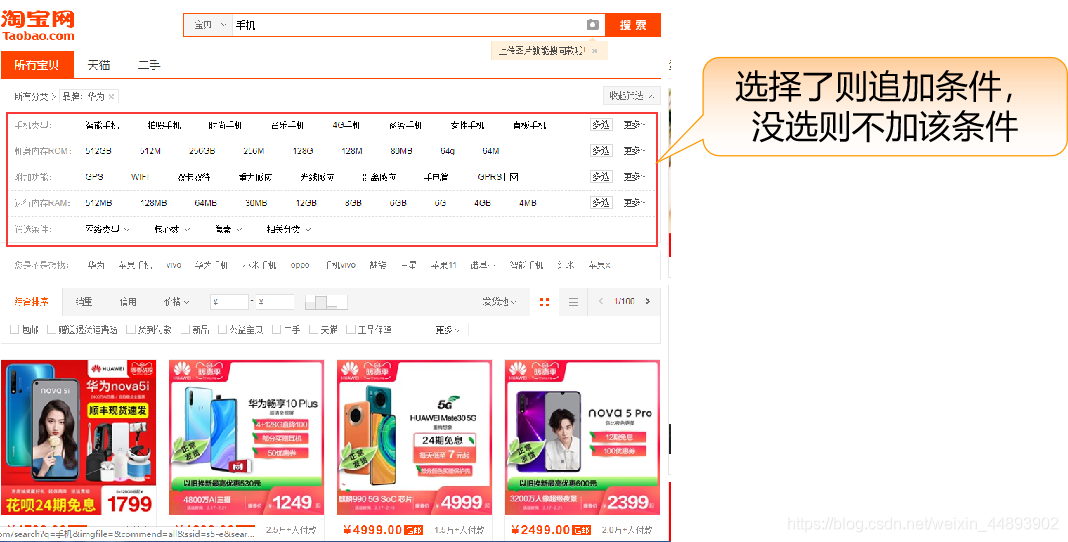
在JDBC操作数据表时,经常需要根据不同条件进行查询,而条件值需要根据用户的选择而定,需要拼接 SQL 语句,且拼接时经常有繁琐易错的操作。
// jdbc拼接sql片段

String sql = “select * from tb_users where 1=1 ”; 	//这里1=1是永远成立的条件,占用where关键字

if(name!=null && !name.equals(“”)){ 	//如果name不为空,则追加用户名条件

         sql+= “ and name like ‘%”+name+”%’”;

}

if(addr!=null && !addr.equals(“”)){	//如果地址不为空,则追加地址条件

         sql+=“ and addr like ‘%”+addr+”%’”;

}

if(score >0 ){

         sql+=“ and score > ”+score;	//如果积分大于0,则追加积分条件

}

//最后组合成一个完整的sql语句进行数据库查询
MyBatis除了结果映射,还拥有强大的动态标签(Dynamic Label)特性。
在MyBatis3之前的版本中,使用动态SQL需要学习和了解非常多的标签,现在MyBatis采用了功能强大的OGNL(Object-Graph Navigation Language,对象图导航语言)表达式语言消除了许多其他标签,实现很多实用的功能。
MyBatis常用的标签包含有:<if>标签、<choose>标签、<trim>标签(where、set)标签和<foreach>标签等。
4.1.2 < if >标签
实现一个用户管理高级查询功能,根据输入的条件去检索用户信息。这个功能还需要支持以下三种情况:
- 当只输入用户名时,需要根据用户名进行模糊查询。
- 当只输入邮箱时,根据邮箱进行完全匹配。
- 当同时输入用户名和邮箱时,用这两个条件去查询匹配的用户。
按照前面思路实现步骤如下:
在UserMapper接口中定义方法selectByUser(SysUser user)方法:
// 将用户名、邮箱两个参数封装在用户实体中传递进来

List<SysUser> selectByUser(SysUser user);
user 是接收的是要查询的条件数据
在UserMapper.xml中定义查询映射:
<mapper namespace="jack.mybatis.authority.mapper.UserMapper">

	<select id="selectByUser" resultMap="userMap">

		select * from sys_user where user_name like

		concat('%', #{userName}, '%') and user_email=#{userEmail}

	</select>

</mapper>
根据参数加入查询条件
编写代码测试查询是否正常:
	UserMapper userMapper = sqlSession.getMapper(UserMapper.class);

	//创建一个存储查询条件的用户对象

	SysUser queryUser = new SysUser();

	queryUser.setUserName(“ad”);	//存入要查询的数据

	//queryUser.setUserEmail(“admin@mybatis.jack”);

	List<SysUser> userList = userMapper.selectByUser(queryUser);

	System.out.println(userList.size());	//输出查询结果大小
//queryUser.setUserEmail(“admin@mybatis.jack”); 注释掉其中一个条件值
为什么当两个条件值都存在的时候,查询结果是正常的,而当其中任何一个条件没有设置的时候,结果不正常?
原因是任何一个条件为空时,sql语句中并未经过判断,直接把null作为查询条件,如下: select * from sys_user where user_name like concat('%', 'ad', '%') and user_email=null
使用MyBatis动态SQL的<if>标签就可以解决条件问题
语法:
//在Mapper.xml中

select * from 表名

<if test=“条件判断”>

	where  列名  = #{参数名}

</if>
if进行参数值判断,如为true则添加查询条件,否则不添加
示例:
根据用户名、邮箱查询用户信息,在UserMapper中修改查询语句如下:
<select id="selectByUser" resultMap="userMap">

	select * from sys_user where 1=1

	<if test="userName!=null and userName!=''">

		and user_name like concat('%', #{userName}, '%')

	</if>

	<if test="userEmail!=null and userEmail!=''">

		and user_email=#{userEmail}

	</if>

</select>
where 1=1 是恒成立条件,目的是占用where关键字
条件参数名不为空,并且不为空字符串时,追加and条件
4.1.3 update语句中使用<if>标签
除了在查询语句中可以使用<if>标签,在update中也可以使用:
通过if标签更新有变化的字段,更新的时候不能将原来有值但没有发生变化的字段更新为空或null
有数据代表用户输入了,则修改,否则不改
// 在UserMapper添加更新方法,根据用户id更新用户信息

int updateUserByIdSelective(SysUser user);
为了防止判断后最后一个逗号问题,这里添加额外修改id=#{id}
<update id="updateUserByIdSelective">

	update sys_user set

		<if test="userName!=null and userName!=''">

			user_name=#{userName},

		</if>

		<if test="userPassword!=null and userPassword!=''">

			user_password=#{userPassword},

		</if>

		<if test="userEmail!=null and userEmail!=''">

			user_email=#{userEmail},

		</if>

		<if test="createTime!=null">

			create_time=#{createTime, jdbcType="TIMESTAMP"},

		</if>

		id=#{id}

	where id=#{id}

</update>
编写测试代码测试动态更新的方法是否正确:
	UserMapper userMapper = sqlSession.getMapper(UserMapper.class);

	SysUser user = new SysUser();

	user.setId(1L); //user的id为1

	user.setUserEmail("admin_new@mybatis.jack"); // 更新了邮箱

	int result = userMapper.updateUserByIdSelective(user); // 更新id为1的用户

	sqlSession.commit(); // 事务提交

	// 根据当前id查找修改后的用户

	user = userMapper.selectUserById(1L);

	System.out.println(“用户名是:”+user.getUserName());		//用户名未发生变化

	System.out.println(“用户名是:”+user.getUserEmail());	//邮箱发生变化
调用修改方法测试是否只更改了邮箱
4.1.4 insert语句中使用< if >标签
在数据库表中插入数据的时候,如果某一列的参数值不为空,就使用传入的值;如果传入参数为空,就使用数据库中的默认值,而不使用传入的空值,使用<if>标签就可以实现这种动态插入列的功能。
以插入用户数据为例,插入时如果用户未输入邮箱,则取默认值(首先需要保证邮箱列具有默认值),实现步骤如下:
- 将用户表的邮箱字段设置具有默认值
- 在UserMapper接口中定义增加用户方法,如下:
/*

如果用户某一列的参数值不为空,就使用传入的值;如果传入参数为空,就使用数据库中的默认值,而不使用传入的空值

*/

int addUserSelective(SysUser user);
在UserMapper.xml中定义动态的增加insert语句,如下:
<insert id="addUserSelective" useGeneratedKeys="true" keyProperty="id">

	insert into sys_user(user_name, user_password,

	<if test="userEmail!=null and userEmail!=''">

		user_email,

	</if>

	user_info, head_img, create_time)

	values(#{userName}, #{userPassword},

	<if test="userEmail!=null and userEmail!=''">

		#{userEmail},

	</if>

	#{userInfo}, #{headImg,jdbcType=BLOB}, #{createTime,jdbcType=TIMESTAMP})

</insert>
通过if条件判断,保证insert的列和values的值数目一致,否则语法错误
通过if条件判断,保证insert的列和values的值数目一致,否则语法错误
	UserMapper userMapper = sqlSession.getMapper(UserMapper.class);

	SysUser user = new SysUser();

	user.setUserName("test-selective");

	user.setUserPassword("123456");

	userMapper.addUserSelective(user); // 新增用户

	sqlSession.commit();

	// 获取新增的这个用户

	user = userMapper.selectUserById(user.getId());

	System.out.println("新增用户的邮箱:"+user.getUserEmail());
没有设置邮箱,最后运行查看是否具有默认值
4.1.5 实践练习
4.2 < choose>、< where>动态标签
4.2.1 < choose>标签
<if>标签提供了基本的条件判断,但是它无法实现“if...else”和“if...else if...”的多重if条件逻辑,要想实现这样的逻辑,就需要用到<choose>标签。
语法:
<choose>

	<when test="userName!=null and userName!=''">

		and 列=#{参数名}

	</when>

	<otherwise>

		and 列=#{参数名}

	</otherwise>

</choose>
设定用户表中用户名不可以重复,进行如下查询:当参数用户id有值的时候优先使用用户id查询,当用户id没有值时就去判断用户名是否有值,如果有值就用用户名查询,如果用户名也没有值,则SQL查询无结果。
<select id="selectByIdOrUserName" resultMap="userMap">

	select * from sys_user where 1=1      //第一行是查询所有用户sql,使用1=1恒成立条件占用where

	<choose>

		<when test=“id!=null”>	//如果id不为空,说明有id,则按id查询,后续代码不执行

			and id=#{id}

		</when>

		<when test=“userName!=null and userName!=‘’”>      //如id为空,则会执行该when标签

			and user_name=#{userName}

		</when>

		<otherwise>	//如果都为空,则不查询结果,给予一个不成立条件

			and 1=2

		</otherwise>

	</choose>

</select>
如果该条件不加,则默认查询出所有用户
4.2.2 < where>标签
<where>标签的作用是如果该标签包含的元素中有返回值,就插入一个where关键字;如果where后面的字符串是以and或or开头的,就将它们剔除。
<where>标签完美的处理了使用1=1占用where关键字的尴尬代码。
语法:
select * from 表

<where>

	<if test=“条件判断">

		and 列=#{参数名}

	</if>

</where >
如果条件成立,则加入where,去掉and;条件不成立,则不加where
示例:
使用where标签处理用户名和邮箱两个关键字查询SQL配置如下:
<select id="selectByUser" resultMap="userMap">

	select * from sys_user

	<where>

		<if test="userName!=null and userName!=''">

			and user_name like concat('%', #{userName}, '%')

		</if>

		<if test="userEmail!=null and userEmail!=''">

			and user_email=#{userEmail}

		</if>

	</where>

</select>
<where> 执行时会自动处理是否在sql语句中添加where 这里无需添加where 1=1
4.2.3 < set>标签
<set>标签的作用是如果该标签包含的元素中有返回值,就插入一个set子句;如果set子句后面的字符串是以逗号结尾的,就将这个逗号剔除,一般在update语句中使用。
语法:
update 表名

<set>

	<if test=“条件判断">

		列=#{参数名},

	</when>

	<if test=“条件判断">

		列=#{参数名},

	</when>

</set >

//条件追加在最后
示例:
<update id="updateUserByIdSelective">

update sys_user 		//修改表名开始

<set>

	<if test="userName!=null and userName!=''">

		user_name=#{userName},

	</if>

	<if test="userPassword!=null and userPassword!=''">

		user_password=#{userPassword},

	</if>

	<if test="userEmail!=null and userEmail!=''">

		user_email=#{userEmail},

	</if>

	<if test="createTime!=null">

		create_time=#{createTime, jdbcType="TIMESTAMP"},

	</if>

	id=#{id}

</set>

	where id=#{id}

</update>
create_time=#{createTime, jdbcType="TIMESTAMP"},
最后一个逗号会被自动过滤掉, id=#{id}防止一个if都不进入时,语句报错的情况
4.2.4 < trim>标签
<where>标签和<set>标签的功能都可以用<trim>标签来实现,并且在底层就是通过TrimSqlNode实现的。
<where>标签对应的<trim>标签的实现如下:
语法:
针对where标签时trim处理
<trim prefix="where" prefixOverrides="and | OR">

	…

</trim>
针对update标签时trim处理
<trim prefix=“set” suffixOverrides=“,">

	…

</trim>
trim标签属性说明:
|
属性名 |
作用 |
|
prefix |
当trim元素内包含内容时,会给内容增加prefix属性指定的前缀 |
|
prefixOverrides |
当trim元素内包含内容时,会把内容中匹配的前缀字符串去掉 |
|
suffix |
当trim元素内包含内容时,会给内容增加suffix属性指定的后缀 |
|
suffixOverrides |
当trim元素内包含内容时,会把内容中匹配的后缀字符串去掉 |
trim标签可以用来实现where条件判断和update时的动态处理
示例:
使用trim标签实现用户名和邮箱的两个条件查询:
<select id="selectByUser" resultMap="userMap">

	select * from sys_user

	<trim prefix="where" prefixOverrides="and|or">

		<if test="userName!=null and userName!=''">

			and user_name like concat('%', #{userName}, '%')

		</if>

		<if test="userEmail!=null and userEmail!=''">

			and user_email=#{userEmail}

		</if>

	</trim>

</select>
<trim prefix="where" prefixOverrides="and|or">
如果trim内包含内容,则添加where前缀,并且去掉最开始的and或者or
示例:
使用trim标签实现动态更新,如果不为空则修改,否则该字段不改:
<update id="updateUserByIdSelective">

	update sys_user

	<trim prefix="set" suffixOverrides=",">

		<if test="userName!=null and userName!=''">

			user_name=#{userName},

		</if>

		<if test="userPassword!=null and userPassword!=''">

			user_password=#{userPassword},

		</if>

		<if test="userEmail!=null and userEmail!=''">

			user_email=#{userEmail},

		</if>

		id=#{id},

	</trim>

	where id=#{id}

</update>
<trim prefix="set" suffixOverrides=",">
如果trim内包含内容,则添加set前缀,并且去掉最后的,逗号
4.2.5 实践练习
4.3 使用< foreach>标签实现对象遍历
实际开发中遇到的SQL各种各样,比如经常会遇到in关键字的多个内容匹配
id in(1,2,3),查询在某个范围内的数据。传递(1,2,3)数据时,不能使用#{参数名} ,因为#号会解析为字符串,自动加上引号,所以只能使用${参数名}方式,但是${}的方式不安全,可能会造成SQL注入,这时候可以利用MyBatis中提供的<foreach>标签解决。
<foreach>标签可以对数组、Map或实现了Iterable接口(例如List、Set)的对象进行遍历,然后对取出的每个数据进行相关操作。
4.3.1 < foreach>标签属性
<foreach>标签的常用属性如下:
|
属性名 |
作用 |
|
collection |
必填,值为所选迭代循环的属性名 |
|
item |
变量名,值为从迭代(foreach)对象中取出的每一个值 |
|
Index |
遍历List集合时,index为索引下标 遍历Map集合时,index为key |
|
open |
整个循环内容开头的字符串 |
|
close |
整个循环内容结尾的字符串 |
|
separator |
循环每个内容之间的分隔符 |
示例:
实现通过传入的用户id集合,查询出所有符合条件的用户:
//首先在UserMapper定义selectUsersByIdList(List<Long> idList)方法,该方法的参数为传入的用户id集合

List<SysUser> selectUsersByIdList(List<Long> idList);
<select id="selectUsersByIdList" resultMap="userMap">

	select * from sys_user where id in

	<foreach collection="list" item="id" index="i" open="(" close=")" separator=",">

		#{id}

	</foreach>

</select>
比如调用时传入的集合中存储的是1 2 3 4 5 6,最终foreach之后产生的如下: select * from sys_user where id in(1,2,3,4,5,6)
	//测试调用代码

	UserMapper userMapper = sqlSession.getMapper(UserMapper.class);

	List<Long> idList = new ArrayList<Long>();	//创建存储id的集合

	idList.add(1L);

	idList.add(2L);

	// 业务逻辑必须校验userList.size()>0

	List<SysUser> userList = userMapper.selectUsersByIdList(idList);   //查询得到符合条件的用户
4.3.2 < foreach>标签循环数组
示例:
实现通过传入的用户id数组,查询出所有符合条件的用户:
//在刚才的UserMapper接口中新增加一个接收数组的方法,如下:

List<SysUser> selectUsersByIdArray(Long[] idArray);
selectUsersByIdArray 针对数组这里更改为array
<select id="selectUsersByIdArray" resultMap="userMap">

	select * from sys_user where id in

	<foreach collection="array" item="id" index="i" open="(" close=")" separator=",">

		#{id}

	</foreach>

</select>
4.3.2 < foreach>循环名称设定
传递给foreach标签参数时,为了更加明确参数名,可以在定义接口时对集合、数组使用@Param进行名称定义,如下:
// @Param的注解名idList为对应的<foreach>标签中collection的属性值

List<SysUser> selectUsersByIdListMap(@Param("idList")List<Long> idList);
(@Param("idList") 这里使用@Param给集合定义了一个参数名
<select id="selectUsersByIdListMap" resultMap="userMap">

	select * from sys_user where id in

	<foreach collection="idList" item="id" index="i" open="(" close=")" separator=",">

		#{id}

	</foreach>

</select>
collection="idList" 这里可以直接使用修饰后的名称
4.3.3 接口方法参数有多个
实现一个用户管理高级查询功能,根据输入的条件去检索用户信息。这个功能还需要支持以下三种情况:
- 当只输入多个用户id时,需要根据这些用户id进行精确匹配。
- 当只输入邮箱关键字时,根据邮箱进行模糊匹配。
- 当同时输入多个用户id和邮箱关键字时,用这两个条件去查询匹配的用户。
分析以上需求所属定义的接口方法的参数有两个。在MyBatis中,如果方法参数有多个,有两种解决方法,第一种方法是使用@Param给方法中的每个参数指定一个名字,第二种方法是将方法中的参数设置为一个Map类型。
第一种实现:使用@Param给方法中的每个参数指定一个名字。
// 注解名idList和userEmail分别为UserMapper.xml中SQL映射语句中的参数名

List<SysUser> selectUsersByIdListEmail(@Param("idList")List<Long> idList, @Param("userEmail")String userEmail);
这里使用@Param修饰参数名
<select id="selectUsersByIdListEmail" resultMap="userMap">

	select * from sys_user

	<where>

		<if test="idList!=null and idList.size()!=0">

			and id in

			<foreach collection="idList" item="id" index="i" open="(" close=")" separator=",">

				#{id}

			</foreach>

		</if>

		<if test="userEmail!=null and userEmail!=''">

			and user_email like concat('%',#{userEmail},'%')

		</if>

	</where>

</select>
idList与方法参数@Param("idList")对应
userEmai与方法参数@Param("userEmail")对应
第二种实现:将方法中的多个参数设置为一个Map类型的关键配置。
List<SysUser> selectUsersByIdListEmailMap(@Param("selectUserMap")Map<String, Object> params);
使用Map封装要接收的参数数据
<!—迭代Map,该Map的key为"idList"和"userEmail",selectUserMap为方法参数注解名-->

<foreach collection="selectUserMap" index="key" item="value">

	<if test="key=='idList'">

			and id in

		<!—迭代List,collection:集合的属性名,index:下标序号,item:迭代值,-->

		<foreach collection="value" item="id" index="i" open="(" close=")" separator=",">

			#{id}

		</foreach>

	</if>

	<if test="key=='userEmail' ">

			and user_email like concat('%',#{value},'%')

	</if>

</foreach>
foreach循环的是map,取出key判断使用
item="value" value就是map中取出的值
4.3.4 实践练习
4.4 < foreach>标签实现批量输入和动态更新
4.4.1 < foreach>标签批量增加
- 在实际开发工作中,用户经常为了操作方便快捷,而要求软件中具有数据的批量增加、删除、更新,甚至一些Excel表格数据导入数据库等工作,利用 MyBatis中的<foreach>标签可以轻松实现批量操作。
- 批量增加思路:insert into 表名() values(),(),()可以形成这种结构批量增加
- 批量删除思路:delete from 表名 where id in(1,2,3)形成值的列表,逗号分隔
在实际工作中,经常为了遍历而进行批量增加,甚至数据导入工作,利用 MyBatis中的<foreach>标签可以轻松实现批量操作。
 <!—UserMapper.xml中批量插入配置-->

<insert id="addUserList">

	insert into

	sys_user(user_name,user_password,user_email,user_info,head_img,create_time)

	values

	<foreach collection="list" item="user" separator=",">

		(#{user.userName},#{user.userPassword},#{user.userEmail},#{user.userInfo},

		 #{user.headImg,jdbcType=BLOB},#{user.createTime,jdbcType=TIMESTAMP})

	</foreach>

</insert>
利用foreach产生多个values数据,插入用户表中
//测试代码

UserMapper userMapper = sqlSession.getMapper(UserMapper.class);

List<SysUser> userList =new ArrayList<SysUser>();//创建要新增的用户集合

// 模拟向用户集合中添加多个用户对象

for (int i = 0; i < 2; i++) {

	SysUser user = new SysUser();

	user.setUserName("testuser"+i);

	user.setUserPassword("123456");

	userList.add(user);

}

int result = userMapper.addUserList(userList);//调用方法,传入用户集合完成批量增加

sqlSession.commit();
4.4.2 < foreach>标签动态更新
利用<foreach>标签除了批量插入,当参数类型是Map时,还可以实现动态更新:
// 在UserMapper接口中定义更新用户方法,updateUserMap为Map参数的注解名

int updateUserByMap(@Param("updateUserMap")Map<String, Object> map);
如果map中取出的键不是id,说明是要修改的列名和数据
<update id="updateUserByMap">

	update sys_user set

	<foreach collection="updateUserMap" index="key" item="value"  separator=",">

		<if test="key!='id'">

			${key}=#{value}

		</if>

	</foreach>

	<where>

		<foreach collection="updateUserMap" index="key" item="value"  separator=",">

		<if test="key=='id'">

			id=#{value}

		</if>

		</foreach>

	<where>

</update>
如果map中取出的键是id,说明是条件部分
4.4.2 接口方法参数有多个
<if test="key!='id'">

	${key}=#{value}

</if>
上面的${key}使用了$符号,而没有#符号,因为该地方应该是一个列名,直接使用#号会变成字符串,然后产生的实际sql中列名会有引号,引起语法错误。如下:
update sys_user set 'user_email'='admin_new@mybatis.jack' 该语法错误
而使用$符号后,产生的语句为:
update sys_user set user_email=‘admin_new@mybatis.jack ' 该语法正确
4.4.3 实践练习
总结:
- MyBatis提供了一系列动态标签实现复杂SQL语句以及动态SQL处理的配置。
- <if>标签可以在配置SQL过程中,实现条件的判断,其中test为条件判断属性。
- <where>标签能够智能的在SQL语句后追加where,以及替换掉重复关键字。
- <choose><when><otherwise>标签能够处理类似多重if条件判断。
- <set>标签能实现在修改时的动态处理要修改的列,一般用在修改语句中。
- <foreach>标签能够实现批量和动态的操作SQL配置,其中collection为操作的List或Map,item为迭代数据,index为索引或key,open和close能产生开始和结束字符,separator为分隔符。
Java EE数据持久化框架 • 【第4章 MyBatis动态SQL】的更多相关文章
- Java EE数据持久化框架笔记 • 【目录】
章节 内容 实践练习 Java EE数据持久化框架作业目录(作业笔记) 第1章 Java EE数据持久化框架笔记 • [第1章 MyBatis入门] 第2章 Java EE数据持久化框架笔记 • [第 ...
- Java EE数据持久化框架 • 【第5章 MyBatis代码生成器和缓存配置】
全部章节 >>>> 本章目录 5.1 配置MyBatis Generator 5.1.1 MyBatis Generator介绍 5.1.2 MyBatis Generat ...
- Java EE数据持久化框架 • 【第1章 MyBatis入门】
全部章节 >>>> 本章目录 1.1 初识MyBatis 1.1.1 持久化技术介绍 1.1.2 MyBatis简介 1.1.2 Mybatis优点 1.1.3 利用Mav ...
- Java EE数据持久化框架 • 【第3章 MyBatis高级映射】
全部章节 >>>> 本章目录 3.1 一对一映射 3.1.1 自动化一对一映射 3.1.2 标签配置一对一映射 3.1.3 标签配置一对一映射 3.1.4 实践练习 3.2 ...
- Java EE数据持久化框架作业目录(作业笔记)
第1章 MyBatis入门>>> 1.1.4 在Eclipse中搭建MyBatis基本开发环境 1.2.5 使用MyBatis查询所有职员信息 1.3.3 获取id值为1的角色信息. ...
- Java EE数据持久化框架 • 【第6章 MyBatis插件开发】
全部章节 >>>> 本章目录 6.1 MyBatis拦截器接口 6.1.1 MyBais拦截器接口介绍 6.1.2 MyBais拦截器签名介绍 6.1.3 实践练习 6.2 ...
- Java EE数据持久化框架 • 【第2章 MyBatis实现DML操作】
全部章节 >>>> 本章目录 2.1 标签 2.1.1 标签简单应用 2.1.2 使用JDBC方式返回主键自增的值 2.1.3 使用标签返回普通主键的值 2.1.4 实践练 ...
- Java EE数据持久化框架mybatis练习——获取id值为1的角色信息。
实现要求: 获取id值为1的角色信息. 实现思路: 创建角色表sys_role所对应的实体类sysRole. package entity; public class SysRole { privat ...
- Java EE互联网轻量级框架整合开发— SSM框架(中文版带书签)、原书代码
Java EE互联网轻量级框架整合开发 第1部分 入门和技术基础 第1章 认识SSM框架和Redis 2 1.1 Spring框架 2 1.2 MyBatis简介 6 1.3 Spring MVC简介 ...
随机推荐
- 【php安全】 register_argc_argv 造成的漏洞分析
对register_argc_argv的分析 简介 使用 cli模式下,不论是否开始register_argc_argv,都可以获取命令行或者说外部参数 web模式下,只有开启了register_ar ...
- How exactly does Google AdWords work?
The key to how Google AdWords works is the Quality Score. Quality Score is generally how well an ad ...
- Can we access global variable if there is a local variable with same name?
In C, we cannot access a global variable if we have a local variable with same name, but it is possi ...
- Multiple Inheritance in C++
Multiple Inheritance is a feature of C++ where a class can inherit from more than one classes. The c ...
- Oracle带输入输出参数的存储过程
(一)使用输入参数 需求:在emp_copy中添加一条记录,empno为已有empno的最大值+1,ename不能为空且长度必须大于0,deptno为60. 创建存储过程: create or rep ...
- 【JavaWeb】【JSP】JSP传值到Servlet后端为NULL的问题
JSP传值到Servlet后端为NULL的问题 哔哩哔哩@萌狼蓝天 博客:萌狼工作室-博客园 联系QQ:#3447902411# | 仅限技术交流可添加 | 添加请说明你的方向和来意 1.目标文件路径 ...
- idea 无法创建子目录
idea 无法创建子目录 解决方案
- Linux下安装Calibre
目录 一.介绍 二.安装 三.测试 四.报错处理 一.介绍 Calibre是基于python的电子书制作软件,可导出PDF.EPUB.MOBI.Word格式电子书. 二.安装 yum -y insta ...
- Java(变量和常量)
变量 可以变化的量.可以通过变量来操控内存中的数据:变量可以指代的是内存中的一块空间,而这块空间的位置是确定的但里边要放什么东西还不确定. Java是强类型语言,每个变量都要声明其类型. Java变量 ...
- 拉丁超立方体初始化种群(附Matlab代码)
拉丁超立方体初始化种群 1.引言 群智能算法一般以随机方式产生初始化种群的位置,但是这种方式可能导致种群内个体分布不均匀.拉丁超立方体抽样方法产生的初始种群位置,可以保证全空间填充和抽样非重叠,从而使 ...