
Java_集合之三
1.红黑树
1.1概述【理解】
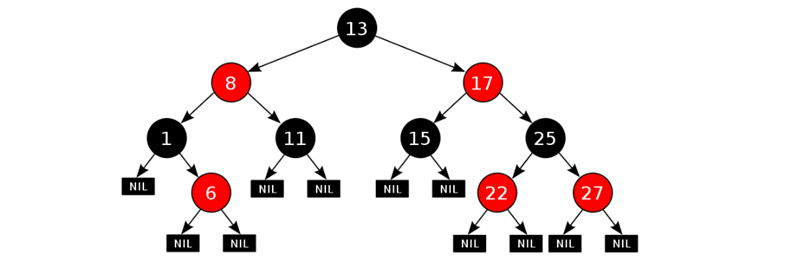
红黑树的特点
平衡二叉B树
每一个节点可以是红或者黑
红黑树不是高度平衡的,它的平衡是通过"自己的红黑规则"进行实现的
红黑树的红黑规则有哪些
每一个节点或是红色的,或者是黑色的
根节点必须是黑色
如果一个节点没有子节点或者父节点,则该节点相应的指针属性值为Nil,这些Nil视为叶节点,每个叶节点(Nil)是黑色的
如果某一个节点是红色,那么它的子节点必须是黑色(不能出现两个红色节点相连 的情况)
对每一个节点,从该节点到其所有后代叶节点的简单路径上,均包含相同数目的黑色节点
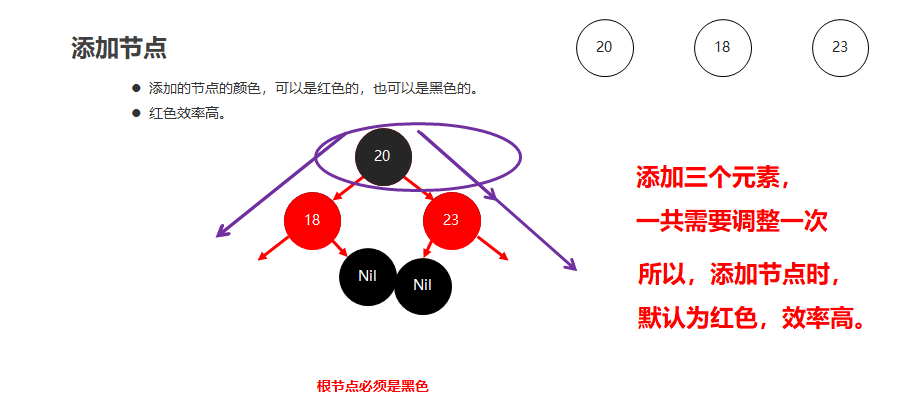
红黑树添加节点的默认颜色
添加节点时,默认为红色,效率高
红黑树添加节点后如何保持红黑规则
根节点位置
直接变为黑色
非根节点位置
父节点为黑色
不需要任何操作,默认红色即可
父节点为红色
叔叔节点为红色
将"父节点"设为黑色,将"叔叔节点"设为黑色
将"祖父节点"设为红色
如果"祖父节点"为根节点,则将根节点再次变成黑色
叔叔节点为黑色
将"父节点"设为黑色
将"祖父节点"设为红色
以"祖父节点"为支点进行旋转
1.2成绩排序案例【应用】
案例需求
用TreeSet集合存储多个学生信息(姓名,语文成绩,数学成绩,英语成绩),并遍历该集合
要求: 按照总分从高到低出现
代码实现
学生类
1 public class Student implements Comparable<Student> {
2 private String name;
3 private int chinese;
4 private int math;
5 private int english;
6
7 public Student() {
8 }
9
10 public Student(String name, int chinese, int math, int english) {
11 this.name = name;
12 this.chinese = chinese;
13 this.math = math;
14 this.english = english;
15 }
16
17 public String getName() {
18 return name;
19 }
20
21 public void setName(String name) {
22 this.name = name;
23 }
24
25 public int getChinese() {
26 return chinese;
27 }
28
29 public void setChinese(int chinese) {
30 this.chinese = chinese;
31 }
32
33 public int getMath() {
34 return math;
35 }
36
37 public void setMath(int math) {
38 this.math = math;
39 }
40
41 public int getEnglish() {
42 return english;
43 }
44
45 public void setEnglish(int english) {
46 this.english = english;
47 }
48
49 public int getSum() {
50 return this.chinese + this.math + this.english;
51 }
52
53 @Override
54 public int compareTo(Student o) {
55 // 主要条件: 按照总分进行排序
56 int result = o.getSum() - this.getSum();
57 // 次要条件: 如果总分一样,就按照语文成绩排序
58 result = result == 0 ? o.getChinese() - this.getChinese() : result;
59 // 如果语文成绩也一样,就按照数学成绩排序
60 result = result == 0 ? o.getMath() - this.getMath() : result;
61 // 如果总分一样,各科成绩也都一样,就按照姓名排序
62 result = result == 0 ? o.getName().compareTo(this.getName()) : result;
63 return result;
64 }
65 }测试类
1 public class TreeSetDemo {
2 public static void main(String[] args) {
3 //创建TreeSet集合对象,通过比较器排序进行排序
4 TreeSet<Student> ts = new TreeSet<Student>();
5 //创建学生对象
6 Student s1 = new Student("jack", 98, 100, 95);
7 Student s2 = new Student("rose", 95, 95, 95);
8 Student s3 = new Student("sam", 100, 93, 98);
9 //把学生对象添加到集合
10 ts.add(s1);
11 ts.add(s2);
12 ts.add(s3);
13
14 //遍历集合
15 for (Student s : ts) {
16 System.out.println(s.getName() + "," + s.getChinese() + "," + s.getMath() + "," + s.getEnglish() + "," + s.getSum());
17 }
18 }
19 }
2.HashSet集合
2.1HashSet集合概述和特点【应用】
底层数据结构是哈希表
存取无序
不可以存储重复元素
没有索引,不能使用普通for循环遍历
2.2HashSet集合的基本应用【应用】
存储字符串并遍历
1 public class HashSetDemo {
2 public static void main(String[] args) {
3 //创建集合对象
4 HashSet<String> set = new HashSet<String>();
5
6 //添加元素
7 set.add("hello");
8 set.add("world");
9 set.add("java");
10 //不包含重复元素的集合
11 set.add("world");
12
13 //遍历
14 for(String s : set) {
15 System.out.println(s);
16 }
17 }
18 }
2.3哈希值【理解】
哈希值简介
是JDK根据对象的地址或者字符串或者数字算出来的int类型的数值
如何获取哈希值
Object类中的public int hashCode():返回对象的哈希码值
哈希值的特点
同一个对象多次调用hashCode()方法返回的哈希值是相同的
默认情况下,不同对象的哈希值是不同的。而重写hashCode()方法,可以实现让不同对象的哈希值相同
2.4哈希表结构【理解】
JDK1.8以前
数组 + 链表
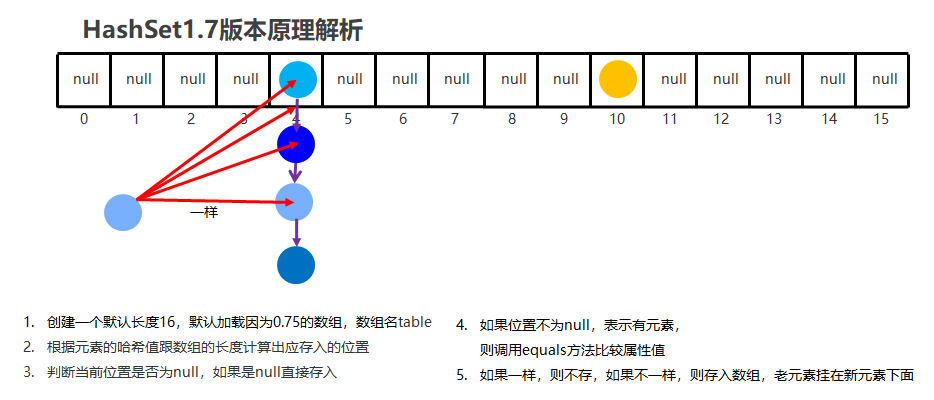
JDK1.8以后
节点个数少于等于8个
数组 + 链表
节点个数多于8个
数组 + 红黑树

2.5HashSet集合存储学生对象并遍历【应用】
案例需求
创建一个存储学生对象的集合,存储多个学生对象,使用程序实现在控制台遍历该集合
要求:学生对象的成员变量值相同,我们就认为是同一个对象
代码实现
学生类
1 public class Student {
2 private String name;
3 private int age;
4
5 public Student() {
6 }
7
8 public Student(String name, int age) {
9 this.name = name;
10 this.age = age;
11 }
12
13 public String getName() {
14 return name;
15 }
16
17 public void setName(String name) {
18 this.name = name;
19 }
20
21 public int getAge() {
22 return age;
23 }
24
25 public void setAge(int age) {
26 this.age = age;
27 }
28
29 @Override
30 public boolean equals(Object o) {
31 if (this == o) return true;
32 if (o == null || getClass() != o.getClass()) return false;
33
34 Student student = (Student) o;
35
36 if (age != student.age) return false;
37 return name != null ? name.equals(student.name) : student.name == null;
38 }
39
40 @Override
41 public int hashCode() {
42 int result = name != null ? name.hashCode() : 0;
43 result = 31 * result + age;
44 return result;
45 }
46 }测试类
1 public class HashSetDemo02 {
2 public static void main(String[] args) {
3 //创建HashSet集合对象
4 HashSet<Student> hs = new HashSet<Student>();
5
6 //创建学生对象
7 Student s1 = new Student("林青霞", 30);
8 Student s2 = new Student("张曼玉", 35);
9 Student s3 = new Student("王祖贤", 33);
10
11 Student s4 = new Student("王祖贤", 33);
12
13 //把学生添加到集合
14 hs.add(s1);
15 hs.add(s2);
16 hs.add(s3);
17 hs.add(s4);
18
19 //遍历集合(增强for)
20 for (Student s : hs) {
21 System.out.println(s.getName() + "," + s.getAge());
22 }
23 }
24 }总结
HashSet集合存储自定义类型元素,要想实现元素的唯一,要求必须重写hashCode方法和equals方法
3.Map集合
3.1Map集合概述和特点【理解】
Map集合概述
interface Map<K,V> K:键的类型;V:值的类型
Map集合的特点
双列集合,一个键对应一个值
键不可以重复,值可以重复
Map集合的基本使用
1 public class MapDemo01 {
2 public static void main(String[] args) {
3 //创建集合对象
4 Map<String,String> map = new HashMap<String,String>();
5
6 //V put(K key, V value) 将指定的值与该映射中的指定键相关联
7 map.put("itheima001","林青霞");
8 map.put("itheima002","张曼玉");
9 map.put("itheima003","王祖贤");
10 map.put("itheima003","柳岩");
11
12 //输出集合对象
13 System.out.println(map);
14 }
15 }
3.2Map集合的基本功能【应用】
方法介绍
方法名 说明 V put(K key,V value) 添加元素 V remove(Object key) 根据键删除键值对元素 void clear() 移除所有的键值对元素 boolean containsKey(Object key) 判断集合是否包含指定的键 boolean containsValue(Object value) 判断集合是否包含指定的值 boolean isEmpty() 判断集合是否为空 int size() 集合的长度,也就是集合中键值对的个数 示例代码
1 public class MapDemo02 {
2 public static void main(String[] args) {
3 //创建集合对象
4 Map<String,String> map = new HashMap<String,String>();
5
6 //V put(K key,V value):添加元素
7 map.put("张无忌","赵敏");
8 map.put("郭靖","黄蓉");
9 map.put("杨过","小龙女");
10
11 //V remove(Object key):根据键删除键值对元素
12 // System.out.println(map.remove("郭靖"));
13 // System.out.println(map.remove("郭襄"));
14
15 //void clear():移除所有的键值对元素
16 // map.clear();
17
18 //boolean containsKey(Object key):判断集合是否包含指定的键
19 // System.out.println(map.containsKey("郭靖"));
20 // System.out.println(map.containsKey("郭襄"));
21
22 //boolean isEmpty():判断集合是否为空
23 // System.out.println(map.isEmpty());
24
25 //int size():集合的长度,也就是集合中键值对的个数
26 System.out.println(map.size());
27
28 //输出集合对象
29 System.out.println(map);
30 }
31 }
3.3Map集合的获取功能【应用】
方法介绍
方法名 说明 V get(Object key) 根据键获取值 Set<K> keySet() 获取所有键的集合 Collection<V> values() 获取所有值的集合 Set<Map.Entry<K,V>> entrySet() 获取所有键值对对象的集合 示例代码
 1 public class MapDemo03 {

 2     public static void main(String[] args) {

 3         //创建集合对象

 4         Map<String, String> map = new HashMap<String, String>();

 5

 6         //添加元素

 7         map.put("张无忌", "赵敏");

 8         map.put("郭靖", "黄蓉");

 9         map.put("杨过", "小龙女");

10

11         //V get(Object key):根据键获取值

12 //        System.out.println(map.get("张无忌"));

13 //        System.out.println(map.get("张三丰"));

14

15         //Set<K> keySet():获取所有键的集合

16 //        Set<String> keySet = map.keySet();

17 //        for(String key : keySet) {

18 //            System.out.println(key);

19 //        }

20

21         //Collection<V> values():获取所有值的集合

22         Collection<String> values = map.values();

23         for(String value : values) {

24             System.out.println(value);

25         }

26     }

27 }
3.4Map集合的遍历(方式1)【应用】
遍历思路
我们刚才存储的元素都是成对出现的,所以我们把Map看成是一个夫妻对的集合
把所有的丈夫给集中起来
遍历丈夫的集合,获取到每一个丈夫
根据丈夫去找对应的妻子
步骤分析
获取所有键的集合。用keySet()方法实现
遍历键的集合,获取到每一个键。用增强for实现
根据键去找值。用get(Object key)方法实现
代码实现
 1 public class MapDemo01 {

 2     public static void main(String[] args) {

 3         //创建集合对象

 4         Map<String, String> map = new HashMap<String, String>();

 5

 6         //添加元素

 7         map.put("张无忌", "赵敏");

 8         map.put("郭靖", "黄蓉");

 9         map.put("杨过", "小龙女");

10

11         //获取所有键的集合。用keySet()方法实现

12         Set<String> keySet = map.keySet();

13         //遍历键的集合,获取到每一个键。用增强for实现

14         for (String key : keySet) {

15             //根据键去找值。用get(Object key)方法实现

16             String value = map.get(key);

17             System.out.println(key + "," + value);

18         }

19     }

20 }
3.5Map集合的遍历(方式2)【应用】
遍历思路
我们刚才存储的元素都是成对出现的,所以我们把Map看成是一个夫妻对的集合
获取所有结婚证的集合
遍历结婚证的集合,得到每一个结婚证
根据结婚证获取丈夫和妻子
步骤分析
获取所有键值对对象的集合
Set<Map.Entry<K,V>> entrySet():获取所有键值对对象的集合
遍历键值对对象的集合,得到每一个键值对对象
用增强for实现,得到每一个Map.Entry
根据键值对对象获取键和值
用getKey()得到键
用getValue()得到值
代码实现
 1 public class MapDemo02 {

 2     public static void main(String[] args) {

 3         //创建集合对象

 4         Map<String, String> map = new HashMap<String, String>();

 5

 6         //添加元素

 7         map.put("张无忌", "赵敏");

 8         map.put("郭靖", "黄蓉");

 9         map.put("杨过", "小龙女");

10

11         //获取所有键值对对象的集合

12         Set<Map.Entry<String, String>> entrySet = map.entrySet();

13         //遍历键值对对象的集合,得到每一个键值对对象

14         for (Map.Entry<String, String> me : entrySet) {

15             //根据键值对对象获取键和值

16             String key = me.getKey();

17             String value = me.getValue();

18             System.out.println(key + "," + value);

19         }

20     }

21 }
4.HashMap集合
4.1HashMap集合概述和特点【理解】
HashMap底层是哈希表结构的
依赖hashCode方法和equals方法保证键的唯一
如果键要存储的是自定义对象,需要重写hashCode和equals方法
4.2HashMap集合应用案例【应用】
案例需求
创建一个HashMap集合,键是学生对象(Student),值是居住地 (String)。存储多个元素,并遍历。
要求保证键的唯一性:如果学生对象的成员变量值相同,我们就认为是同一个对象
代码实现
学生类
 1 public class Student {

 2     private String name;

 3     private int age;

 4

 5     public Student() {

 6     }

 7

 8     public Student(String name, int age) {

 9         this.name = name;

10         this.age = age;

11     }

12

13     public String getName() {

14         return name;

15     }

16

17     public void setName(String name) {

18         this.name = name;

19     }

20

21     public int getAge() {

22         return age;

23     }

24

25     public void setAge(int age) {

26         this.age = age;

27     }

28

29     @Override

30     public boolean equals(Object o) {

31         if (this == o) return true;

32         if (o == null || getClass() != o.getClass()) return false;

33

34         Student student = (Student) o;

35

36         if (age != student.age) return false;

37         return name != null ? name.equals(student.name) : student.name == null;

38     }

39

40     @Override

41     public int hashCode() {

42         int result = name != null ? name.hashCode() : 0;

43         result = 31 * result + age;

44         return result;

45     }

46 }
测试类
 1 public class HashMapDemo {

 2     public static void main(String[] args) {

 3         //创建HashMap集合对象

 4         HashMap<Student, String> hm = new HashMap<Student, String>();

 5

 6         //创建学生对象

 7         Student s1 = new Student("林青霞", 30);

 8         Student s2 = new Student("张曼玉", 35);

 9         Student s3 = new Student("王祖贤", 33);

10         Student s4 = new Student("王祖贤", 33);

11

12         //把学生添加到集合

13         hm.put(s1, "西安");

14         hm.put(s2, "武汉");

15         hm.put(s3, "郑州");

16         hm.put(s4, "北京");

17

18         //遍历集合

19         Set<Student> keySet = hm.keySet();

20         for (Student key : keySet) {

21             String value = hm.get(key);

22             System.out.println(key.getName() + "," + key.getAge() + "," + value);

23         }

24     }

25 }
5.TreeMap集合
5.1TreeMap集合概述和特点【理解】
TreeMap底层是红黑树结构
依赖自然排序或者比较器排序,对键进行排序
如果键存储的是自定义对象,需要实现Comparable接口或者在创建TreeMap对象时候给出比较器排序规则
5.2TreeMap集合应用案例【应用】
案例需求
创建一个TreeMap集合,键是学生对象(Student),值是籍贯(String),学生属性姓名和年龄,按照年龄进行排序并遍历
要求按照学生的年龄进行排序,如果年龄相同则按照姓名进行排序
代码实现
学生类
 1 public class Student implements Comparable<Student>{

 2     private String name;

 3     private int age;

 4

 5     public Student() {

 6     }

 7

 8     public Student(String name, int age) {

 9         this.name = name;

10         this.age = age;

11     }

12

13     public String getName() {

14         return name;

15     }

16

17     public void setName(String name) {

18         this.name = name;

19     }

20

21     public int getAge() {

22         return age;

23     }

24

25     public void setAge(int age) {

26         this.age = age;

27     }

28

29     @Override

30     public String toString() {

31         return "Student{" +

32                 "name='" + name + '\'' +

33                 ", age=" + age +

34                 '}';

35     }

36

37     @Override

38     public int compareTo(Student o) {

39         //按照年龄进行排序

40         int result = o.getAge() - this.getAge();

41         //次要条件,按照姓名排序。

42         result = result == 0 ? o.getName().compareTo(this.getName()) : result;

43         return result;

44     }

45 }
测试类
 1 public class Test1 {

 2     public static void main(String[] args) {

 3           // 创建TreeMap集合对象

 4         TreeMap<Student,String> tm = new TreeMap<>();

 5

 6         // 创建学生对象

 7         Student s1 = new Student("xiaohei",23);

 8         Student s2 = new Student("dapang",22);

 9         Student s3 = new Student("xiaomei",22);

10

11         // 将学生对象添加到TreeMap集合中

12         tm.put(s1,"江苏");

13         tm.put(s2,"北京");

14         tm.put(s3,"天津");

15

16         // 遍历TreeMap集合,打印每个学生的信息

17         tm.forEach(

18                 (Student key, String value)->{

19                     System.out.println(key + "---" + value);

20                 }

21         );

22     }

23 }
Java_集合之三的更多相关文章
- Java_集合面试题
Java_集合面试题 0.链表,队列和栈的区别? 链表是一种存储结构,指得是存储时候除了要存储数据元素之外,还要用数据元素一起的另外空间存储数据元素的关系. 队列和栈都是线性表,属于逻辑结构范畴,都是 ...
- JAVA_集合框架虐我千百遍,虐也是一种进步
1.Collection和Collections区别: Collection是java的一个集合接口,集合类的顶级接口 Collections是一个包装类(工具类),不能被实例化(由于其构造函数设为私 ...
- java_集合框架
一.集合框架图 二.Collection接口 Collection中可以存储的元素间无序,可以重复的元素. Collection接口的子接口List和Set,Map不是Collecti ...
- java_ 集合
集合类说明及区别Collection├List│├LinkedList│├ArrayList│└Vector│ └Stack└SetMap├Hashtable├HashMap└WeakHashMap ...
- Java_集合
定义: 是一种工具,就像是容器,能存储任意数量的具有共同属性的对象. 与数组比较优点: (1)数组定义后长度不可变,集合长度可变: (2)数组只能通过下标访问,且下标类型只能是数字型,而有的集合(ma ...
- Java_集合与泛型
Collection 集合,集合是java中提供的一种容器,可以用来存储多个数据.在前面的学习中,我们知道数据多了,可以使用数组存放或者使用ArrayList集合进行存放数据.那么,集合和数组既然都是 ...
- 【源码阅读】Java集合之三 - ArrayDeque源码深度解读
Java 源码阅读的第一步是Collection框架源码,这也是面试基础中的基础: 针对Collection的源码阅读写一个系列的文章,本文是第三篇ArrayDeque. ---@pdai JDK版本 ...
- Java_集合总结
集合分类 Collection 接口是集合的父类 1.Set 集合 使用内部的排列机制(无序),存入集合的顺序和取出集合的顺序不一致,没有索引,存入集合的元素没有重复 HashSet集合 Linked ...
- 【Java_集合框架Set】HashSet、LinkedHashSet、TreeSet使用区别
HashSet:哈希表是通过使用称为散列法的机制来存储信息的,元素并没有以某种特定顺序来存放: LinkedHashSet:以元素插入的顺序来维护集合的链接表,允许以插入的顺序在集合中迭代: Tree ...
随机推荐
- Java系列教程-SpringMVC教程
SpringMVC教程 1.SpringMVC概述 1.回顾MVC 1.什么是MVC MVC是模型(Model).视图(View).控制器(Controller)的简写,是一种软件设计规范. 是将业务 ...
- 14、MyBatis教程之全部(包括所有章节)
MyBatis 3.5.5 教程 1.环境准备 jdk 8 + MySQL 5.7.19 maven-3.6.1 IDEA 学习前需要掌握: JDBC MySQL Java 基础 Maven Juni ...
- Git代码版本控制流程
我们的项目使用Git作为代码仓库.和版本控制工具. Git有几种Workflow,来管理代码版本变更流程,我们采用Gitflow Workflow流程. Gitflow Workflow,采用了mas ...
- 别再面向 for 循环编程了,JDK 自带的观察者模式就很香!
大家好,你还在面向 for 循环编程吗? 还有谁不会用观察者模式吗? 本篇栈长带来<观察者模式>理论及实战- 什么是观察者模式? 观察者模式(Observer Pattern)定义了对象间 ...
- CodeForces571A. Lengthening Sticks(组合数学-容斥)
题目大意: a,b,c三根木棍可以增加三个不同的数字,aa,bb,cc,且aa+bb+cc<=L,问能构成三角形的木棒有多少种方案 题目思路: 如果我们直接考虑把L分配给aa,bb,cc好像不好 ...
- JS定时器使用,定时定点,固定时刻,循环执行
JS定时器使用,定时定点,固定时刻,循环执行 本文概述:本文主要介绍通过JS实现定时定点执行,在某一个固定时刻执行某个函数的方法.比如说在下一个整点执行,在每一个整点执行,每隔10分钟定时执行的方法. ...
- epoll poll select区别
函数依赖 ( Functional Dependency,FD) select:http://www.cnblogs.com/Anker/archive/2013/08/14/3258674.html ...
- 第30 章 : 理解 RuntimeClass 与使用多容器运行时
理解 RuntimeClass 与使用多容器运行时 本文将主要分享以下三方面的内容: RuntimeClass 需求来源 RuntimeClass 功能介绍 多容器运行时示例 RuntimeClass ...
- Swagger3注解使用
这里只简单的说一下swagger的传值,返回值时注解的使用演示.相关注解及说明见其他文章 接收参数方式1 我们常规接收参数,可以使用一个类,类里面把属性作为接收的参数,使用注解对属性进行说明.但是这种 ...
- 【NCRE】三级网络技术 选择题易错点记录(1)
部分易错点 连接到一个集线器的多个节点不能同时发送数据帧 嵌入式安装插座用来连接双绞线 异步串行端口 PPP 同步串行端口 PPP/HPLC 对于频繁改变位置并使用DHCP获取IP地址的DNS客户端, ...