
使用.NET 6开发TodoList应用(17)——实现数据塑形
系列导航及源代码
需求
在查询的场景中,还有一类需求不是很常见,就是在前端请求中指定返回的字段,所以关于搜索的最后一个主题我们就来演示一下关于数据塑形(Data Shaping)。
目标
实现数据塑形搜索请求。
原理与思路
对于数据塑形来说,我们需要定义一些接口和泛型类实现来完成通用的功能,然后修改对应的查询请求,实现具体的功能。
实现
定义通用接口和泛型类实现
IDataShaper.cs
using System.Dynamic;

namespace TodoList.Application.Common.Interfaces;

public interface IDataShaper<T>

{

    IEnumerable<ExpandoObject> ShapeData(IEnumerable<T> entities, string fieldString);

    ExpandoObject ShapeData(T entity, string fieldString);

}
并实现通用的功能:
DataShaper.cs
using System.Dynamic;

using System.Reflection;

using TodoList.Application.Common.Interfaces;

namespace TodoList.Application.Common;

public class DataShaper<T> : IDataShaper<T> where T : class

{

    public PropertyInfo[] Properties { get; set; }

    public DataShaper()

    {

        Properties = typeof(T).GetProperties(BindingFlags.Public | BindingFlags.Instance);

    }

    public IEnumerable<ExpandoObject> ShapeData(IEnumerable<T> entities, string? fieldString)

    {

        var requiredProperties = GetRequiredProperties(fieldString);

        return GetData(entities, requiredProperties);

    }

    public ExpandoObject ShapeData(T entity, string? fieldString)

    {

        var requiredProperties = GetRequiredProperties(fieldString);

        return GetDataForEntity(entity, requiredProperties);

    }

    private IEnumerable<PropertyInfo> GetRequiredProperties(string? fieldString)

    {

        var requiredProperties = new List<PropertyInfo>();

        if (!string.IsNullOrEmpty(fieldString))

        {

            var fields = fieldString.Split(',', StringSplitOptions.RemoveEmptyEntries);

            foreach (var field in fields)

            {

                var property = Properties.FirstOrDefault(pi => pi.Name.Equals(field.Trim(), StringComparison.InvariantCultureIgnoreCase));

                if (property == null)

                {

                    continue;

                }

                requiredProperties.Add(property);

            }

        }

        else

        {

            requiredProperties = Properties.ToList();

        }

        return requiredProperties;

    }

    private IEnumerable<ExpandoObject> GetData(IEnumerable<T> entities, IEnumerable<PropertyInfo> requiredProperties)

    {

        return entities.Select(entity => GetDataForEntity(entity, requiredProperties)).ToList();

    }

    private ExpandoObject GetDataForEntity(T entity, IEnumerable<PropertyInfo> requiredProperties)

    {

        var shapedObject = new ExpandoObject();

        foreach (var property in requiredProperties)

        {

            var objectPropertyValue = property.GetValue(entity);

            shapedObject.TryAdd(property.Name, objectPropertyValue);

        }

        return shapedObject;

    }

}
定义扩展方法
为了使我们的Handle方法调用链能够直接应用,我们在Application/Extensions中新增一个DataShaperExtensions:
DataShaperExtensions.cs
using System.Dynamic;

using TodoList.Application.Common.Interfaces;

namespace TodoList.Application.Common.Extensions;

public static class DataShaperExtensions

{

    public static IEnumerable<ExpandoObject> ShapeData<T>(this IEnumerable<T> entities, IDataShaper<T> shaper, string? fieldString)

    {

        return shaper.ShapeData(entities, fieldString);

    }

}
然后再对我们之前写的MappingExtensions静态类中添加一个方法:
MappingExtensions.cs
// 省略其他...

public static PaginatedList<TDestination> PaginatedListFromEnumerable<TDestination>(this IEnumerable<TDestination> entities, int pageNumber, int pageSize)

{

    return PaginatedList<TDestination>.Create(entities, pageNumber, pageSize);

}
添加依赖注入
在Application的DependencyInjection.cs中添加依赖注入:
DependencyInjection.cs
// 省略其他

services.AddScoped(typeof(IDataShaper<>), typeof(DataShaper<>));
修改查询请求和Controller接口
我们在上一篇文章实现排序的基础上增加一个字段用于指明数据塑形字段并对应修改Handle方法:
GetTodoItemsWithConditionQuery.cs
using System.Dynamic;

using AutoMapper;

using AutoMapper.QueryableExtensions;

using MediatR;

using TodoList.Application.Common.Extensions;

using TodoList.Application.Common.Interfaces;

using TodoList.Application.Common.Mappings;

using TodoList.Application.Common.Models;

using TodoList.Application.TodoItems.Specs;

using TodoList.Domain.Entities;

using TodoList.Domain.Enums;

namespace TodoList.Application.TodoItems.Queries.GetTodoItems;

public class GetTodoItemsWithConditionQuery : IRequest<PaginatedList<ExpandoObject>>

{

    public Guid ListId { get; set; }

    public bool? Done { get; set; }

    public string? Title { get; set; }

    // 前端指明需要返回的字段

    public string? Fields { get; set; }

    public PriorityLevel? PriorityLevel { get; set; }

    public string? SortOrder { get; set; } = "title_asc";

    public int PageNumber { get; set; } = 1;

    public int PageSize { get; set; } = 10;

}

public class GetTodoItemsWithConditionQueryHandler : IRequestHandler<GetTodoItemsWithConditionQuery, PaginatedList<ExpandoObject>>

{

    private readonly IRepository<TodoItem> _repository;

    private readonly IMapper _mapper;

    private readonly IDataShaper<TodoItemDto> _shaper;

    public GetTodoItemsWithConditionQueryHandler(IRepository<TodoItem> repository, IMapper mapper, IDataShaper<TodoItemDto> shaper)

    {

        _repository = repository;

        _mapper = mapper;

        _shaper = shaper;

    }

    public Task<PaginatedList<ExpandoObject>> Handle(GetTodoItemsWithConditionQuery request, CancellationToken cancellationToken)

    {

        var spec = new TodoItemSpec(request);

        return Task.FromResult(

            _repository

                .GetAsQueryable(spec)

                .ProjectTo<TodoItemDto>(_mapper.ConfigurationProvider)

                .AsEnumerable()

                // 进行数据塑形和分页返回

                .ShapeData(_shaper, request.Fields)

                .PaginatedListFromEnumerable(request.PageNumber, request.PageSize)

            );

    }

}
对应修改Controller:
TodoItemController.cs
[HttpGet]

public async Task<ApiResponse<PaginatedList<ExpandoObject>>> GetTodoItemsWithCondition([FromQuery] GetTodoItemsWithConditionQuery query)

{

    return ApiResponse<PaginatedList<ExpandoObject>>.Success(await _mediator.Send(query));

}
验证
启动Api项目,执行查询TodoItem的请求:
请求

响应
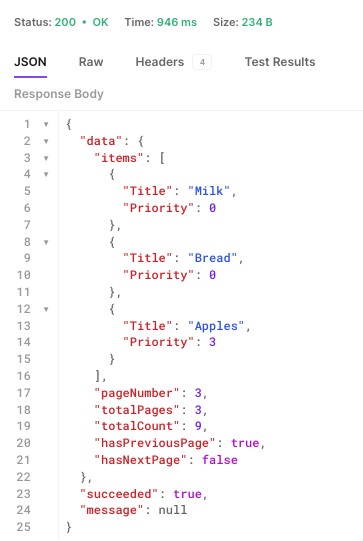
我们再把之前讲到的过滤和搜索添加到请求里来:
请求

响应
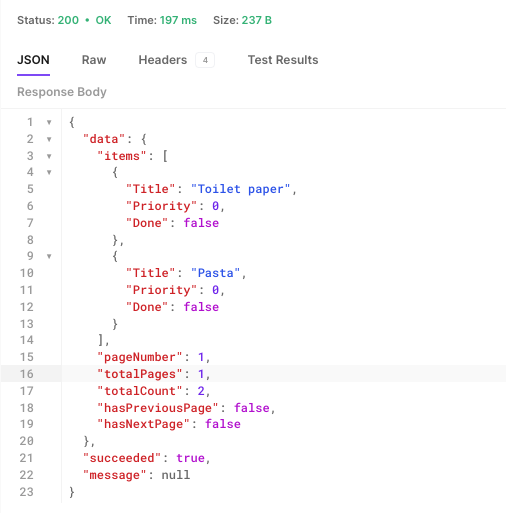
总结
对于数据塑形的请求,关键步骤就是使用反射获取待返回对象的所有配置的可以返回的属性,再通过前端传入的属性名称进行过滤和值的重组进行返回。实现起来是比较简单的。但是在实际的使用过程中我不推荐这样用,除了某些非常适用的特殊场景。个人更偏向于向前端提供明确的接口定义。
使用.NET 6开发TodoList应用(17)——实现数据塑形的更多相关文章
- 使用.NET 6开发TodoList应用(4)——引入数据存储
需求 作为后端CRUD程序员(bushi,数据存储是开发后端服务一个非常重要的组件.对我们的TodoList项目来说,自然也需要配置数据存储.目前的需求很简单: 需要能持久化TodoList对象并对其 ...
- 使用.NET 6开发TodoList应用(3)——引入第三方日志库
需求 在我们项目开发的过程中,使用.NET 6自带的日志系统有时是不能满足实际需求的,比如有的时候我们需要将日志输出到第三方平台上,最典型的应用就是在各种云平台上,为了集中管理日志和查询日志,通常会选 ...
- 使用.NET 6开发TodoList应用(1)——系列背景
前言 想到要写这样一个系列博客,初衷有两个:一是希望通过一个实践项目,将.NET 6 WebAPI开发的基础知识串联起来,帮助那些想要入门.NET 6服务端开发的朋友们快速上手,对使用.NET 6开发 ...
- 使用.NET 6开发TodoList应用(2)——项目结构搭建
为了不影响阅读的体验,我把系列导航放到文章最后了,有需要的小伙伴可以直接通过导航跳转到对应的文章 : P TodoList需求简介 首先明确一下我们即将开发的这个TodoList应用都需要完成什么功能 ...
- 使用.NET 6开发TodoList应用(5)——领域实体创建
需求 上一篇文章中我们完成了数据存储服务的接入,从这一篇开始将正式进入业务逻辑部分的开发. 首先要定义和解决的问题是,根据TodoList项目的需求,我们应该设计怎样的数据实体,如何去进行操作? 长文 ...
- 使用.NET 6开发TodoList应用(5.1)——实现Repository模式
需求 经常写CRUD程序的小伙伴们可能都经历过定义很多Repository接口,分别做对应的实现,依赖注入并使用的场景.有的时候会发现,很多分散的XXXXRepository的逻辑都是基本一致的,于是 ...
- 使用.NET 6开发TodoList应用(6)——使用MediatR实现POST请求
需求 需求很简单:如何创建新的TodoList和TodoItem并持久化. 初学者按照教程去实现的话,应该分成以下几步:创建Controller并实现POST方法:实用传入的请求参数new一个数据库实 ...
- 使用.NET 6开发TodoList应用文章索引
系列导航 使用.NET 6开发TodoList应用(1)--系列背景 使用.NET 6开发TodoList应用(2)--项目结构搭建 使用.NET 6开发TodoList应用(3)--引入第三方日志 ...
- 使用.NET 6开发TodoList应用(16)——实现查询排序
系列导航及源代码 使用.NET 6开发TodoList应用文章索引 需求 关于查询的另一个需求是要根据前端请求的排序字段进行对结果相应的排序. 目标 实现根据排序要求返回排序后的结果 原理与思路 要实 ...
随机推荐
- Flask + Nginx + uwsgi 部署过程
一.安装Flask 1.itsdangerous tar xvf itsdangerous-0.23.tar.gz cd itsdangerous-0.23/ python setup.py inst ...
- Java虚拟机(JVM)以及跨平台原理
相信大家已经了解到Java具有跨平台的特性,可以"一次编译,到处运行",在Windows下编写的程序,无需任何修改就可以在Linux下运行,这是C和C++很难做到的. 那么,跨平台 ...
- VUE页面实现加载外部HTML方法
前后端分离,后端提供了接口.但有一部分数据,比较产品说明文件,是存在其他的服务器上的.所以,在页面显示的时候,如果以页面内嵌的形式显示这个说明文件.需要搞点事情以达到想要的效果.本文主要和大家介绍VU ...
- Oracle SQL中join方式总结
在ORACLE数据库中,表与表之间的SQL JOIN方式有多种(不仅表与表,还可以表与视图.物化视图等联结).SQL JOIN其实是一个逻辑概念,像NEST LOOP JOIN. HASH JOIN等 ...
- Java中Date类型与String 类型之间的互相转换
Java中String类型和Date类型之间的转换 我们在注册网站的时候,往往需要填写个人信息,如姓名,年龄,出生日期等,在页面上的出生日期的值传递到后台的时候是一个字符串,而我们存入数据库的时候确需 ...
- Linux centos 安装Docker
安装docker需要centos7 内核3.1以上 基本上centos7以上的都支持, 然后先更新到最新 sudo yum update 然后直接安装 sudo yum install docker ...
- CF1547A Shortest Path with Obstacle 题解
Content 给定两个在二维平面上的网格 \(A(x_A,y_A)\) 和 \(B(x_B,y_B)\),另外,还有一个不可通过的网格 \(F(x_F,y_F)\).你需要求出在不经过 \(F\) ...
- SQL:大表多表更新的两种方法
#标记不参与计算的明细(跨平台的或is_end=2)#跨平台订单:暂不处理 说明:大表即order_list_wx,几十万,需要根据小表(order_list_zfb ,几万)来做更新,查出两个平台都 ...
- centos使用shell脚本定时备份docker中的mysql数据库
shell脚本 #!/bin/bash #容器ID container_id="6b1faea2b4d7" #登录用户名 mysql_user="root" # ...
- java源码——计算不同图形的周长和面积
计算任意三角形,正方形,正五边形,圆形的周长和面积. 利用类的继承实现. 将计算结果进行输出. 不多说,贴码. Contants.java 常量存储类 <pre name="code& ...