
Pytest_定制allure报告(12)
定制报告需要先导入allure模块,再使用以下装饰器方法:
- feature: 标注主要功能模块。
- story: 标注feature功能模块下的分支功能。
- description:在报告中显示用例描述。
- step: 标注测试用例步骤。
- issue && testcase:标注用例关联的链接。
- attach: 添加一些附加内容到测试报告中。
- severity: 标注测试用例的重要级别,包含blocker, critical, normal, minor, trivial 几个不同的等级。
feature && story
主要用于为用例分层级
import allure

@allure.feature("评论模块")

class TestComment:

    @allure.story("填写所有信息,点击提交,预期评论成功")

    def test_001(self):

        print("\n填写信息")

        print("\n点击提交")

    @allure.story("不输入任何信息,点击提交,预期提示填写必填项")

    def test_002(self):

        print("\n点击提交")
报告样式如下:
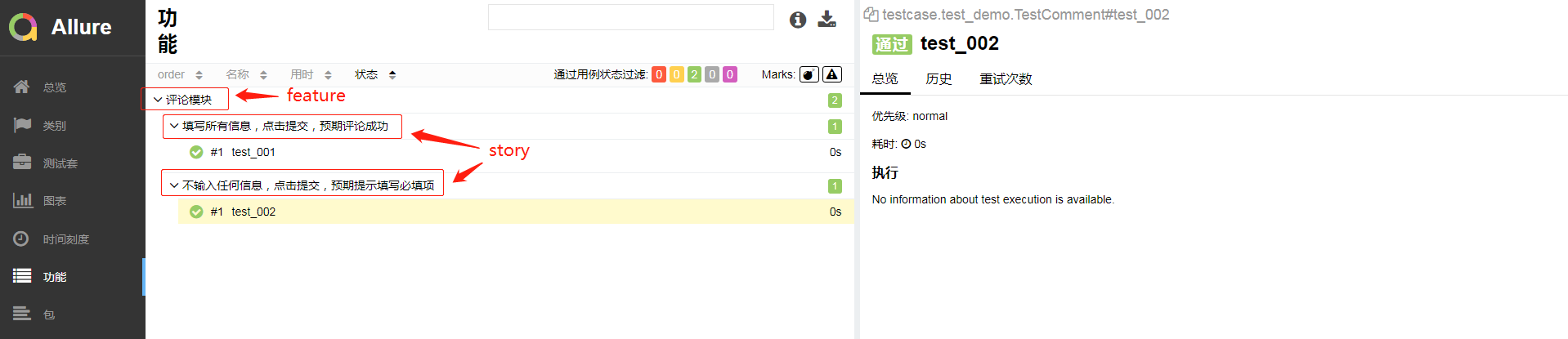
description
用于在报告中增加用例描述信息,除了这个方法外,还可以在方法下使用3个引号的方式增加用例描述信息。
import allure

@allure.feature("评论模块")

class TestComment:

    @allure.story("填写所有信息,点击提交,预期评论成功")

    @allure.description("用例描述...这样...那样...")

    def test_001(self):

        print("\n填写信息")

        print("\n点击提交")

    @allure.story("不输入任何信息,点击提交,预期提示填写必填项")

    def test_002(self):

        """用例描述...也可以...这样...那样"""

        print("\n点击提交")
报告样式如下:
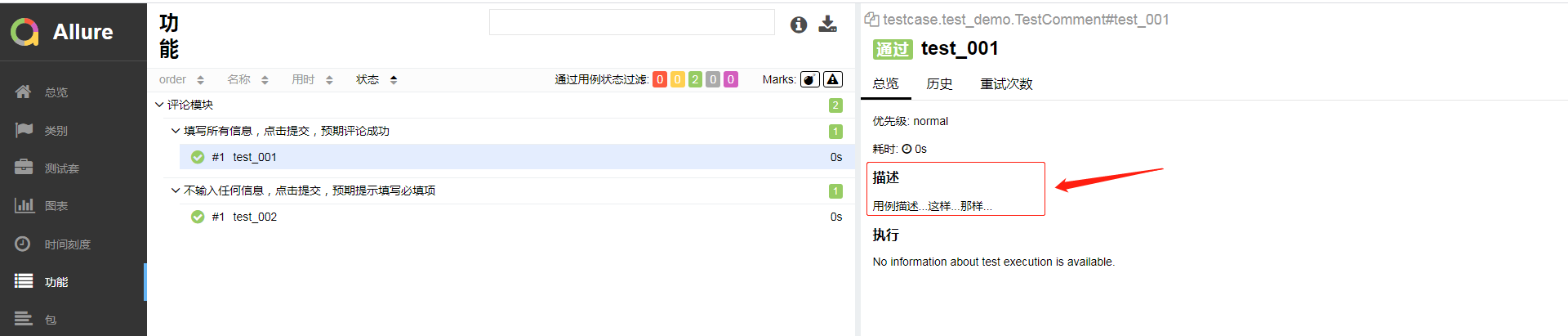
step
在报告中增加测试步骤的显示。
import allure

@allure.feature("评论模块")

class TestComment:

    @allure.story("填写所有信息,点击提交,预期评论成功")

    @allure.description("用例描述...这样...那样...")

    def test_001(self):

        with allure.step("1、填写信息"):

            print("\n填写信息")

            assert 1 == 1

        with allure.step("2、点击提交"):

            print("\n点击提交")

            assert 2 == 1

    @allure.story("不输入任何信息,点击提交,预期提示填写必填项")

    def test_002(self):

        """用例描述...也可以...这样...那样"""

        print("\n点击提交")
报告样式如下:

issue && testcase
issue与testcase用于在报告中增加关联链接,用法基本一样,第1个参数为关联的url地址,第2个为缺省参数,作用是为地址的别名。
import allure

@allure.feature("评论模块")

class TestComment:

    @allure.story("填写所有信息,点击提交,预期评论成功")

    @allure.description("用例描述...这样...那样...")

    @allure.issue("http://www.baidu.com")

    @allure.testcase("http://www.baidu.com", "百度一下")

    def test_001(self):

        with allure.step("1、填写信息"):

            print("\n填写信息")

            assert 1 == 1

        with allure.step("2、点击提交"):

            print("\n点击提交")

            assert 2 == 1

    @allure.story("不输入任何信息,点击提交,预期提示填写必填项")

    def test_002(self):

        """用例描述...也可以...这样...那样"""

        print("\n点击提交")
报告样式如下:

attach
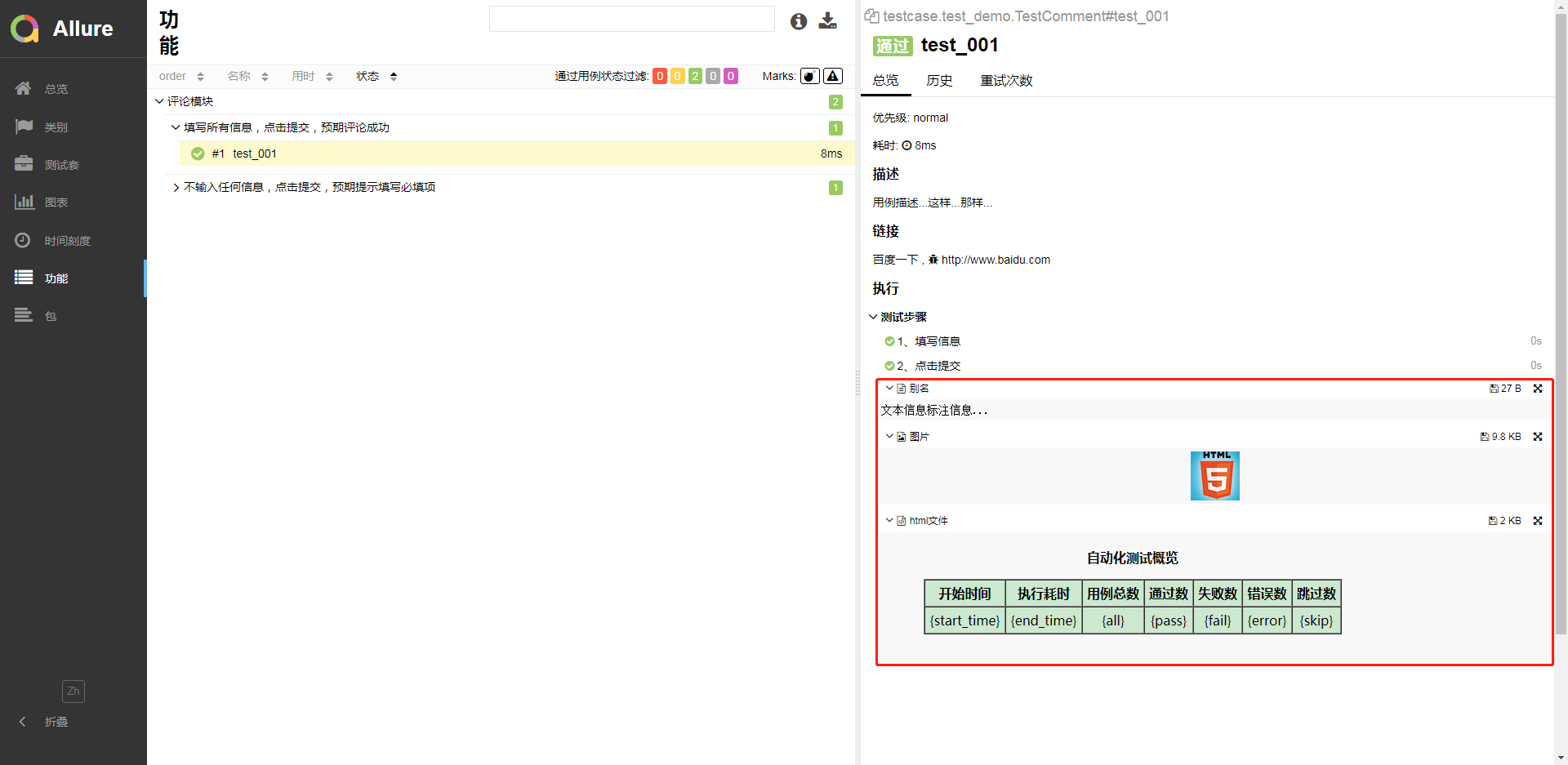
在报告中添加一些附加内容,内容可以为文本信息、图片、文件等。
import allure

@allure.feature("评论模块")

class TestComment:

    @allure.story("填写所有信息,点击提交,预期评论成功")

    @allure.description("用例描述...这样...那样...")

    @allure.issue("http://www.baidu.com")

    @allure.testcase("http://www.baidu.com", "百度一下")

    def test_001(self):

        with allure.step("1、填写信息"):

            print("\n填写信息")

            assert 1 == 1

        with allure.step("2、点击提交"):

            print("\n点击提交")

        # attach 添加文本信息

        allure.attach("文本信息标注信息...", "别名")

        # attach 可以添加图片

        allure.attach.file(r"D:\Users\User\Desktop\图片管理\60-60.jpg", "图片", attachment_type=allure.attachment_type.JPG)

        # attach 可以添加html文件

        allure.attach.file(r"D:\Users\User\Desktop\图片管理\test.html", "html文件", attachment_type=allure.attachment_type.HTML)

    @allure.story("不输入任何信息,点击提交,预期提示填写必填项")

    def test_002(self):

        """用例描述...也可以...这样...那样"""

        print("\n点击提交")
报告样式如下:
severity
为测试用例的划分重要级别,包含blocker, critical, normal, minor, trivial 5个不同的等级。默认是normal级别。
import allure

@allure.feature("评论模块")

class TestComment:

    @allure.story("填写所有信息,点击提交,预期评论成功")

    @allure.description("用例描述...这样...那样...")

    @allure.issue("http://www.baidu.com")

    @allure.testcase("http://www.baidu.com", "百度一下")

    def test_001(self):

        with allure.step("1、填写信息"):

            print("\n填写信息")

            assert 1 == 1

        with allure.step("2、点击提交"):

            print("\n点击提交")

        # attach 添加文本信息

        allure.attach("文本信息标注信息...", "别名")

        # attach 可以添加图片

        allure.attach.file(r"D:\Users\User\Desktop\图片管理\60-60.jpg", "图片", attachment_type=allure.attachment_type.JPG)

        # attach 可以添加html文件

        allure.attach.file(r"D:\Users\User\Desktop\图片管理\test.html", "html文件", attachment_type=allure.attachment_type.HTML)

    @allure.severity("blocker")

    def test_002(self):

        pass

    @allure.severity("critical")

    def test_003(self):

        pass

    @allure.severity("minor")

    def test_004(self):

        assert 1 == 2
报告样式如下:
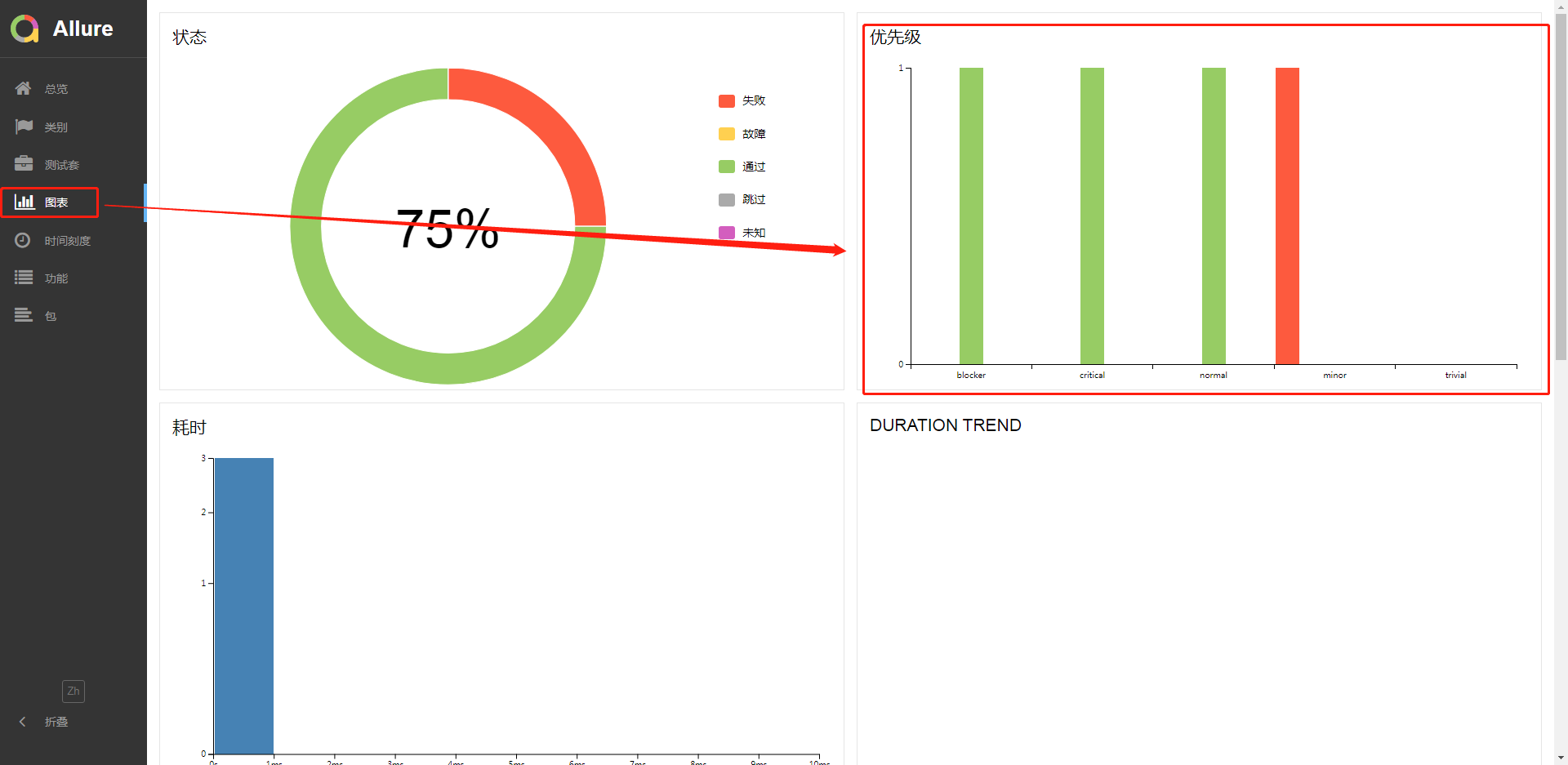
环境配置信息
在概览中查看环境配置默认是没有的。
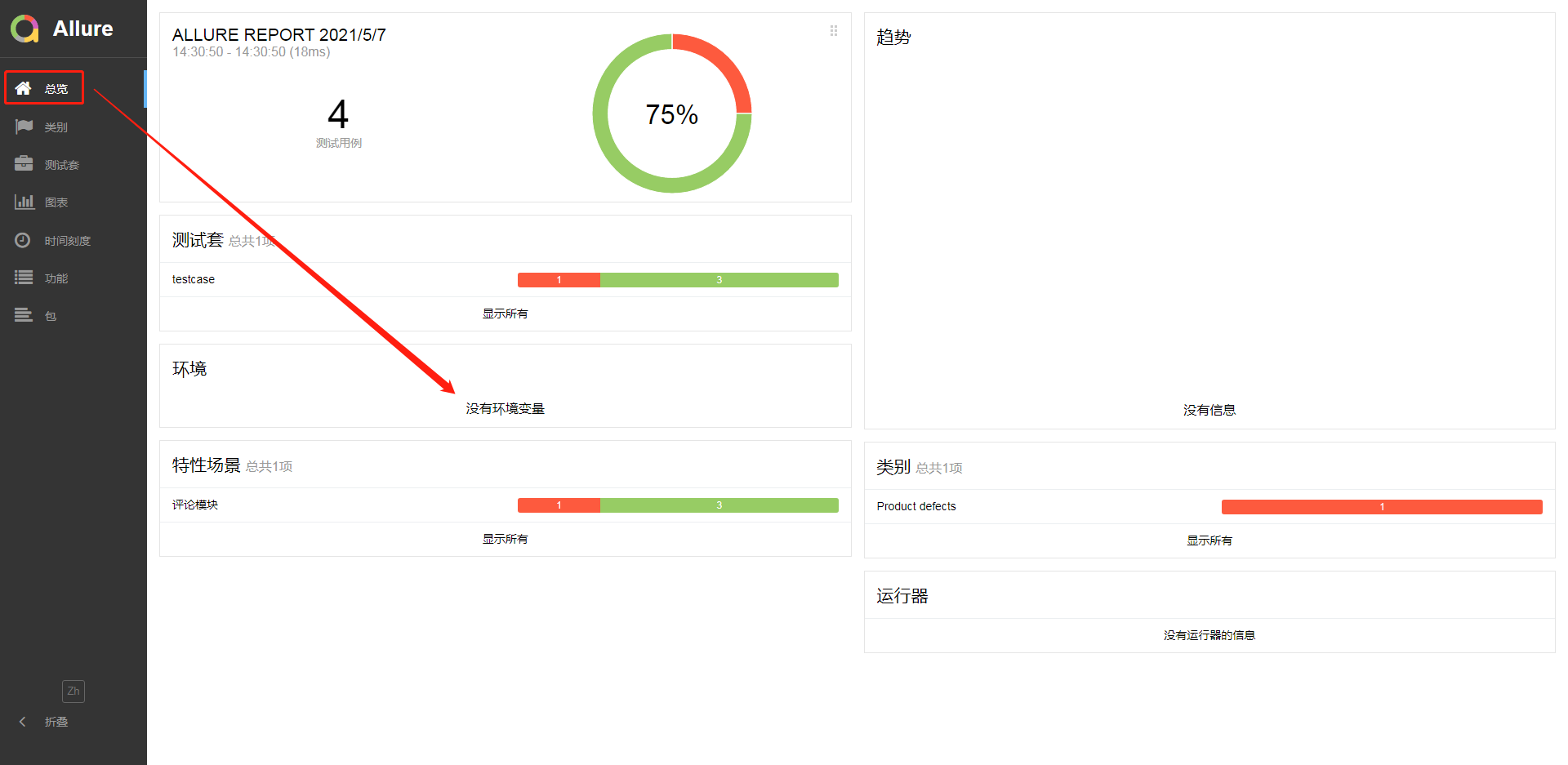
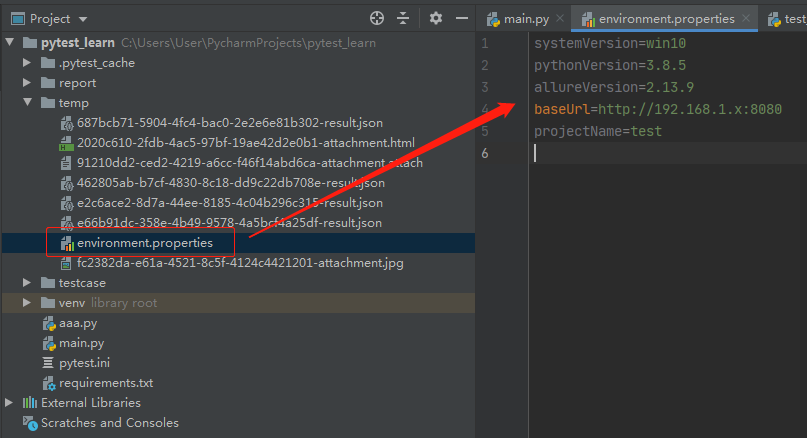
若要在报告中增加环境信息需要在第一步生成的json文件中,增加一个environment.properties文件,文件内容如下样式:
systemVersion=win10

pythonVersion=3.8.5

allureVersion=2.13.9

baseUrl=http://192.168.1.x:8080

projectName=test
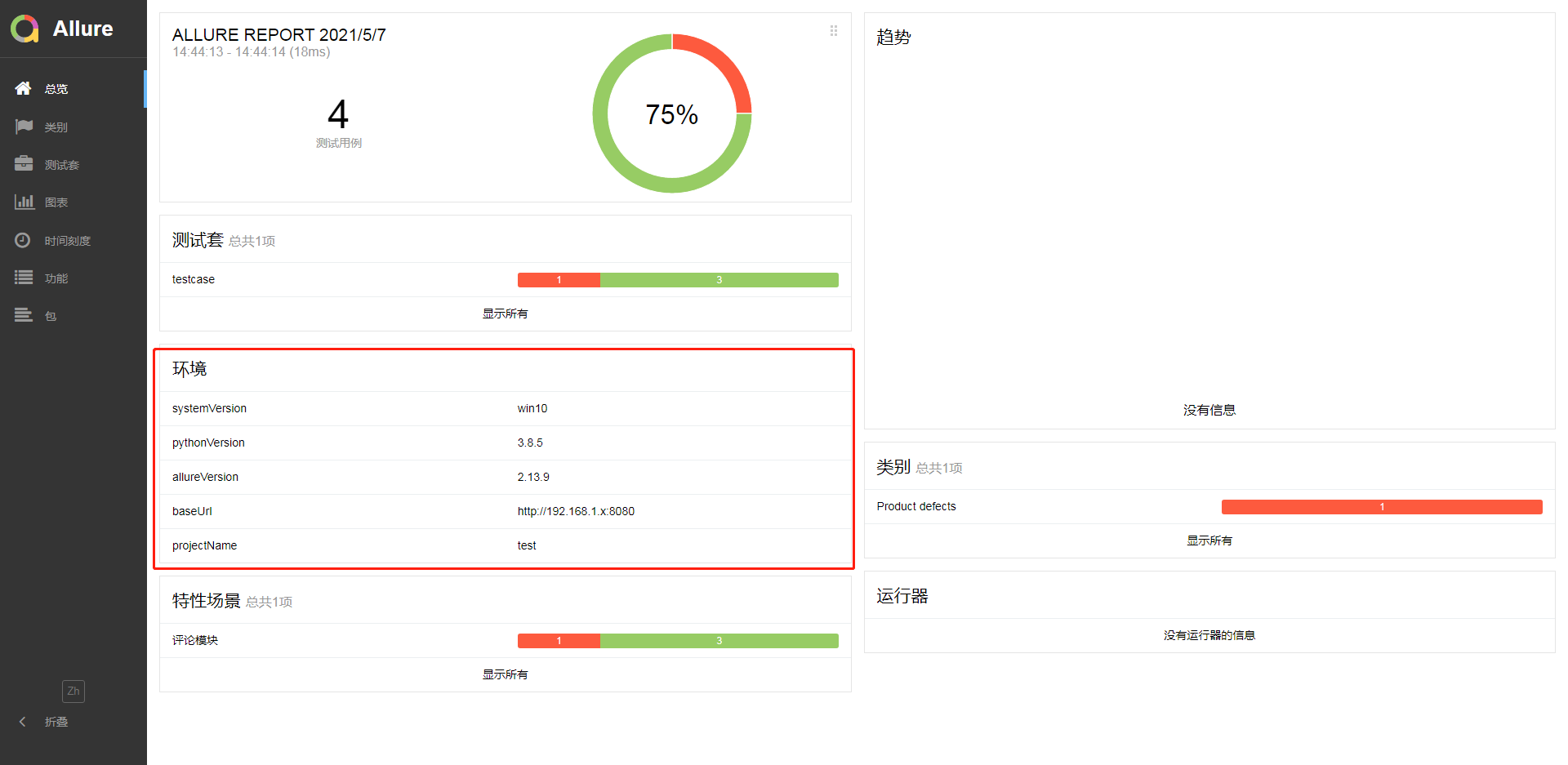
然后再执行并生成报告,报告样式如下:
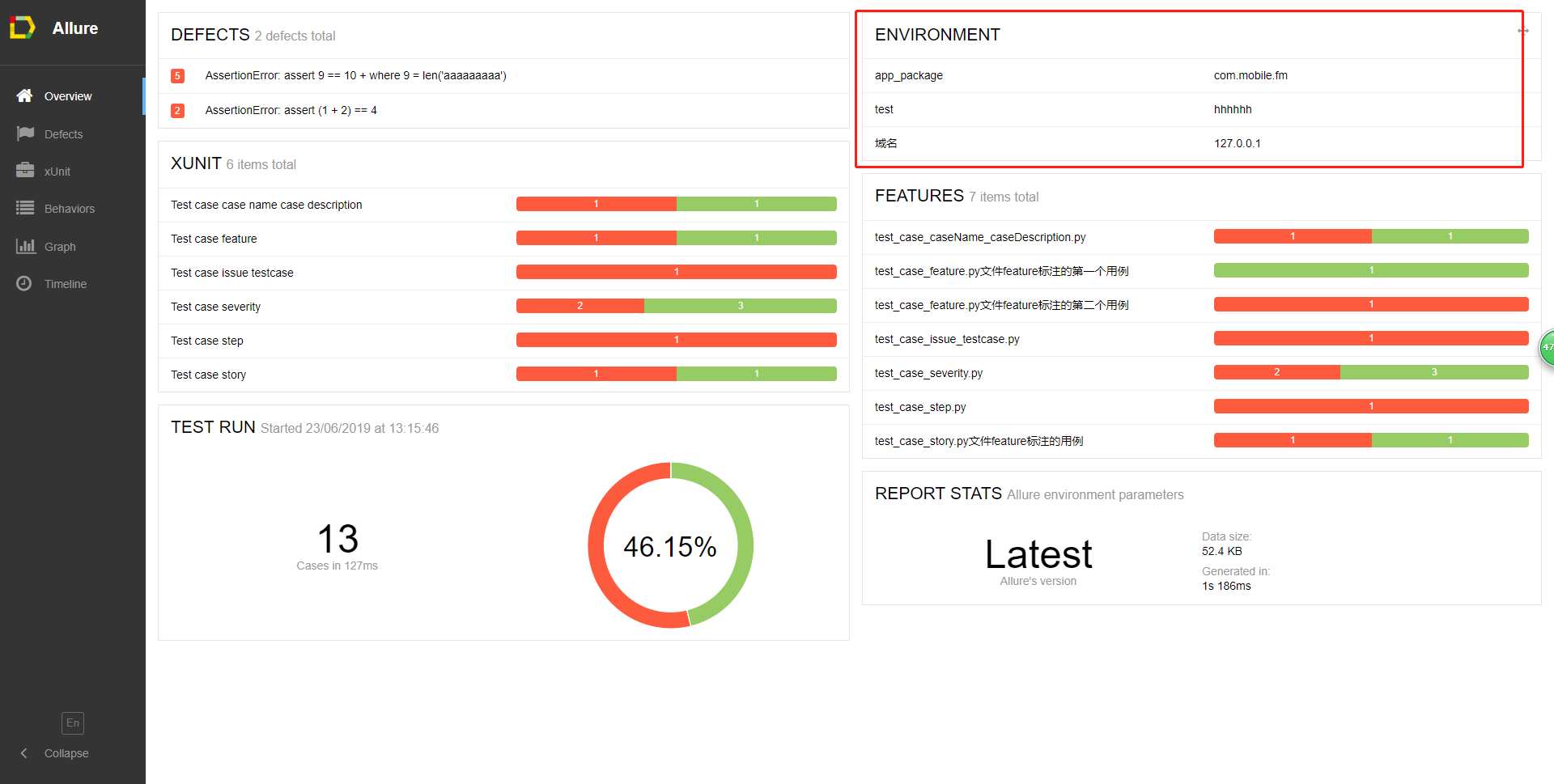
在allure 1.X的中,可以通过一个以test开头的py文件来配置,该方法在 2.X已弃用,仅供了解:

报告样式如下:
Pytest_定制allure报告(12)的更多相关文章
- allure报告定制(pytest+jenkins)
环境及安装可查看 pytest+jenkins安装+allure导出报告 要让allure报告更漂亮,更直观,需要在脚本中写入allure特性 一开始allure调用step().story().fe ...
- pytest+allure(allure-pytest基于这个插件)设计定制化报告
一:环境准备 1.python3.6 2.windows环境 3.pycharm 4.allure-pytest 5.allure2.8.0 6.java1.8 allure-pytest快速安装 在 ...
- pytest+allure(pytest-allure-adaptor基于这个插件)设计定制化报告
一:环境准备 1.python3.6 2.windows环境 3.pycharm 4.pytest-allure-adaptor 5.allure2.8.0 6.java1.8 pytest-allu ...
- 如何利用jenkins插件查看allure报告-----完整篇(解决404和无数据问题)
背景: python3+appium+pytest+allure写了安卓的自动化脚本,在windows本机pycharm上跑通过后生成了allure报告. 公司jenkins搭建在linux服务器上 ...
- pytest系列(四)- pytest+allure+jenkins - 持续集成平台生成allure报告
pytest是什么 pytest是python的一款测试框架,拥有unittest的功能并比它更丰富. allure是什么 有非常多的优秀的测试框架,但却是有非常少优秀的报告工具可以展示非常清楚的用例 ...
- pytest框架优化——将异常截屏图片加入到allure报告中
痛点分析: 在做allure定制化的时候,关于附件添加这一块,我们在代码里可以添加我们准备好的附件,这里用图片,通过下面的方法就能实现 allure.attach(file, '图片描述', allu ...
- pytest框架之allure报告生成
一.关于安装 allure是跟pytest一起集成使用的,所以需要同时安装pytest以及allure-pytest插件: pip install pytest pip install allure- ...
- pytest生成allure报告
在pytest框架中可以用很多插件来生成测试报告,本文总结下怎么生成allure报告 allure allure是一款开源的,专门用来展示测试结果的一个工具,allure可以与很多的测试框架做集成,比 ...
- 移动自动化appium(2)- Allure报告使用详解
6 Allure报告 6.1 Allure介绍 Allure是一个独立的报告插件,生成美观易读的报告,比之前的html好看,目前支持的语言:Java.PHP.Ruby.Python.C#等 6.2 A ...
随机推荐
- Spring事务隔离级别和传播特性(转)
相信每个人都被问过无数次Spring声明式事务的隔离级别和传播机制吧!今天我也来说说这两个东西. 加入一个小插曲,一天电话里有人问我声明式事务隔离级别有哪几种,我就回答了7种,他问我Spring的版本 ...
- 搭建mybatis开发环境
1.创建工程 <groupId>com.hope</groupId> <artifactId>day01_eesy_01mybatis</artifa ...
- DT10功能介绍--DT10多波示波器
功能介绍 有些嵌入式软件方面的问题,利用传统的调试器可能无法解决,而通过逻辑分析器则能有效地解决.请仔细阅读本文, 看我们如何一步一步地讲解在这种情况下所需的配置. 但是,从传统意义上讲,逻辑分析器是 ...
- 【JAVA今法修真】 第三章 关系非关系 redis法器
您好,我是南橘,万法仙门的掌门,刚刚从九州世界穿越到地球,因为时空乱流的影响导致我的法力全失,现在不得不通过这个平台向广大修真天才们借去力量.你们的每一个点赞,每一个关注都是让我回到九州世界的助力,兄 ...
- Python用pandas获取Excel数据
import pandas as pd df1 = pd.DataFrame(pd.read_excel(r'C:\python测试文件\我的三国啊.xlsx',sheet_name='Sheet1' ...
- 自动化测试环境搭建之Python3.6+selenium44+firefox
推荐使用: Python3.6+selenium2.53.6+Firefox46以下 +[Chrome任意版本+对应版本webdriver] ----------------------------- ...
- bootstrap.css 进度条没有动画效果
操作系统设置会影响浏览器的行为 Win+R 输入 sysdm.cpl ,3 打开 性能 的 设置 确保 窗口内动画控件和元素 被勾选
- CF312A Whose sentence is it? 题解
Content \(\texttt{Freda}\) 和 \(\texttt{Rainbow}\) 在网上聊了 \(n\) 句话.我们根据他们聊天的语句的特点来判断每一句是谁说的.\(\texttt{ ...
- Tornado WEB服务器框架 Epoll-- 【模板】
4.2 使用模板 1. 路径与渲染 使用模板,需要仿照静态文件路径设置一样,向web.Application类的构造函数传递一个名为template_path的参数来告诉Tornado从文件系统的一个 ...
- python requests库的简单运用
python requests的简单运用 使用pycharm获取requests包 ctrl+alt+s Project:pythonProject pythoninterpreter 点+号搜索 使 ...