
Easy machine learning pipelines with pipelearner: intro and call for contributors
@drsimonj here to introduce pipelearner – a package I’m developing to make it easy to create machine learning pipelines in R – and to spread the word in the hope that some readers may be interested in contributing or testing it.
This post will demonstrate some examples of what pipeleaner can currently do. For example, the Figure below plots the results of a model fitted to 10% to 100% (in 10% increments) of training data in 50 cross-validation pairs. Fitting all of these models takes about four lines of code in pipelearner.
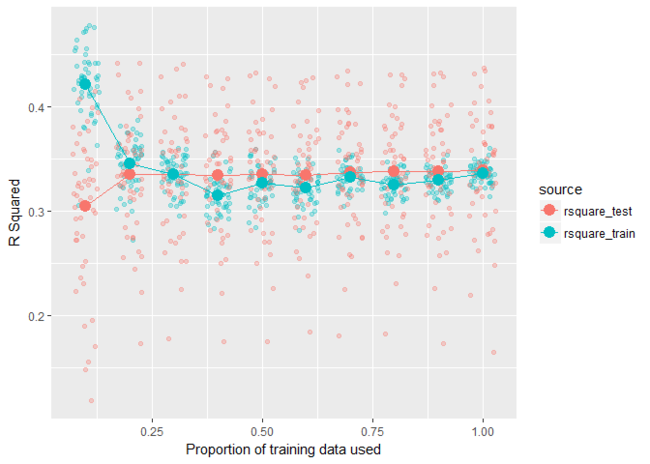
Head to the pipelearner Github page to learn more and contact me if you have a chance to test it yourself or are interested in contributing (my contact details are at the end of this post).
Examples
Some setup
library(pipelearner)

library(tidyverse)

library(nycflights13)

# Help functions

r_square <- function(model, data) {

  actual    <- eval(formula(model)[[2]], as.data.frame(data))

  residuals <- predict(model, data) - actual

  1 - (var(residuals, na.rm = TRUE) / var(actual, na.rm = TRUE))

}

add_rsquare <- function(result_tbl) {

  result_tbl %>%

    mutate(rsquare_train = map2_dbl(fit, train, r_square),

           rsquare_test  = map2_dbl(fit, test,  r_square))

}

# Data set

d <- weather %>%

  select(visib, humid, precip, wind_dir) %>%

  drop_na() %>%

  sample_n(2000)

# Set theme for plots

theme_set(theme_minimal())
k-fold cross validation
results <- d %>%

  pipelearner(lm, visib ~ .) %>%

  learn_cvpairs(k = 10) %>%

  learn()

results %>%

  add_rsquare() %>%

  select(cv_pairs.id, contains("rsquare")) %>%

  gather(source, rsquare, contains("rsquare")) %>%

  mutate(source = gsub("rsquare_", "", source)) %>%

  ggplot(aes(cv_pairs.id, rsquare, color = source)) +

    geom_point() +

    labs(x = "Fold",

         y = "R Squared")
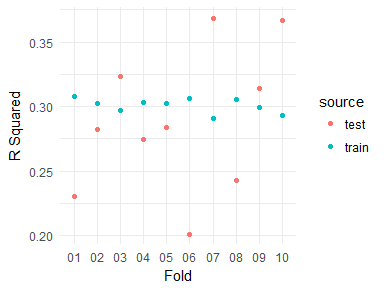
Learning curves
results <- d %>%

  pipelearner(lm, visib ~ .) %>%

  learn_curves(seq(.1, 1, .1)) %>%

  learn()

results %>%

  add_rsquare() %>%

  select(train_p, contains("rsquare")) %>%

  gather(source, rsquare, contains("rsquare")) %>%

  mutate(source = gsub("rsquare_", "", source)) %>%

  ggplot(aes(train_p, rsquare, color = source)) +

   geom_line() +

   geom_point(size = 2) +

   labs(x = "Proportion of training data used",

       y = "R Squared")
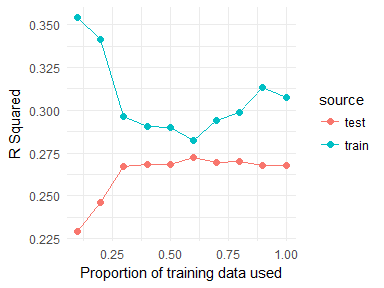
Grid Search
results <- d %>%

  pipelearner(rpart::rpart, visib ~ .,

              minsplit = c(2, 50, 100),

              cp = c(.005, .01, .1)) %>%

  learn()

results %>%

  mutate(minsplit = map_dbl(params, ~ .$minsplit),

         cp       = map_dbl(params, ~ .$cp)) %>%

  add_rsquare() %>%

  select(minsplit, cp, contains("rsquare")) %>%

  gather(source, rsquare, contains("rsquare")) %>%

  mutate(source = gsub("rsquare_", "", source),

         minsplit = paste("minsplit", minsplit, sep = "\n"),

         cp       = paste("cp", cp, sep = "\n")) %>%

  ggplot(aes(source, rsquare, fill = source)) +

   geom_col() +

   facet_grid(minsplit ~ cp) +

   guides(fill = "none") +

   labs(x = NULL, y = "R Squared")
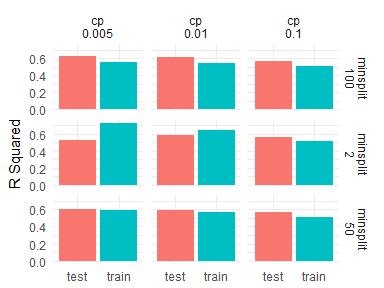
Model comparisons
results <- d %>%

  pipelearner() %>%

  learn_models(

    c(lm, rpart::rpart, randomForest::randomForest),

    visib ~ .) %>%

  learn()

results %>%

  add_rsquare() %>%

  select(model, contains("rsquare")) %>%

  gather(source, rsquare, contains("rsquare")) %>%

  mutate(source = gsub("rsquare_", "", source)) %>%

  ggplot(aes(model, rsquare, fill = source)) +

   geom_col(position = "dodge", size = .5) +

   labs(x = NULL, y = "R Squared") +

   coord_flip()
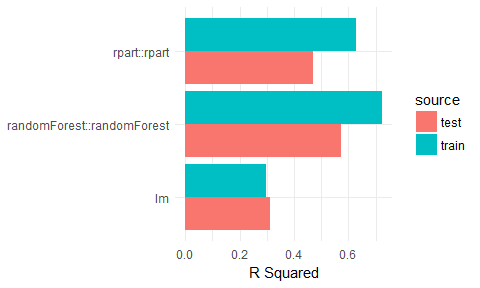
Sign off
Thanks for reading and I hope this was useful for you.
For updates of recent blog posts, follow @drsimonj on Twitter, or email me atdrsimonjackson@gmail.com to get in touch.
If you’d like the code that produced this blog, check out the blogR GitHub repository.
转自:https://drsimonj.svbtle.com/easy-machine-learning-pipelines-with-pipelearner-intro-and-call-for-contributors
Easy machine learning pipelines with pipelearner: intro and call for contributors的更多相关文章
- 【机器学习Machine Learning】资料大全
昨天总结了深度学习的资料,今天把机器学习的资料也总结一下(友情提示:有些网站需要"科学上网"^_^) 推荐几本好书: 1.Pattern Recognition and Machi ...
- 机器学习(Machine Learning)&深度学习(Deep Learning)资料【转】
转自:机器学习(Machine Learning)&深度学习(Deep Learning)资料 <Brief History of Machine Learning> 介绍:这是一 ...
- 机器学习(Machine Learning)与深度学习(Deep Learning)资料汇总
<Brief History of Machine Learning> 介绍:这是一篇介绍机器学习历史的文章,介绍很全面,从感知机.神经网络.决策树.SVM.Adaboost到随机森林.D ...
- How do I learn machine learning?
https://www.quora.com/How-do-I-learn-machine-learning-1?redirected_qid=6578644 How Can I Learn X? ...
- 机器学习(Machine Learning)&深度学习(Deep Learning)资料(Chapter 2)
##机器学习(Machine Learning)&深度学习(Deep Learning)资料(Chapter 2)---#####注:机器学习资料[篇目一](https://github.co ...
- 机器学习(Machine Learning)&深度学习(Deep Learning)资料(下)
转载:http://www.jianshu.com/p/b73b6953e849 该资源的github地址:Qix <Statistical foundations of machine lea ...
- Intro to Machine Learning
本节主要用于机器学习入门,介绍两个简单的分类模型: 决策树和随机森林 不涉及内部原理,仅仅介绍基础的调用方法 1. How Models Work 以简单的决策树为例 This step of cap ...
- Advice for applying Machine Learning
https://jmetzen.github.io/2015-01-29/ml_advice.html Advice for applying Machine Learning This post i ...
- 壁虎书2 End-to-End Machine Learning Project
the main steps: 1. look at the big picture 2. get the data 3. discover and visualize the data to gai ...
随机推荐
- PixiJS - 基于 WebGL 的超快 HTML5 2D 渲染引擎
Pixi.js 是一个开源的HTML5 2D 渲染引擎,使用 WebGL 实现,不支持的浏览器会自动降低到 Canvas 实现.PixiJS 的目标是提供一个快速且轻量级的2D库,并能兼容所有设备.此 ...
- 从零开始用 Flask 搭建一个网站(二)
从零开始用 Flask 搭建一个网站(一) 介绍了如何搭建 Python 环境,以及 Flask 应用基本项目结构.我们要搭建的网站是管理第三方集成的控制台,类似于 Slack. 本篇主要讲解数据如何 ...
- 利刃 MVVMLight 6:命令基础
在MVVM Light框架中,事件是WPF应用程序中UI与后台代码进行交互的最主要方式,与传统方式不同,mvvm中主要通过绑定到命令来进行事件的处理, 因此要了解mvvm中处理事件的方式,就必须先熟悉 ...
- http协议的八种请求类型
GET:向特定的资源发出请求. POST:向指定资源提交数据进行处理请求(例如提交表单或者上传文件).数据被包含在请求体中.POST请求可能会导致新的资源的创建和/或已有资源的修改. OPTIONS: ...
- 前端随手优化不完全篇-SEO篇
一代码优化概述 关于代码优化的知识是纯理论的知识,学习的很枯燥.在学到CSS时,不免遇到CSS+div进行代码优化的知 识,因此在网上看了一些关于这方面的知识,简单的整合一下,梳理自己所了解的代码优化 ...
- Unity属性的封装、继承、方法隐藏
(一)Unity属性封装.继承.方法隐藏的学习和总结 一.属性的封装 1.属性封装的定义:通过对属性的读和写来保护类中的域. 2.格式例子: private string departname; // ...
- 一款好用的分页插件用于regularJS
最近在用一款来自网易的javascript MVC 框架regularJS来写项目,这是网易一位叫郑海波的大神写的一款框架,所谓regualrJS, 作者这样取名主要是因为这个框架更像是angular ...
- (转载)Linux查看文件编码格式及文件编码转换
Linux查看文件编码格式及文件编码转换 时间:2011-04-08作者:woyoo分类:linux评论:0 我友分享: 新浪微博 腾讯微博 搜狐微博 网易微博 开心网 QQ空间 msn 如果你需要在 ...
- android在myeclipse上创建的项目各种报错
这几天被android弄得头疼死了.差不多把电脑弄了个遍. 先是离线安装ADT,下载ADT,然后配置,但是因为ADT与MyEclipse冲突.所以直接不要再myeclipse下弄Android的环境了 ...
- 程序员要拥抱变化,聊聊Android即将支持的Java 8
WeTest 导读 Java 9预计今年也会正式发布,Java 8这个最具变革性且变革性最适于GUI程序的版本,Android终于准备正式支持.从自己开发JavaFx的感受,说一说Java 8应该使用 ...