
Easy machine learning pipelines with pipelearner: intro and call for contributors
@drsimonj here to introduce pipelearner – a package I’m developing to make it easy to create machine learning pipelines in R – and to spread the word in the hope that some readers may be interested in contributing or testing it.
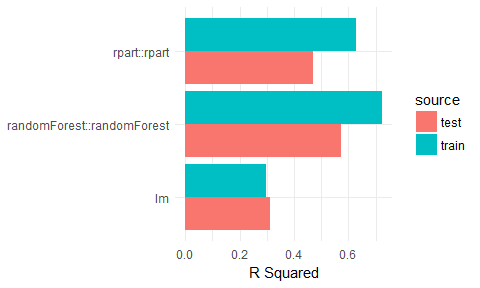
This post will demonstrate some examples of what pipeleaner can currently do. For example, the Figure below plots the results of a model fitted to 10% to 100% (in 10% increments) of training data in 50 cross-validation pairs. Fitting all of these models takes about four lines of code in pipelearner.
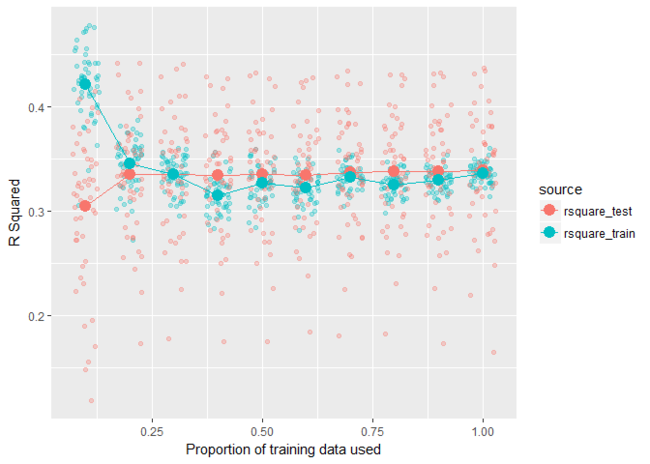
Head to the pipelearner Github page to learn more and contact me if you have a chance to test it yourself or are interested in contributing (my contact details are at the end of this post).
Examples
Some setup
library(pipelearner)

library(tidyverse)

library(nycflights13)

# Help functions

r_square <- function(model, data) {

  actual    <- eval(formula(model)[[2]], as.data.frame(data))

  residuals <- predict(model, data) - actual

  1 - (var(residuals, na.rm = TRUE) / var(actual, na.rm = TRUE))

}

add_rsquare <- function(result_tbl) {

  result_tbl %>%

    mutate(rsquare_train = map2_dbl(fit, train, r_square),

           rsquare_test  = map2_dbl(fit, test,  r_square))

}

# Data set

d <- weather %>%

  select(visib, humid, precip, wind_dir) %>%

  drop_na() %>%

  sample_n(2000)

# Set theme for plots

theme_set(theme_minimal())
k-fold cross validation
results <- d %>%

  pipelearner(lm, visib ~ .) %>%

  learn_cvpairs(k = 10) %>%

  learn()

results %>%

  add_rsquare() %>%

  select(cv_pairs.id, contains("rsquare")) %>%

  gather(source, rsquare, contains("rsquare")) %>%

  mutate(source = gsub("rsquare_", "", source)) %>%

  ggplot(aes(cv_pairs.id, rsquare, color = source)) +

    geom_point() +

    labs(x = "Fold",

         y = "R Squared")
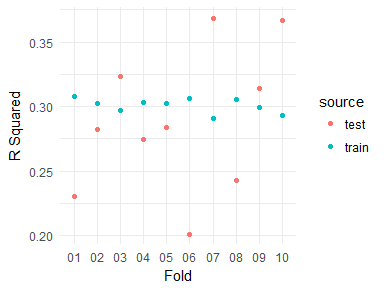
Learning curves
results <- d %>%

  pipelearner(lm, visib ~ .) %>%

  learn_curves(seq(.1, 1, .1)) %>%

  learn()

results %>%

  add_rsquare() %>%

  select(train_p, contains("rsquare")) %>%

  gather(source, rsquare, contains("rsquare")) %>%

  mutate(source = gsub("rsquare_", "", source)) %>%

  ggplot(aes(train_p, rsquare, color = source)) +

   geom_line() +

   geom_point(size = 2) +

   labs(x = "Proportion of training data used",

       y = "R Squared")
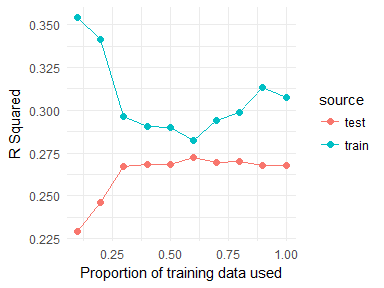
Grid Search
results <- d %>%

  pipelearner(rpart::rpart, visib ~ .,

              minsplit = c(2, 50, 100),

              cp = c(.005, .01, .1)) %>%

  learn()

results %>%

  mutate(minsplit = map_dbl(params, ~ .$minsplit),

         cp       = map_dbl(params, ~ .$cp)) %>%

  add_rsquare() %>%

  select(minsplit, cp, contains("rsquare")) %>%

  gather(source, rsquare, contains("rsquare")) %>%

  mutate(source = gsub("rsquare_", "", source),

         minsplit = paste("minsplit", minsplit, sep = "\n"),

         cp       = paste("cp", cp, sep = "\n")) %>%

  ggplot(aes(source, rsquare, fill = source)) +

   geom_col() +

   facet_grid(minsplit ~ cp) +

   guides(fill = "none") +

   labs(x = NULL, y = "R Squared")
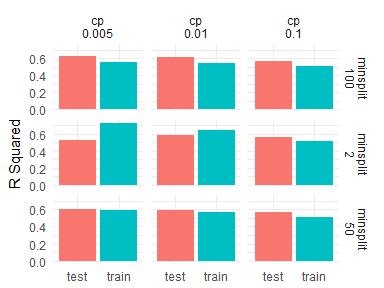
Model comparisons
results <- d %>%

  pipelearner() %>%

  learn_models(

    c(lm, rpart::rpart, randomForest::randomForest),

    visib ~ .) %>%

  learn()

results %>%

  add_rsquare() %>%

  select(model, contains("rsquare")) %>%

  gather(source, rsquare, contains("rsquare")) %>%

  mutate(source = gsub("rsquare_", "", source)) %>%

  ggplot(aes(model, rsquare, fill = source)) +

   geom_col(position = "dodge", size = .5) +

   labs(x = NULL, y = "R Squared") +

   coord_flip()
Sign off
Thanks for reading and I hope this was useful for you.
For updates of recent blog posts, follow @drsimonj on Twitter, or email me atdrsimonjackson@gmail.com to get in touch.
If you’d like the code that produced this blog, check out the blogR GitHub repository.
转自:https://drsimonj.svbtle.com/easy-machine-learning-pipelines-with-pipelearner-intro-and-call-for-contributors
Easy machine learning pipelines with pipelearner: intro and call for contributors的更多相关文章
- 【机器学习Machine Learning】资料大全
昨天总结了深度学习的资料,今天把机器学习的资料也总结一下(友情提示:有些网站需要"科学上网"^_^) 推荐几本好书: 1.Pattern Recognition and Machi ...
- 机器学习(Machine Learning)&深度学习(Deep Learning)资料【转】
转自:机器学习(Machine Learning)&深度学习(Deep Learning)资料 <Brief History of Machine Learning> 介绍:这是一 ...
- 机器学习(Machine Learning)与深度学习(Deep Learning)资料汇总
<Brief History of Machine Learning> 介绍:这是一篇介绍机器学习历史的文章,介绍很全面,从感知机.神经网络.决策树.SVM.Adaboost到随机森林.D ...
- How do I learn machine learning?
https://www.quora.com/How-do-I-learn-machine-learning-1?redirected_qid=6578644 How Can I Learn X? ...
- 机器学习(Machine Learning)&深度学习(Deep Learning)资料(Chapter 2)
##机器学习(Machine Learning)&深度学习(Deep Learning)资料(Chapter 2)---#####注:机器学习资料[篇目一](https://github.co ...
- 机器学习(Machine Learning)&深度学习(Deep Learning)资料(下)
转载:http://www.jianshu.com/p/b73b6953e849 该资源的github地址:Qix <Statistical foundations of machine lea ...
- Intro to Machine Learning
本节主要用于机器学习入门,介绍两个简单的分类模型: 决策树和随机森林 不涉及内部原理,仅仅介绍基础的调用方法 1. How Models Work 以简单的决策树为例 This step of cap ...
- Advice for applying Machine Learning
https://jmetzen.github.io/2015-01-29/ml_advice.html Advice for applying Machine Learning This post i ...
- 壁虎书2 End-to-End Machine Learning Project
the main steps: 1. look at the big picture 2. get the data 3. discover and visualize the data to gai ...
随机推荐
- ASP.NET Core 网站在Docker中运行
Docker作为新一代的虚拟化方式,未来肯定会得到广泛的应用,传统虚拟机的部署方式要保证开发环境.测试环境.UAT环境.生产环境的依赖一致性,需要大量的运维人力,使用Docker我们可以实现一次部署, ...
- R语言各种假设检验实例整理(常用)
一.正态分布参数检验 例1. 某种原件的寿命X(以小时计)服从正态分布N(μ, σ)其中μ, σ2均未知.现测得16只元件的寿命如下: 159 280 101 212 224 379 179 264 ...
- Python 装饰器装饰类中的方法
title: Python 装饰器装饰类中的方法 comments: true date: 2017-04-17 20:44:31 tags: ['Python', 'Decorate'] categ ...
- socket.io的编程实现
socket.io实例 一.环境要求 客户端需要引用socket.io.js文件 服务端需要按照node环境,以及npm install socket.io用来安装服务端的socket.io 二.客户 ...
- 安卓Native和H5页面进行交互
安卓Native和H5页面进行交互 1.H5页面调用安卓Native界面 1)通过给webView添加JsInterface,安卓提供接口,让H5来进行调用 a)安卓写一个类,里面的方法需要用通 ...
- 【微信小程序】认识微信小程序
目前微信小程序已经支持个人版了 罗列一下微信开发的一些资料和工具 (如果你还不了解微信小程序如何操作请点击 新手教程 )里面罗列了 开发者工具 如何使用 和 微信的基本操作 很详细 一.微信开发者工 ...
- 虚拟机下安装ubuntu系统
前期准备工具; 1,Oracle VM VirtualBox虚拟机 下载地址:http://pan.baidu.com/s/1miSaGvm 密码:c3dy 2,ubuntu系统文件 下载地址:htt ...
- 页面性能优化的利器 — Timeline
欢迎大家关注腾讯云技术社区-博客园官方主页,我们将持续在博客园为大家推荐技术精品文章哦~ 陈泽钦,腾讯移动客户端工程师,目前就职于腾讯MIG移动互联网事业群,负责腾讯浏览服务TBS的X5内核业务. 1 ...
- VirtulBox虚拟机搭建Linux Centos系统
简要说明 该文章目的是基于搭建hadoop的前置文章,当然也可以搭建Linux的入门文章.那我再重复一下安装准备软件. 环境准备:http://pan.baidu.com/s/1dFrHyxV 密码 ...
- [转]ObjectARX二次开发vs编译器版本ARX版本对应说明