
LINUX centos 7.2/7.3 搭建LANP环境
首先我们先查看下centos的版本信息
#适用于所有的linux

lsb_release -a

#或者

cat /etc/redhat-release

#又或者

rpm -q centos-release
接下来我们先安装一台web服务器,因为是lanp,所以我们选用的是apache
yum install httpd
然后我们手动启动apache
#centos7 启动httpd

apachectl start

#centos6. 启动httpd

/etc/init.d/httpd start 或者 service httpd start
既然web服务器搭好了是不是就代表着可以通过web进行访问了呢?是的,浏览器直接访问你的服务器ip地址,就会打开apache的默认页面。
接下来我们设置开机启动httpd服务
#centos7

systemctl enable httpd.service
接着我们安装php5,同样很简单,一条命令即可
(因为我这边有需要,所以我安装的是php5.,如果没有特殊需求的话,直接去掉数字就好)

yum install php55

#centos7 安装好后重启apache

apachectl restart
#下面是安装php5.5的组件例如GD库等
yum install php55w.x86_64 php55w-cli.x86_64 php55w-common.x86_64 php55w-gd.x86_64 php55w-ldap.x86_64 php55w-mbstring.x86_64 php55w-mcrypt.x86_64 php55w-mysql.x86_64 php55w-pdo.x86_64
如果php安装出错,我们更换掉rpm源就好,然后重新执行上面的代码
#CentOs .X rpm源(任选其一):

    rpm -Uvh https://mirror.webtatic.com/yum/el7/epel-release.rpm

    rpm -Uvh https://mirror.webtatic.com/yum/el7/webtatic-release.rpm
mysql安装
一般网上给出的资料都是
#yum install mysql

#yum install mysql-server

#yum install mysql-devel
安装mysql和mysql-devel都成功,但是安装mysql-server失败,如下:

[root@yl-web yl]# yum install mysql-server

Loaded plugins: fastestmirror

Loading mirror speeds from cached hostfile

 * base: mirrors.sina.cn

 * extras: mirrors.sina.cn

 * updates: mirrors.sina.cn

No package mysql-server available.

Error: Nothing to do
查资料发现是CentOS 7 版本将MySQL数据库软件从默认的程序列表中移除,用mariadb代替了。
方法一:安装mariadb
MariaDB数据库管理系统是MySQL的一个分支,主要由开源社区在维护,采用GPL授权许可。开发这个分支的原因之一是:甲骨文公司收购了MySQL后,有将MySQL闭源的潜在风险,因此社区采用分支的方式来避开这个风险。MariaDB的目的是完全兼容MySQL,包括API和命令行,使之能轻松成为MySQL的代替品。
安装mariadb,大小59 M。
[root@yl-web yl]# yum install mariadb-server mariadb
mariadb数据库的相关命令是:
systemctl start mariadb #启动MariaDB
systemctl stop mariadb #停止MariaDB
systemctl restart mariadb #重启MariaDB
systemctl enable mariadb #设置开机启动
所以先启动数据库
[root@yl-web yl]# systemctl start mariadb
然后就可以正常使用mysql了
[root@yl-web yl]# mysql -u root -p

Enter password:

Welcome to the MariaDB monitor.  Commands end with ; or \g.

Your MariaDB connection id is 3

Server version: 5.5.41-MariaDB MariaDB Server

Copyright (c) 2000, 2014, Oracle, MariaDB Corporation Ab and others.

Type 'help;' or '\h' for help. Type '\c' to clear the current input statement.

MariaDB [(none)]> show databases;

+--------------------+

| Database           |

+--------------------+

| information_schema |

| mysql              |

| performance_schema |

| test               |

+--------------------+

4 rows in set (0.00 sec)

MariaDB [(none)]>
安装mariadb后显示的也是 MariaDB [(none)]> ,可能看起来有点不习惯。下面是第二种方法。
方法二:官网下载安装mysql-server
# wget http://dev.mysql.com/get/mysql-community-release-el7-5.noarch.rpm

# rpm -ivh mysql-community-release-el7-5.noarch.rpm

# yum install mysql-community-server
安装成功后重启mysql服务。
# service mysqld restart
初次安装mysql,root账户没有密码。
[root@yl-web yl]# mysql -u root

Welcome to the MySQL monitor.  Commands end with ; or \g.

Your MySQL connection id is 3

Server version: 5.6.26 MySQL Community Server (GPL)

Copyright (c) 2000, 2015, Oracle and/or its affiliates. All rights reserved.

Oracle is a registered trademark of Oracle Corporation and/or its

affiliates. Other names may be trademarks of their respective

owners.

Type 'help;' or '\h' for help. Type '\c' to clear the current input statement.

mysql> show databases;

+--------------------+

| Database           |

+--------------------+

| information_schema |

| mysql              |

| performance_schema |

| test               |

+--------------------+

4 rows in set (0.01 sec)

mysql>
设置密码
mysql> set password for 'root'@'localhost' =password('password');

Query OK, 0 rows affected (0.00 sec)

mysql>
不需要重启数据库即可生效。
在mysql安装过程中如下内容:
Installed:
  mysql-community-client.x86_64 0:5.6.26-2.el7                mysql-community-devel.x86_64 0:5.6.26-2.el7
  mysql-community-libs.x86_64 0:5.6.26-2.el7                  mysql-community-server.x86_64 0:5.6.26-2.el7

Dependency Installed:
  mysql-community-common.x86_64 0:5.6.26-2.el7

Replaced:
  mariadb.x86_64 1:5.5.41-2.el7_0          mariadb-devel.x86_64 1:5.5.41-2.el7_0   mariadb-libs.x86_64 1:5.5.41-2.el7_0
  mariadb-server.x86_64 1:5.5.41-2.el7_0
所以安装完以后mariadb自动就被替换了,将不再生效。
[root@yl-web yl]# rpm -qa |grep mariadb

[root@yl-web yl]#
配置mysql
1、编码
mysql配置文件为/etc/my.cnf
最后加上编码配置
[mysql]

default-character-set =utf8
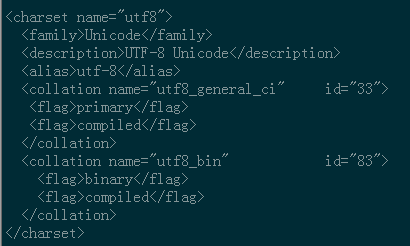
这里的字符编码必须和/usr/share/mysql/charsets/Index.xml中一致。
2、远程连接设置
把在所有数据库的所有表的所有权限赋值给位于所有IP地址的root用户。
mysql> grant all privileges on *.* to root@'%'identified by 'password';
如果是新用户而不是root,则要先新建用户
mysql>create user 'username'@'%' identified by 'password';
此时就可以进行远程连接了。
最后我们介绍下相关文件的默认安装路径
#apache主配置文件

/etc/httpd/conf/httpd.conf

#相关配置 比如vhost文件就可以创建在该目录下

/etc/httpd/conf.d/

#模块配置文件 比如你要开启rewrite模块,可能你就需要到这个目录下面做一些配置了

/etc/httpd/conf.modules.d/

#web可访问目录 网站根目录

/var/www/html

#apache日志文件目录

/var/log/httpd/
LINUX centos 7.2/7.3 搭建LANP环境的更多相关文章
- LINUX centos 7.2/7.3 搭建LAMP环境
首先我们先查看下centos的版本信息 #适用于所有的linux lsb_release -a #或者 cat /etc/redhat-release #又或者 rpm -q centos-relea ...
- 记录Linux CentOS 7系统完整部署Docker容器环境教程
笔者之前有在"详细介绍Ubuntu 16.04系统环境安装Docker CE容器的过程"文章中有介绍到利用Ubuntu系统安装Docker容器环境的过程.如果我们有使用CentOS ...
- Linux/CentOS各种服务框架的搭建完整流程
在2012年的时候,由于要照应新人对Linux以及相关服务的了解和学习,我特地把当时我们创业项目的全部服务搭建过程写成了一篇文档,能够让他们学习而且有所參照. 以下就以这篇文档为底稿,进行一些改动和敏 ...
- linux CentOS 安装 nginx+tomcat+java+mysql运行环境
本文介绍了CentOS7 64 Java,Tomcat,MySQL,Maven热部署等服务器环境的搭建过程. 服务器: 已经将所需要的工具(Xshell,Xftp.FileZilla等sftp上传工具 ...
- CentOS 与 Ubuntu 使用命令搭建 LAMP 环境
LAMP指的Linux操作系统 + Apache服务器 + MariaDB/MySQL数据库软件 + PHP开发语言的第一个字母. ==================CentOS LAMP===== ...
- 阿里云 CentOS 6.5 使用XAMPP 搭建LAMP环境
LAMP环境是常见的服务器环境,也是PHP网站常用的服务器环境,很多人喜欢手动配置,但是手动配置LAMP复杂.麻烦,简单一点的话可以使用集成环境.试了下LNMP的集成环境,用不习惯,另外由于本地一直使 ...
- CentOS 7使用yum快速搭建LAMP环境
1.安装Apache [root@localhost ~]# yum -y install httpd # 开机自启动 [root@localhost ~]# chkconfig httpd on # ...
- freescale-sdk linux移植一搭建编译环境脚本host-prepare.sh分析
接下来使用自己的课外歇息时间,对基于PowerPC架构freescale-sdk,进行linux移植和分析.主要參考官方文档freescale linux sdk START_HERE.html,首先 ...
- CentOS 6.5下快速搭建ftp服务器
来源:Linux社区 作者:Linux CentOS 6.5下快速搭建ftp服务器 1.用root 进入系统 2.使用命令 rpm -qa|grep vsftpd 查看系统是否安装了ftp,若安装了v ...
随机推荐
- js事件相关面试题
说是面试题,其实也相当于是对js事件部分知识点的一个总结.简单内容一笔带过,了解详情我都给出了参考链接,都是之前写的一些相关文章.JavaScript本身没有事件模型,但是环境可以有. DOM:add ...
- Elasticsearch 默认配置 IK 及 Java AnalyzeRequestBuilder 使用
摘要: 原创出处 www.bysocket.com 「泥瓦匠BYSocket 」欢迎转载,保留摘要,谢谢! 『 春夏秋冬失去了你,我怎么过一年四季- 民谣歌词 』 本文提纲 一.什么是 Ela ...
- POJ 3311---Hie with the Pie(状压DP)
题目链接 Description The Pizazz Pizzeria prides itself in delivering pizzas to its customers as fast as ...
- TP5.0 PHPExcel 数据表格导出(原)
今天看的是PHPExcel这个扩展库,Comporse 下载不下来,最后只能自己去github里面手动下载,但有一个问题就是下载下来的PHPExcel没有命名空间,所以框架里面的use根本引入不进去, ...
- Hive-1.2.1与HBase-1.1.2的整合
这里的整合是指,将HBase作为存储数据的库,由Hive作为连接桥梁 修改 Hive hive-site.xml 增加<property> <name>hbase.zookee ...
- python 分片
有些书中叫做分片,有些书中叫做切片,翻译时的一些误差) 概念:将序列按段进行切割 作用:通过分片操作符来访问一定范围内的元素 实现:分片是通过两个冒号相隔的索引来实现 范围:符合序列特性即可使用切片功 ...
- Kotlin学习第一课:从对比Java开始
1. 介绍 今年初,甲骨文再次对谷歌所谓的安卓侵权使用Java提起诉讼,要求后者赔偿高达90亿美元.随后便传出谷歌因此计划将主力语言切换到苹果主导的Swift,不过这事后来没了跟进. 但谷歌在这两天的 ...
- Basic Sort Algorithms
1. Bubble Sort public void bubbleSort(int[] arr) { boolean swapped = true; int j = 0; int tmp; while ...
- VUE依赖webpack分别给开发环境和生产环境配置不同的常量值并在项目中动态引用
当在开发和产品上线的时候,我们经常会遇到在同一个地方由于环境的不同而地址也不同的情况,这时候如果在代码中将该地址写死,那势必会造成上线时手动改动,多人开发及多处使用该地址难以维护等一系列问题,为避免这 ...
- MySQL优化总结,百万级数据库优化方案
1.对查询进行优化,应尽量避免全表扫描,首先应考虑在 where 及 order by 涉及的列上建立索引. 2.应尽量避免在 where 子句中对字段进行 null 值判断,否则将导致引擎放弃使用索 ...