
Nginx集群之WCF分布式身份验证(支持Soap)
目录
1 大概思路... 1
2 Nginx集群之WCF分布式身份验证... 1
3 BasicHttpBinding、ws2007HttpBinding. 2
4 Windows证书生成私钥、公钥(X.509证书)... 3
5 编写WCF服务、客户端程序... 7
6 URL保留项... 13
7 部署WCF服务程序到局域网内3台PC机... 14
8 Nginx集群配置搭建... 15
9 SoapUI和WCF客户端程序的运行结果... 16
10 总结... 18
1 大概思路
l Nginx集群之WCF分布式身份验证
l BasicHttpBinding、Ws2007HttpBinding
l Windows证书生成公钥、私钥(x509证书)
l 编写WCF服务、客户端程序
l URL保留项
l 部署WCF服务程序到局域网内3台PC机
l Nginx集群配置搭建
l SoapUI和WCF客户端程序的运行结果
l 总结
2 Nginx集群之WCF分布式身份验证
Nginx是个轻量级的反向代理,当然,也有相应的SSL身份认证。本文主要采用一种自我寄宿的方式,使用Nginx集群,通过windows证书(X.509证书),讲述客户端如何访问服务器的方法。
本文源代码主要分类:
l HighlyConcurrentHosting
使用BasicHttpBinding的源代码(本文主要以这种方式进行Nginx集群)
l HighlyConcurrentHosting_Ws2007HttpBinding
使用ws2007HttpBinding的源代码(这是一种点对点的Windows认证方式)
l Nginx配置
nginx.conf
l Windows证书
wcf_zhyongfeng.cer(客户端需要安装的证书)
wcf_zhyongfeng.pfx(服务器需要安装的证书)
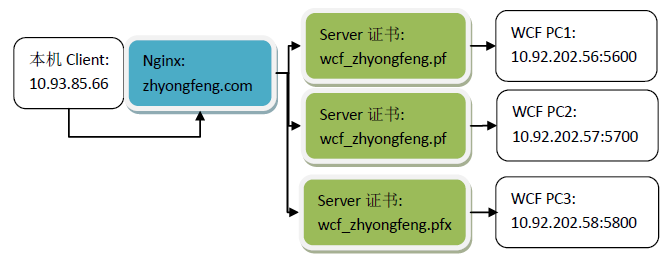
以下是本文讲述的主要结构图:
客户端以BasicHttpBinding进行访问Nginx,然后Nginx进行负载均衡,将消息分发到后端任意一台WCF的PC机,后端需要被访问的WCF服务器,都要安装Windows证书(仅被访问的服务器需要安装wcf_zhyongfegn.pfx证书)。
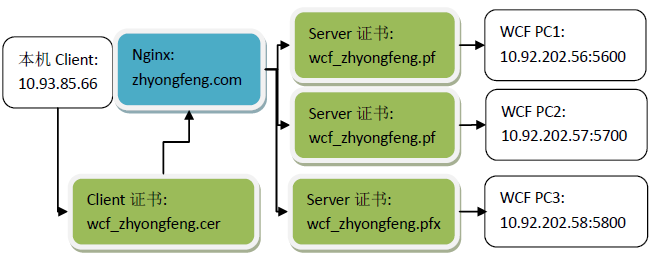
若以ws2007HttpBinding进行点对点Windows认证,则Nginx只能起到通过划分IP绑定特定一台服务器访问的作用,并不能起到集群负载均衡,同时除了服务器要wcf_zhyongfeng.pfx安装证书外,客户端也需要进行安装wcf_zhyongfeng.cer证书,这里不作为重点讲述。
3 BasicHttpBinding、ws2007HttpBinding
这里WCF的Ningx集群,主要用的是BasicHttpBinding。BasicHttpBinding的默认安全模式是None,即没有任何安全设置,消息都以明文传送,对客户端也不进行验证。 但是basicHttpBinding绑定可以实现安全传输,也可以通过传输层和消息层来保证消息的安全性。 basicHttpBinding设置为Transport安全模式,传输层的安全是使用IIS的安全机制,比如基本身份验证、集成windows验证、SSL安全通道等等
.NET Framework 3.5 介绍了一种用于Web 服务交互称为ws2007HttpBinding绑定的新的绑定。这个绑定类似于ws2007HttpBinding绑定除了它支持最新的WS-* 消息,安全,可信赖消息和事务标准。
ws2007HttpBinding支持的标准:
|
WS-SecureConversation v1.3 |
WS-Security的扩展,为多个消息交换提供一个安全上下文 |
|
WS-Trust v1.3 |
WS-Security的扩展,请求并标记问题,管理可依赖关系。 |
|
WS-SecurityPolicy v1.2 |
WS-Security的安全断言,WS-Security转换以及使用WS-Policy表达的WS-Trust |
|
Web Services Reliable Messaging v1.1 |
保证消息被传递,适当编码且不会重复接收的协议 |
|
Web Services Coordination v1.1 |
为分布式平台的动作合作提供协议的平台 |
4 Windows证书生成私钥、公钥(X.509证书)
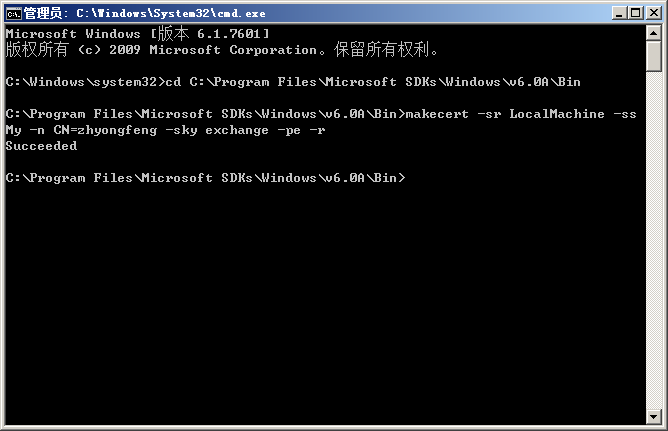
进行C:\Windows\system32,以管理员运行cmd.ext
Microsoft Windows [版本 6.1.7601]

版权所有 (c) 2009 Microsoft Corporation。保留所有权利。

C:\Windows\system32>cd C:\Program Files\Microsoft SDKs\Windows\v6.0A\Bin

C:\Program Files\Microsoft SDKs\Windows\v6.0A\Bin>makecert -r -pe -n "CN=wcf_zhyongfeng" -ss My -sky exchange

Succeeded

C:\Program Files\Microsoft SDKs\Windows\v6.0A\Bin>
查看Windows证书的生成,开始->运行,输入:
certmgr.msc
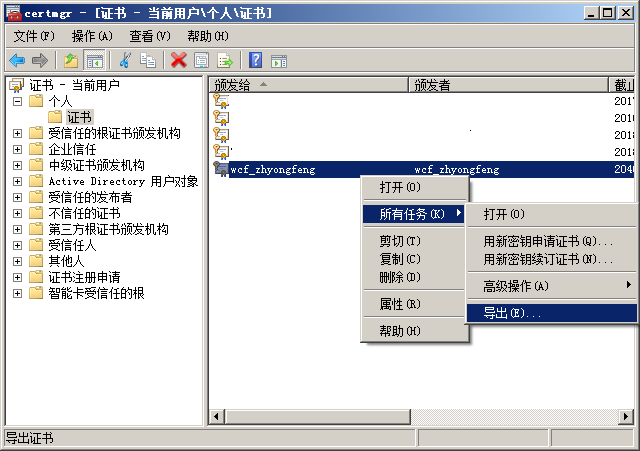
Windows导出wcf_zhyongfeng.pfx服务端证书:
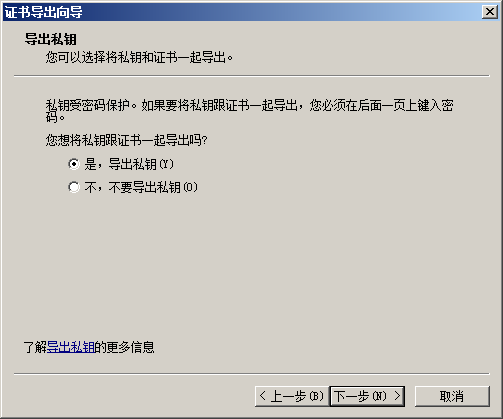
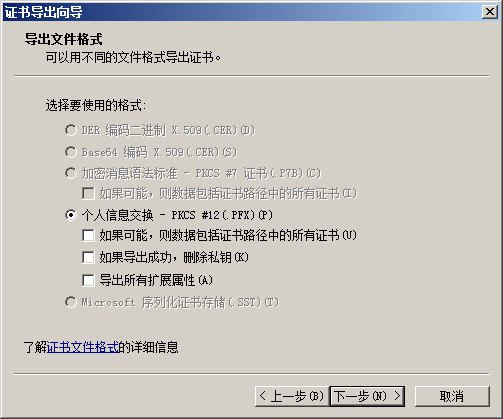


Windows导出wcf_zhyongfeng.cer客户端证书:
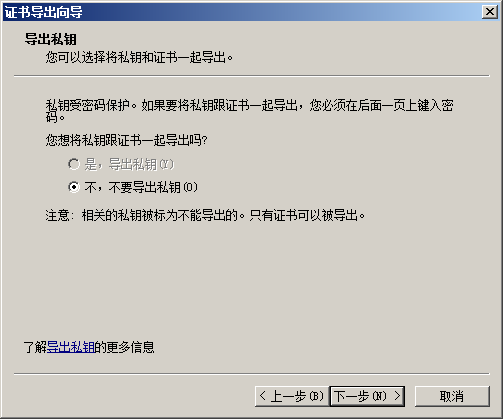
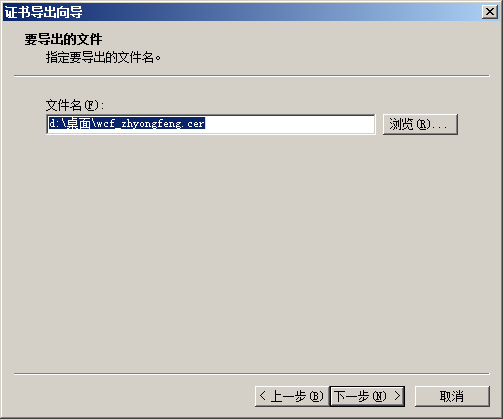

5 编写WCF服务、客户端程序
l WCF服务程序
Program.cs
using Service;

using System;

using System.ServiceModel;

namespace HighlyConcurrentHosting

{

    class Program

    {

        static void Main(string[] args)

        {

            using (ServiceHost host = new ServiceHost(typeof(OutputSomething)))

            {

                host.Opened += delegate

                {

                    Console.WriteLine(host.Description.Endpoints[].Address.Uri + "已经启动,按任意键终止服务!");

                };

                host.Open();

                Console.Read();

            }

        }

    }

    /// <summary>

    /// 证书验证帐户名,密码

    /// </summary>

    public class UserNamePasswordValidator : System.IdentityModel.Selectors.UserNamePasswordValidator

    {

        public override void Validate(string userName, string password)

        {

            if (userName != "zhyongfeng" || password != "")

            {

                throw new System.IdentityModel.Tokens.SecurityTokenException("Unknown Username or Password");

            }

        }

    }

}
服务端配置文件:
<?xml version="1.0" encoding="utf-8" ?>

<configuration>

  <system.serviceModel>

    <behaviors>

      <serviceBehaviors>

        <behavior name="metadataBehavior">

          <serviceMetadata httpGetEnabled="true"/>

          <!-- 要接收故障异常详细信息以进行调试,请将以下值设置为 true。在部署前设置为 false 以避免泄漏异常信息 -->

          <serviceDebug includeExceptionDetailInFaults="true"/>

          <serviceCredentials>

            <!--指定一个 X.509 证书,用户对认证中的用户名密码加密解密-->

            <!--C:\Program Files\Microsoft SDKs\Windows\v6.0A\Bin,使用makecert -r -pe -n "CN=wcf_zhyongfeng" -ss My -sky exchange-->

            <serviceCertificate findValue="wcf_zhyongfeng" x509FindType="FindBySubjectName" storeLocation="CurrentUser" storeName="My"/>

            <clientCertificate>

              <!--自定义对客户端进行证书认证方式 这里为 None-->

              <authentication certificateValidationMode="None"></authentication>

            </clientCertificate>

            <!--自定义用户名和密码验证的设置-->

            <userNameAuthentication userNamePasswordValidationMode="Custom" customUserNamePasswordValidatorType="HighlyConcurrentHosting.UserNamePasswordValidator,HighlyConcurrentHosting" />

          </serviceCredentials>

        </behavior>

      </serviceBehaviors>

    </behaviors>

    <bindings>

      <basicHttpBinding>

        <!--这个是需要输入用户名密码的-->

        <binding name="YesCertificate">

          <security mode="TransportCredentialOnly">

            <transport clientCredentialType="Basic"></transport>

            <message clientCredentialType="UserName"/>

          </security>

        </binding>

      </basicHttpBinding>

  </bindings>

    <services>

      <service name="Service.OutputSomething" behaviorConfiguration="metadataBehavior" >

        <host>

          <baseAddresses>

            <add baseAddress="http://127.0.0.1:5600/hello"/>

          </baseAddresses>

        </host>

        <endpoint binding="basicHttpBinding" bindingConfiguration="YesCertificate" contract="Service.Interface.IOutputSomething"/>

        <endpoint binding="basicHttpBinding" bindingConfiguration="YesCertificate" contract="Service.Interface.IOutputSomethingCertificate" />

      </service>

    </services>

  </system.serviceModel>

  <startup>

    <supportedRuntime version="v4.0" sku=".NETFramework,Version=v4.5" />

  </startup>

</configuration>
l 客户端程序
using HighlyConcurrentClient.HighlyConcurrentService;

using System;

using System.Net;

namespace HighlyConcurrentClient

{

    class Program

    {

        static void Main(string[] args)

        {

            string AddressIP = string.Empty;

            foreach (IPAddress _IPAddress in Dns.GetHostEntry(Dns.GetHostName()).AddressList)

            {

                if (_IPAddress.AddressFamily.ToString() == "InterNetwork")

                {

                    AddressIP = _IPAddress.ToString();

                }

            }

            Console.WriteLine(string.Format("本机IP是:{0}", AddressIP));

            using (OutputSomethingCertificateClient proxy = new OutputSomethingCertificateClient())

            {

                proxy.ClientCredentials.UserName.UserName = "zhyongfeng";

                proxy.ClientCredentials.UserName.Password = "";

                for (int i = ; i < ; i++)

                {

                    Console.WriteLine(proxy.GetCertContentData(i));

                }

            }

            Console.Read();

        }

    }

}
客户端配置文件:
<?xml version="1.0" encoding="utf-8" ?>

<configuration>

  <configSections>

  </configSections>

  <startup>

    <supportedRuntime version="v4.0" sku=".NETFramework,Version=v4.5" />

  </startup>

  <system.serviceModel>

    <bindings>

      <basicHttpBinding>

        <binding name="BasicHttpBinding_IOutputSomething">

          <security mode="TransportCredentialOnly">

            <transport clientCredentialType="Basic" />

          </security>

        </binding>

        <binding name="BasicHttpBinding_IOutputSomethingCertificate">

          <security mode="TransportCredentialOnly">

            <transport clientCredentialType="Basic" />

          </security>

        </binding>

      </basicHttpBinding>

    </bindings>

    <client>

      <endpoint address="http://zhyongfeng.com/hello" binding="basicHttpBinding"

        bindingConfiguration="BasicHttpBinding_IOutputSomething" contract="HighlyConcurrentService.IOutputSomething"

        name="BasicHttpBinding_IOutputSomething" />

      <endpoint address="http://zhyongfeng.com/hello" binding="basicHttpBinding"

        bindingConfiguration="BasicHttpBinding_IOutputSomethingCertificate"

        contract="HighlyConcurrentService.IOutputSomethingCertificate"

        name="BasicHttpBinding_IOutputSomethingCertificate" />

    </client>

  </system.serviceModel>

</configuration>
客户端添加引用时,会产生
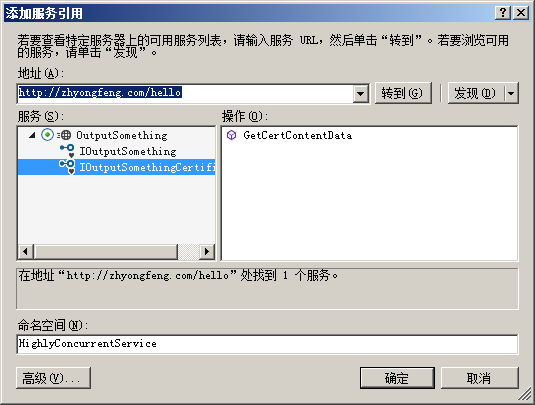

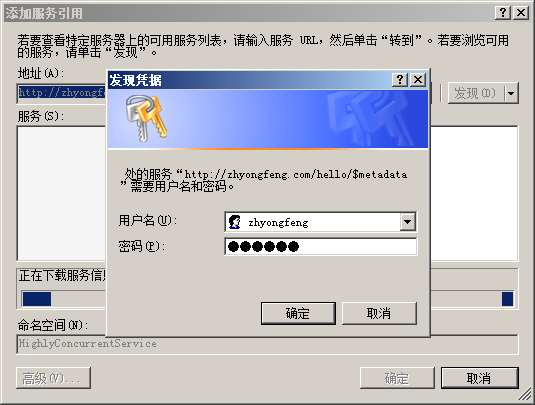
客户端添加服务引用后,Address可能是某一台PC机的IP地址(例如:address="http:// 10.92.202.56:5600/hello")这是需要修改为以下Nginx的地址
address="http://zhyongfeng.com/hello".
即如图所示:

6 URL保留项
详见:http://www.cnblogs.com/yongfeng/p/7851039.html
7 部署WCF服务程序到局域网内3台PC机
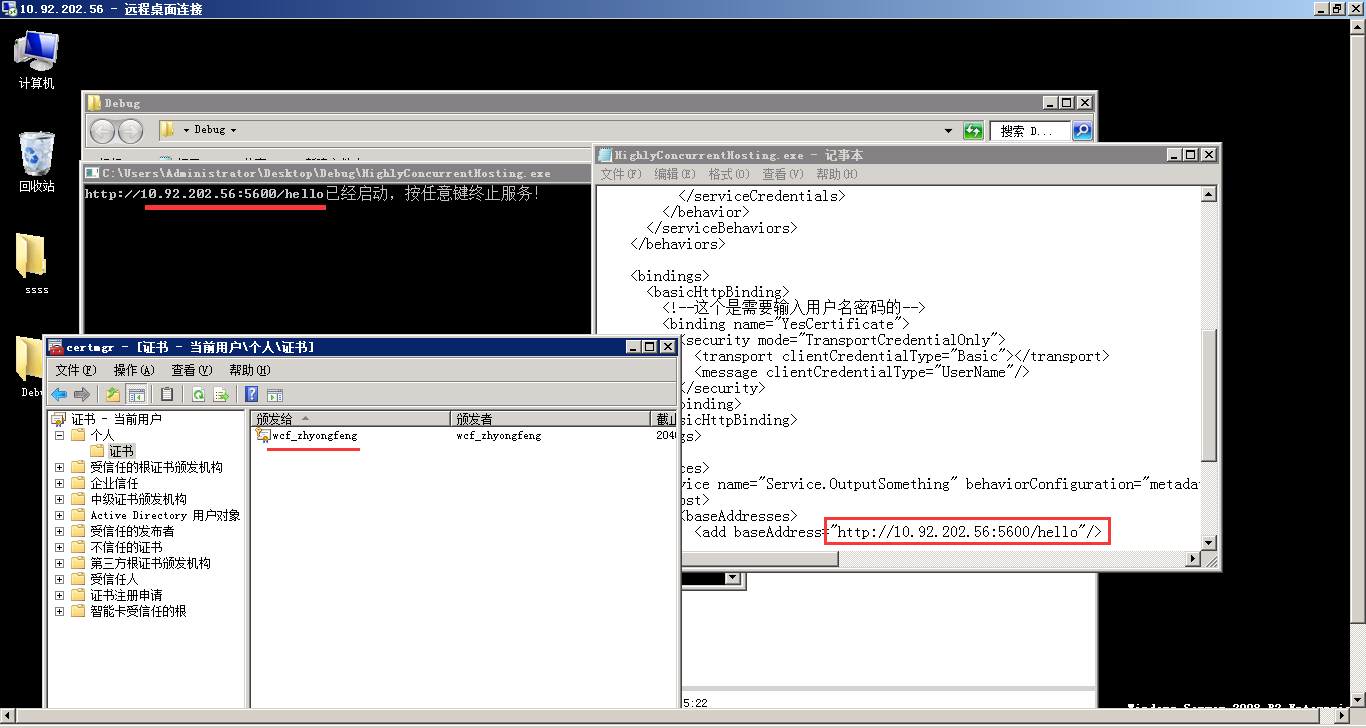
远程进行部署WCF服务程序时,需要双击安装服务器wcf_zhyongfeng.pfx证书、修改config三台机的配置文件:10.92.202.56:5600、10.92.202.57:5700、10.92.202.58:5800
然后启动远程计算机的WCF服务程序,运行效果如下:

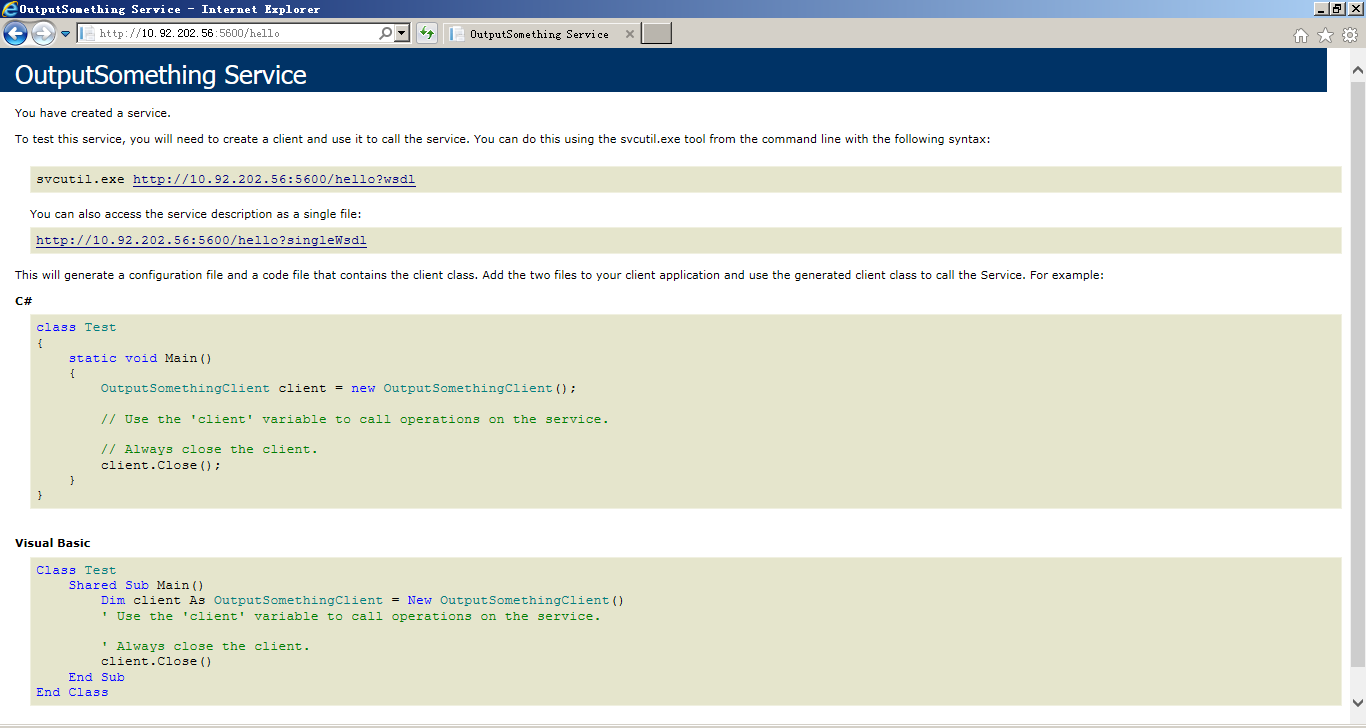
本机IE上访问WCF服务端的运行效果:
8 Nginx集群配置搭建
通过自主义域名zhyongfeng.com:80端口进行负载均衡集群访问,则访问C:\Windows\System32\drivers\etc\hosts,添加下列“本机IP 自定义的域名”:
10.93.85.66 zhyongfeng.com
针对WCF部署的多台PC机配置(设置了proxy_connect_timeout为10s,如果其中一台机down掉了,可以转发到另一台机器)如下:
worker_processes  1;

events {

    worker_connections  1024;

}

http {

    include       mime.types;

    default_type  application/octet-stream;

    sendfile        on;

    keepalive_timeout  65;

    upstream zhyongfeng.com {

        server    10.92.202.56:5600;

        server    10.92.202.57:5700;

        server    10.92.202.58:5800;

    }

    server {

        listen       80;

        server_name  zhyongfeng.com;

        location / {

            proxy_pass   http://zhyongfeng.com;

            proxy_connect_timeout       10s;

        }

    }

}
运行CMD:
D:\DTLDownLoads\nginx-1.10.2>start nginx

D:\DTLDownLoads\nginx-1.10.2>nginx -s reload
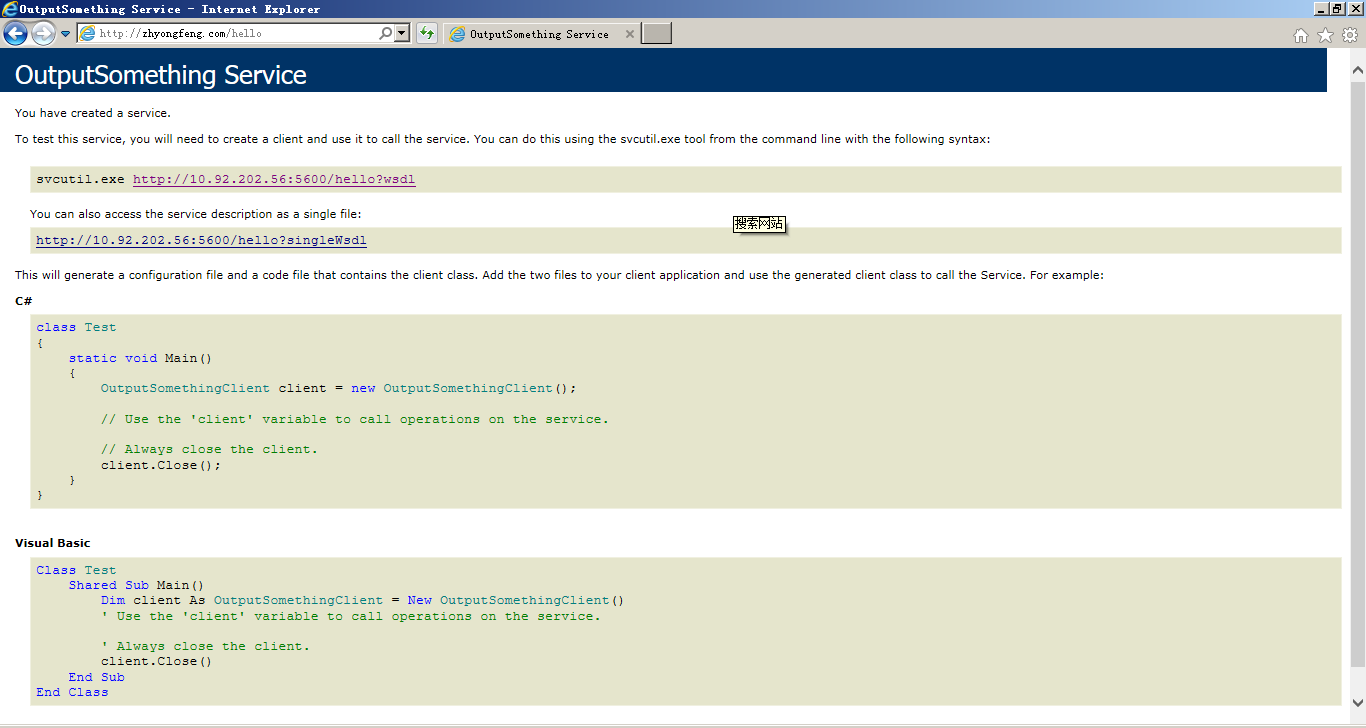
访问WCF服务端:http://zhyongfeng.com/hello,运行结果:
9 SoapUI和WCF客户端程序的运行结果
Soap协议,可以使用SoapUI测试并添加WCF的wsdl:http://zhyongfeng.com/hello?wsdl,运行效果如下:

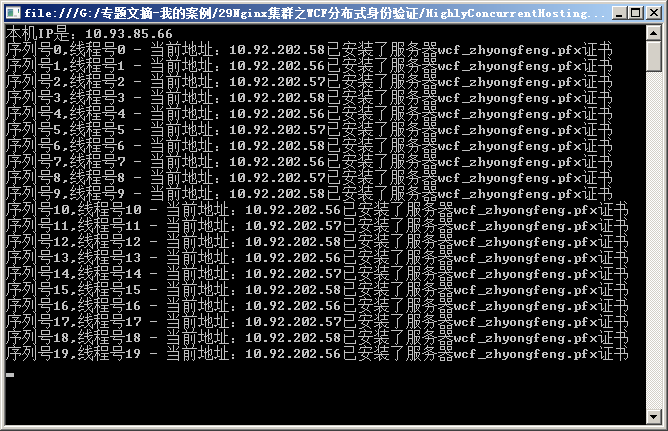
启动WCF客户端程序,运行效果图如下:
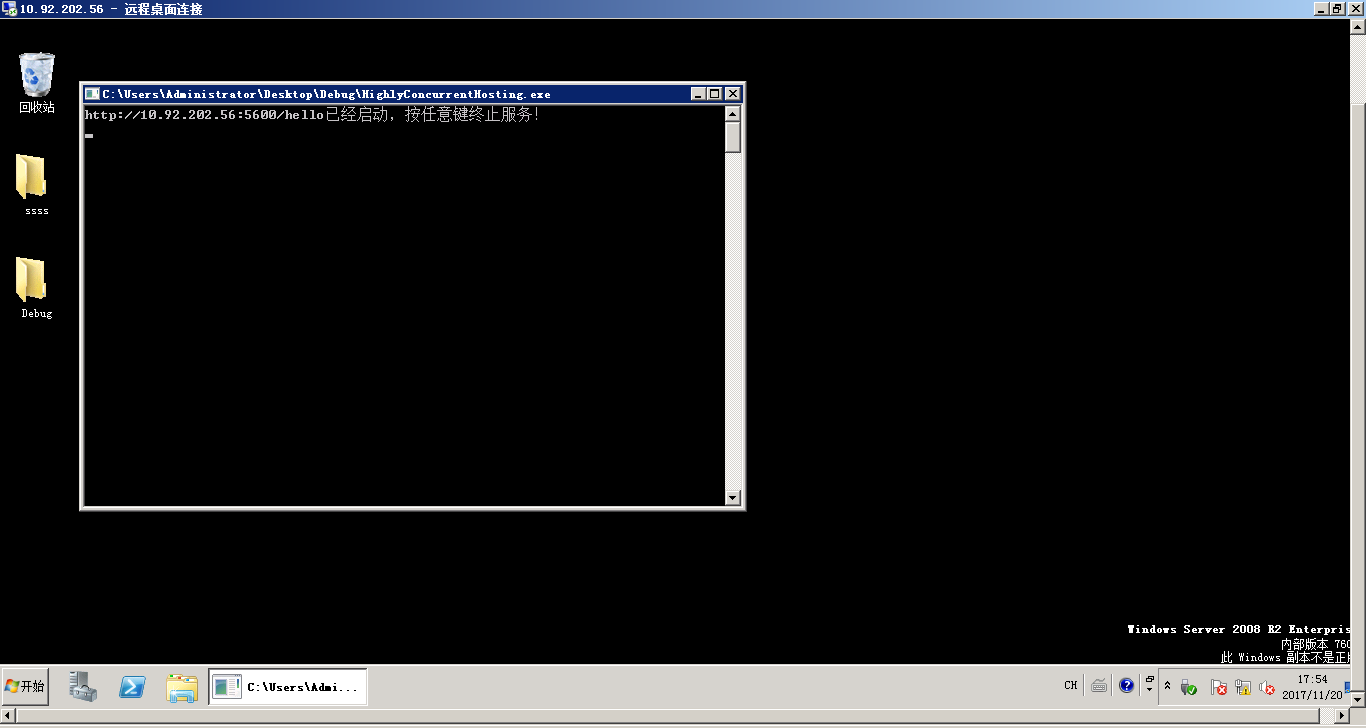
远程桌面关掉其中一台10.92.202.56:5600的PC机:
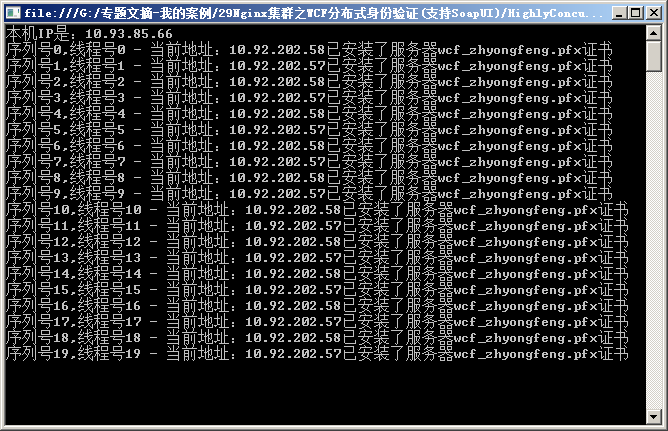
重新启动WCF客户端程序,因为Nginx配置文件设置了proxy_connect_timeout为10s,则关闭的PC机10.92.202.56:5600在10s后会将它的消息转发给10.92.202.57:5700,继续由其它2台PC机执行:
10 总结
通过使用BasicHttpBinding,除了能让WCF客户端访问之外,还增加了WSDL的访问方式。Nginx集群让WCF客户端具备用户名密码验证的同时,达到负载均衡分布式处理的效果。
源代码下载:
http://download.csdn.net/download/ruby_matlab/10126187
PDF下载:
Nginx集群之WCF分布式身份验证(支持soap).pdf
Nginx集群之WCF分布式身份验证(支持Soap)的更多相关文章
- Nginx集群之WCF分布式局域网应用
目录 1 大概思路... 1 2 Nginx集群WCF分布式局域网结构图... 1 3 关于WCF的BasicHttpBinding. 1 4 编写WC ...
- Nginx集群之WCF分布式消息队列
目录 1 大概思路... 1 2 Nginx集群之WCF分布式消息队列... 1 3 MSMQ消息队列... 2 4 编写WCF服务.客户端程序... ...
- Nginx集群之WCF大文件上传及下载(支持6G传输)
目录 1 大概思路... 1 2 Nginx集群之WCF大文件上传及下载... 1 3 BasicHttpBinding相关配置解析... 2 4 编写 ...
- 扎实基础之从零开始-Nginx集群分布式.NET应用
1 扎实基础之快速学习Nginx Nginx是一款轻量级的Web 服务器/反向代理服务器及电子邮件(IMAP/POP3)代理服务器,并在一个BSD-like 协议下发行.其特点是占有内存少 ...
- Nginx集群之SSL证书的WebApi令牌验证
目录 1 大概思路... 1 2 Nginx集群之SSL证书的WebApi令牌验证... 1 3 Openssl生成SSL证书... 2 4 编写.NE ...
- Nginx集群之基于Redis的WebApi身份验证
目录 1 大概思路... 1 2 Nginx集群之基于Redis的WebApi身份验证... 1 3 Redis数据库... 2 4 Visualbox ...
- Nginx集群之SSL证书的WebApi身份验证
目录 1 大概思路... 1 2 Nginx集群之SSL证书的WebApi身份验证... 1 3 AuthorizeAttribute类... 2 4 ...
- Nginx集群之SSL证书的WebApi微服务
目录 1 大概思路... 1 2 Nginx集群之SSL证书的WebApi微服务... 1 3 HTTP与HTTPS(SSL协议)... 1 4 Ope ...
- XNginx - nginx 集群可视化管理工具
之前团队的nginx管理,都是运维同学每次去修改配置文件,然后重启,非常不方便,一直想找一个可以方便管理nginx集群的工具,翻遍web,未寻到可用之物,于是自己设计开发了一个. 效果预览 集群gro ...
随机推荐
- python3 scrapy+Crontab部署过程
背景 最近有时间想学习下python3+scrapy,于是决定写一个小程序来练练手. 开发环境:MacOS High Sierra(10.13.1)+python3+scrapy. 开发工具:PyCh ...
- JS 获取上传文件的内容
<div> 上传文件 : <input type="file" name = "file" id = "fileId" / ...
- Java代码操作SVN
package com.leadbank.oprPlatform.util;import org.slf4j.Logger;import org.slf4j.LoggerFactory;import ...
- Java爬虫--Https绕过证书
https网站服务器都是有证书的. 是由网站自己的服务器签发的,并不被浏览器或操作系统广泛接受. 在使用CloseableHttpClient时经常遇到证书错误(知乎的网站就是这样) 现在需要SSL绕 ...
- java_抽象类
抽象类1,语法定义抽象类前使用abstract关键字修饰,则该类为抽象类2.应用场景(1)在某些情况下,某个父类只是知道其子类应该包含怎样的方法,但无法准确知道这些子类如何实现这些方法. (2)从多个 ...
- SLAM入门之视觉里程计(2):相机模型(内参数,外参数)
相机成像的过程实际是将真实的三维空间中的三维点映射到成像平面(二维空间)过程,可以简单的使用小孔成像模型来描述该过程,以了解成像过程中三维空间到二位图像空间的变换过程. 本文包含两部分内容,首先介绍小 ...
- 原生JS的Ajax
转自:https://www.cnblogs.com/yufann/p/JS-Ajax.html 1.创建一个Ajax对象 非IE6浏览器:var obj = new XMLHttpReuqest() ...
- DotNetCasClient 如何获取Cas服务器返回的attributes中的数据
最近开始接触做与其它认证系统的集成,其中有个是与某学校的CAS服务器集成.cas服务器认证成功后返回的数据格式如下: 其中红色部分是我需要取出来用于识别用户身份的数据. 一开始,我根据网上的教程,引用 ...
- mkpasswd 随机密码生成
root@op-admin:~# mkpasswd -l -n usage: mkpasswd [args] [user] where arguments are: -l # (length of p ...
- C++ 头文件系列(iomanip)
1. 简介 该头文件定义了一些参数化的操纵器(manipulatators),注意ios头文件也定义了一些. 2. maniapulators 2.1 C++98 resetiosflags : 重置 ...