
让你成功安装vscode中go的相关插件
注意:该演示环境是windows环境,linux和mac环境操作思路一样
vscode中有很多go的相关插件,非常好用如下:
gocode
gopkgs
go-outline
go-symbols
guru
gorename
gomodifytags
goplay
impl
godef
goreturns
golint
gotests
dlv
但是由于各种原因,这些插件无法安装,甚至你翻墙之后发现也还是无法安装,加上最近翻墙被限制的这么严格,所以总结了如下方法,让你在不翻墙的情况下还能将这些插件安装成功,下图是我直接通过vscode安装提示的错误:
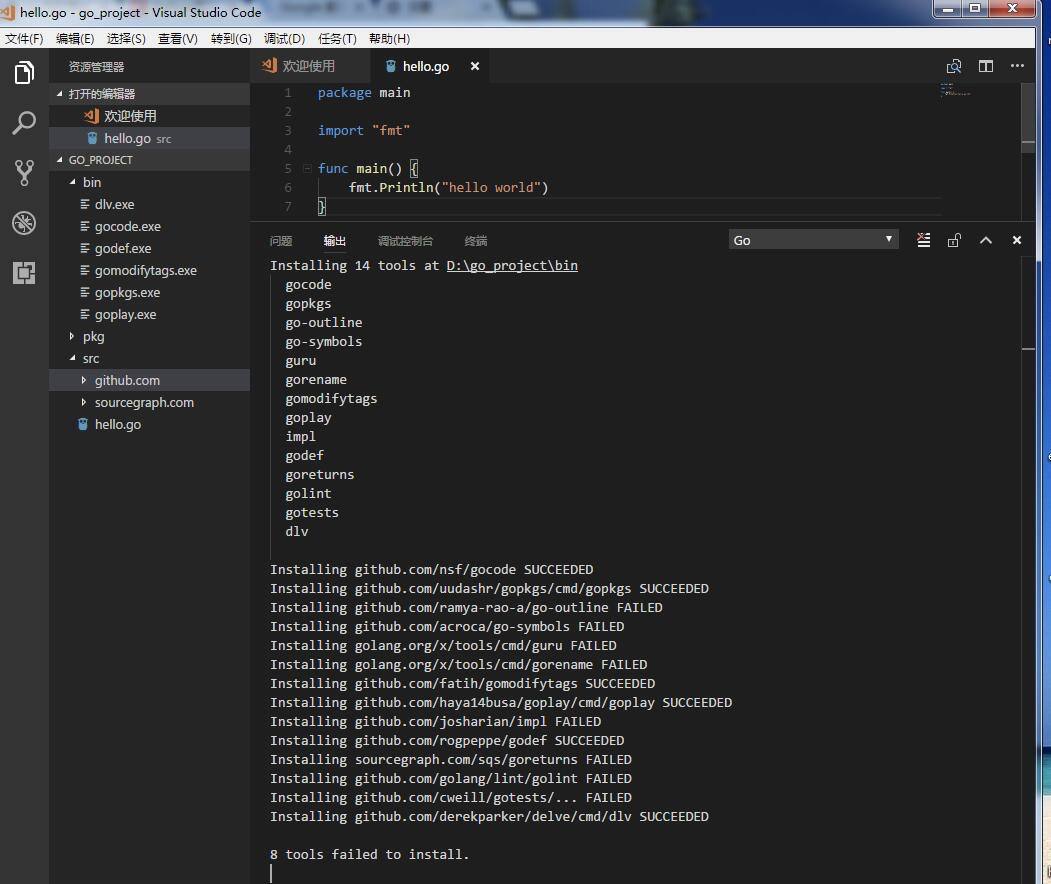
貌似运气还不错,还安装成功了几个,但是大部分还是没有安装成功,下面是vscode详细的安装日志:
Installing 14 tools at D:\go_project\bin

  gocode

  gopkgs

  go-outline

  go-symbols

  guru

  gorename

  gomodifytags

  goplay

  impl

  godef

  goreturns

  golint

  gotests

  dlv

Installing github.com/nsf/gocode SUCCEEDED

Installing github.com/uudashr/gopkgs/cmd/gopkgs SUCCEEDED

Installing github.com/ramya-rao-a/go-outline FAILED

Installing github.com/acroca/go-symbols FAILED

Installing golang.org/x/tools/cmd/guru FAILED

Installing golang.org/x/tools/cmd/gorename FAILED

Installing github.com/fatih/gomodifytags SUCCEEDED

Installing github.com/haya14busa/goplay/cmd/goplay SUCCEEDED

Installing github.com/josharian/impl FAILED

Installing github.com/rogpeppe/godef SUCCEEDED

Installing sourcegraph.com/sqs/goreturns FAILED

Installing github.com/golang/lint/golint FAILED

Installing github.com/cweill/gotests/... FAILED

Installing github.com/derekparker/delve/cmd/dlv SUCCEEDED

8 tools failed to install.

go-outline:

Error: Command failed: D:\Go\bin\go.exe get -u -v github.com/ramya-rao-a/go-outline

github.com/ramya-rao-a/go-outline (download)

Fetching https://golang.org/x/tools/go/buildutil?go-get=1

https fetch failed: Get https://golang.org/x/tools/go/buildutil?go-get=1: dial tcp 216.239.37.1:443: connectex: A connection attempt failed because the connected party did not properly respond after a period of time, or established connection failed because connected host has failed to respond.

package golang.org/x/tools/go/buildutil: unrecognized import path "golang.org/x/tools/go/buildutil" (https fetch: Get https://golang.org/x/tools/go/buildutil?go-get=1: dial tcp 216.239.37.1:443: connectex: A connection attempt failed because the connected party did not properly respond after a period of time, or established connection failed because connected host has failed to respond.)

github.com/ramya-rao-a/go-outline (download)

Fetching https://golang.org/x/tools/go/buildutil?go-get=1

https fetch failed: Get https://golang.org/x/tools/go/buildutil?go-get=1: dial tcp 216.239.37.1:443: connectex: A connection attempt failed because the connected party did not properly respond after a period of time, or established connection failed because connected host has failed to respond.

package golang.org/x/tools/go/buildutil: unrecognized import path "golang.org/x/tools/go/buildutil" (https fetch: Get https://golang.org/x/tools/go/buildutil?go-get=1: dial tcp 216.239.37.1:443: connectex: A connection attempt failed because the connected party did not properly respond after a period of time, or established connection failed because connected host has failed to respond.)

go-symbols:

Error: Command failed: D:\Go\bin\go.exe get -u -v github.com/acroca/go-symbols

github.com/acroca/go-symbols (download)

Fetching https://golang.org/x/tools/go/buildutil?go-get=1

https fetch failed: Get https://golang.org/x/tools/go/buildutil?go-get=1: dial tcp 216.239.37.1:443: connectex: A connection attempt failed because the connected party did not properly respond after a period of time, or established connection failed because connected host has failed to respond.

package golang.org/x/tools/go/buildutil: unrecognized import path "golang.org/x/tools/go/buildutil" (https fetch: Get https://golang.org/x/tools/go/buildutil?go-get=1: dial tcp 216.239.37.1:443: connectex: A connection attempt failed because the connected party did not properly respond after a period of time, or established connection failed because connected host has failed to respond.)

github.com/acroca/go-symbols (download)

Fetching https://golang.org/x/tools/go/buildutil?go-get=1

https fetch failed: Get https://golang.org/x/tools/go/buildutil?go-get=1: dial tcp 216.239.37.1:443: connectex: A connection attempt failed because the connected party did not properly respond after a period of time, or established connection failed because connected host has failed to respond.

package golang.org/x/tools/go/buildutil: unrecognized import path "golang.org/x/tools/go/buildutil" (https fetch: Get https://golang.org/x/tools/go/buildutil?go-get=1: dial tcp 216.239.37.1:443: connectex: A connection attempt failed because the connected party did not properly respond after a period of time, or established connection failed because connected host has failed to respond.)

guru:

Error: Command failed: D:\Go\bin\go.exe get -u -v golang.org/x/tools/cmd/guru

Fetching https://golang.org/x/tools/cmd/guru?go-get=1

https fetch failed: Get https://golang.org/x/tools/cmd/guru?go-get=1: dial tcp 216.239.37.1:443: connectex: A connection attempt failed because the connected party did not properly respond after a period of time, or established connection failed because connected host has failed to respond.

package golang.org/x/tools/cmd/guru: unrecognized import path "golang.org/x/tools/cmd/guru" (https fetch: Get https://golang.org/x/tools/cmd/guru?go-get=1: dial tcp 216.239.37.1:443: connectex: A connection attempt failed because the connected party did not properly respond after a period of time, or established connection failed because connected host has failed to respond.)

Fetching https://golang.org/x/tools/cmd/guru?go-get=1

https fetch failed: Get https://golang.org/x/tools/cmd/guru?go-get=1: dial tcp 216.239.37.1:443: connectex: A connection attempt failed because the connected party did not properly respond after a period of time, or established connection failed because connected host has failed to respond.

package golang.org/x/tools/cmd/guru: unrecognized import path "golang.org/x/tools/cmd/guru" (https fetch: Get https://golang.org/x/tools/cmd/guru?go-get=1: dial tcp 216.239.37.1:443: connectex: A connection attempt failed because the connected party did not properly respond after a period of time, or established connection failed because connected host has failed to respond.)

gorename:

Error: Command failed: D:\Go\bin\go.exe get -u -v golang.org/x/tools/cmd/gorename

Fetching https://golang.org/x/tools/cmd/gorename?go-get=1

https fetch failed: Get https://golang.org/x/tools/cmd/gorename?go-get=1: dial tcp 216.239.37.1:443: connectex: A connection attempt failed because the connected party did not properly respond after a period of time, or established connection failed because connected host has failed to respond.

package golang.org/x/tools/cmd/gorename: unrecognized import path "golang.org/x/tools/cmd/gorename" (https fetch: Get https://golang.org/x/tools/cmd/gorename?go-get=1: dial tcp 216.239.37.1:443: connectex: A connection attempt failed because the connected party did not properly respond after a period of time, or established connection failed because connected host has failed to respond.)

Fetching https://golang.org/x/tools/cmd/gorename?go-get=1

https fetch failed: Get https://golang.org/x/tools/cmd/gorename?go-get=1: dial tcp 216.239.37.1:443: connectex: A connection attempt failed because the connected party did not properly respond after a period of time, or established connection failed because connected host has failed to respond.

package golang.org/x/tools/cmd/gorename: unrecognized import path "golang.org/x/tools/cmd/gorename" (https fetch: Get https://golang.org/x/tools/cmd/gorename?go-get=1: dial tcp 216.239.37.1:443: connectex: A connection attempt failed because the connected party did not properly respond after a period of time, or established connection failed because connected host has failed to respond.)

impl:

Error: Command failed: D:\Go\bin\go.exe get -u -v github.com/josharian/impl

github.com/josharian/impl (download)

Fetching https://golang.org/x/tools/imports?go-get=1

https fetch failed: Get https://golang.org/x/tools/imports?go-get=1: dial tcp 216.239.37.1:443: connectex: A connection attempt failed because the connected party did not properly respond after a period of time, or established connection failed because connected host has failed to respond.

package golang.org/x/tools/imports: unrecognized import path "golang.org/x/tools/imports" (https fetch: Get https://golang.org/x/tools/imports?go-get=1: dial tcp 216.239.37.1:443: connectex: A connection attempt failed because the connected party did not properly respond after a period of time, or established connection failed because connected host has failed to respond.)

github.com/josharian/impl (download)

Fetching https://golang.org/x/tools/imports?go-get=1

https fetch failed: Get https://golang.org/x/tools/imports?go-get=1: dial tcp 216.239.37.1:443: connectex: A connection attempt failed because the connected party did not properly respond after a period of time, or established connection failed because connected host has failed to respond.

package golang.org/x/tools/imports: unrecognized import path "golang.org/x/tools/imports" (https fetch: Get https://golang.org/x/tools/imports?go-get=1: dial tcp 216.239.37.1:443: connectex: A connection attempt failed because the connected party did not properly respond after a period of time, or established connection failed because connected host has failed to respond.)

goreturns:

Error: Command failed: D:\Go\bin\go.exe get -u -v sourcegraph.com/sqs/goreturns

Fetching https://sourcegraph.com/sqs/goreturns?go-get=1

Parsing meta tags from https://sourcegraph.com/sqs/goreturns?go-get=1 (status code 200)

get "sourcegraph.com/sqs/goreturns": found meta tag get.metaImport{Prefix:"sourcegraph.com/sqs/goreturns", VCS:"git", RepoRoot:"https://github.com/sqs/goreturns"} at https://sourcegraph.com/sqs/goreturns?go-get=1

sourcegraph.com/sqs/goreturns (download)

github.com/sqs/goreturns (download)

Fetching https://golang.org/x/tools/imports?go-get=1

https fetch failed: Get https://golang.org/x/tools/imports?go-get=1: dial tcp 216.239.37.1:443: connectex: A connection attempt failed because the connected party did not properly respond after a period of time, or established connection failed because connected host has failed to respond.

package golang.org/x/tools/imports: unrecognized import path "golang.org/x/tools/imports" (https fetch: Get https://golang.org/x/tools/imports?go-get=1: dial tcp 216.239.37.1:443: connectex: A connection attempt failed because the connected party did not properly respond after a period of time, or established connection failed because connected host has failed to respond.)

Fetching https://sourcegraph.com/sqs/goreturns?go-get=1

Parsing meta tags from https://sourcegraph.com/sqs/goreturns?go-get=1 (status code 200)

get "sourcegraph.com/sqs/goreturns": found meta tag get.metaImport{Prefix:"sourcegraph.com/sqs/goreturns", VCS:"git", RepoRoot:"https://github.com/sqs/goreturns"} at https://sourcegraph.com/sqs/goreturns?go-get=1

sourcegraph.com/sqs/goreturns (download)

github.com/sqs/goreturns (download)

Fetching https://golang.org/x/tools/imports?go-get=1

https fetch failed: Get https://golang.org/x/tools/imports?go-get=1: dial tcp 216.239.37.1:443: connectex: A connection attempt failed because the connected party did not properly respond after a period of time, or established connection failed because connected host has failed to respond.

package golang.org/x/tools/imports: unrecognized import path "golang.org/x/tools/imports" (https fetch: Get https://golang.org/x/tools/imports?go-get=1: dial tcp 216.239.37.1:443: connectex: A connection attempt failed because the connected party did not properly respond after a period of time, or established connection failed because connected host has failed to respond.)

golint:

Error: Command failed: D:\Go\bin\go.exe get -u -v github.com/golang/lint/golint

github.com/golang/lint (download)

Fetching https://golang.org/x/tools/go/gcexportdata?go-get=1

https fetch failed: Get https://golang.org/x/tools/go/gcexportdata?go-get=1: dial tcp 216.239.37.1:443: connectex: A connection attempt failed because the connected party did not properly respond after a period of time, or established connection failed because connected host has failed to respond.

package golang.org/x/tools/go/gcexportdata: unrecognized import path "golang.org/x/tools/go/gcexportdata" (https fetch: Get https://golang.org/x/tools/go/gcexportdata?go-get=1: dial tcp 216.239.37.1:443: connectex: A connection attempt failed because the connected party did not properly respond after a period of time, or established connection failed because connected host has failed to respond.)

github.com/golang/lint (download)

Fetching https://golang.org/x/tools/go/gcexportdata?go-get=1

https fetch failed: Get https://golang.org/x/tools/go/gcexportdata?go-get=1: dial tcp 216.239.37.1:443: connectex: A connection attempt failed because the connected party did not properly respond after a period of time, or established connection failed because connected host has failed to respond.

package golang.org/x/tools/go/gcexportdata: unrecognized import path "golang.org/x/tools/go/gcexportdata" (https fetch: Get https://golang.org/x/tools/go/gcexportdata?go-get=1: dial tcp 216.239.37.1:443: connectex: A connection attempt failed because the connected party did not properly respond after a period of time, or established connection failed because connected host has failed to respond.)

gotests:

Error: Command failed: D:\Go\bin\go.exe get -u -v github.com/cweill/gotests/...

github.com/cweill/gotests (download)

Fetching https://golang.org/x/tools/imports?go-get=1

https fetch failed: Get https://golang.org/x/tools/imports?go-get=1: dial tcp 216.239.37.1:443: connectex: A connection attempt failed because the connected party did not properly respond after a period of time, or established connection failed because connected host has failed to respond.

package github.com/cweill/gotests

    imports golang.org/x/tools/imports: unrecognized import path "golang.org/x/tools/imports" (https fetch: Get https://golang.org/x/tools/imports?go-get=1: dial tcp 216.239.37.1:443: connectex: A connection attempt failed because the connected party did not properly respond after a period of time, or established connection failed because connected host has failed to respond.)

github.com/cweill/gotests (download)

Fetching https://golang.org/x/tools/imports?go-get=1

https fetch failed: Get https://golang.org/x/tools/imports?go-get=1: dial tcp 216.239.37.1:443: connectex: A connection attempt failed because the connected party did not properly respond after a period of time, or established connection failed because connected host has failed to respond.

package github.com/cweill/gotests

    imports golang.org/x/tools/imports: unrecognized import path "golang.org/x/tools/imports" (https fetch: Get https://golang.org/x/tools/imports?go-get=1: dial tcp 216.239.37.1:443: connectex: A connection attempt failed because the connected party did not properly respond after a period of time, or established connection failed because connected host has failed to respond.)
其实去src目录下看的话,是下载成功了,但是没有安装成功,并且我们也可以看出有几个是可以直接安装成功的
github.com/nsf/gocode
github.com/tpng/gopkgs
github.com/fatih/gomodifytags
github.com/haya14busa/goplay
github.com/rogpeppe/gode
github.com/derekparker/delve/cmd/dlv
解决方法
关于go开发目录的结构这里不做过多解释,之前已经说过了
进行如下命令进行目录切换:
cd %GOPATH%\src\github.com\golang
我这里的GOPATH是在D:\go_project
如果src目录下面没有github.com\golang请自行创建
完成目录切换后,开始下载插件包:
git clone https://github.com/golang/tools.git tools
当下载完成后,你会发现%GOPATH%\src\github.com\golang多了一个tools目录
需要把tools目录下的所有文件拷贝到%GOPATH%\src\golang.org\x\tools下,如果没有自行创建
当然如果你是windows环境,如果你当前是在%GOPATH%\src\golang.org\x\tools
目录下,你可以直接使用如下命令进行拷贝:
xcopy /s /e %GOPATH%\src\github.com\golang\tools
关于这个命令的使用可以具体百度查看,如果对该命令不熟悉就手动拷贝,直接将你下载的tools目录下的所有文件拷贝到%GOPATH%\src\golang.org\x\tools目录下
经过多次测试,插件中有几个其实不用翻墙或其他方法就可以安装成功:
github.com/nsf/gocode
github.com/uudashr/gopkgs/cmd/gopkgs
github.com/fatih/gomodifytags
github.com/haya14busa/goplay/cmd/goplay
github.com/derekparker/delve/cmd/dlv
下面安装无法安装的插件
开始安装:
切换到GOPATH目录下,执行相关的go install 命令
go install github.com/ramya-rao-a/go-outline
go install github.com/acroca/go-symbols
go install golang.org/x/tools/cmd/guru
go install golang.org/x/tools/cmd/gorename
go install github.com/josharian/impl
go install github.com/rogpeppe/godef
go install github.com/sqs/goreturns
go install github.com/golang/lint/golint
go install github.com/cweill/gotests/gotests
这样vscode下go开发需要安装的插件都已经安装成功
让你成功安装vscode中go的相关插件的更多相关文章
- 成功安装vscode中go的相关插件
让你成功安装vscode中go的相关插件 注意:该演示环境是windows环境,linux和mac环境操作思路一样 vscode中有很多go的相关插件,非常好用如下:gocodegopkgsgo-ou ...
- VScode中Go的相关插件的安装
一.安装Go插件失败 使用VScode时,当我们安装完go语言扩展时,新建一个go的源码文件,进行保存时,会提示我们需要安装一些go的扩展插件,可别小看这些插件,这些插件都是非常有用的,比如说自动补全 ...
- vscode中vue代码颜色插件
vue提示插件[Vscode] 编者寄语:vscode的确是前端开发中很好的工具,安装颜色插件,从视觉上是美的享受.曾经的我遇到了vscode代码全是灰色,黑色的困惑,后来整理找到方法,整 ...
- JMeter中添加dubbo相关插件异常问题解决
从网上下载了一个dubbo的插件,然后放到JMeter的/lib/ext目录下: 然后启动直接异常 发现启动不了,然后下载了一个全新的JMeter3.2将dubbo插件放到同样的目录,启动,没有问题: ...
- 在VSCode中成功安装Go相关插件问题:tools failed to install.
一.介绍 目的:本文将主要介绍在windows使用VSCode配置Go语言环境 软件:VSCode 二.安装出现的问题 完整信息如下 Installing tools at D:\GoPath\bin ...
- Git安装/VScode+Git+Github
Git安装/VScode+Git+Github 1. 相关简介 git 版本控制工具,支持该工具的网站有Github.BitBucket.Gitorious.国内的OS China仓库.Csdn仓库等 ...
- VSCode中插件Code Spell Checker
说在前面 介绍 Code Spell Checker 是在VSCode中的一款插件,能够帮助我们检查单词拼写是否出现错误,检查的规则遵循 camelCase (驼峰拼写法). 安装方法 打开VSCod ...
- 在线安装eclipse中html/jsp/xml editor插件(很可靠)
之前有一篇文章也是安装eclipse中的web开发插件 ,可是经过非常多人使用,那种方法.不是全部人使用都能够. 接下来,找到一种很管用的方法.就是在线安装. 废话不多说,这样的方法绝对能够成功安装. ...
- 在VSCode中使用Markdown
前言 最近在学习使用Markdown语法,尝试使用了"MarkdownEditor"."Sublime Text3"."VSCode"这三种 ...
随机推荐
- JVM命令
jstack--jstack用于打印出给定的java进程ID或core file或远程调试服务的Java堆栈信息: jinfo--jinfo可以输出并修改运行时的java 进程的opts.用处比较简单 ...
- 前端设计师如何提高UI界面中的阅读性
阅读体验是ui设计中必不可少的一项,良好的设计应该都是可读的设计,如果信息都无法正常而清晰的传达,那么设计就失去了意义.设计的可读性和排版设计息息相关,这也就跟设计师的设计功底息息相关.下面简单介绍文 ...
- 说说css中pt、px、em、rem都扮演了什么角色
前段时间,终于仔仔细细的把pt.px.em.rem了解了一遍,简单整理了一下做个记录. pt.px.em.rem都是什么 pt单位名称为点(Point),绝对长度单位.现在网页中出现得很少甚至不出现, ...
- Tomcat多域名访问
对于域名解析相信很多小伙伴都了解过,就是我们在万网购买一个域名,比如hpugs.com,然后呢?我们希望域名与我们的服务器绑定,然后通过域名直接访问我们的项目,这就是本篇要和大家一起探讨的问题.下面开 ...
- 使用canvas绘制时钟 (http://heeroluo.net/Article/Detail/95)
准备工作 在HTML中指定一个区域放置时钟: <div id="clock" style="position: relative;"></di ...
- [动态规划]P1220 关路灯
题目描述 某一村庄在一条路线上安装了n盏路灯,每盏灯的功率有大有小(即同一段时间内消耗的电量有多有少).老张就住在这条路中间某一路灯旁,他有一项工作就是每天早上天亮时一盏一盏地关掉这些路灯. 为了给村 ...
- Hive详解
1. Hive基本概念 1.1 Hive简介 1.1.1 什么是Hive Hive是基于Hadoop的一个数据仓库工具,可以将结构化的数据文件映射为一张数据库表,并提供类SQL查询功能. 1.1 ...
- Python学习一
安装时遇到的问题 安装anaconda3.0到D盘之后,配置好两个环境变量:D:\anaconda和D:\anaconda\Scripts.发现在命令行中执行python指令可以,但conda指令却是 ...
- java基础回顾(2)
java中只有两种类型:基础类型.引用类型 8中基本类型:byte short int long float double char boolean,其中byte类型取值范围[-2^7~2^7-1] ...
- 简单的基于Vue-axios请求封装
具体实现思路=>封装之前需要用npm安装并引入axios,使用一个单独的js模块作为接口请输出对象,然后export dafult 这个对象. 1.首先我们需要在Vue实例的原型prototyp ...