
一百二十六:CMS系统之轮播图管理页面布局和添加轮播图的模态对话框制作
视图
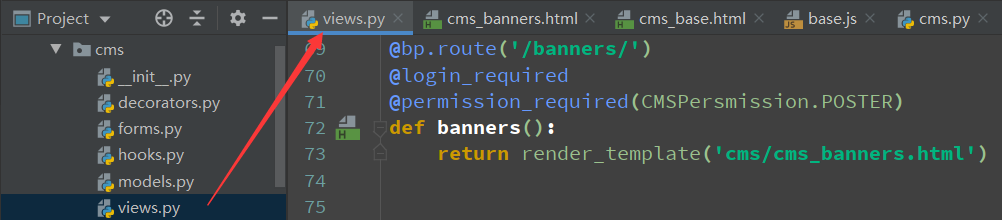
@bp.route('/banners/')
@login_required
@permission_required(CMSPersmission.POSTER)
def banners():
    return render_template('cms/cms_banners.html')
给这个url添加选中事件

else if(url.indexOf('banners') >= 0) {
    var bannerManageLi = $('.banner-manage');
    bannerManageLi.addClass('unfold').siblings().removeClass('unfold');
}
base模板

页面


{% extends 'cms/cms_base.html' %}

{% block title %}
    轮播图管理
{% endblock %}

{% block head %}
    <style>
        .top-box{
            overflow: hidden;
            background: #ecedf0;
            padding: 5px;
        }
        .top-box button{
            float: right;
        }
    </style>
{% endblock %}

{% block page_title %}
    {{ self.title() }}
{% endblock %}

{% block main_content %}
    <div class="top-box">
        <button class="btn btn-warning">添加轮播图</button>
    </div>
    <table class="table table-bordered">
        <thead>
            <tr>
                <th>名称</th>
                <th>图片链接</th>
                <th>跳转链接 </th>
                <th>优先级</th>
                <th>创建时间</th>
                <th>操作</th>
            </tr>
        </thead>

    </table>
{% endblock %}
访问

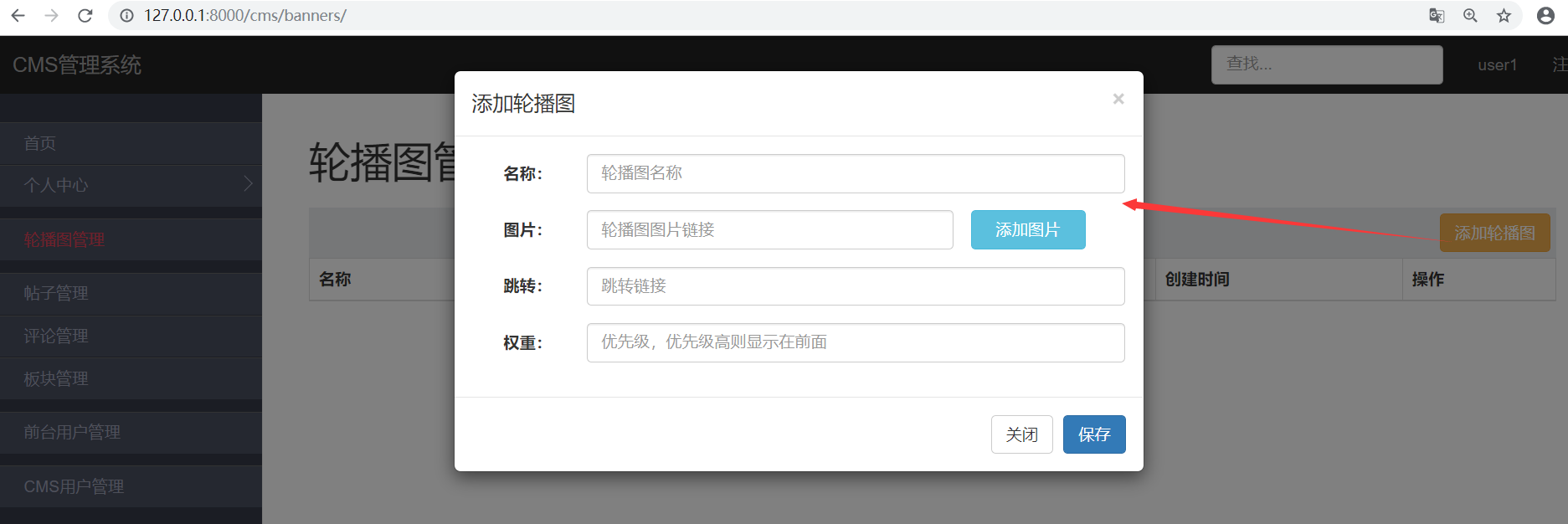
添加轮播图的模态对话框


{% extends 'cms/cms_base.html' %}
{% block title %}
轮播图管理
{% endblock %}
{% block head %}
<style>
.top-box {
overflow: hidden;
background: #ecedf0;
padding: 5px;
}
.top-box button {
float: right;
}
</style>
{% endblock %}
{% block page_title %}
{{ self.title() }}
{% endblock %}
{% block main_content %}
<div class="top-box">
<button class="btn btn-warning" data-toggle="modal" data-target="#banner-dialog">添加轮播图</button>
</div>
<table class="table table-bordered">
<thead>
<tr>
<th>名称</th>
<th>图片链接</th>
<th>跳转链接</th>
<th>优先级</th>
<th>创建时间</th>
<th>操作</th>
</tr>
</thead>
</table>
<!-- 模态对话框,需包含上面button包含的属性(#属性),如这里用的#banner-dialog -->
<div class="modal fade" id="banner-dialog" tabindex="-1" role="dialog" aria-labelledby="myModalLabel">
<div class="modal-dialog" role="document">
<div class="modal-content">
<div class="modal-header">
<button type="button" class="close" data-dismiss="modal" aria-label="Close"><span aria-hidden="true">×</span></button>
<h4 class="modal-title" id="myModalLabel">添加轮播图</h4>
</div>
<div class="modal-body">
<form action="" class="form-horizontal">
<div class="form-group">
<label class="col-sm-2 control-label">名称:</label>
<div class="col-sm-10">
<input type="text" class="form-control" name="name" placeholder="轮播图名称">
</div>
</div>
<div class="form-group">
<label class="col-sm-2 control-label">图片:</label>
<div class="col-sm-7">
<input type="text" class="form-control" name="image_url" placeholder="轮播图图片链接">
</div>
<button class="btn btn-info col-sm-2">添加图片</button>
</div>
<div class="form-group">
<label class="col-sm-2 control-label">跳转:</label>
<div class="col-sm-10">
<input type="text" class="form-control" name="link_url" placeholder="跳转链接">
</div>
</div>
<div class="form-group">
<label class="col-sm-2 control-label">权重:</label>
<div class="col-sm-10">
<input type="text" class="form-control" name="priority" placeholder="优先级,优先级高则显示在前面">
</div>
</div>
</form>
</div>
<div class="modal-footer">
<button type="button" class="btn btn-default" data-dismiss="modal">关闭</button>
<button type="button" class="btn btn-primary">保存</button>
</div>
</div>
</div>
</div>
{% endblock %}
访问
一百二十六:CMS系统之轮播图管理页面布局和添加轮播图的模态对话框制作的更多相关文章
- 一百二十:CMS系统之注册功能前后端逻辑
给提交按钮加一个id,方便写js js //发送ajax请求注册请求$(function () { $('#submit-btn').click(function (event) { event.pr ...
- Flask实战第49天:cms轮播图管理页面布局
新建cms_banners.html继承cms_base.html {% extends 'cms/cms_base.html' %} {% block title %} 轮播图管理-CMS管理系统 ...
- 一百二十七:CMS系统之添加轮播图前后台逻辑
后台逻辑 模型 from exts import dbfrom datetime import datetime class BannerModel(db.Model): __tablename__ ...
- Java开发笔记(一百二十六)Swing的窗口
前面介绍了AWT界面编程的若干技术,在编码实践的时候,会发现AWT用起来甚是别扭,它的毛病包括但不限于下列几点:1.对中文的支持不好,要想在界面上正常显示汉字,还得在运行时指定额外的运行参数“-Dfi ...
- 一百三十:CMS系统之七牛js和python的SDK使用示例
1.安装: pip install qiniu 2.编写获取uptoken的接口 @app.route('/uptoken/')def uptoken(): access_key = '' secre ...
- 一百二十三:CMS系统之登录功能
配置文件中加入前台用户的身份标识 form class SigninForm(BaseForm): telephone = StringField(validators=[Regexp(r'1[345 ...
- 一百二十一:CMS系统之注册后跳转到上一个页面
实现功能,访问测试页面的时候,跳转到注册页面,注册成功后跳转到测试页面 使用参数:若是从其他地址跳转过来时,头部信息中会携带参数referrer,此参数为从从哪个地址跳转到当前地址的,若是直接从浏览器 ...
- 测开之路一百二十六:flask之获取request请求数据
可以根据flask的request对象获取所有的请求信息 path = request.path # 获取请求地址method = request.method # 获取请求方法ip = reques ...
- VMware vSphere 服务器虚拟化之二十六 桌面虚拟化之View Persona Management
VMware vSphere 服务器虚拟化之二十六 桌面虚拟化之View Persona Management 实验失败告终,启动VMware View Persona Management服务报10 ...
随机推荐
- 看一下我学习linux的过程
学习Linux的最佳方法是将它用于日常工作. 阅读Linux书籍,观看Linux视频不仅仅是足够的. 学习Linux没有捷径可走. 你不可能在一夜之间在Linux中掌握. 这需要时间和持久性. 刚刚潜 ...
- 常量和iota
定义常量时如果不是必须指定特定类型,可以省略类型,使用默认类型.且数值类型常量(不定义类型)可以直接进行运算 常量的值可以是表达式,但是不允许出现变量 func main() { const a st ...
- [转载]pytest学习笔记
pytest学习笔记(三) 接着上一篇的内容,这里主要讲下参数化,pytest很好的支持了测试函数中变量的参数化 一.pytest的参数化 1.通过命令行来实现参数化 文档中给了一个简单的例子, ...
- 理解Event冒泡模型
本文探索一下Event的冒泡过程和初学遇到的几个小bug DOM Event概述 Event接口是检测在DOM中的发生的所有事件,我们一直在用,而且从DOM的很早的版本就一直在用着.早期的网景(后来的 ...
- springboot2.0入门(三)----定义编程风格+jackjson使用+postMan测试
一.RESTFul风格API 1.优点: )看Url就知道要什么资源 )看http method就知道针对资源干什么 )看http status code就知道结果如何 HTTP方法体现对资源的操作: ...
- css 过渡效果
来自 https://www.w3school.com.cn/cssref/pr_transition-timing-function.asp css <!DOCTYPE html> &l ...
- 弱势图解AC自动机
本篇文章主要详细介绍$AC$自动机的$fail$指针: 如果有什么不完善的地方,请联系我$qwq$ 前置知识: 1.建议学一下$kmp$算法 2.$Trie$ 导入: AC自动机是用来解决多模板匹配问 ...
- 数论之同余性质 线性同余方程&拔山盖世BSGS&中国剩余定理
先记录一下一些概念和定理 同余:给定整数a,b,c,若用c不停的去除a和b最终所得余数一样,则称a和b对模c同余,记做a≡b (mod c),同余满足自反性,对称性,传递性 定理1: 若a≡b (mo ...
- java中Switch的实现原理浅谈
switch的转换和具体系统实现有关,如果分支比较少,可能会转换为跳转指令(条件跳转指令和无条件跳转指令).但如果分支比较多,使用条件跳转会进行很多次的比较运算,效率比较低,可能会使用一种更为高效的方 ...
- maven创建可执行jar包项目的配置
<build> <plugins> <plugin> <artifactId>maven-shade-plugin</artifactId> ...