
vue 01 练习
1.有 红、黄、蓝 三个按钮,以及一个200x200矩形框box,点击不同的按钮,box的颜色会被切换为指定的颜色
<!DOCTYPE html>

<html lang="en">

<head>

    <meta charset="UTF-8">

    <title>Title</title>

    <style>

        .box {

            height:100px;

            width:100px;

        }

    </style>

</head>

<body>

<div id="app">

    <div>

        <button @click="changeColor('red')">红色</button>

        <button @click="changeColor('yellow')">黄色</button>

        <button @click="changeColor('blue')">蓝色</button>

    </div>

    <div class="box" :style="{backgroundColor:bgColor}"></div>

</div>

</body>

<script src="js/vue.js"></script>

<script>

new Vue({

    el:'#app',

    data:{

        bgColor:'black',

    },

    methods:{

        changeColor(color) {

            this.bgColor = color;

        },

    }

})

</script>

</html>
2.有一个200x200矩形框wrap,点击wrap本身,记录点击次数,如果是1次wrap为pink色,2次wrap为green色,3次wrap为cyan色,4次重新回到pink色,依次类推
<!DOCTYPE html>

<html lang="en">

<head>

    <meta charset="UTF-8">

    <title>Title</title>

    <style>

        .wrap {

            height: 200px;

            width: 200px;

            background-color: black;

            border: 3px solid red;

            color:white;

            font:bold 50px/200px 'STSong';

            text-align: center;

            /*cursor: crosshair;*/  /* 十字架*/

            /*cursor: help;;   !*箭头旁边带一个问号*!*/

            /*cursor: wait	;  !* 动态旋转的一个圆圈*!*/

            cursor: text	;  /* 此光标指示文本*/

            user-select:none;  /*文本不能被选中*/

        }

    </style>

</head>

<body>

<div id="app">

    <div class="wrap" @click="actionFn" :style="{backgroundColor:bgColor}">{{ counter }}</div>

</div>

</body>

<script src="js/vue.js"></script>

<script>

    new Vue({

        el:'#app',

        data:{

            counter:0,

            colorArr:['cyan','pink','green',]

        },

        methods:{

          actionFn() {

              this.counter ++;

              this.bgColor = this.colorArr[this.counter % 3]

          },

          }

    })

</script>

</html>
3.如图:图形初始左红右绿,点击一下后变成上红下绿,再点击变成右红左绿,再点击变成下红上绿,依次类推
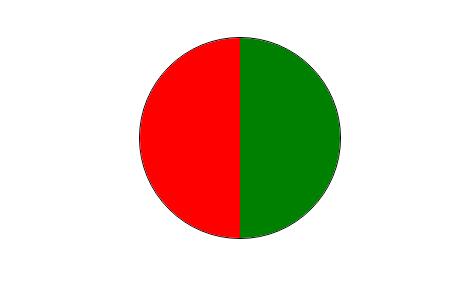
<!DOCTYPE html>

<html lang="en">

<head>

    <meta charset="UTF-8">

    <title>Title</title>

    <style>

        .box {

            width: 200px;

            height: 200px;

            border: 1px solid black;

            margin:50px auto 0;

            border-radius: 50%;

            overflow: hidden;

            position: relative;

        }

        .b1 {

            background-color: red;

            position: absolute;

        }

        .b2 {

            background-color: green;

            position: absolute;

        }

        .left {

            width: 100px;

            height: 200px;

            left: 0;

        }

        .right {

            width: 100px;

            height: 200px;

            right: 0;

        }

        .top {

            width: 200px;

            height: 100px;

            top: 0;

        }

        .bottom {

            width: 200px;

            height: 100px;

            bottom: 0;

        }

    </style>

</head>

<body>

<div id="app">

    <div class="box" @click="roll">

        <div class="b1" :class="c1"></div>

        <div class="b2" :class="c2"></div>

    </div>

</div>

</body>

<script src="js/vue.js"></script>

<script>

    let app = new Vue({

        el: '#app',

        data: {

            count: 1,

            c1: 'left',

            c2: 'right',

            c1Arr: ['left', 'top', 'right', 'bottom'],

            c2Arr: ['right', 'bottom', 'left', 'top']

        },

        methods: {

            roll() {

                let n = this.count++;

                this.c1 = this.c1Arr[n % 4];

                this.c2 = this.c2Arr[n % 4];

            }

        }

    });

    // 利用定时器自动旋转图像

    setInterval(function () {

        app.roll();

    }, 100)

</script>

</html>
vue 01 练习的更多相关文章
- 如何优雅的使用vue+vux开发app -01
如何优雅的使用vue+vux开发app -01 很明显下面是个错误的示范: <!DOCTYPE html> <html> <head> <title>v ...
- vue.js精讲01
笔记及源码地址 : https://github.com/wll8/vue_note 01 2017-09-13 view一个 mvvm框架(库),和 ag 类似.比较小巧,容易上手. mvc: mv ...
- vue.js 2.0 官方文档学习笔记 —— 01. vue 介绍
这是我的vue.js 2.0的学习笔记,采取了将官方文档中的代码集中到一个文件的形式.目的是保存下来,方便自己查阅. !官方文档:https://cn.vuejs.org/v2/guide/ 01. ...
- vue学习01
vue学习01 1. 创建一个Vue实例官网-学习-教程-安装-(开发/生产版本)-与jQuery的引用相似 <!DOCTYPE html> <html> <head ...
- vue项目搭建介绍01
目录 vue项目搭建介绍01 vue 项目框架环境搭建: 创建项目: vue 项目创建流程: vue项目搭建介绍01 vue 项目框架环境搭建: vue 项目框架: vue django(类似)(vu ...
- vue 2.0-1
vue 2.0 开发实践总结之疑难篇 续上一篇文章:vue2.0 开发实践总结之入门篇 ,如果没有看过的可以移步看一下. 本篇文章目录如下: 1. vue 组件的说明和使用 2. vuex在实 ...
- vue.js插件使用(01) vue-resource
本文的主要内容如下: 介绍vue-resource的特点 介绍vue-resource的基本使用方法 基于this.$http的增删查改示例 基于this.$resource的增删查改示例 基于int ...
- vue视频学习笔记01
video 1 vue:读音: v-u-eview vue到底是什么?一个mvvm框架(库).和angular类似比较容易上手.小巧mvc:mvpmvvmmv*mvx官网:http://cn.vuej ...
- Vuejs实例-01使用vue-cli脚手架搭建Vue.js项目
[TOC] 1. 前言 vue-cli 一个简单的构建Vue.js项目的命令行界面 整体过程: $ npm install -g vue-cli $ vue init webpack vue-admi ...
随机推荐
- [LuoguP2157][SDOI2009]学校食堂_状压dp
学校食堂 题目链接:https://www.luogu.org/problem/P2157 数据范围:略. 题解: 发现$B$特别小,很容易想到状压. 即在$dp$的时候弄出来$f_{(i,j,k)} ...
- Shell脚本之流程控制(if、for、while)
if 判断 if语句的三种格式: (1)if (2)if else (3)if elif else 语法格式如下: #if 语法格式 if 条件 then 命令1... 命令2... fi #if e ...
- 19牛客暑期多校 round2 H 01矩阵内第二大矩形
题目传送门//res tp nowcoder 目的 给定n*m 01矩阵,求矩阵内第二大矩形 分析 O(nm)预处理01矩阵为n个直方图,问题转换为求n个直方图中的第二大矩形.单调栈计算,同时维护前二 ...
- Numbers(CodeForces-128D)【思维/list】
题目链接:https://vjudge.net/problem/CodeForces-128D 题意:给出一组数,要求将这些数排列成一个环,满足每相邻两个数的差值为1,问能否完成. 思路:先取出最小的 ...
- spark异常篇-Removing executor 5 with no recent heartbeats: 120504 ms exceeds timeout 120000 ms 可能的解决方案
问题描述与分析 题目中的问题大致可以描述为: 由于某个 Executor 没有按时向 Driver 发送心跳,而被 Driver 判断该 Executor 已挂掉,此时 Driver 要把 该 Exe ...
- Wannafly挑战赛23
B. 游戏 大意: $n$堆石子, 第$i$堆初始$a_i$, 每次只能选一堆, 假设一堆个数$x$, 只能取$x$的约数, 求先手第一步必胜取法. SG入门题, 预处理出所有$SG$值. 先手要必胜 ...
- beego 参数配置
详细配置请参考:https://godoc.org/github.com/astaxie/beego#pkg-constants. App配置 AppName 应用名称,默认是 beego.通过bee ...
- makemigrations和migrate到底干了什么以及如何查询原生的sql语句
在你改动了 model.py的内容之后执行下面的命令: python manger.py makemigrations 相当于 在该app下建立 migrations目录,并记录下你所有的关于mode ...
- win10下面opencv安装
记得以前是安装好的,但是用了conda更新所有包以后,cv2不好用了,试验了很多方法都不管用,最后只能卸载opencv然后重新安装了. 如果电脑上安装了很多版本的python,比如我就安装了pytho ...
- IOS开发copy,nonatomic, retain,weak,strong用法
readwrite 是可读可写特性;需要生成getter方法和setter方法时 readonly 是只读特性 只会生成getter方法 不会生成setter方法 ;不希望属性在类外改变 ass ...