
python(29)Tinker+BeautifulSoup+Request抓取美女壁纸
原文链接:http://www.limerence2017.com/2019/10/22/python29/
抓取准备
今天是10月24日,祝所有程序员节日快乐。今天打算写个爬虫抓取3DMGAME论坛美女cosplay壁纸。
论坛首页网址为https://www.3dmgame.com/tu_53_1/
我们点击其中一个图集,然后网页跳转,看下源码
<div class="dg-wrapper">

    <a data-src = "/uploads/images/thumbpicfirst/20190730/1564452665_126346.jpg">

    <div class="img"><img src="https://img.3dmgame.com/uploads/images/thumbpicfirst/20190730/1564452665_126346.jpg"></div>

    <div class="miaoshu">

        <p></p>

    <div class="num"><i></i> /<u></u></div>

    </div>

    </a>

    <a data-src = "/uploads/images/thumbpicfirst/20190730/1564452665_242197.jpg">

    <div class="img"><img src="https://img.3dmgame.com/uploads/images/thumbpicfirst/20190730/1564452665_242197.jpg"></div>

    <div class="miaoshu">

    <p></p>

    <div class="num"><i></i> /<u></u></div>

    </div>

    </a>
网址是静态的,我们直接提取其中的图片链接再下载即可。
抓取网页采用的是python的requests库,直接发送http请求即可。收到回包后,通过BeautifulSoup提炼其中图片地址再次下载即可。
另外我们的界面用的是python自带的Tinker编写的。
代码实现
实现线程装饰器
def thread_run(func):

    def wraper(*args, **kwargs):

        t = threading.Thread(target=func, args=args, kwargs=kwargs)

        t.daemon = True

        t.start()

    return wraper
我们实现了DownloadFrame类封装了一个装饰器,启动线程并调用传入的函数。
类里实现如下方法
def prepare(self, downloadlinks):

        self.flag = True

        self.downloadlinks = downloadlinks

        self.base_url =   self.downloadlinks

        fail = 0

        try:

            url = self.base_url

            result = requests.get(url, headers=HEADERS,timeout=10)

            restxt = result.content.decode('UTF-8')

            soup = BeautifulSoup(restxt,'lxml')

            titles = soup.select('div .bt')

            if titles is None or len(titles)==0:

                print("html page res not found ! \n")

                return

            title = re.split(r'[;,\s]',titles[0].text)[0]

            curdir = os.path.dirname(os.path.abspath(__file__))

            picpath = os.path.join(curdir,title)

            if not os.path.exists(picpath):

                os.mkdir(picpath)

            print(picpath)

            imglist = soup.select('.dg-wrapper img')

            if imglist is None or len(imglist)==0:

                print("html page res not found ! \n")

                return

            self.downloadPic(imglist,picpath)

        except Exception as e:

            print(e)

            time.sleep(3)
prpare函数实现了请求指定网页,并用BeautifulSoup处理回包的功能。
@thread_run

    def download(self, url, path):

        try:

            if lock.acquire():

                self.name += 1

                imgname = str(self.name)+'.'+url.split('.')[-1]

                filename = os.path.join(path,imgname)

                lock.release()

                print(url)

                print(filename)

                # res = requests.get(url,  headers=header  )

                res = requests.get(url, headers=HEADERS,timeout=10 )

                with open(filename, 'wb') as f:

                    f.write(res.content)

            # 下载完后检查是否完成下载

            if lock.acquire():

                if self.flag:

                    self.flag = False

                    messagebox.showinfo("提示", "下载完成")

                lock.release()

        except Exception as e:

            print(e)
效果展示download传给了我们之前封装的装饰器thread_fun, download实现了下载指定图片的功能。
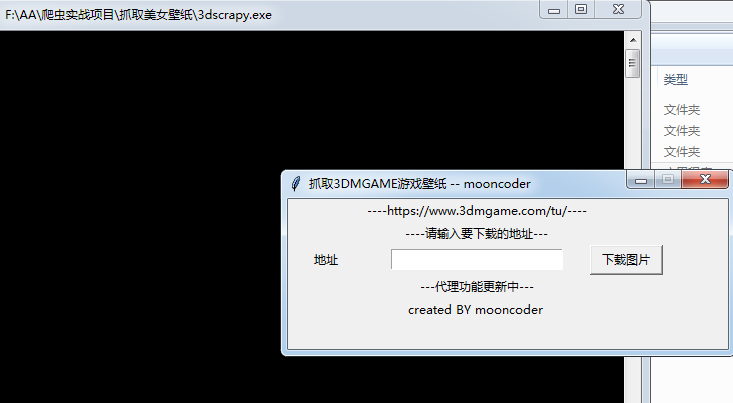
下载图片
感谢关注我的公众号
源码下载
python(29)Tinker+BeautifulSoup+Request抓取美女壁纸的更多相关文章
- Python爬虫实战六之抓取爱问知识人问题并保存至数据库
大家好,本次为大家带来的是抓取爱问知识人的问题并将问题和答案保存到数据库的方法,涉及的内容包括: Urllib的用法及异常处理 Beautiful Soup的简单应用 MySQLdb的基础用法 正则表 ...
- python爬虫beta版之抓取知乎单页面回答(low 逼版)
闲着无聊,逛知乎.发现想找点有意思的回答也不容易,就想说要不写个爬虫帮我把点赞数最多的给我搞下来方便阅读,也许还能做做数据分析(意淫中--) 鉴于之前用python写爬虫,帮运营人员抓取过京东的商品品 ...
- Python爬虫实战四之抓取淘宝MM照片
原文:Python爬虫实战四之抓取淘宝MM照片其实还有好多,大家可以看 Python爬虫学习系列教程 福利啊福利,本次为大家带来的项目是抓取淘宝MM照片并保存起来,大家有没有很激动呢? 本篇目标 1. ...
- 一次Python爬虫的修改,抓取淘宝MM照片
这篇文章是2016-3-2写的,时隔一年了,淘宝的验证机制也有了改变.代码不一定有效,保留着作为一种代码学习. 崔大哥这有篇>>小白爬虫第一弹之抓取妹子图 不失为学python爬虫的绝佳教 ...
- 利用python脚本(xpath)抓取数据
有人会问re和xpath是什么关系?如果你了解js与jquery,那么这个就很好理解了. 上一篇:利用python脚本(re)抓取美空mm图片 # -*- coding:utf-8 -*- from ...
- 利用Nodejs & Cheerio & Request抓取Lofter美女图片
还是参考了这篇文章: http://cnodejs.org/topic/54bdaac4514ea9146862abee 另外有上面文章 nodejs抓取网易公开课的一些经验. 代码如下,注意其中用到 ...
- Python爬虫 —— 抓取美女图片
代码如下: #coding:utf-8 # import datetime import requests import os import sys from lxml import etree im ...
- python:利用asyncio进行快速抓取
web数据抓取是一个经常在python的讨论中出现的主题.有很多方法可以用来进行web数据抓取,然而其中好像并没有一个最好的办法.有一些如scrapy这样十分成熟的框架,更多的则是像mechanize ...
- Python实现简单的网页抓取
现在开源的网页抓取程序有很多,各种语言应有尽有. 这里分享一下Python从零开始的网页抓取过程 第一步:安装Python 点击下载适合的版本https://www.python.org/ 我这里选择 ...
随机推荐
- (转) Oracle性能优化-读懂执行计划
Oracle的执行计划 得到执行计划的方式 Autotrace例子 使用Explain explain plan set STATEMENT_ID='testplan'for select * fro ...
- django虚拟环境搭建
windows建立Django项目(建立虚拟环境,安装virtualenv,安装Django,创建项目) 目的:为每一个项目单独配置一个环境例如:项目一使用django1.10, 项目二使用djang ...
- java-udp编程
TCP/IP UDP都是基于传输层的:而udp发送数据会出现丢包的情况,发送一个数据不管对方接收不接收,发送过去就完事了: udp的特点:将数据源和目的封装成数据包中,不要建立连接:(Datagram ...
- AVL树的介绍和实现
一.AVL树 AVL树是一种自平衡二叉查找树,因此在了解AVL树之前先介绍一下平衡二叉树.所谓平衡二叉树即该树中的任一个节点的左子树和右子树高度差不会超过1.如下图左是平衡二叉树,而右图则不是.节点4 ...
- Java常用类(一)Math类和Random类
一.Math类 Math类中有一些常用的数学函数,比较简单,不进行详细解释,仅举例说明: 1.绝对值和取整 import java.lang.Math; public class Mat { publ ...
- java程序连接Liunx服务器并且执行命令
JSch 介绍 JSch 是SSH2的一个纯Java实现.它允许你连接到一个sshd 服务器,使用端口转发,X11转发,文件传输等等.你可以将它的功能集成到你自己的 程序中.同时该项目也提供一个J2M ...
- QSettings 介绍
https://blog.csdn.net/liang19890820/article/details/50513695 QSettings settings(“./test.ini”, QSetti ...
- 并发编程-Java内存模型
将之前看过的关于并发编程的东西总结记录一下,本文简单记录Java内存模型的相关知识. 1. 并发编程两个关键问题 并发编程中,需要处理两个关键问题:线程之间如何通信及线程之间如何同步. (1)在命令式 ...
- abd常用命令
1.adb install -r 包名 ----------安装包,-r 替换原有apk安装 2.adb uninstall -k 包名 ---------------卸载包, ...
- [PWN]fsb with stack frame
0x00: 格式化字符串漏洞出现的时间很早了,偶然在前一段时间学到了一个其他的利用姿势,通过栈桢结构去利用格式化字符串漏洞. 原文链接:http://phrack.org/issues/59/7.ht ...