
Spring Boot学习随记
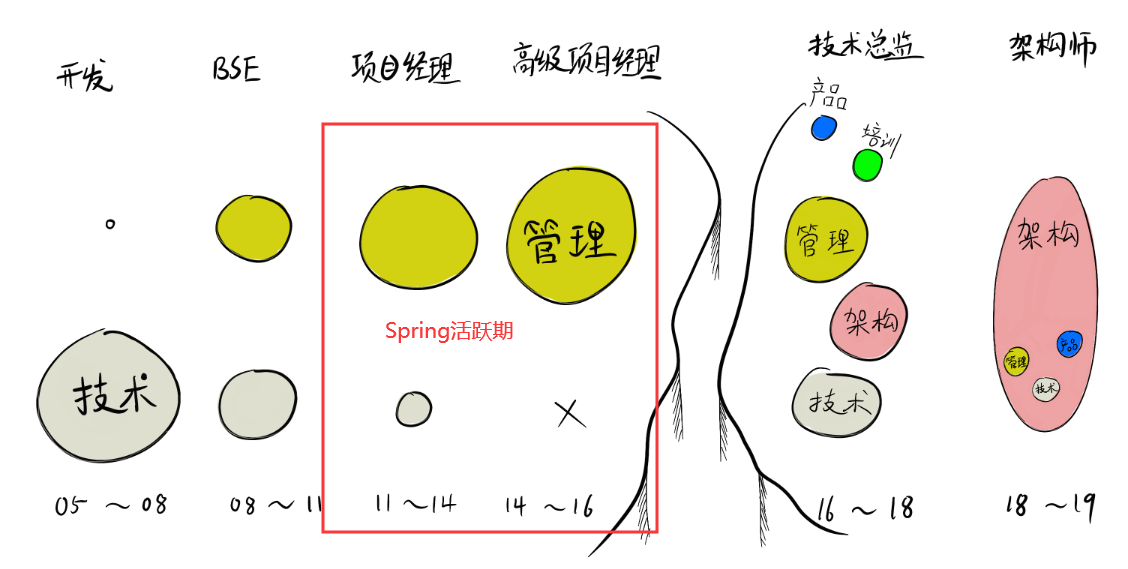
由于早年在管理领域耕耘了一段时间,完美错过了Spring的活跃期,
多少对这个经典的技术带有一种遗憾的心态在里面的,
从下面的我的生涯手绘图中大概可以看出来我的经历。
最近由于新介入到了工业数字化领域,工作也专注于业务应用,
不怎么搞平台了,平台更多的是采取与友商战略合作的方式,
也有机会重新认识并学习一下这个被完美错过的经典技术。
以下是本次的随记。
一、本次的代码地址
https://github.com/quchunhui/demo-macket/tree/master/springboot
二、一个简单的需求场景
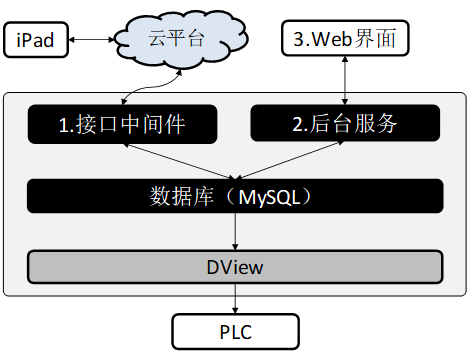
1) 从云平台按照一定频率拉取数据(每次间隔5秒)。
2) 将待获取的数据保存至本地数据库(MySQL)。
3)提供可视化web页面供查看流转数据状态。
4) 由DView工业软件从数据库中拉取数据(每次间隔5秒)。
5) 按照一定数量间隔向PLC下发加工数据(每次5个)。
其中,红色字体部分,为本次随记的范围。
三、学习书籍
我本在在正式开始学习及开发之前,通过书籍和付费视频对Spring boot进行了简单扫盲
学习的书籍为:《Spring 5企业级开发实战》
学习的收费视频为:极客时间《Spring全家桶》
书籍可以采用快速阅读的方式进行框架性学习
视频可以采用2倍速,按照需要先挑选部分模块学习
四、学习笔记
===初始化工程===
可以通过这个地址初始化工程
也可以通过IDEA的Spring initializr来进行初始设计。
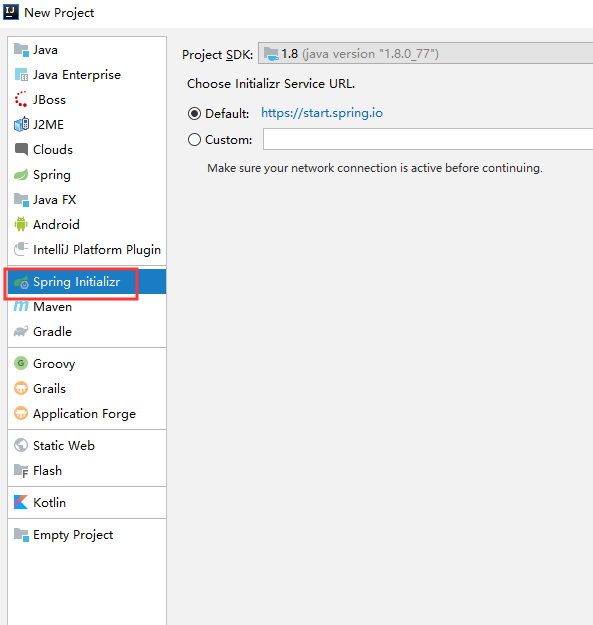
可以选择一下组件:
Developer Tools
→Lombok
→Spring Configuration Processor
Web
→Spring Web
SQL
→Spring Boot JPA
→MySQL Driver
Ops
→Spring Boot Actuator
===spring boot actuator===
用于健康检查的模块,可以考虑引入进来。
===lombok===
Lombok想要解决了的是在我们实体Bean中大量的Getter/Setter方法,以及toString,hashCode等可能不会用到,
在使用Lombok之后,将由其来自动帮你实现代码生成,注意,其是 在运行过程中,帮你自动生成的 。就是说,将极大减少你的代码总量。
===JDBC与JPA区别===
1.定义
JDBC提供一种接口,它是由各种数据库厂商提供类和接口组成的数据库驱动,为多种数据库提供统一访问。我们使用数据库时只需要调用JDBC接口就行了。
JDBC的用途:与数据库建立连接、发送操作数据库的语句并处理结果。
JPA是Java持久层API。它是对java应用程序访问ORM(对象关系映射)框架的规范。为了我们能用相同的方法使用各种ORM框架。
JPA用途:简化现有Java EE和Java SE应用开发工作;整合ORM技术。
2.不同点:
1)使用的sql语言不同:
JDBC使用的是基于关系型数据库的标准SQL语言;
JPA通过面向对象而非面向数据库的查询语言查询数据,避免程序的SQL语句紧密耦合。
2)操作的对象不同:
JDBC操作的是数据,将数据通过SQL语句直接传送到数据库中执行:
JPA操作的是持久化对象,由底层持久化对象的数据更新到数据库中。
3)数据状态不同:
JDBC操作的数据是“瞬时”的,变量的值无法与数据库中的值保持一致;
JPA操作的数据时可持久的,即持久化对象的数据属性的值是可以跟数据库中的值保持一致的。
===mvn package报错===
错误日志
Failed to configure a DataSource: 'url' attribute is not specified and no embedded datasource could be configured.
问题原因:
Mybatis没有找到合适的加载类,其实是大部分spring - datasource - url没有加载成功,
解决办法:
在application.propertier中增加如下代码之后,编译通过。
spring.datasource.url=jdbc:mysql://localhost:3306/read_data?useUnicode=true&characterEncoding=UTF-8&useSSL=false

spring.datasource.username: root

spring.datasource.password: 123456

spring.datasource.driver-class-name: com.mysql.jdbc.Driver
参考博客:
https://www.cnblogs.com/wuxiang12580/archive/2019/01/25/10319914.html
===运行报错===
错误日志
com.mysql.cj.jdbc.exceptions.CommunicationsException: Communications link failure
问题原因:
数据库连接相关的配置不正确,连接不上数据库
解决办法:
application.propertier中的数据库连接信息修改为正确的即可。修改后如下:
spring.datasource.url=jdbc:mysql://localhost:3306/visual?useUnicode=true&characterEncoding=UTF-8&useSSL=false

spring.datasource.username: root

spring.datasource.password: 123456

spring.datasource.driver-class-name: com.mysql.jdbc.Driver
===@Builder注解===
在出现lombok之后,对象的创建工作更提供Builder方法,
它提供在设计数据实体时,对外保持private setter,而对属性的赋值采用Builder的方式,
这种方式最优雅,也更符合封装的原则,不对外公开属性的写操作!
@Builder声明实体,表示可以进行Builder方式初始化,
@Value注解,表示只公开getter,对所有属性的setter都封闭,即private修饰,所以它不能和@Builder一起使用
参考博客:
https://www.cnblogs.com/lori/p/9024933.html
===Builder注解没有builder方法===
解决办法:
在IDEA中下载lombok插件解决。vscode一样。
参考博客:
https://blog.csdn.net/Butterfly_resting/article/details/101377756
===Lombok中的@Data注解===
@Data:该注解相当于同时加上以下注解@Setter @Getter,@ToString,@EqualsAndHashCode
@Getter:生成getter方法
@Setter:生成setter方法
@AllArgsConstructor:全参构造
@NoArgsContructor:无参构造
===JdbcTemplate与NamedParameterJdbcTemplate===
SimpleJdbcTemplate加入了Java5的特性支持,例如可变参数、自动拆包封包、泛型等支持。
JdbcTemplate,已经基本能看到相对于JDBC比较强大的能力,
但是它有一个问题很不方便,就是使用参数的占位符时,必须得按照顺序来写参数,如果顺序不对,则操作失败,
NamedParameterJdbcTemplate可以用来解决这个问题,它提供了一个方式,可以通过参数名来映射参数而不是传统的"?"
可以使用SqlParameterSourceUtils.createBatch()方法,将list里的东西变成一个batch的值
List<Foo> list = new ArrayList<>();

list.add(Foo.builder().id(100L).bar("b-100").build());

list.add(Foo.builder().id(101L).bar("b-101").build());

namedParameterJdbcTemplate.batchUpdate("INSERT INTO FOO (ID, BAR) VALUES (:id, :bar)",

SqlParameterSourceUtils.createBatch(list));
===spring boot的定时任务(Scheduled)===
@Scheduled中的参数说明
@Scheduled(fixedRate=2000):上一次开始执行时间点后2秒再次执行;
Scheduled(fixedDelay=2000):上一次执行完毕时间点后2秒再次执行;
@Scheduled(initialDelay=1000, fixedDelay=2000):第一次延迟1秒执行,然后在上一次执行完毕时间点后2秒再次执行;
@Scheduled(cron="* * * * * ?"):按cron规则执行。
参考博客:
https://www.cnblogs.com/mmzs/p/10161936.html
===Spring boot Scheduled没有被定时执行===
解决办法:
@ComponentScan(basePackages = {"com.xxx"})
这是spring扫描路径,Test 是否在 com.xxx 包下面
@ComponentScan做的事情就是告诉Spring从哪里找到bean
@Component 和 @ComponentScan的使用目的不一样
@Component注解,表明当需要创建类时,这个被注解的类是一个候选类。就像是举手。
@ComponentScan 用于扫描指定包下的类。就像看都有哪些举手了
参考博客:
https://blog.csdn.net/Lamb_IT/article/details/80918704
===JPA的一些注解===
主体
@Entity
@MappedSuperclass
@Table(name)
主键
@Id
@GeneratedValue(strategy, generator)
@SuquenceGenerator(name, sequenceName)
@GeneratedValue注解的strategy属性提供四种值:
-AUTO主键由程序控制, 是默认选项 ,不设置就是这个
-IDENTITY 主键由数据库生成, 采用数据库自增长, Oracle不支持这种方式
-SEQUENCE 通过数据库的序列产生主键, MYSQL 不支持
-Table 提供特定的数据库产生主键, 该方式更有利于数据库的移植
映射
@Column(name, nullable, length, insertable, updatable)
@JoinTable(name)
@JoinColumn(name)
关系
@OneToOne
@OneToMany
@ManyToOne
@ManyToMany
@OrderBy
===几种注解的关系===
@Repository、@Service、@Controller 和 @Component 将类标识为Bean
@Repository注解便属于最先引入的一批,它用于将数据访问层 (DAO 层 ) 的类标识为 Spring Bean
@Component 是一个泛化的概念,仅仅表示一个组件 (Bean) ,可以作用在任何层次。
@Service 通常作用在业务层,但是目前该功能与 @Component 相同。
@Constroller 通常作用在控制层,但是目前该功能与 @Component 相同。
通过在类上使用 @Repository、@Component、@Service 和 @Constroller 注解,
Spring会自动创建相应的 BeanDefinition 对象,并注册到 ApplicationContext 中。
这些类就成了Spring受管组件。
这三个注解除了作用于不同软件层次的类,其使用方式与 @Repository 是完全相同的。
===@GeneratedValue===
在JPA中
@GeneratedValue注解存在的意义主要就是为一个实体生成一个唯一标识的主键(JPA要求每一个实体Entity,必须有且只有一个主键)
@GeneratedValue提供了主键的生成策略。
@GeneratedValue注解有两个属性,分别是strategy和generator
generator属性的值是一个字符串,默认为"",其声明了主键生成器的名称(对应于同名的主键生成器@SequenceGenerator和@TableGenerator)
PA为开发人员提供了四种主键生成策略,其被定义在枚举类GenerationType中,包括
GenerationType.TABLE:
GenerationType.SEQUENCE:
GenerationType.IDENTITY:
GenerationType.AUTO:
参考博客:
https://blog.csdn.net/u012493207/article/details/50846616
===@Id 和 @GeneratedValue 注解===
@Id 标注用于声明一个实体类的属性映射为数据库的主键列。
该属性通常置于属性声明语句之前,可与声明语句同行,也可写在单独行上。
参考博客:
https://blog.csdn.net/Jae_Wang/article/details/80533137
===@Query===
@Query(value=" 这里就是查询语句")
@Query支持hql和原生sql两种方式,默认是hql,hql就是语句中用的是实体名字和实体属性,原生sql用的表名字和表字段,
hql方式不支持select * 要想查询全部字段可以用select 实体名 这里省略了value,参数使用了占位置符 ?1代表第一个参数?2代表第二个
@Param 代替参数占位符,hql或者sql里就用:firstname替换方法里的参数顺序可以打乱
如果是更新或者删除操作,方法上面要加@Modifying默认开启的事务只是可读的,更新操作加入@Modifying就会关闭可读
原生sql方式 不能和Pageable pageable 同时使用,要用自己的limit实现分页,原生的方式就和sql语法完全一样,使用的表名字,表字段
@Data 属于lombok注解,与jpa无关,自动生成getter/setter/equals/hashcode/tostring等方法
@Entity, @Table jpa注解,表示这个类与db的表关联,具体匹配的是表 money
@Id @GeneratedValue 作用与自增主键
@Column表明这个属性与表中的某列对应
@CreateDate根据当前时间来生成默认的时间戳
参考博客:
https://blog.csdn.net/qq_27886997/article/details/82982936
===启动报错===
Field processedDataDao in rexel.controller.RexelMiddlewareController required a bean of type 'rexel.dao.ProcessedDataDao' that could not be found.

The injection point has the following annotations:

- @org.springframework.beans.factory.annotation.Autowired(required=true)
问题原因:
包扫描路径不正确
@ComponentScan("rexel")
===启动报错===
Composite-id class must implement Serializable: rexel.entity.DViewVarNameDic
如果该实体类对应的表只有一个主键,即图中的id,把linkName上面的@Id注解删除即可,重新启动就不会报错了。
如果该实体类对应的表确实使用的两个字段(联合主键),则要求该实体类必须可序列化,该类要实现 Serializable 接口,并添加如下代码:
private static final long serialVersionUID = 1L;

public class DViewVarNameDic implements Serializable {
参考博客:
http://www.mamicode.com/info-detail-2681892.html
===启动报错===
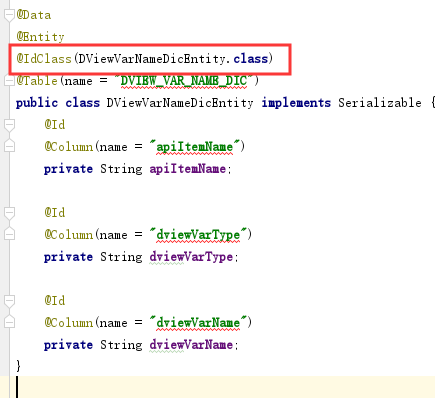
Invocation of init method failed; nested exception is java.lang.IllegalArgumentException: This class [class rexel.entity.DViewVarNameDicEntity] does not define an IdClass
解决办法:
在Entity类前面加上@IdClass()
===@Configuration和@Bean===
@Configuration底层是含有@Component ,所以@Configuration 具有和 @Component 的作用。
@Configuration可理解为用spring的时候xml里面的<beans>标签。
@Configuration注解可以达到在Spring中使用xml配置文件的作用。
@Configuration标注在类上,相当于把该类作为spring的xml配置文件中的<beans>,作用为:配置spring容器(应用上下文)
参考博客:
https://blog.csdn.net/qq_36472252/article/details/86623630
===RestRemplate样例程序运行报错===
Caused by: org.springframework.web.client.RestClientException: Could not extract response: no suitable HttpMessageConverter found for response type [class rexel.webservice.bean.ProcessedDataBean] and content type [text/html;charset=utf-8]
按照这个网址可以解决
https://www.jianshu.com/p/95bf08696cd7
然后再次运行,又会提示其他错误
Caused by: org.springframework.http.converter.HttpMessageNotReadableException: JSON parse error: Unrecognized token 'H24': was expecting (JSON String, Number, Array, Object or token 'null', 'true' or 'false'); nested exception is com.fasterxml.jackson.core.JsonParseException: Unrecognized token 'H24': was expecting (JSON String, Number, Array, Object or token 'null', 'true' or 'false')

at [Source: (PushbackInputStream); line: 6, column: 20]
检查之后,发现是我在postman里定义的json格式不正确引起的。
Shit,多少有些2B了,暂时放过自己一次。
===增加了事务注解,但是无法回滚===
我这里发生的原因是用@Transactional(rollbackFor = Exception.class)标注的方法没有是public
参考博客:
https://blog.csdn.net/zdyueguanyun/article/details/80236401
===读取application.properties文件的几种方法===
第一种方式:使用@ConfigurationProperties(prefix = "com.zyd")注解在class头
第二种方式:使用@Value("${propertyName}")注解在变量上
第三种方式:使用Environment evn; env.getProperty("com.zyd.type2")
第四种方式:使用Properties properties = PropertiesLoaderUtils.loadAllProperties(propertyFileName);
参考博客:
https://www.cnblogs.com/FraserYu/p/11261916.html
===Http报头Accept与Content-Type的区别===
Http报头分为通用报头,请求报头,响应报头和实体报头。
1.Accept属于请求头, Content-Type属于实体头。
Http报头分为通用报头,请求报头,响应报头和实体报头。
请求方的http报头结构:通用报头|请求报头|实体报头
响应方的http报头结构:通用报头|响应报头|实体报头
2.Accept代表发送端(客户端)希望接受的数据类型。
比如:Accept:text/xml;
代表客户端希望接受的数据类型是xml类型
3.Content-Type代表发送端(客户端|服务器)发送的实体数据的数据类型。
比如:Content-Type:text/html;
代表发送端发送的数据格式是html。
二者合起来,
Accept:text/xml;
Content-Type:text/html
即代表希望接受的数据类型是xml格式,本次请求发送的数据的数据格式是html。
===运行报错===
Caused by: org.hibernate.AnnotationException: No identifier specified for entity: rexel.entity.AccessTokenEntity

at org.hibernate.cfg.InheritanceState.determineDefaultAccessType(InheritanceState.java:266) ~[hibernate-core-5.4.8.Final.jar:5.4.8.Final]

at org.hibernate.cfg.InheritanceState.getElementsToProcess(InheritanceState.java:211) ~[hibernate-core-5.4.8.Final.jar:5.4.8.Final]

at org.hibernate.cfg.AnnotationBinder.bindClass(AnnotationBinder.java:781) ~[hibernate-core-5.4.8.Final.jar:5.4.8.Final]

at org.hibernate.boot.model.source.internal.annotations.AnnotationMetadataSourceProcessorImpl.processEntityHierarchies(AnnotationMetadataSourceProcessorImpl.java:254) ~[hibernate-core-5.4.8.Final.jar:5.4.8.Final]

at org.hibernate.boot.model.process.spi.MetadataBuildingProcess$1.processEntityHierarchies(MetadataBuildingProcess.java:230) ~[hibernate-core-5.4.8.Final.jar:5.4.8.Final]

at org.hibernate.boot.model.process.spi.MetadataBuildingProcess.complete(MetadataBuildingProcess.java:273) ~[hibernate-core-5.4.8.Final.jar:5.4.8.Final]

at org.hibernate.jpa.boot.internal.EntityManagerFactoryBuilderImpl.metadata(EntityManagerFactoryBuilderImpl.java:1214) ~[hibernate-core-5.4.8.Final.jar:5.4.8.Final]

at org.hibernate.jpa.boot.internal.EntityManagerFactoryBuilderImpl.build(EntityManagerFactoryBuilderImpl.java:1245) ~[hibernate-core-5.4.8.Final.jar:5.4.8.Final]
问题原因:
当使用idclass时,实体中须有和idclass类中属性个数的主键,并且一致
参考博客:
https://blog.csdn.net/Mosqiote/article/details/89227931
===Springboot的entity,dao,controller,service层级理解===
1.Dao层:持久层,主要与数据库交互
DAO层首先会创建Dao接口,接着就可以在配置文件中定义该接口的实现类;
接着就可以在模块中调用Dao的接口进行数据业务的处理,而不用关注此接口的具体实现类是哪一个类,
Dao层的数据源和数据库连接的参数都是在配置文件中进行配置的。
2.Entity层:实体层,数据库在项目中的类
主要用于定义与数据库对象应的属性,提供get/set方法,tostring方法,有参无参构造函数。
3.Service层:业务层 控制业务
业务模块的逻辑应用设计,和DAO层一样都是先设计接口,再创建要实现的类,然后在配置文件中进行配置其实现的关联。
接下来就可以在service层调用接口进行业务逻辑应用的处理。
好处:封装Service层的业务逻辑有利于业务逻辑的独立性和重复利用性。
4.Controller层:控制层 控制业务逻辑
具体的业务模块流程的控制,controller层主要调用Service层里面的接口控制具体的业务流程,控制的配置也要在配置文件中进行。
Controller和Service的区别是:Controller负责具体的业务模块流程的控制;Service层负责业务模块的逻辑应用设计
5、View层
此层与控制层结合比较紧密,需要二者结合起来协同工发。View层主要负责前台jsp页面的表示
总结:
Controller层调用了Service层的方法,Service层调用Dao层的方法,其中调用的参数是使用Entity层进行传递的。
参考博客:
https://www.cnblogs.com/almm/p/10802419.html
===请求报错===
Invalid character found in method name. HTTP method names must be tokens
解决办法:
请求由https修改为http之后解决。
===后端如何将数据返回给前端?===
@RequestBody:
用于读取Http请求的body部分数据——就是我们的请求数据。比如json或者xml。然后把数据绑定到 controller中方法的参数上
@ReponseBody:
放在controller层的方法上,将Controller的方法返回的对象,通过适当的HttpMessageConverter转换为指定格式后,写入到Response对象的body数据区。
使用时机: 当我们想让页面知道我们返回的数据不是按照html标签的页面来解析,而是其他某种格式的数据解析时(如json、xml等)使用。
===运行报错===
javax.persistence.TransactionRequiredException: Executing an update/delete query

	at org.hibernate.internal.AbstractSharedSessionContract.checkTransactionNeededForUpdateOperation(AbstractSharedSessionContract.java:409) ~[hibernate-core-5.4.8.Final.jar:5.4.8.Final]

	at org.hibernate.query.internal.AbstractProducedQuery.executeUpdate(AbstractProducedQuery.java:1601) ~[hibernate-core-5.4.8.Final.jar:5.4.8.Final]
问题原因
在@Query注解中编写JPQL语句, 但必须使用@Modifying进行修饰。以通知SpringData,这是一个UPDATE或DELETE操作
其中,nativeQuery = true 就代表使用原始 sql
修改之后代码如下:
@Modifying

@Query(nativeQuery = true, value = "insert into COLLECT_SWITCH(collect) values (:#{#entity.collect})")

public void insert(@Param("entity") CollectSwitchEntity entity);
===运行错误===
org.springframework.web.client.ResourceAccessException: I/O error on GET request for "https://3dd39ca6-40bd-41ae-a045-ff80d0e6aca8.mock.pstmn.io/openapi/ipm/wait/process/query": Read timed out; nested exception is java.net.SocketTimeoutException: Read timed out
解决办法:
增加对RestRemplate连接时间的配置。
解决后代码
@Configuration

public class RestTemplateConfig {

    @Bean

    public RestTemplate restTemplate(ClientHttpRequestFactory factory){

        return new RestTemplate(factory);

    }

    @Bean

    public ClientHttpRequestFactory simpleClientHttpRequestFactory() {

        SimpleClientHttpRequestFactory factory = new SimpleClientHttpRequestFactory();

        factory.setConnectTimeout(15000);

        factory.setReadTimeout(15000);

        return factory;

    }

}
===mysql传入时间正确,但是插入到数据库时间错误,相差几个小时===
解决办法:
直接在数据库连接地址后面添加引号内的内容“&serverTimezone=GMT%2B8”
spring.datasource.url=jdbc:mysql://192.168.29.100:3306/rexel_hzzg?useUnicode=true&characterEncoding=UTF-8&useSSL=false&serverTimezone=GMT%2B8
===saveAll为啥每次都要查询数据?===
原因请参考博客:
https://www.cnblogs.com/blog5277/p/10661096.html
解决办法:
自己写插入的语句,不适用JPA自带的saveAll方法。
====运行错误===
错误日志:
2019-11-22 16:20:13.862 ERROR 98860 --- [   scheduling-1] o.s.s.s.TaskUtils$LoggingErrorHandler    : Unexpected error occurred in scheduled task

org.springframework.web.client.HttpClientErrorException$NotFound: 404 Not Found

	at org.springframework.web.client.HttpClientErrorException.create(HttpClientErrorException.java:85) ~[spring-web-5.2.1.RELEASE.jar:5.2.1.RELEASE]

	at org.springframework.web.client.DefaultResponseErrorHandler.handleError(DefaultResponseErrorHandler.java:123) ~[spring-web-5.2.1.RELEASE.jar:5.2.1.RELEASE]

	at org.springframework.web.client.DefaultResponseErrorHandler.handleError(DefaultResponseErrorHandler.java:102) ~[spring-web-5.2.1.RELEASE.jar:5.2.1.RELEASE]
原因:
已经发布的系统,其中有一个quartz的定时器运行了一段时间后突然挂掉了。
并报错:Unexpected error occurred in scheduled task.
调查发现因为:定时器的动作是调用一个同步线程,而某一次该线程运行时间过长即锁未释放,而第二次定时器动作又并发执行了,所以就导致了冲突。
解决办法:
1、增加config配置
2、----------------------------不要使用https请求。。。。。。。。。。。。。
补充:
在博文最开始共享的代码中,我已经删除了ScheduleConfig的配置,代码中已经找不到这个配置了。
===mysql在台式机上安装报错(Windows10操作系统)===
mysql启动服务报错
Found option without preceding group in config file
问题原因:
mysql里面的配置文件my.ini文件格式是utf-8。
只要把my.ini文件格式改为ANSI就可以了。
===程序运行了一段时间之后,报错===
Hibernate: select collectswi0_.collect as collect1_1_ from COLLECT_SWITCH collectswi0_

Hibernate: select accesstoke0_.token as token1_0_, accesstoke0_.insertTime as insertTi2_0_ from ACCESS_TOKEN accesstoke0_ order by accesstoke0_.insertTime desc

2019-11-25 08:20:49.772 ERROR 15728 --- [pool-1-thread-2] o.s.s.s.TaskUtils$LoggingErrorHandler    : Unexpected error occurred in scheduled task

org.springframework.web.client.HttpClientErrorException$TooManyRequests: 429 Too Many Requests

        at org.springframework.web.client.HttpClientErrorException.create(HttpClientErrorException.java:97) ~[spring-web-5.2.1.RELEASE.jar!/:5.2.1.RELEASE]

        at org.springframework.web.client.DefaultResponseErrorHandler.handleError(DefaultResponseErrorHandler.java:123) ~[spring-web-5.2.1.RELEASE.jar!/:5.2.1.RELEASE]

        at org.springframework.web.client.DefaultResponseErrorHandler.handleError(DefaultResponseErrorHandler.java:102) ~[spring-web-5.2.1.RELEASE.jar!/:5.2.1.RELEASE]

        at org.springframework.web.client.ResponseErrorHandler.handleError(ResponseErrorHandler.java:63) ~[spring-web-5.2.1.RELEASE.jar!/:5.2.1.RELEASE]

        at org.springframework.web.client.RestTemplate.handleResponse(RestTemplate.java:785) ~[spring-web-5.2.1.RELEASE.jar!/:5.2.1.RELEASE]

        at org.springframework.web.client.RestTemplate.doExecute(RestTemplate.java:743) ~[spring-web-5.2.1.RELEASE.jar!/:5.2.1.RELEASE]

        at org.springframework.web.client.RestTemplate.execute(RestTemplate.java:717) ~[spring-web-5.2.1.RELEASE.jar!/:5.2.1.RELEASE]

        at org.springframework.web.client.RestTemplate.exchange(RestTemplate.java:605) ~[spring-web-5.2.1.RELEASE.jar!/:5.2.1.RELEASE]

        at rexel.schedule.MiddleWareSchedule.exchange(MiddleWareSchedule.java:318) ~[classes!/:0.0.1]

        at rexel.schedule.MiddleWareSchedule.getProcessData(MiddleWareSchedule.java:218) ~[classes!/:0.0.1]

        at rexel.schedule.MiddleWareSchedule.scheduleProcess(MiddleWareSchedule.java:111) ~[classes!/:0.0.1]

        at rexel.schedule.MiddleWareSchedule$$FastClassBySpringCGLIB$$3847585e.invoke(<generated>) ~[classes!/:0.0.1]

        at org.springframework.cglib.proxy.MethodProxy.invoke(MethodProxy.java:218) ~[spring-core-5.2.1.RELEASE.jar!/:5.2.1.RELEASE]

        at org.springframework.aop.framework.CglibAopProxy$CglibMethodInvocation.invokeJoinpoint(CglibAopProxy.java:769) ~[spring-aop-5.2.1.RELEASE.jar!/:5.2.1.RELEASE]

        at org.springframework.aop.framework.ReflectiveMethodInvocation.proceed(ReflectiveMethodInvocation.java:163) ~[spring-aop-5.2.1.RELEASE.jar!/:5.2.1.RELEASE]

        at org.springframework.aop.framework.CglibAopProxy$CglibMethodInvocation.proceed(CglibAopProxy.java:747) ~[spring-aop-5.2.1.RELEASE.jar!/:5.2.1.RELEASE]

        at org.springframework.transaction.interceptor.TransactionAspectSupport.invokeWithinTransaction(TransactionAspectSupport.java:366) ~[spring-tx-5.2.1.RELEASE.jar!/:5.2.1.RELEASE]

        at org.springframework.transaction.interceptor.TransactionInterceptor.invoke(TransactionInterceptor.java:99) ~[spring-tx-5.2.1.RELEASE.jar!/:5.2.1.RELEASE]

        at org.springframework.aop.framework.ReflectiveMethodInvocation.proceed(ReflectiveMethodInvocation.java:186) ~[spring-aop-5.2.1.RELEASE.jar!/:5.2.1.RELEASE]

        at org.springframework.aop.framework.CglibAopProxy$CglibMethodInvocation.proceed(CglibAopProxy.java:747) ~[spring-aop-5.2.1.RELEASE.jar!/:5.2.1.RELEASE]

        at org.springframework.aop.framework.CglibAopProxy$DynamicAdvisedInterceptor.intercept(CglibAopProxy.java:689) ~[spring-aop-5.2.1.RELEASE.jar!/:5.2.1.RELEASE]

        at rexel.schedule.MiddleWareSchedule$$EnhancerBySpringCGLIB$$3bdb64f9.scheduleProcess(<generated>) ~[classes!/:0.0.1]

        at sun.reflect.GeneratedMethodAccessor96.invoke(Unknown Source) ~[na:na]

        at sun.reflect.DelegatingMethodAccessorImpl.invoke(Unknown Source) ~[na:1.8.0_77]

        at java.lang.reflect.Method.invoke(Unknown Source) ~[na:1.8.0_77]

        at org.springframework.scheduling.support.ScheduledMethodRunnable.run(ScheduledMethodRunnable.java:84) ~[spring-context-5.2.1.RELEASE.jar!/:5.2.1.RELEASE]

        at org.springframework.scheduling.support.DelegatingErrorHandlingRunnable.run(DelegatingErrorHandlingRunnable.java:54) ~[spring-context-5.2.1.RELEASE.jar!/:5.2.1.RELEASE]

        at java.util.concurrent.Executors$RunnableAdapter.call(Unknown Source) [na:1.8.0_77]

        at java.util.concurrent.FutureTask.runAndReset(Unknown Source) [na:1.8.0_77]

        at java.util.concurrent.ScheduledThreadPoolExecutor$ScheduledFutureTask.access$301(Unknown Source) [na:1.8.0_77]

        at java.util.concurrent.ScheduledThreadPoolExecutor$ScheduledFutureTask.run(Unknown Source) [na:1.8.0_77]

        at java.util.concurrent.ThreadPoolExecutor.runWorker(Unknown Source) [na:1.8.0_77]

        at java.util.concurrent.ThreadPoolExecutor$Worker.run(Unknown Source) [na:1.8.0_77]

        at java.lang.Thread.run(Unknown Source) [na:1.8.0_77]
原因是potstman已经达到了模拟请求的极限,需要升级到专业版
You’ve reached your limit for mock requests. Upgrade to Pro for more.
===cron表达式===
cron一共有7位,但是最后一位是年,可以留空,所以我们一般可以只写6位:
第一位,表示秒,取值0-59
第二位,表示分,取值0-59
第三位,表示小时,取值0-23
第四位,日期天/日,取值1-31
第五位,日期月份,取值1-12
第六位,星期,取值1-7,星期一,星期二…注意:1表示星期天,2表示星期一。
第7为,年份,可以留空,取值1970-2099
样例:
每隔5秒执行一次:*/5 * * * * ?

每隔1分钟执行一次:0 */1 * * * ?

每天凌晨1点执行一次:0 0 1 * * ?

每天23点执行一次:0 0 23 * * ?

每月最后一天23点执行一次:0 0 23 L * ?

每月1号凌晨1点执行一次:0 0 1 1 * ?

每天3点5分执行:0 5 3 * * ?

每天3点5分执行,与上面作用相同:0 5 3 ? * *

每天3点的 5分,15分,25分,35分,45分,55分这几个时间点执行:0 5/10 3 * * ?

每周星期天,3点10分 执行,注:1表示星期天:0 10 3 ? * 1

每个月的第三个星期,星期天 执行,注:#号只能出现在星期的位置:0 10 3 ? * 1#3

在26分、29分、33分执行一次:0 26,29,33 * * * ?

每天的0点、13点、18点、21点都执行一次:0 0 0,13,18,21 * * ?
===@Scope("prototype")===
spring中bean的scope属性,有如下5种类型:
1)singleton 表示在spring容器中的单例,通过spring容器获得该bean时总是返回唯一的实例
2)prototype表示每次获得bean都会生成一个新的对象
3)request表示在一次http请求内有效(只适用于web应用)
4)session表示在一个用户会话内有效(只适用于web应用)
5)globalSession表示在全局会话内有效(只适用于web应用)
在多数情况,我们只会使用singleton和prototype两种scope,如果在spring配置文件内未指定scope属性,默认为singleton。
===接口Service有多个实现类===
//接口.java

public interface DeService {

}

//接口实现类1.java

@Service("ud")

public class DeServiceImplUD implements DeService{

}

//接口实现类2.java

@Service("ug")

public class DeServiceImplUG implements DeService{

}

//调用类.java

@Autowired

@Qualifier("ug")

private DeService ds;
===all elements are null===
使用spring jpa查询书库的时候,数据库中明明有数据,查询出来的结果却显示all elements are null。
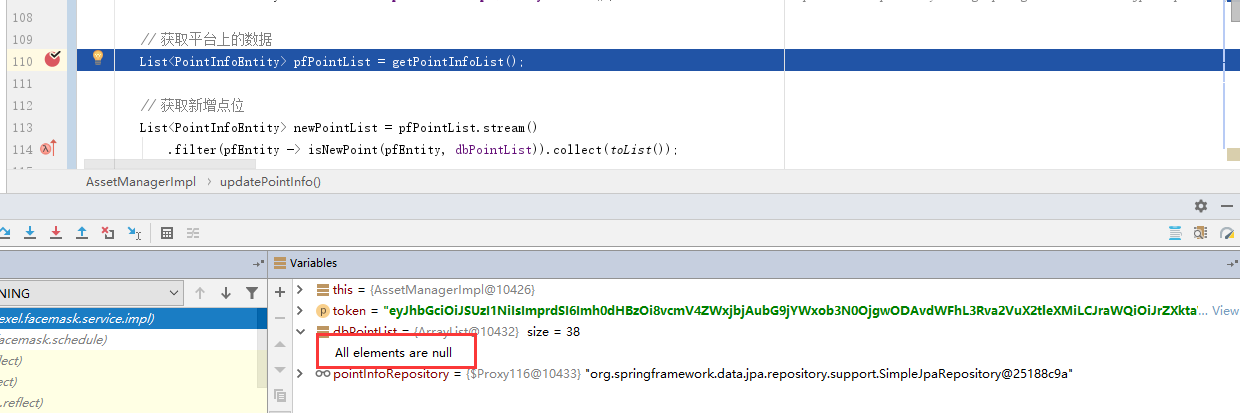
可以看出,实际上List中有38条数据,只不过都没能正确转换为Entity。
后来调查原因是因为我用的PostgreSQL中数据有的字段为null,所以没能转换成功。
Spring Boot学习随记的更多相关文章
- Spring Boot 学习随记
微架构的思想在各大互联网公司越来越普及,特此记录Spring Boot的一些细节问题! 网上spring-boot的教程一堆一堆,就没有必要再详细记录了 1:建议通过Idea 来创建spring-bo ...
- Spring Boot学习大全(入门)
Spring Boot学习(入门) 1.了解Spring boot Spring boot的官网(https://spring.io),我们需要的一些jar包,配置文件都可以在下载.添置书签后,我自己 ...
- Spring Boot学习记录(二)--thymeleaf模板 - CSDN博客
==他的博客应该不错,没有细看 Spring Boot学习记录(二)--thymeleaf模板 - CSDN博客 http://blog.csdn.net/u012706811/article/det ...
- Spring boot学习1 构建微服务:Spring boot 入门篇
Spring boot学习1 构建微服务:Spring boot 入门篇 Spring Boot是由Pivotal团队提供的全新框架,其设计目的是用来简化新Spring应用的初始搭建以及开发过程.该框 ...
- spring boot 学习资料
spring boot 学习资料: 学习资料 网址 Spring Boot Cookbook-极客学院 http://wiki.jikexueyuan.com/project/spring-boot- ...
- Spring Boot学习笔记2——基本使用之最佳实践[z]
前言 在上一篇文章Spring Boot 学习笔记1——初体验之3分钟启动你的Web应用已经对Spring Boot的基本体系与基本使用进行了学习,本文主要目的是更加进一步的来说明对于Spring B ...
- spring boot 学习(十四)SpringBoot+Redis+SpringSession缓存之实战
SpringBoot + Redis +SpringSession 缓存之实战 前言 前几天,从师兄那儿了解到EhCache是进程内的缓存框架,虽然它已经提供了集群环境下的缓存同步策略,这种同步仍然需 ...
- 转载:spring boot学习
Spring Boot学习 Spring Boot是为了简化Spring应用的创建.运行.调试.部署等而出现的,使用它可以做到专注于Spring应用的开发,而无需过多关注XML的配置. 简单来说,它提 ...
- Spring Boot学习路线
Spring Boot 学习路线,本文计划根据作者近几年的工作.学习经验,来分析和制定一个学习使用 Spring Boot技术的步骤路线图. SpringBoot是伴随着Spring4.0诞生的: S ...
随机推荐
- vue入门|ElementUI使用指南
vue入门|ElementUI使用指南 1.开发前务必熟悉的文档: vue.js2.0中文,项目所使用的js框架 vue-router,vue.js配套路由 vuex 状态管理 Element UI框 ...
- Flutter -------- dio网络请求
dio是Flutter中文网开源的一个强大的Dart Http请求库,支持Restful API.FormData.拦截器.请求取消.Cookie管理.文件上传/下载.超时等... 1.添加依赖# d ...
- 移动端IM系统的协议选型:UDP还是TCP?(转)
源: 移动端IM系统的协议选型:UDP还是TCP?
- Opencv图片明暗处理
Opencv图片明暗处理 #include <iostream> #include <opencv2/opencv.hpp> using namespace std; usin ...
- visual studio code 调试ROS的插件
ctrl+p搜索: ext install ros https://marketplace.visualstudio.com/items?itemName=ajshort.ros 进行安装 其他可以调 ...
- C# 实现生产者消费者队列 (转)
按语:按照下面文档,测试成功: https://www.cnblogs.com/samgk/p/4772806.html 开发过程中经常会碰到这样的场景:需要从一个地方获取一些数据,然后处理数据并将其 ...
- 小程序报错 thirdScriptError
thirdScriptError sdk uncaught third Error Unexpected token export SyntaxError: Unexpected token expo ...
- 原生JavaScript常用本地浏览器存储方法三(UserData IE Only)
UserData的应用范围 serData是微软为IE专门在系统中开辟的一块存储空间,所以说只支持Windows+IE的组合,实际测试在2000(IE5.5).XP(IE6.IE7),Vista(IE ...
- 微信API V3 RESTFUL
{"code":"SIGN_ERROR","message":"商户未设置加密的密钥,请登录商户平台操作!请参考http://kf ...
- Framework7 介绍
Framework7 - is a free and open source framework to develop mobile, desktop or web apps with native ...