
Remote Desktop突然不能用了 “This could be due to CredSSP encryption oracle remediation”
一段时间没有用RDP去连远程的Windows主机,某一天突然发现用不了了。
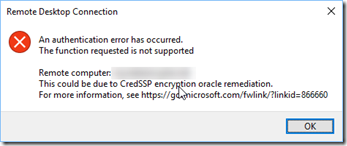
错误信息如下:
An authentication error has occurred.
The function requested is not supportedRemote computer: 10.2XX.XXX.XXX
This could be due to CredSSP encryption oracle remediation.
For more information, see https://go.microsoft.com/fwlink/?linkid=866660
查了点资料,发现这是由于安装了KB4103727(Windows 10 Version 1709) 或者KB4103718 (Windows 7),其目的是修复了一些安全方面的问题。但是,副作用就是导致了RDP不能用了。
有四个解决方案。笔者试验了第二个,修改group policy,成功的解决了这个问题。
具体步骤如下:
运行: gpedit.msc
打开 Computer Configuration -> Administrative Templates -> System -> Credentials Delegation -> Encryption Oracle Remediation

打开Encryption Oracle Remediation, 选择Enable,然后修改protection level 为Vulnerable,点Apply。
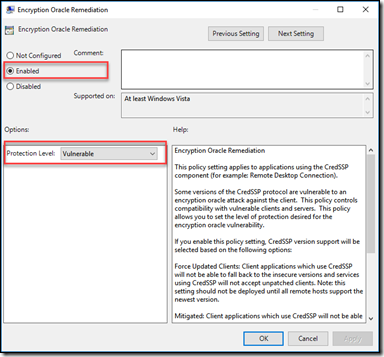
问题解决。
参考资料
==============
[Solved] RDP Authentication Error Function Requested Is Not Supported
https://www.itechtics.com/solved-authentication-error-function-requested-is-not-supported/
Remote Desktop Authentication Error Has Occurred. The function requested is not supported.
Remote Desktop突然不能用了 “This could be due to CredSSP encryption oracle remediation”的更多相关文章
- Configure Security Settings for Remote Desktop(RDP) Services Connections
catalogue . Configure Server Authentication and Encryption Levels . Configure Network Level Authenti ...
- Remote Desktop Connection Manager
通过Remote Desktop Connection Manager(RDCMan),当前最新版本是 v2.7. 通过这款软件,我们便可以轻松的管理和访问数个RDP.左边的列表中我们可以创建总的分区 ...
- Windows组件:打开MSDTC,恢复Windows TaskBar,查看windows日志,打开Remote Desktop,打开Services,资源监控
一,Win10 打开 MSDTC 1,Win+R 打开运行窗口,输入 dcomcnfg,打开组件服务窗口 2,在组件服务 catalog下找到 Distributed Transaction Coor ...
- logoff remote desktop sessions via command line tools
This trick I learned from my one of ex-college. In Windows servers, only two remote desktop session ...
- Remote Desktop Connection Manager (RDCMan)
当前最新版本是 v2.7. 通过这款软件,我们便可以轻松的管理和访问数个RDP.左边的列表中我们可以创建总的分区列表(即 RDCMan Group),该列表保存采用的是RDG扩展名,使用时通过&quo ...
- Remote Desktop File Format
转自:http://engrmosaic.uncc.edu/mosaic-anywhere/remote-desktop-file-format The new Terminal Services c ...
- Windows 2012 装 Remote Desktop Organizer 无法连接到其他远程服务器
一句话,版本太低 换Remote Desktop Organizer 1.4.5版本就ok 了
- 「2013-9-14」Change Remote Desktop Port
修改远程桌面服务(Remote Desktop Service)的端口号,有几点原因: 默认是 3389 端口,也是经常被端口嗅探器扫描的一个端口.更换端口号,一定程度上可以带来更好的安全性. 如果一 ...
- Remote Desktop Connection from Windows 7 to Ubuntu 12.04
$sudo apt-get install xrdp $cd ~ $sudo vim .xsession gnome-session --session=ubuntu-2d 在windows下进行远程 ...
随机推荐
- springmvc4 mybatis 整合 框架源码 bootstrap html5 mysql oracle sqlsever spring SSM
A 调用摄像头拍照,自定义裁剪编辑头像 [新录针对本系统的视频教程,手把手教开发一个模块,快速掌握本系统]B 集成代码生成器 [正反双向](单表.主表.明细表.树形表,开发利器)+快速构建表单; 技 ...
- 【软件工程第二次作业】个人项目:WordCountPy
一.GitHub 地址 项目 GitHub 地址为:https://github.com/bytemo/WordCountTool 二.PSP表格 PSP2.1 Personal Software P ...
- windows设置多个JDK环境
1.查看jdk版本 java -version 2.查看JAVA_HOME和PATH的变量值 echo %JAVA_HOME% set path 3.临时修改环境变量JAVA_HOME和PATH的变量 ...
- VMWare虚拟机出现问题
软件版本:VMware ESXi 5.5.0 服务器型号: Dell R720 问题经过: 某天ssh登录其中一个虚拟机,报错:kernel:BUG: soft lockup - CPU#6 stuc ...
- oracle 导入导出表
imp username/pwd@orcl file=c:\temp\exp.dmp tables=(table1, table2)#imp username/pwd@ip:1521/orcl ful ...
- linux防止恶意采集攻防战
这两天ytkah开发的一个中大型项目被人盯上了,网站打开非常慢,查看了一下cpu.内存使用情况,30%左右占用不高,网络上下行就比较大了,IO实时流量达到40MB,IO总流量更是7TB,非常大的数据量 ...
- url路由
注意: url(r'^index/', views.index) 第一个index是提交跳转的网址 (可修改) 第二个是自定义的方法 url(r'^index666/', views.ind ...
- 趣味编程:静夜思(C++17 Ranges版)
#include <iostream> #include <range/v3/all.hpp> #include <vector> #include <loc ...
- Windbg Register(寄存器)窗口的使用
寄存器是位于在 CPU 的小易失性内存单位. 许多寄存器专用于特定用途,并可用于用户模式应用程序使用的其他寄存器. 基于 x86 和基于 x64 的处理器在有可用的寄存器的不同集合. 如何打开寄存器窗 ...
- Sublime Text3 设置
主题:Spacegrey.sublime-theme 配色方案:Mariana 自动保存 参考:https://www.cnblogs.com/mzzz/p/6178341.html "sa ...