
2.Spring Cloud初相识--------Eureka服务注册与消费
前言:
1.Eureka介绍:
Spring Cloud Eureka,使用Netflix Eureka来实现服务注册与发现,它既包含了服务端组件,也包含了客户端组件,并且服务端与客户端均采用Java编写,所以Eureka主要适用于通过Java实现的分布式系统,或是与JVM兼容语言构建的系统。
2.为什么使用Eureka
假设我们要买一个商品,但是我们并不知道卖家是谁、在哪里,我们只要登录购物平台下单,平台就会负责通知卖家发货。我们不需要了解卖家的消息,就可以享受到服务。而卖家提供服务,它把服务注册到了购物平台上,我们才可以消费。
实现:
1.Eureka注册中心:cl_eureka
(1)添加依赖
<?xml version="1.0" encoding="UTF-8"?>

<project xmlns="http://maven.apache.org/POM/4.0.0" xmlns:xsi="http://www.w3.org/2001/XMLSchema-instance"

	xsi:schemaLocation="http://maven.apache.org/POM/4.0.0 http://maven.apache.org/xsd/maven-4.0.0.xsd">

	<modelVersion>4.0.0</modelVersion>

	<groupId>com.xm.cloud</groupId>

	<artifactId>cl_eureka</artifactId>

	<version>0.0.1-SNAPSHOT</version>

	<packaging>jar</packaging>

	<name>cl_eureka</name>

	<description>This is a Web about springcloud</description>

	<parent>

		<groupId>org.springframework.boot</groupId>

		<artifactId>spring-boot-starter-parent</artifactId>

		<version>2.0.6.RELEASE</version>

		<relativePath/> <!-- lookup parent from repository -->

	</parent>

	<properties>

		<project.build.sourceEncoding>UTF-8</project.build.sourceEncoding>

		<project.reporting.outputEncoding>UTF-8</project.reporting.outputEncoding>

		<java.version>1.8</java.version>

		<spring-cloud.version>Finchley.SR1</spring-cloud.version>

	</properties>

	<dependencies>

		<dependency>

			<groupId>org.springframework.cloud</groupId>

			<artifactId>spring-cloud-starter-netflix-eureka-server</artifactId>

		</dependency>

		<dependency>

			<groupId>org.springframework.boot</groupId>

			<artifactId>spring-boot-starter-test</artifactId>

			<scope>test</scope>

		</dependency>

	</dependencies>

	<dependencyManagement>

		<dependencies>

			<dependency>

				<groupId>org.springframework.cloud</groupId>

				<artifactId>spring-cloud-dependencies</artifactId>

				<version>${spring-cloud.version}</version>

				<type>pom</type>

				<scope>import</scope>

			</dependency>

		</dependencies>

	</dependencyManagement>

	<build>

		<plugins>

			<plugin>

				<groupId>org.springframework.boot</groupId>

				<artifactId>spring-boot-maven-plugin</artifactId>

			</plugin>

		</plugins>

	</build>

</project>
(2)修改配置文件
server.port=7001

eureka.instance.hostname=localhost

#拒绝向注册中心注册

eureka.client.register-with-eureka=false

#拒绝注册中心扫描

eureka.client.fetch-registry=false

eureka.client.service-url.defaultZone=http://${eureka.instance.hostname}:${server.port}/eureka/
(3)开启Eureka服务注解
package com.xm.cloud;

import org.springframework.boot.SpringApplication;

import org.springframework.boot.autoconfigure.SpringBootApplication;

import org.springframework.cloud.netflix.eureka.server.EnableEurekaServer;

@EnableEurekaServer

@SpringBootApplication

public class ClEurekaApplication {

	public static void main(String[] args) {

		SpringApplication.run(ClEurekaApplication.class, args);

	}

}
2.服务提供者:cl_hello_producer
(1)添加依赖
<?xml version="1.0" encoding="UTF-8"?>

<project xmlns="http://maven.apache.org/POM/4.0.0" xmlns:xsi="http://www.w3.org/2001/XMLSchema-instance"

	xsi:schemaLocation="http://maven.apache.org/POM/4.0.0 http://maven.apache.org/xsd/maven-4.0.0.xsd">

	<modelVersion>4.0.0</modelVersion>

	<groupId>com.xm.cloud</groupId>

	<artifactId>cl_hello_producer</artifactId>

	<version>0.0.1-SNAPSHOT</version>

	<packaging>jar</packaging>

	<name>cl_hello_producer</name>

	<description>This is a Web about springcloud</description>

	<parent>

		<groupId>org.springframework.boot</groupId>

		<artifactId>spring-boot-starter-parent</artifactId>

		<version>2.0.6.RELEASE</version>

		<relativePath/> <!-- lookup parent from repository -->

	</parent>

	<properties>

		<project.build.sourceEncoding>UTF-8</project.build.sourceEncoding>

		<project.reporting.outputEncoding>UTF-8</project.reporting.outputEncoding>

		<java.version>1.8</java.version>

		<spring-cloud.version>Finchley.SR1</spring-cloud.version>

	</properties>

	<dependencies>

		<dependency>

			<groupId>org.springframework.boot</groupId>

			<artifactId>spring-boot-starter-web</artifactId>

		</dependency>

		<dependency>

			<groupId>org.springframework.cloud</groupId>

			<artifactId>spring-cloud-starter-netflix-eureka-client</artifactId>

		</dependency>

		<dependency>

			<groupId>org.springframework.boot</groupId>

			<artifactId>spring-boot-starter-test</artifactId>

			<scope>test</scope>

		</dependency>

	</dependencies>

	<dependencyManagement>

		<dependencies>

			<dependency>

				<groupId>org.springframework.cloud</groupId>

				<artifactId>spring-cloud-dependencies</artifactId>

				<version>${spring-cloud.version}</version>

				<type>pom</type>

				<scope>import</scope>

			</dependency>

		</dependencies>

	</dependencyManagement>

	<build>

		<plugins>

			<plugin>

				<groupId>org.springframework.boot</groupId>

				<artifactId>spring-boot-maven-plugin</artifactId>

			</plugin>

		</plugins>

	</build>

</project>
(2)修改配置
server.port=8001

spring.application.name=cl-hello-producer

eureka.client.service-url.defaultZone=http://127.0.0.1:7001/eureka/
注意:spring.application.name不要包含下划线,否则消费服务时,url失效
(3)开启注解
package com.xm.cloud;

import org.springframework.boot.SpringApplication;

import org.springframework.boot.autoconfigure.SpringBootApplication;

import org.springframework.cloud.client.discovery.EnableDiscoveryClient;

@EnableDiscoveryClient

@SpringBootApplication

public class ClHelloProducerApplication {

	public static void main(String[] args) {

		SpringApplication.run(ClHelloProducerApplication.class, args);

	}

}
(4)提供服务
package com.xm.cloud.controller;

import org.springframework.web.bind.annotation.GetMapping;

import org.springframework.web.bind.annotation.RestController;

@RestController

public class HelloController {

	@GetMapping("/hello")

	public String sayHello() {

		return "Hello Spring Cloud!";

	}

}
3.服务消费者:cl_hello_consumer
(1)添加依赖
<?xml version="1.0" encoding="UTF-8"?>

<project xmlns="http://maven.apache.org/POM/4.0.0" xmlns:xsi="http://www.w3.org/2001/XMLSchema-instance"

	xsi:schemaLocation="http://maven.apache.org/POM/4.0.0 http://maven.apache.org/xsd/maven-4.0.0.xsd">

	<modelVersion>4.0.0</modelVersion>

	<groupId>com.xm.cloud</groupId>

	<artifactId>cl_hello_consumer</artifactId>

	<version>0.0.1-SNAPSHOT</version>

	<packaging>jar</packaging>

	<name>cl_hello_consumer</name>

	<description>This is a Web about springcloud</description>

	<parent>

		<groupId>org.springframework.boot</groupId>

		<artifactId>spring-boot-starter-parent</artifactId>

		<version>2.0.6.RELEASE</version>

		<relativePath/> <!-- lookup parent from repository -->

	</parent>

	<properties>

		<project.build.sourceEncoding>UTF-8</project.build.sourceEncoding>

		<project.reporting.outputEncoding>UTF-8</project.reporting.outputEncoding>

		<java.version>1.8</java.version>

		<spring-cloud.version>Finchley.SR1</spring-cloud.version>

	</properties>

	<dependencies>

		<dependency>

			<groupId>org.springframework.boot</groupId>

			<artifactId>spring-boot-starter-web</artifactId>

		</dependency>

		<dependency>

			<groupId>org.springframework.cloud</groupId>

			<artifactId>spring-cloud-starter-netflix-eureka-client</artifactId>

		</dependency>

		<dependency>

			<groupId>org.springframework.boot</groupId>

			<artifactId>spring-boot-starter-test</artifactId>

			<scope>test</scope>

		</dependency>

	</dependencies>

	<dependencyManagement>

		<dependencies>

			<dependency>

				<groupId>org.springframework.cloud</groupId>

				<artifactId>spring-cloud-dependencies</artifactId>

				<version>${spring-cloud.version}</version>

				<type>pom</type>

				<scope>import</scope>

			</dependency>

		</dependencies>

	</dependencyManagement>

	<build>

		<plugins>

			<plugin>

				<groupId>org.springframework.boot</groupId>

				<artifactId>spring-boot-maven-plugin</artifactId>

			</plugin>

		</plugins>

	</build>

</project>
(2)修改配置
eureka.client.service-url.defaultZone=http://127.0.0.1:7001/eureka/

eureka.client.register-with-eureka=false
(3)开启注解
package com.xm.cloud;

import org.springframework.boot.SpringApplication;

import org.springframework.boot.autoconfigure.SpringBootApplication;

import org.springframework.cloud.client.discovery.EnableDiscoveryClient;

import org.springframework.cloud.netflix.eureka.EnableEurekaClient;

@EnableDiscoveryClient

@SpringBootApplication

public class ClHelloConsumerApplication {

	public static void main(String[] args) {

		SpringApplication.run(ClHelloConsumerApplication.class, args);

	}

}
(4)配置RestTemplate
package com.xm.cloud.cfg;

import org.springframework.cloud.client.loadbalancer.LoadBalanced;

import org.springframework.context.annotation.Bean;

import org.springframework.context.annotation.Configuration;

import org.springframework.web.client.RestTemplate;

@Configuration

public class MyConfiguration {

	@LoadBalanced

	@Bean

	RestTemplate restTemplate() {

		return new RestTemplate();

	}

}
注意:@LoadBalanced注解不加,Applicayion作为url将失效
(5)消费服务
package com.xm.cloud.controller;

import org.springframework.beans.factory.annotation.Autowired;

import org.springframework.web.bind.annotation.GetMapping;

import org.springframework.web.bind.annotation.RestController;

import org.springframework.web.client.RestTemplate;

@RestController

public class HelloController {

	@Autowired

	private RestTemplate restTemplate;

	@GetMapping("/hello")

	public String sayHello() {

		return restTemplate.getForObject("http://CL-HELLO-PRODUCER/hello", String.class);

	}

}
4.运行结果
(1)启动cl_eureka
查看:localhost:7001

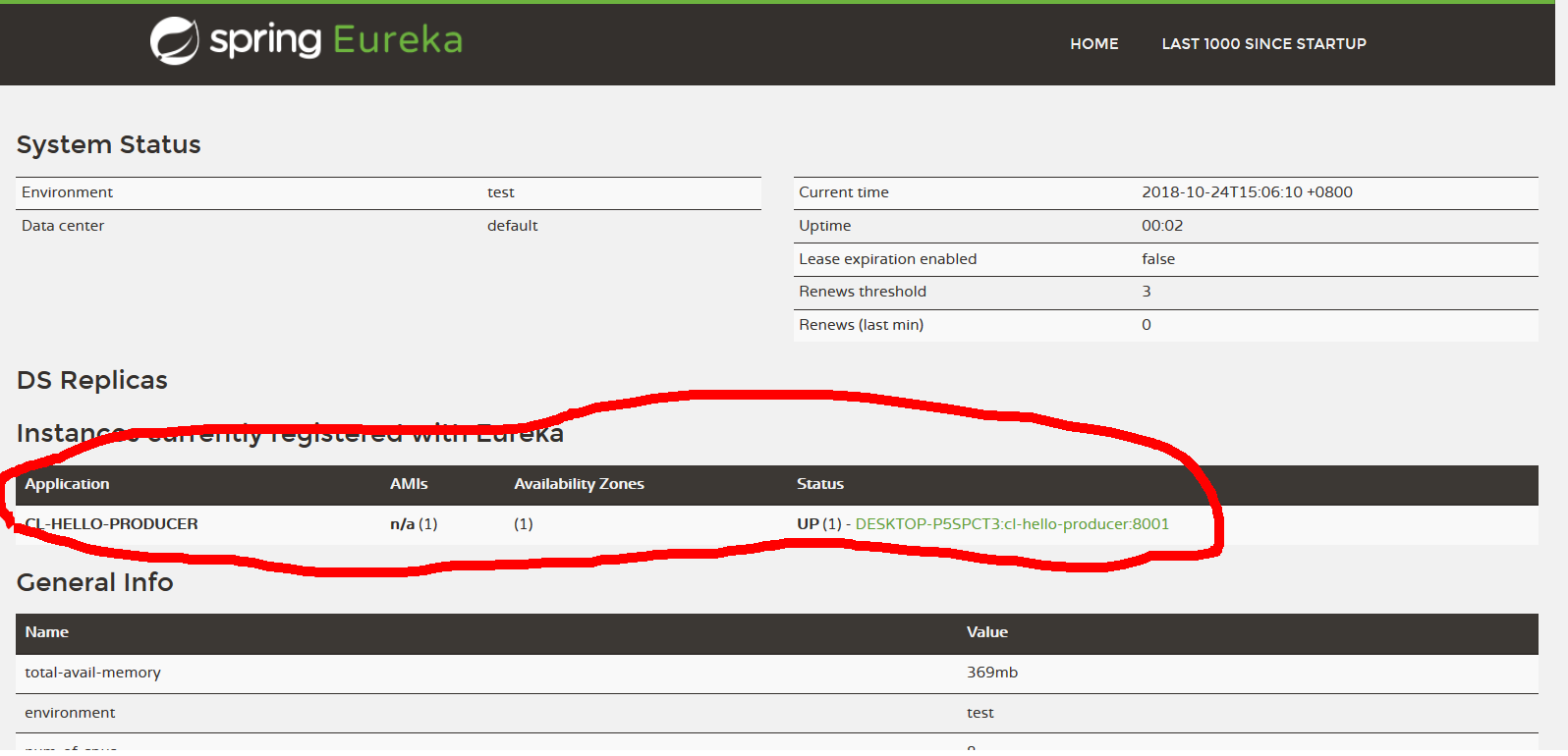
(2)启动提供者
查看:localhost:7001
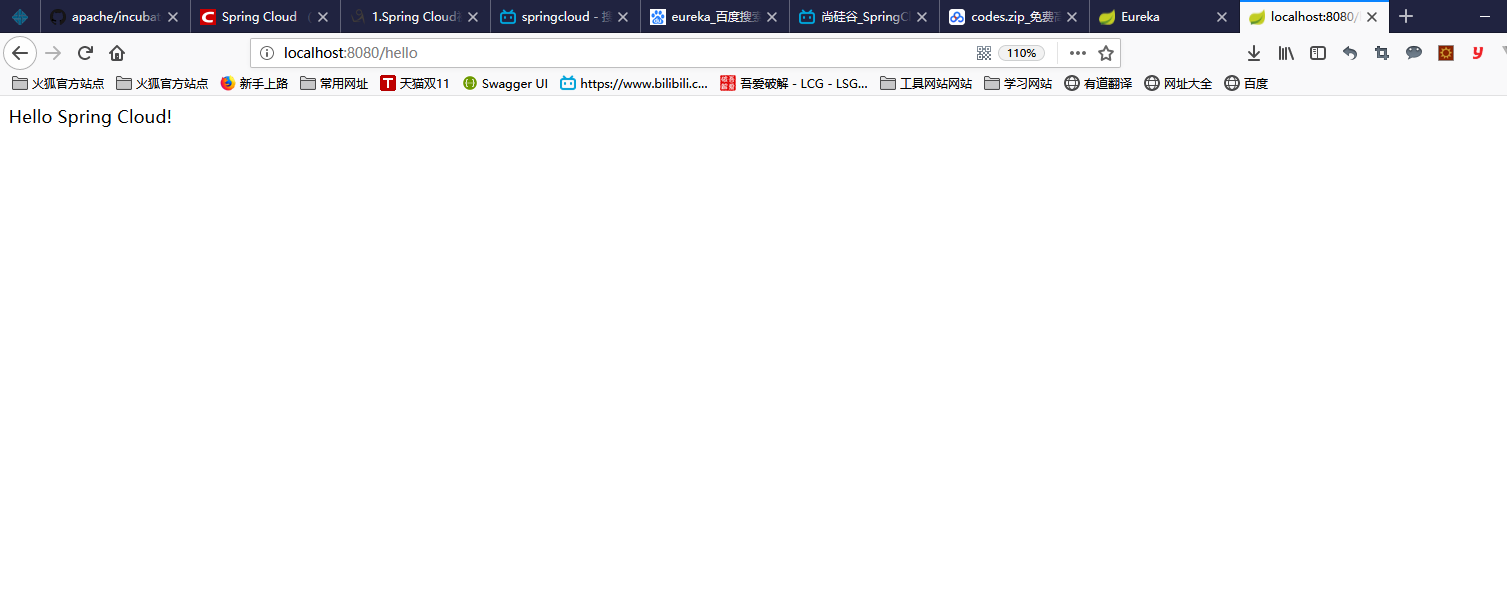
(3)启动消费者
查看:localhost:8080/hello
2.Spring Cloud初相识--------Eureka服务注册与消费的更多相关文章
- Spring Cloud 入门教程 - Eureka服务注册与发现
简介 在微服务中,服务注册与发现对管理各个微服务子系统起着关键作用.随着系统水平扩展的越来越多,系统拆分为微服务的数量也会相应增加,那么管理和获取这些微服务的URL就会变得十分棘手,如果我们每新加一个 ...
- spring cloud学习一--Eureka服务注册与发现
spring cloud Eureka是基于Netflix Eureka服务发现注册产品的二次封装,它提供了服务注册功能(Service Registry)和服务发现功能(Service Discov ...
- 一起来学Spring Cloud | 第二章:服务注册和发现组件 (Eureka)
本篇文章,很浅显的一步步讲解如何搭建一个能运行的springcloud项目(带所有操作截图).相信!看完本篇之后,你会觉得springcloud搭建如此简单~~~~ 一. Eureka简介: 1.1 ...
- spring cloud (二、服务注册安全demo_eureka)
spring cloud (一.服务注册demo_eureka) 加强服务的安全性,我们接下来加上访问的账号密码: 首先需要添加对应的依赖 <!--账号密码认证依赖--> <depe ...
- Spring Cloud系列之Eureka服务治理
写在前面 Spring Cloud Eureka是基于Netflix Eureka做的二次封装.主要包含两部分: 服务注册中心 eureka server 服务提供者 eureka client ps ...
- spring cloud深入学习(二)-----服务注册中心spring cloud eureka
服务治理 主要用来实现各个微服务实例的自动化注册与发现,为啥需要这玩意呢?在一开始比如A系统调用B服务,可能通过手工维护B服务的实例,并且还得采用负载均衡等方式,这些全部都得需要手工维护,等后面系统越 ...
- 使用Spring Cloud搭建高可用服务注册中心
我们需要的,不仅仅是一个服务注册中心而已,而是一个高可用服务注册中心. 上篇博客[使用Spring Cloud搭建服务注册中心]中我们介绍了如何使用Spring Cloud搭建一个服务注册中心,但是搭 ...
- spring cloud (一、服务注册demo_eureka)
首先我的博客记理论知识很少,大家对spring boot.spring cloud .分布式 .微服务什么的一点概念都没有的还请先去百度看看理论,知道了是做什么用的,然后再写下demo ,这样学起来 ...
- Spring Cloud 入门教程(一): 服务注册
1. 什么是Spring Cloud? Spring提供了一系列工具,可以帮助开发人员迅速搭建分布式系统中的公共组件(比如:配置管理,服务发现,断路器,智能路由,微代理,控制总线,一次性令牌,全局锁 ...
随机推荐
- C# List(T).Reverse 方法 顺序反转
using System; using System.Collections.Generic; public class Example { public static void Main() { L ...
- Murano Weekly Meeting 2016.08.09
Meeting time: 2016.August.09 1:00~2:00 Chairperson: Kirill Zaitsev, from Mirantis Meeting summary: ...
- 解决dede图集上传图片时跳出302错误
错误.以前从来没遇到过,想了半天也没想出是哪里出了错误,郁闷~ 没辙,去论坛搜了一下,还真有同命相连的兄弟,同样爆出这个错误.往下拉了几楼,还是找到了答案. 解决办法是: 在include/userl ...
- 异步对象(XMLHttpRequest)的帮助脚本
异步对象五部曲 这是post请求的. //1.00创建异步对象 var xhr = new XMLHttpRequest(); //2.0 xhr.open("post", url ...
- Oracle数据库触发器使用(删除触发)
当我们需要用到触发器的时候,还是很方便,你会指定当我在操作某一事件时触发效果完成我所希望完成的事情:这就是触发器, 下面我给大家上一串代码,这是一个当我在操作删除事件操作时候,我希望把即将删除那条数据 ...
- Hibernate课程 初探一对多映射2-7 测试-修改和删除学生信息
package com.ddwei.entity; import java.util.Set; import org.hibernate.Session; import org.hibernate.T ...
- pm2的的常用命令及用法
使用pm2启动静态文件服务器的方法如下: pm2 serve path port pm2 serve . 9001 这样就可以把当前文件夹下的静态文件跑起来了,而且端口号是9001, 同样也支持进阶的 ...
- 基于表单布局:分析过时的table结构与当下的div结构
一些话在前面 最近做了百度前端学院一个小任务,其中涉及到表单布局的问题, 它要处理的布局问题:左边的标签要右对齐,右边的输入框.单选按钮等要实现左对齐. 从开始入门就被告知table布局已经过时了,当 ...
- DIV内数据删除操作
对于数据操作,前端提供静态方法,交给后台去操作 此处记录一下,待优化,不过精华都在里面了 静态页面: 鼠标移上显示: html代码 css代码 js代码
- Refactoring in Coding
Make changes on existing code for subsequent and constant changes of requirement. Reference:http://w ...