
ubuntu 14.04安装quickbuild buildagent (二)
使用方法:
/home/carloz/programfiles/quickbuild6/buildagent/bin/agent.sh start
/home/carloz/programfiles/quickbuild6/buildagent/bin/agent.sh stop
==============================================================
安装指南 http://wiki.pmease.com/display/QB60/Build+Agent+Installation+Guide
1. 启动 QuickBuild server, 并且login to QuickBuild as administrator, 然后打开 Grid tab

点击 download build agent , 下载 buildagent 软件,并解压在 安装目录下
carloz@linux:~/programfiles/quickbuild6$ cd buildagent/

carloz@linux:~/programfiles/quickbuild6/buildagent$ pwd

/home/carloz/programfiles/quickbuild6/buildagent

carloz@linux:~/programfiles/quickbuild6/buildagent$ ls

asset  bin  conf  logs  plugins
保证当前用户有足够的权限
2. 保证系统已经安装了 JDK6 or JDK7 , 环境变量已经被设定,并且java 命令能够被执行
3. 运行 <agent install dir>/bin/config.bat|sh 来设置build agent的属性, 如 IP address, port number, SSL setting, 等等
carloz@linux:~/programfiles/quickbuild6/buildagent$ bin/config.sh

java version "1.8.0_60"

Java(TM) SE Runtime Environment (build 1.8.0_60-b27)

Java HotSpot(TM) -Bit Server VM (build 25.60-b23, mixed mode)

===========================================================

carloz@linux:~/programfiles/quickbuild6/buildagent$

信息保存在 /home/carloz/programfiles/quickbuild6/buildagent/conf/node.properties里, 如下

carloz@linux:~/programfiles/quickbuild6/buildagent$ bin/agent.sh

Usage: bin/agent.sh [ console | start | stop | restart | condrestart | status | install | remove | dump ]

Commands:

  console      Launch in the current console.

  start        Start in the background as a daemon process.

  stop         Stop if running as a daemon or in another console.

  restart      Stop if running and then start.

  condrestart  Restart only if already running.

  status       Query the current status.

  install      Install to start automatically when system boots.

  remove       Uninstall.

  dump         Request a Java thread dump if running.

carloz@linux:~/programfiles/quickbuild6/buildagent$ bin/agent.sh start

Starting QuickBuild Build Agent...

Waiting for QuickBuild Build Agent......

running: PID:

carloz@linux:~/programfiles/quickbuild6/buildagent$
4. 在build agent 启动以后, 我们会发现我们并不能运行它, 我们需要在 QuickBuild server 中添加, 并且授权加入网络
4.1 打开 http://localhost:8810/grid/active_nodes

这里仅仅有一个节点, 这个节点 就是QuickBuild server 本身.
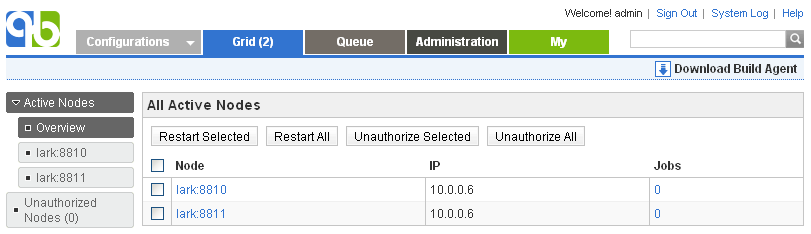
我们需要在这里添加 build agent, 方法参考 Working with Build Grid , 在未授权 节点列表里找到并选中它, 给他授权, 如下

然后 Active nodes 列表就变成了两个

然而 我发现 http://localhost:8811/ 这个网址还是不能访问, 返回404, 需要继续解决
============================================
Supported operating systems
- Windows 2000/XP/Vista/7, Windows server 2003/2008, 32 bit and 64 bit, x86 and IA architecture
- Linux, 32 bit and 64 bit, x86, PowerPC and S/390 architecture
- Mac OS X, 32 bit and 64 bit
- Solaris, 32 bit and 64 bit, Sparc and x86 architecture
- AIX, 32 bit and 64 bit, PowerPC architecture
- HP-UX, 32 bit and 64 bit, IA and PARISC architecture
- FreeBSD, 32 bit and 64 bit, x86 architecture
Memory requirement
- 64M minimum, 256M recommended
Installation Steps
- Make sure QuickBuild server is up and running, login to QuickBuild as administrator and navigate to Grid tab, follow the download build agent link to download the build agent. Extract downloaded file into the directory where the build agent should be installed. Make sure the user running user agent has full access rights to the installation directory.
- Make sure you have JDK6 or JDK7 installed. Download the appropriate JDK version from http://java.sun.com
 if needed.
 - Make sure the java command exists in the system path; if not, you will need to modify the file conf/wrapper.conf under the build agent's installation directory, and point the entry wrapper.java.command to path of the java command.
- Optionally run <agent install dir>/bin/config.bat|sh) to configure build agent properties such as IP address, port number, SSL setting, etc.
- Open a command prompt window, switch to folder <agent install dir>/bin, and run command agent.(bat|sh) console to start the agent.

Follow this guide on how to install the agent as system service so that it auto-starts when machine reboots.
- After the agent starts up, it may complain with the message "This build agent is not authorized to join the grid". Upon this, you need to login to QuickBuild server and authorize the agent to join the grid. Refer to Working with Build Grid for how to authorize build agents to join grid.
- If the build agent is connected to QuickBuild server correctly, you will see its entry in active node list of the build grid like below by logging in as administrator:
Trouble Shooting
If your agent does not connect with server, please make sure that:
- You can telnet to server port from agent machine with below command:
telnet _<server host name>_ _<server port>_
Here <server host name> and <server port> has to be extracted from serverUrl in file conf/node.properties of under agent directory.
- You can telnet to agent port from server machine with below command:
telnet <agent ip address> <agent port> - If auto-detected agent ip reported in server console log is incorrect, specify it explicitly by editing conf/node.properties of the agent to add below property:
ip=_<agent ip address>_
- Recently we found a case where QB agent from other subnets connects to server but then times out during initialization (agents from same subnet works fine), and it turns out that server response package is dropped for some reason (maybe the package content matches some pre-set drop rule) across the gateway, and the problem is solved by connecting to server via ssl port so that server response package is encrypted.
ubuntu 14.04安装quickbuild buildagent (二)的更多相关文章
- ubuntu 14.04安装quickbuild server (一)
官网: http://www.pmease.com/ 指导网站: http://wiki.pmease.com/display/QB60/ 1. 安装quickbuild server ------ ...
- 在Ubuntu 14.04安装和使用Docker
Docker是一个开源软件,它可以把一个Linux应用和它所依赖的一切(比如配置文件)都封装到一个容器.然而,Docker与虚拟机不同,它使用了沙箱机制,Docker容器不运行操作系统,它共享主机上的 ...
- [转]在Ubuntu 14.04安装和使用Docker
在Ubuntu 14.04安装和使用Docker 作者:chszs,版权所有,未经同意,不得转载.博主主页:http://blog.csdn.net/chszs Docker是一个开源软件,它可以把一 ...
- Ubuntu 14.04 安装VMware 12
/*********************************************************************** * Ubuntu 14.04 安装VMware 12 ...
- Ubuntu 14.04安装Chromium浏览器并添加Flash插件Pepper Flas
转自Ubuntu 14.04安装Chromium浏览器并添加Flash插件Pepper Flash Player Chromium谷歌的开源浏览器将不再支持Netscape浏览器插件API,Adobe ...
- ubuntu 14.04 安装搜狗拼音输入法
原文:ubuntu 14.04 安装搜狗拼音输入法 ubuntu桌面系统下终于有了好用的拼音法-搜狗拼音输入法,欲在ubuntu 14.04下安装搜狗拼音输入法相当的简单. 先到搜狗拼音官网下载对应的 ...
- ubuntu 14.04 安装torch及编译环境zbstudio
ubuntu 14.04 安装torch及编译环境zbstudio torch zbstudio 本来是安装官网给的步骤安装torch的,可是碰到一系列的问题,后来参考网上的安装方法安装成功了 官网安 ...
- ubuntu 14.04 安装svn server (subversionedge )
ubuntu 14.04 安装subversionedge 请仔细阅读安装包自带的readme文件! 1.先去官网,找安装包: http://subversion.apache.org/ http:/ ...
- Ubuntu 14.04 安装 sysrepo v0.7.5
参考: Tentative gNMI support with sysrepo protobuf-c/protobuf-c Ubuntu 14.04 安装 sysrepo v0.7.5 安装依赖: s ...
随机推荐
- oc学习之路----内存管理
直接上图啊.
- 把谷歌等webkit内核浏览器变为输入文本编辑器的方法
只需要在地址栏输入 data:text/html, <html contenteditable> 回车后即可看到效果
- MINA2.0原理
转自:http://blog.csdn.net/liuzhenwen/article/details/5894279 客户端通信过程 1.通过SocketConnector同服务器端建立连接 2. ...
- Razor 语法快速参考
Razor 语法快速参考 本文引自:http://haacked.com/archive/2011/01/06/razor-syntax-quick-reference.aspx 语法名称 Raz ...
- MVC传递Model之TempData、ViewData、ViewBag差别及用途
MVC使用过程中常常会用到TempData.ViewData.ViewBag三种方式,这三种什么差别呢? TempData:默认存储于Session中,可通过继承ITempDataProvider接口 ...
- linux 通用时钟框架CCF
linux CCF 时钟框架 简单介绍 这里讲的时钟是给soc各组件提供时钟的树状框架,并非内核使用的时间,和其它模块一样,clk也有框架,用以适配不同的平台.适配层之上是客户代码和接口,也就是各模块 ...
- EBS OAF开发中实现參数式弹出窗体
EBS OAF开发中实现參数式弹出窗体 (版权声明,本人原创或者翻译的文章如需转载,如转载用于个人学习,请注明出处:否则请与本人联系,违者必究) 概览 參数式弹出窗体和嵌入式弹出窗体不一样,它拥有独立 ...
- Chrome/Chromium HTML5 video 视频播放硬件加速
Chromium站点上有个大致的框图.描写叙述了Chromium的video在各个平台 - 包含Android - 上是怎样使用硬件资源来做视频编解码加速的: 而依据Android Kitkat上的C ...
- C语言 小游戏之贪吃蛇
还记得非常久曾经听群里人说做贪吃蛇什么的,那时候大一刚学了C语言,认为非常难,根本没什么思路. 前不久群里有些人又在谈论C语言贪吃蛇的事了,看着他们在做,我也打算做一个出来. 如今大三,经过了这一年半 ...
- 统计功能和子对象的大小信息查询Bug
I hava below two statement sql: 0. not in subquery select a.schemaname, pg_size_pretty(pg_total_rela ...