
docker容器使用
查看容器的配置信息
# docker inspect dc4e2ff3eb58
查看容器的网络信息
# docker inspect -f {{.NetworkSettings}} node4
[root@localhost ~]# docker inspect -f {{.NetworkSettings}} dc4e2ff3eb58

{{ ca0148c227fb8637d33ed84b330562e8a684e7b4f58707d23191fb00febbc81d false   map[/tcp:[{0.0.0.0 }]] /var/run/docker/netns/ca0148c227fb [] []} {c9e5b72dd6eeef1fe0997bd97144fd338aa38ce0ece39c225a9846a64246ebd5 172.17.0.1   172.17.0.4   ::ac:::} map[bridge:0xc420398cc0]}
查看容器的IP地址
# docker inspect redis7001 | grep IPAddress
[root@localhost ~]# docker inspect redis7001 | grep IPAddress

            "SecondaryIPAddresses": null,

            "IPAddress": "172.17.0.8",

                    "IPAddress": "172.17.0.8",
查看容器的端口的绑定情况。
# docker port redis
[root@localhost ~]# docker port redis

/tcp -> 0.0.0.0:

[root@localhost ~]# docker ps

7626b4b8f3c1        redis                                                  "docker-entrypoint.s…"    days ago          Up  hours         0.0.0.0:->/tcp   redis
容器的打包
# docker export -o centos-`date +%Y%m%d`.tar ab48db8d2967
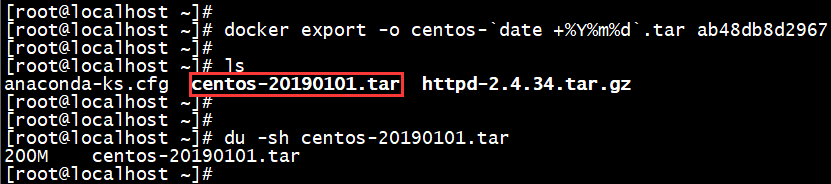
容器打包文件的导入
# docker import oracle-20190422.tar oracle:latest
[root@localhost ~]# docker import oracle-.tar oracle:latest

sha256:7d8fcddf7380f0c36f4fe9f5b9a120698c74099090b80d17c18a81d1053145d3

[root@localhost ~]#

[root@localhost ~]# docker images oracle:latest

REPOSITORY          TAG                 IMAGE ID            CREATED             SIZE

oracle              latest              7d8fcddf7380         seconds ago      9.26 GB
容器的重命名
# docker rename 56e5cfe8f8a8 node2
[root@localhost ~]# docker ps -a

56e5cfe8f8a8        centos                                                 "/bin/bash"               days ago          Up  minutes                                          node4

[root@localhost ~]#

[root@localhost ~]# docker rename 56e5cfe8f8a8 node2

[root@localhost ~]#

[root@localhost ~]# docker ps -a

56e5cfe8f8a8        centos                                                 "/bin/bash"               days ago          Up  minutes                                          node2
查看容器的文件变更
# docker diff 56e5cfe8f8a8

查看容器的日志
docker logs [id]
查看是否有启动失败的容器,如有,再查看log ,为什么失败,最后10行日志
docker logs -tf --tail 10 容器名/容器id
实时查看docker容器日志
docker logs -f -t --tail 行数 容器名
Docker容器开机自动启动
1、在使用docker run启动容器时,使用--restart参数来设置:
--restart具体参数值详细信息:
no             容器退出时,不重启容器;

on-failure     只有在非0状态退出时才从新启动容器;

always         无论退出状态是如何,都重启容器;
还可以在使用on-failure策略时,指定Docker将尝试重新启动容器的最大次数。默认情况下,Docker将尝试永远重新启动容器。
# docker run --restart=on-failure:10 redis
2、如果容器已经被创建,我们想要修改容器的重启策略
# docker update --restart=always xxx
end
参考:
docker容器使用的更多相关文章
- docker——容器安装tomcat
写在前面: 继续docker的学习,学习了docker的基本常用命令之后,我在docker上安装jdk,tomcat两个基本的java web工具,这里对操作流程记录一下. 软件准备: 1.jdk-7 ...
- Docker容器环境下ASP.NET Core Web API应用程序的调试
本文主要介绍通过Visual Studio 2015 Tools for Docker – Preview插件,在Docker容器环境下,对ASP.NET Core Web API应用程序进行调试.在 ...
- 在docker容器中vi指令找不到
在使用docker容器时,有时候里边没有安装vi,敲vi命令时提示说:vi: command not found,这个时候就需要安装vi,可是当你敲apt-get install vi命令时,提示: ...
- 理解Docker(4):Docker 容器使用 cgroups 限制资源使用
本系列文章将介绍Docker的有关知识: (1)Docker 安装及基本用法 (2)Docker 镜像 (3)Docker 容器的隔离性 - 使用 Linux namespace 隔离容器的运行环境 ...
- docker学习(5) 在mac中创建mysql docker容器
github上有一个专门的docker-libary项目,里面有各种各样常用的docker镜像,可以做为学习的示例,今天研究下其中mysql镜像的用法,国内镜像daocloud.io也能找到mysql ...
- 在Linux和Windows的Docker容器中运行ASP.NET Core
(此文章同时发表在本人微信公众号"dotNET每日精华文章",欢迎右边二维码来关注.) 译者序:其实过去这周我都在研究这方面的内容,结果周末有事没有来得及总结为文章,Scott H ...
- 自定义Docker容器的 hostname
自定义Docker容器的 hostname 作者: John Deng 原创内容,欢迎传播,请注明出处:http://www.cnblogs.com/johnd/p/set-docker-host ...
- Docker容器是否可以改变世界?
Docker容器是否可以改变世界? 2016-01-15 杜亦舒 2016年了,很多大牛开始预测技术趋势,其中一个普遍的观点我也很认同: Docker会更加流行,会改变程序世界 2015年的上半年我接 ...
- 搭建ubuntu14.04的hadoop集群【docker容器充当服务器】
首先弄出来装有hadoop.java.ssh.vim的镜像起名badboyf/hadoop.做镜像有两种方法,一种是用Dockerfile来生成一个镜像,一种是基于ubuntu14.04的基础镜像生成 ...
- 在docker容器中安装和使用,linux版的powershell
powershell 传教士 原创文章.始于 2016-09-18 ,2016-10-27修改powershell docker官网.允许转载,但必须保留名字和出处,否则追究法律责任 1 在任意版本的 ...
随机推荐
- hdu4614 Vases and Flowers 线段树
Alice is so popular that she can receive many flowers everyday. She has N vases numbered from 0 to N ...
- linux----别名
经常一些命令太长,输入太麻烦,给该命令起个别名,直接执行,简单又方便. 1.查看别名 alias 2.编辑别名 vi ~/.brashrc 3.添加自己的别名 例如:重启网卡 alias netres ...
- crash - JNI WARNING: input is not valid modified utf-8: illegal continuation byte
the key point is "Modified UTF-8" is not like "Regular UTF-8", a legal Rgular UT ...
- 芯灵思SInA33开发板怎样烧写镜像文件
上一节已经制作好了linux镜像文件,现在将它烧入开发板中需要的工具有 * SINLINX-A33_qt-4.8.7_lcd1024x600_v3.1 #镜像文件 * PhoenixSuit #烧写工 ...
- python结合redis模拟队列
实在无聊就写了个很小的python程序用来实现模拟redis队列的代码如下: redis_lpush.py #!/usr/bin/python3 import time import redis ...
- auto sudo password in shell
here is the example how to implement the auto password in shell script. Echo yourpasswordhere | sudo ...
- Java Runnable与Callable区别
接口定义 #Callable接口 public interface Callable<V> { V call() throws Exception; } #Runnable接口 publi ...
- 学习concurrency programming进展
看了一段时间的actor model,goroutine之类的东东,最近在github上写了个简单的框架, 注:未做大量测试,仅供学习用,勿用于生产用途 链接: https://github.com/ ...
- 使用Jenkins 安装和自动化部署项目
安装 jenkins 安装方法可以使用war 安装 或者服务安装.我这里使用 rpm 安装 第一步: 我们使用的 centos ,选着这个,直接 下载传到服务器上.或者 复制下载链接 到 服务器上 ...
- ik_max_word ik_smart 区别 和 单字 查询 不到问题
ik_smart:分词的时候只分一次,句子里面的每个字只会出现一次. 比如:中华人民共和国国歌 入上图,分成:中华人民共和国 国歌 2 部分.每个字都自出现了一次.(我指的每一个位置 的子. 2个国 ...