
[k8s]k8s配置nfs做后端存储&配置多nginx共享存储&&statefulset配置
所有节点安装nfs
yum install nfs-utils rpcbind -y

mkdir -p /ifs/kubernetes

echo "/ifs/kubernetes 192.168.x.0/24(rw,sync,no_root_squash)" >> /etc/exports

仅在nfs服务器上 systemctl start rpcbind nfs

节点测试没问题即可
可以参考下以前写的:
http://blog.csdn.net/iiiiher/article/details/77865530
安装nfs作为存储
参考:
https://github.com/kubernetes-incubator/external-storage/tree/master/nfs-client/deploy

deployment这是一个nfs的client的,会挂载/ifs/kubernetes, 以后创建的目录,会在这个目录下创建各个子目录.
$ cat deployment.yaml

kind: Deployment

apiVersion: extensions/v1beta1

metadata:

  name: nfs-client-provisioner

spec:

  replicas: 1

  strategy:

    type: Recreate

  template:

    metadata:

      labels:

        app: nfs-client-provisioner

    spec:

      containers:

        - name: nfs-client-provisioner

          image: quay.io/external_storage/nfs-client-provisioner:latest

          volumeMounts:

            - name: nfs-client-root

              mountPath: /persistentvolumes

          env:

            - name: PROVISIONER_NAME

              value: fuseim.pri/ifs

            - name: NFS_SERVER

              value: 192.168.x.135

            - name: NFS_PATH

              value: /ifs/kubernetes

      volumes:

        - name: nfs-client-root

          nfs:

            server: 192.168.x.135

            path: /ifs/kubernetes
$ cat class.yaml

apiVersion: storage.k8s.io/v1beta1

kind: StorageClass

metadata:

  name: managed-nfs-storage

provisioner: fuseim.pri/ifs # or choose another name, must match deployment's env PROVISIONER_NAME'
$ cat test-claim.yaml

kind: PersistentVolumeClaim

apiVersion: v1

metadata:

  name: test-claim

  annotations:

    volume.beta.kubernetes.io/storage-class: "managed-nfs-storage"

spec:

  accessModes:

    - ReadWriteMany

  resources:

    requests:

      storage: 1Mi
$ cat test-pod.yaml

kind: Pod

apiVersion: v1

metadata:

  name: test-pod

spec:

  containers:

  - name: test-pod

    image: busybox

    command:

      - "/bin/sh"

    args:

      - "-c"

      - "touch /mnt/SUCCESS && exit 0 || exit 1"

    volumeMounts:

      - name: nfs-pvc

        mountPath: "/mnt"

  restartPolicy: "Never"

  volumes:

    - name: nfs-pvc

      persistentVolumeClaim:

        claimName: test-claim

默认情况创建pvc,pv自动创建. pvc手动干掉后,nfs里面是archive状态.还没弄清楚在哪控制这东西
todo:
验证pvc的:
容量
读写
回收策略
实现下共享存储(左半部分)
$ cat nginx-pvc.yaml

kind: PersistentVolumeClaim

apiVersion: v1

metadata:

  name: nginx-claim

  annotations:

    volume.beta.kubernetes.io/storage-class: "managed-nfs-storage"

spec:

  accessModes:

    - ReadOnlyMany

  resources:

    requests:

      storage: 1Mi
$ cat nginx-deployment.yaml

apiVersion: apps/v1beta1 # for versions before 1.8.0 use apps/v1beta1

kind: Deployment

metadata:

  name: nginx-deployment

  labels:

    app: nginx

spec:

  replicas: 1

  selector:

    matchLabels:

      app: nginx

  template:

    metadata:

      labels:

        app: nginx

    spec:

      containers:

      - name: nginx

        image: nginx

        ports:

        - containerPort: 80

        volumeMounts:

          - name: nfs-pvc

            mountPath: "/usr/share/nginx/html"

      volumes:

        - name: nfs-pvc

          persistentVolumeClaim:

            claimName: nginx-claim
$ cat nginx-svc.yaml

kind: Service

apiVersion: v1

metadata:

  name: svc-nginx

spec:

  selector:

    app: nginx

  type: NodePort

  ports:

  - protocol: TCP

    targetPort: 80
右半部分参考
https://feisky.gitbooks.io/kubernetes/concepts/statefulset.html
todo:
我想验证左边模式ReadWriteOnce情况怎么破.
---

apiVersion: v1

kind: Service

metadata:

  name: nginx

  labels:

    app: nginx

spec:

  ports:

  - port: 80

    name: web

  clusterIP: None

  selector:

    app: nginx

---

apiVersion: apps/v1beta1

kind: StatefulSet

metadata:

  name: web

spec:

  serviceName: "nginx"

  replicas: 2

  template:

    metadata:

      labels:

        app: nginx

    spec:

      containers:

      - name: nginx

        image: nginx

        ports:

        - containerPort: 80

          name: web

        volumeMounts:

        - name: www

          mountPath: /usr/share/nginx/html

  volumeClaimTemplates:

  - metadata:

      name: www

      annotations:

        volume.beta.kubernetes.io/storage-class: "managed-nfs-storage"

    spec:

      accessModes: [ "ReadWriteOnce" ]

      resources:

        requests:

          storage: 1Mi
pvc通过storageClassName调用nfs存储(strorageclass)
kind: PersistentVolumeClaim

apiVersion: v1

metadata:

  name: spring-pvc

  namespace: kube-public

spec:

  storageClassName: "managed-nfs-storage"

  accessModes:

    - ReadOnlyMany

  resources:

    requests:

      storage: 100Mi
gfs参考:
https://github.com/kubernetes-incubator/external-storage/tree/master/gluster/glusterfs
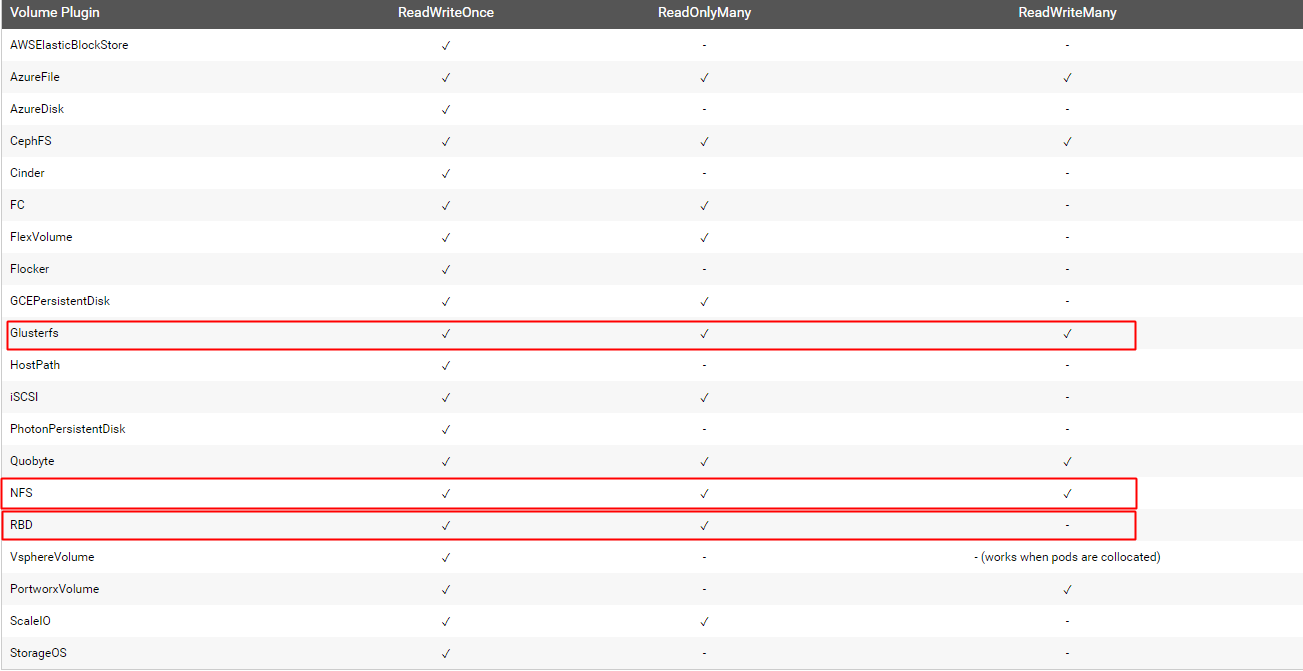
pv读写模式(1.9)
参考
ReadWriteOnce / ReadOnlyMany / ReadWriteMany
)
[k8s]k8s配置nfs做后端存储&配置多nginx共享存储&&statefulset配置的更多相关文章
- [k8s]k8s内容索引
我会陆陆续续小结下. dns相关 dns策略 1.集群内 2.指定内网 subdomain 3.访问互联网 resovel.conf kube-dns架构图解及策略 nginx-ingress: DN ...
- 转: ubuntu配置NFS,挂载开发板
====================================== 命令: 1. $sudo apt-get install nfs-kernel-server (安装N ...
- NFS共享存储服务部署
第1章 NFS介绍 1.1 NFS基本概述 NFS(Network File System)网络文件系统 主要功能是通过局域网络让不同的主机系统之间可以共享文件或目录. NFS系统和Windows网络 ...
- Linux架构之NFS共享存储1
第35章 NFS共享存储 35.1 NFS基本概述 NFS是Network File System的缩写及网络文件系统.NFS主要功能是通过局域网络让不同的主机系统之间可以共享文件或目录. 常见的文件 ...
- 二十五 存储技术与应用 iSCSI技术应用 、 udev配置 NFS网络文件系统 、 Multipath多路径 、 NFS网络文件系统 、 udev配置
1.配置iSCSI服务 服务器上要额外配置一块硬盘 服务端(proxy)安装target,并将新加的硬盘配置为iSCSI 的共享磁盘 在客户端(client)上安装initiator,挂载服务器iSC ...
- k8s 使用nfs做provisioner
官方的nfs provisoner,serviceAccount RABC相关 请在这里下载https://raw.githubusercontent.com/kubernetes-incubator ...
- Linux之nginx反向代理+三台web+nfs共享存储实现集群配置
作业四:nginx反向代理+三台web+nfs共享存储实现集群配置 在各个web服务器上挂载nfs [root@localhost nginx]# mount -t nfs 192.168.152.1 ...
- k8s入坑之路(15)kubernetes共享存储与StatefulSet有状态
共享存储 docker默认是无状态,当有状态服务时需要用到共享存储 为什么需要共享存储: 1.最常见有状态服务,本地存储有些程序会把文件保存在服务器目录中,如果容器重新启停则会丢失. 2.如果使用vo ...
- Openstack使用NFS作为后端存储
续:Openstack块存储cinder安装配置 接上使用ISCSI作为后端存储,使用NFS作为后端存储配置 参考官方文档:https://wiki.openstack.org/wiki/How_to ...
随机推荐
- Java Web 之javabeans
Java遇见HTML——JSP篇之JavaBeans: http://www.cnblogs.com/Qian123/p/5277425.html
- 细说Vue作用域插槽,匹配应用场景。
最近在官方文档中看到,vue新增了一种插槽机制,叫做作用域插槽.要求的版本是2.1.0+. 首先来说一下:顾名思义,所谓作用域插槽,主要就在作用域,需要注意的是(以下几点看不懂不要紧,配合下面的例子, ...
- MySQL 5.7基于GTID复制的常见问题和修复步骤(二)
[问题二] 有一个集群(MySQL5.7.23)切换后复制slave报1236,其实是不小心在slave上执行了事务导致 Got fatal error 1236 from master when r ...
- Git中的bash与CMD的区别
Windows在使用git工具时,可以看到有两个命令输入窗: 1. Git CMD 2. Git Bash 两者的区别:Bash是基于CMD的,Bash在CMD的基础上新增了一些命令和功能,故建议使用 ...
- Bootstrap 分页、标签、徽章、超大屏幕、页面标题
分页(pagination), 是一种无序列表 1.默认的分页(.pagination) 代码示例: <ul class="pagination"> <li> ...
- idea颜色主题
作者:韩梦飞沙 Author:han_meng_fei_sha 邮箱:313134555@qq.com E-mail: 313134555 @qq.com IDEA 主题样式 === 这个垂直线的 颜 ...
- BZOJ.2208.[JSOI2010]连通数(bitset Tarjan 拓扑)
题目链接 先缩点,对于scc之间贡献即为szscc[i]*szscc[j] 用f[i][j]表示scci是否能到sccj 拓扑排序,每次把now的f或上to的f 用bitset优化 //63888kb ...
- 闪烁的LED灯
/* Main.c file generated by New Project wizard * * Created: 周五 五月 5 2017 * Processor: 80C31 * Compil ...
- centos 6 秘钥分发
http://www.cnblogs.com/chensiqiqi/p/6554055.html
- CocosCreator编辑器脚本生命周期函数
Cocos Creator 为组件脚本提供了生命周期的回调函数.用户只要定义特定的回调函数,Creator 就会在特定的时期自动执行相关脚本,用户不需要手工调用它们. 目前提供给用户的生命周期回调函数 ...