
SSL/TLS Server supports TLSv1.0
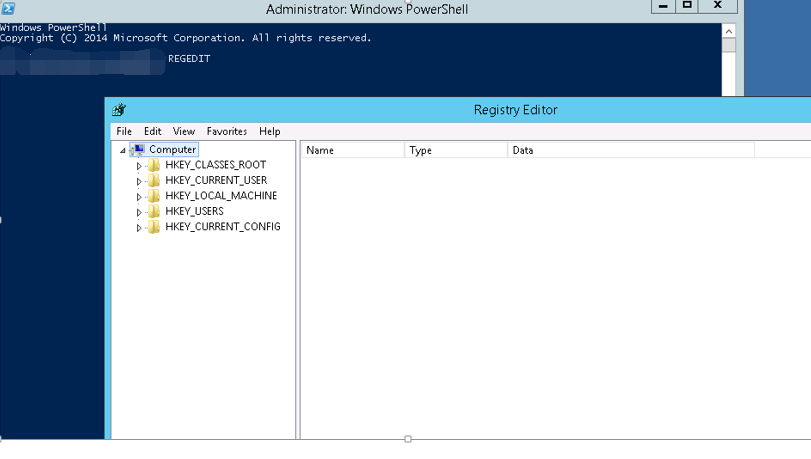
远程登录服务器后打开注册表编辑器,点开HKEY-LOCAL-MACHINE,SYSTEM,CURRENTCONTROLSET下的Control
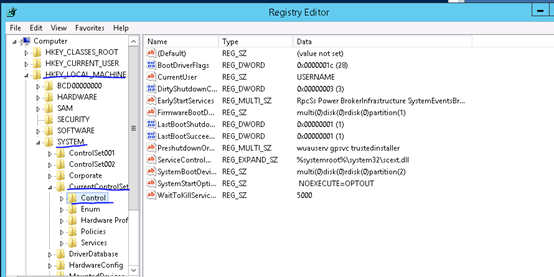
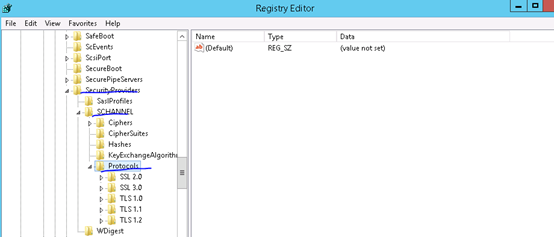
找到SecurityProviders下的SCHANNEL,右键展开找到Protocols,对其右键点导出
导出注册表文件,文件名可任意输入,点保存
在任意磁盘下新建记事本TLS1.2,并输入以下代码后保存
Windows Registry Editor Version 5.00
[HKEY_LOCAL_MACHINE\SYSTEM\CurrentControlSet\Control\SecurityProviders\SCHANNEL\Protocols]
[HKEY_LOCAL_MACHINE\SYSTEM\CurrentControlSet\Control\SecurityProviders\SCHANNEL\Protocols\Multi-Protocol Unified Hello]
[HKEY_LOCAL_MACHINE\SYSTEM\CurrentControlSet\Control\SecurityProviders\SCHANNEL\Protocols\Multi-Protocol Unified Hello\Client]
“Enabled”=dword:00000000
“DisabledByDefault”=dword:00000001
[HKEY_LOCAL_MACHINE\SYSTEM\CurrentControlSet\Control\SecurityProviders\SCHANNEL\Protocols\Multi-Protocol Unified Hello\Server]
“Enabled”=dword:00000000
“DisabledByDefault”=dword:00000001
[HKEY_LOCAL_MACHINE\SYSTEM\CurrentControlSet\Control\SecurityProviders\SCHANNEL\Protocols\PCT 1.0]
[HKEY_LOCAL_MACHINE\SYSTEM\CurrentControlSet\Control\SecurityProviders\SCHANNEL\Protocols\PCT 1.0\Client]
“Enabled”=dword:00000000
“DisabledByDefault”=dword:00000001
[HKEY_LOCAL_MACHINE\SYSTEM\CurrentControlSet\Control\SecurityProviders\SCHANNEL\Protocols\PCT 1.0\Server]
“Enabled”=dword:00000000
“DisabledByDefault”=dword:00000001
[HKEY_LOCAL_MACHINE\SYSTEM\CurrentControlSet\Control\SecurityProviders\SCHANNEL\Protocols\SSL 2.0]
[HKEY_LOCAL_MACHINE\SYSTEM\CurrentControlSet\Control\SecurityProviders\SCHANNEL\Protocols\SSL 2.0\Client]
“DisabledByDefault”=dword:00000001
“Enabled”=dword:00000000
[HKEY_LOCAL_MACHINE\SYSTEM\CurrentControlSet\Control\SecurityProviders\SCHANNEL\Protocols\SSL 2.0\Server]
“Enabled”=dword:00000000
“DisabledByDefault”=dword:00000001
[HKEY_LOCAL_MACHINE\SYSTEM\CurrentControlSet\Control\SecurityProviders\SCHANNEL\Protocols\SSL 3.0]
[HKEY_LOCAL_MACHINE\SYSTEM\CurrentControlSet\Control\SecurityProviders\SCHANNEL\Protocols\SSL 3.0\Client]
“Enabled”=dword:00000000
“DisabledByDefault”=dword:00000001
[HKEY_LOCAL_MACHINE\SYSTEM\CurrentControlSet\Control\SecurityProviders\SCHANNEL\Protocols\SSL 3.0\Server]
“Enabled”=dword:00000000
“DisabledByDefault”=dword:00000001
[HKEY_LOCAL_MACHINE\SYSTEM\CurrentControlSet\Control\SecurityProviders\SCHANNEL\Protocols\TLS 1.0]
[HKEY_LOCAL_MACHINE\SYSTEM\CurrentControlSet\Control\SecurityProviders\SCHANNEL\Protocols\TLS 1.0\Client]
“Enabled”=dword:00000001
“DisabledByDefault”=dword:00000000
[HKEY_LOCAL_MACHINE\SYSTEM\CurrentControlSet\Control\SecurityProviders\SCHANNEL\Protocols\TLS 1.0\Server]
“Enabled”=dword:00000001
“DisabledByDefault”=dword:00000000
[HKEY_LOCAL_MACHINE\SYSTEM\CurrentControlSet\Control\SecurityProviders\SCHANNEL\Protocols\TLS 1.1]
[HKEY_LOCAL_MACHINE\SYSTEM\CurrentControlSet\Control\SecurityProviders\SCHANNEL\Protocols\TLS 1.1\Client]
“DisabledByDefault”=dword:00000000
“Enabled”=dword:00000001
[HKEY_LOCAL_MACHINE\SYSTEM\CurrentControlSet\Control\SecurityProviders\SCHANNEL\Protocols\TLS 1.1\Server]
“DisabledByDefault”=dword:00000000
“Enabled”=dword:00000001
[HKEY_LOCAL_MACHINE\SYSTEM\CurrentControlSet\Control\SecurityProviders\SCHANNEL\Protocols\TLS 1.2]
[HKEY_LOCAL_MACHINE\SYSTEM\CurrentControlSet\Control\SecurityProviders\SCHANNEL\Protocols\TLS 1.2\Client]
“DisabledByDefault”=dword:00000000
“Enabled”=dword:00000001
[HKEY_LOCAL_MACHINE\SYSTEM\CurrentControlSet\Control\SecurityProviders\SCHANNEL\Protocols\TLS 1.2\Server]
“Enabled”=dword:00000001
“DisabledByDefault”=dword:00000000
注意此时文件类型仍为txt,将后缀txt改为reg(注册表项),导入(导入之前做备份),查看。
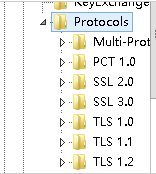
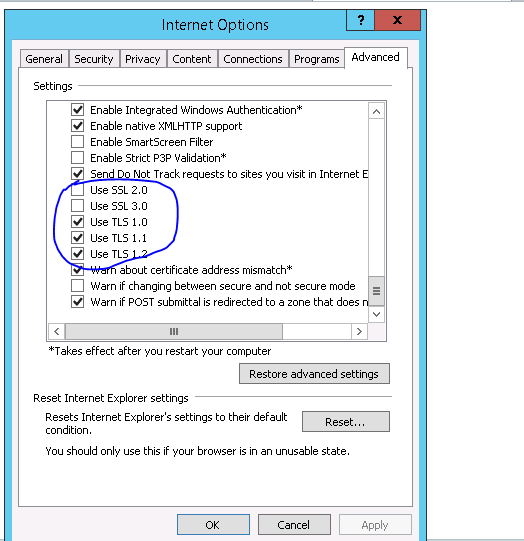
打开IE浏览器设置-高级
SSL/TLS Server supports TLSv1.0的更多相关文章
- 聊聊HTTPS和SSL/TLS协议 分类: 计算机网络 2015-07-11 21:41 4人阅读 评论(0) 收藏
要说清楚 HTTPS 协议的实现原理,至少需要如下几个背景知识. 1. 大致了解几个基本术语(HTTPS.SSL.TLS)的含义 2. 大致了解 HTTP 和 TCP 的关系(尤其是"短连接 ...
- 请求被中止: 未能创建 SSL/TLS 安全通道,设置 TLSv1.2和TLSv1.1版本 .基础链接已经关闭,发送时发生错误
WSO2 API访问的安全要求, 只能提供TLSv1.2和TLSv1.1版本,其它SSL版本协议因为存在较高安全漏洞问题会被disable. A 改成TLSv1.1或TLSv1.2,最好使用TLSv1 ...
- SSL安装方法一:在Windows Server 2008安装SSL证书(IIS 7.0)
购买的是GlobalSign 公司的通配符域名型SSL 大致的意思就是“通配符公用名填写*.域名.com,这个下面的所有子域名是不受数量限制的,*可以换成任意字符” 1 生成数字证书签名请求文件(CS ...
- TLS/SSL 协议 - Server Certificate
Server Certificate 典型的Certificate消息用于携带服务器X.509证书链.证书链是以ASN.1 DER编码的一系列证书,一个接着一个组合而成.主证书必须第一个发送,中间证书 ...
- Web Server 使用WebClient 发送https请求 The underlying connection was closed: Could not establish trust relationship for the SSL/TLS secure channel
使用WebClient 发送https请求 使用WebClient发送请求时,并且是以https协议: WebClient webClient = new WebClient(); string re ...
- SQL Server使用加密连接SSL/TLS (转载)
说明 应用程序通过未加密的通道与数据库服务器通信, 这可能会造成重大的安全风险.在这种情况下, 攻击者可以修改用户输入的数据, 甚至对数据库服务器执行任意 SQL 命令.例如,当您使用以下连接字符串时 ...
- Centos7 python 安装 Ignoring ensurepip failure: pip 9.0.1 requires SSL/TLS
安装python时出现Ignoring ensurepip failure:pip required SSL/TLS 因为没有安装OpenSSL 使用yum install openssl-devel
- SSL/TLS握手过程
----------------------------------专栏导航----------------------------------HTTPS协议详解(一):HTTPS基础知识 HTTPS ...
- 使用openSSL开源工具进行SSL/TLS 安全测试
本文介绍了使用半自动化工具执行SSL&TLS安全性评估的过程,以及如何使用手动及工具的测试方法验证并发现问题.目的是优化TLS和SSL安全测试流程,帮助信息安全顾问在渗透测试时在TLS / S ...
随机推荐
- oracle分区表(附带按照月自动分区、按天自动分区)
--list_range 示例 drop table list_range_tab purge; create table list_range_tab(n1 number,n2 date)pa ...
- Connection parameters are correct , SSL not enabled
这个仅仅是个消息提示,告诉你SSL not enabled.无须理会,直接点击ok
- Git中ssh的使用
远程仓库前期工作(SSH HEY的使用) 1.1.注册GitHub账号 1.2.创建SSH Key 打开Git Bash后,输入ssh-keygen -t rsa -C "youremail ...
- vue 中router.go、router.push和router.replace的区别
router.go(n) 这个方法的参数是一个整数,意思是在 history 记录中向前或者后退多少步,类似 window.history.go(n) router.push(location) 想要 ...
- dubbo 框架小结
1. dubbo:protocol Dubbo缺省协议采用单一长连接和NIO异步通讯,适合于小数据量大并发的服务调用,以及服务消费者机器数远大于服务提供者机器数的情况. <dubbo:proto ...
- redis使用epoll
redis使用epoll的代码在ae_epoll.c文件中. epoll_create:redis服务器在启动时,创建事件循环,调用epoll_create方法创建epoll实例. static in ...
- drozer安装使用教程(Windows)
drozer和adb一样,又不是新出的工具,本不该出了这么久还要由我这样半懂不懂的再写篇东西了.但是还是一样每次使用都得百度和筛选半天,所以记下来算给自己看.以后看到我还写些老掉牙的东西都是这个原因, ...
- Python3各种进制之间的转换方法
一.2/8/10/16进制互转 1.1 2/8/10/16进制赋值 # 二进制赋值以0b打头 a = 0b1000 # 八进制赋值以0o打头,第一个是数字0第二个是字母o b = 0o1100 # 十 ...
- Win10系列:JavaScript页面导航
页面导航是在开发应用的过程中使用频率较高的技术,其中比较常用的导航方式有多页导航和页内导航,采用多页导航方式的应用程序包含一系列的页面,在一个页面中加入另一个页面的链接地址后,单击链接将跳转到指定页面 ...
- SpringBoot document notes
图片拷贝不过来,直接从github上下载 . 链接: https://github.com/DFX339/SpringBootDocumentNotes.git Create a example po ...