
docker+Nexus Repository Manager 搭建私有docker仓库
使用容器安装Nexus3
1.下载nexus3的镜像:
docker pull sonatype/nexus3
2.使用镜像启动一个容器:
docker run -d -p 8081:8081 -p 5000:5000 --name nexus3 -v /nexus-data:/nexus-data/ --restart=always sonatype/nexus3
要是启动不起来有可能是/nexus-data目录没有权限,把目录权限改为757
注:5000端口是用于镜像仓库的服务端口 8081 端口是nexus的服务端口
3.启动之后我们就可以通过http://服务器IP:8081访问。
默认账号密码为admin/admin123
创建Docker私有仓库
通过浏览器访问Nexus:
http://服务器IP:8081
点击右上角进行登录,通过初始用户名和密码进行登录(admin/admin123):

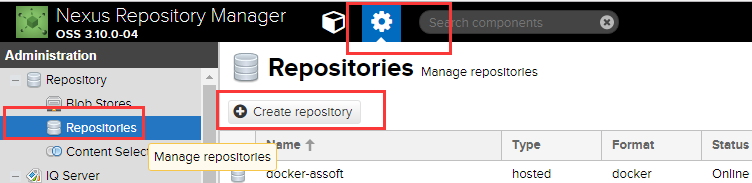
点击设置界面,选择Repositories,点击Create repository,如下图所示:
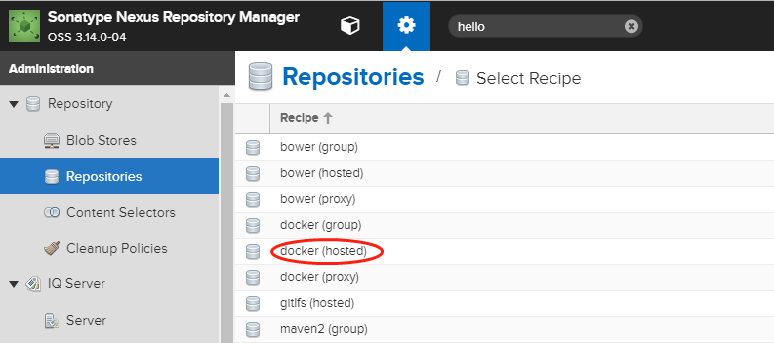
选择仓库类型,这里Docker有三种类型,分别是group、hosted、proxy。这里只演示hosted类型,所以选择docker(hosted),如下图:
注:Docker镜像仓库类型含义解释如下:
hosted : 本地存储,即同docker官方仓库一样提供本地私服功能
proxy : 提供代理其他仓库的类型,如docker中央仓库
group : 组类型,实质作用是组合多个仓库为一个地址
指定docker仓库的名称、指定一个端口用来通过http的方式进行访问仓库、勾选是否支持docker API V1,然后create repository;
Force basic authentication:这里最好也勾选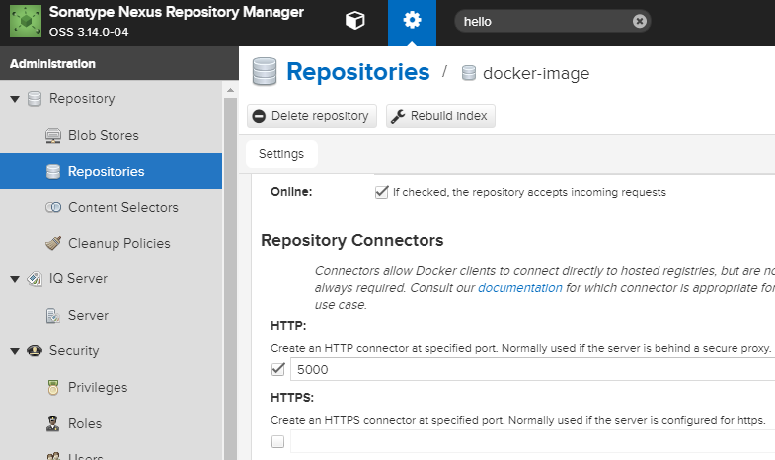
因为我们测试的时候不是使用加密的HTTPS进行访问,所以这里需要增加一个docker的启动参数,给他指定私库的地址,如下:
编辑/etc/docker/daemon.json 增加如下内容,当然也可通过启动参数增加,如果出现response https等错误,把http://去掉。
{
........,
"insecure-registries":["http://172.xx.xx.60:5000"]
}
重启docker进程: systemctl restart docker
查看docker信息: docker info ,有如下输出即正常
OSType: linux

Architecture: x86_64

Number of Docker Hooks:

CPUs:

Total Memory: 62.25 GiB

Name: .novalocal

ID: I4YA:R77P:4MMX:V76S:NL4J:XP42:WZFR:5UFD:QRNT:N4GD:54UV:KFXS

Docker Root Dir: /var/lib/docker

Debug Mode (client): false

Debug Mode (server): false

Registry: https://index.docker.io/v1/

WARNING: bridge-nf-call-iptables is disabled

WARNING: bridge-nf-call-ip6tables is disabled

Experimental: false

Insecure Registries:

 172.xx.xx.60:

 127.0.0.0/

Registry Mirrors:

 https://aj2rgad5.mirror.aliyuncs.com

Live Restore Enabled: false

Registries: docker.io (secure)
登录私库
要使用私库进行上传下载需要进行登录连接到Nexus(物理机重启推拉不了镜像要重新docker logiin)
docker login http://172.xx.xx.60:5000/
Docker上传镜像到私库
使用docker tag 对镜像进行管理(必须进行此项操作)
docker tag使用格式:
docker tag SOURCE_IMAGE[:TAG] TARGET_IMAGE[:TAG]
docker tag helolo-world 172.xx.xx.60:5000/hello:v1
docker push 172.xx.xx.60:5000/hello:v1
示例:使用tag进行打标,正常上传的结果
[root@ docker]# docker pull 172.xx.xx.60:/hello:v1

Trying to pull repository .xx.xx.:/hello ...

v1: Pulling from 172.xx.xx.60:/hello

Digest: sha256:92c7f9c92844bbbb5d0a101b22f7c2a7949e40f8ea90c8b3bc396879d95e899a

Status: Image is up to date for .xx.xx.:/hello:v1
不进行tag打标,会出现denied: requested access to the resource is denied报错
查看镜像
[root@ docker]# curl http://172.xx.xx.60:5000/v2/_catalog

{"repositories":["hello"]}

[root@ docker]#
[root@ ~]# curl http://172.xx.xx.60:5000/v2/hello/tags/list

{"name":"hello","tags":["v1"]}

[root@ ~]#
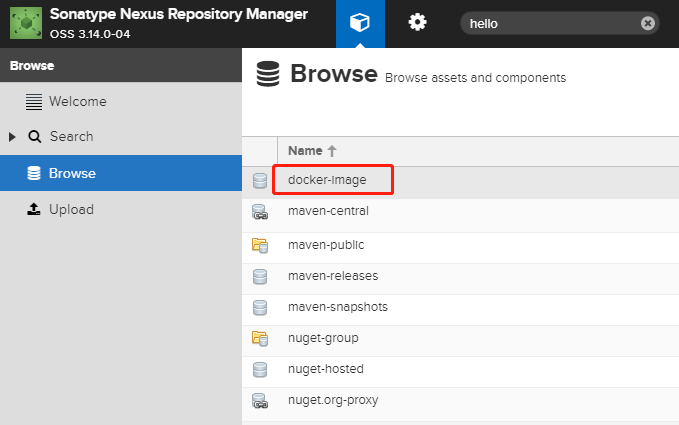
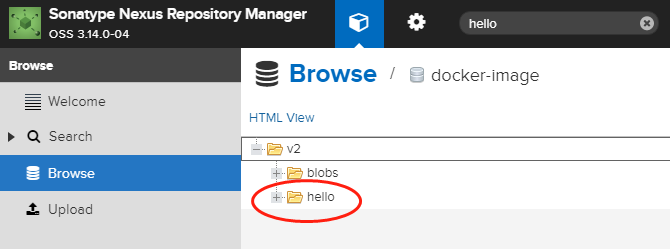
上传完成后,在nexus中对应的docker库中,即可看到此镜像
下载私库中的镜像
1、删除本地上例实验中的镜像(docker rmi 172.xx.xx.60:5000/hello:v1)
[root@ ~]# docker rmi .xx.xx.:/hello:v1

Untagged: .xx.xx.:/hello:v1

Untagged: .xx.xx.:/hello@sha256:92c7f9c92844bbbb5d0a101b22f7c2a7949e40f8ea90c8b3bc396879d95e899a

[root@ ~]#
2、docker pull 172.xx.xx.60:5000/hello:v1
[root@ ~]# docker pull .xx.xx.:/hello:v1

Trying to pull repository .xx.xx.:/hello ...

v1: Pulling from .xx.xx.:/hello

Digest: sha256:92c7f9c92844bbbb5d0a101b22f7c2a7949e40f8ea90c8b3bc396879d95e899a

Status: Downloaded newer image for .xx.xx.:/hello:v1

[root@ ~]#
删除私库中的镜像
命令有时候不灵通curl -I -X DELETE http://172.xx.xx.60:5000/v2/hello/manifests/sha256:92c7f9c92844bbbb5d0a101b22f7c2a7949e40f8ea90c8b3bc396879d95e899a
可以回到浏览器Browse server里面删除
转摘:https://www.cnblogs.com/jihongjun/p/8968901.html
docker+Nexus Repository Manager 搭建私有docker仓库的更多相关文章
- 使用 Nexus Repository Manager 搭建私有docker仓库
使用容器安装Nexus3 1.下载nexus3的镜像: docker pull sonatype/nexus3 2.使用镜像启动一个容器: docker run -d --name nexus -- ...
- 【Docker】(4)搭建私有镜像仓库
[Docker](4)搭建私有镜像仓库 说明 1. 这里是通过阿里云,搭建Docker私有镜像仓库. 2. 这里打包的镜像是从官网拉下来的,并不是自己项目创建的新镜像,主要测试功能 一.搭建过程 首先 ...
- 使用 Nexus Repository Manager 搭建 npm 私服
目录 环境 下载与安装 添加npm仓库 配置与验证npm仓库 发布自己的包 Nexus开启启动 脚注 环境 windows10(1803) Nexus Repository Manager OSS 3 ...
- [转] 使用HTTPS在Nexus Repository Manager 3.0上搭建私有Docker仓库
FROM: https://www.hifreud.com/2018/06/06/03-nexus-docker-repository-with-ssl/ 搭建方式 搭建SSL的Nexus官方提供两种 ...
- [转]Ubuntu18.04下使用Docker Registry快速搭建私有镜像仓库
本文转自:https://blog.csdn.net/BigData_Mining/article/details/88233015 1.背景 在 Docker 中,当我们执行 docker pull ...
- Android业务组件化之Gradle和Sonatype Nexus搭建私有maven仓库
前言: 公司的业务组件化推进的已经差不多三四个月的时间了,各个业务组件之间的解耦工作已经基本完成,各个业务组件以module的形式存在项目中,然后项目依赖本地的module,多少有点不太利于项目的并行 ...
- Maven私服搭建(Nexus Repository Manager 3)
下载和安装 下载地址:https://help.sonatype.com/repomanager3/download 注意:Nexus Repository Manager 3是一个Java服务器应用 ...
- Nexus Repository Manager OSS 3.x 安装配置
前言想要使用maven搭建项目,但是国内的网络环境可以想象,还有公司自己开发的jar包等问题,所以需要搭建一个maven的私服,这样便于管理. 找了一些教程,顺便记下来,当做笔记. 本文以Window ...
- Nexus Repository Manager 3(CVE-2019-7238) 远程代码执行漏洞分析和复现
0x00 漏洞背景 Nexus Repository Manager 3是一款软件仓库,可以用来存储和分发Maven,NuGET等软件源仓库.其3.14.0及之前版本中,存在一处基于OrientDB自 ...
随机推荐
- dedecms调用日期格式化形式大全
dedecms特有常用的日期格式化函数MyDate() 代码:[field:pubdate function="MyDate('Y-m-d',@me)" /] 样式:2013-08 ...
- [Tensorflow] RNN - 02. Movie Review Sentiment Prediction with LSTM
From: Predicting Movie Review Sentiment with TensorFlow and TensorBoard Ref: http://www.cnblogs.com/ ...
- How to hard reset Visual Studio instance
When developing extensions sometimes you just mess up, others someone else does. If you start gettin ...
- 13组合模式Composite
一.什么是组合模式 Composite模式也叫组合模式,是构造型的设 计模式之一.通过递归手段来构造树形的对象结 构,并可以通过一个对象来访问整个对象树. 二.组合模式的结构 三.组合模式的角色和职责 ...
- SpringBoot(十五)-- 修改SpringBoot默认的错误页面
将以下代码放置到 main方法中.然后在resources 中的static中新建404.html.405.html,这里可以自定义错误编码,不局限于这两个. @Bean public Embedde ...
- sencha touch 百度地图扩展(2014-12-17)
上个版本http://www.cnblogs.com/mlzs/p/3666466.html,新增了一些功能,修复了一些bug 扩展代码如下: Ext.define('ux.BMap', { alte ...
- 理解xwindows
大名鼎鼎的 X Window 大家肯定不陌生.都知道它是 Unix/Linux 下面的窗口系统,也都知道它基于 Server/Clinet 架构.在网上随便搜一搜,也可以找到不少 X Window 的 ...
- SQL Server 2012 R2升级到SQL Server 2016无法正常启动数据库服务解决方案
原定周末把公司的TFS升级到2018,由于TFS 2018需要SQL Server至少是2016以上版本,所以还需要将原来的SQL Server 2012 R2一并升级.今天早上负责的同事告诉我升级失 ...
- 淘宝Tengine 2.1.2 稳定版(nginx/1.6.2) Centos 6.5安装教程
淘宝Tengine 2.1.2 稳定版(nginx/1.6.2) Centos 6.5 安装教程 Tengine 简介: Tengine是由淘宝网发起的Web服务器项目.它在Nginx的基础上,针对大 ...
- .Net Windows Service(服务) 调试安装及System.Timers.Timer 使用
Windows Service(服务) 是运行在后台的进程 1.VS建立 Windows 服务(.NET Framework) 2.添加Timer 双击Service1.cs可以拖控件(System ...