
SpringBoot文件上传(MVC情况和webFlux情况)
MVC情况
引入依赖
<?xml version="1.0" encoding="UTF-8"?>

<project xmlns="http://maven.apache.org/POM/4.0.0" xmlns:xsi="http://www.w3.org/2001/XMLSchema-instance"

    xsi:schemaLocation="http://maven.apache.org/POM/4.0.0 http://maven.apache.org/xsd/maven-4.0.0.xsd">

    <modelVersion>4.0.0</modelVersion>

    <parent>

        <groupId>org.springframework.boot</groupId>

        <artifactId>spring-boot-starter-parent</artifactId>

        <version>2.1.3.RELEASE</version>

        <relativePath/> <!-- lookup parent from repository -->

    </parent>

    <groupId>com.example</groupId>

    <artifactId>demo</artifactId>

    <version>0.0.1-SNAPSHOT</version>

    <name>demo</name>

    <description>Demo project for Spring Boot</description>

    <properties>

        <java.version>1.8</java.version>

    </properties>

    <dependencies>

        <dependency>

            <groupId>org.springframework.boot</groupId>

            <artifactId>spring-boot-starter-thymeleaf</artifactId>

        </dependency>

        <dependency>

            <groupId>org.springframework.boot</groupId>

            <artifactId>spring-boot-starter-web</artifactId>

        </dependency>

        <dependency>

            <groupId>commons-io</groupId>

            <artifactId>commons-io</artifactId>

            <version>2.6</version>

        </dependency>

        <dependency>

            <groupId>org.projectlombok</groupId>

            <artifactId>lombok</artifactId>

            <optional>true</optional>

        </dependency>

        <dependency>

            <groupId>org.springframework.boot</groupId>

            <artifactId>spring-boot-starter-test</artifactId>

            <scope>test</scope>

        </dependency>

    </dependencies>

    <build>

        <plugins>

            <plugin>

                <groupId>org.springframework.boot</groupId>

                <artifactId>spring-boot-maven-plugin</artifactId>

            </plugin>

        </plugins>

    </build>

</project>
前台(两个js框架自行下载)
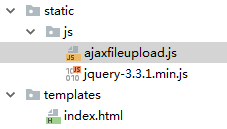
<!DOCTYPE html>

<html lang="en" xmlns:th="http://www.thymeleaf.org">

<head>

    <meta charset="UTF-8">

    <title>Index</title>

    <style>

        html, body {

            margin: 0;

            padding: 0;

            height: 100%;

            min-height: 100%;

        }

        .header {

            padding: 1px;

            position: relative;

            left: 0;

            top: 0;

            width: 100%;

            height: 70px;

            background-color: #4E3384;

            color: #c7acff;

        }

        .header h2 {

            text-align: center;

        }

        .header a {

            display: block;

            position: absolute;

            top: 18px;

            right: 15px;

            padding: 8px 15px;

            background-color: #a27bf1;

            color: #fff;

            border-radius: 3px;

            text-decoration: none;

        }

        .container {

            min-height: 100%;

        }

        .main {

            max-width: 1200px;

            margin: 30px auto;

            text-align: center;

        }

        .file-wrap {

            position: relative;

            padding: 8px 10px;

            background-color: #ad0660;

            color: #fff;

            text-decoration: none;

            font-size: 14px;

            border-radius: 3px;

            margin: 60px 25px;

            display: inline-block;

        }

        .file-wrap:hover {

            background-color: #d80b7a;

        }

        .file-input {

            font-size: 0;

            position: absolute;

            left: 0;

            top: 0;

            width: 100%;

            height: 100%;

            cursor: pointer;

            opacity: 0;

        }

    </style>

</head>

<body>

<div class="container">

    <div class="header">

        <h2>文件上传</h2>

    </div>

    <div class="main">

        <a href="javascript:;" class="file-wrap">单文件上传

            <input type="file" id="singleFile" name="singleFile" class="file-input">

        </a>

        <a href="javascript:;" class="file-wrap">多文件上传

            <input type="file" id="multiFile" name="multiFile" class="file-input" multiple>

        </a>

        <div id="imgDiv"></div>

    </div>

</div>

<script th:src="@{js/jquery-3.3.1.min.js}"></script>

<script th:src="@{js/ajaxfileupload.js}"></script>

<script>

    $(document).on('change', '#singleFile', function () {

        $.ajaxFileUpload({

            url: '/upload/single', // 用于文件上传的服务器端请求地址

            secureuri: false, // 是否需要安全协议,一般设置为false

            fileElementId: 'singleFile', // 文件上传域的ID

            dataType: 'json', // 返回值类型 一般设置为json

            // 服务器成功响应处理函数

            success: function (data, status) {

                alert(data.msg);

                if (data.code == 1){

                    $('#imgDiv').append($('<img src="'+ data.data +'">'));

                }

            },

            // 服务器响应失败处理函数

            error: function (data, status, e) {

                alert(e);

            }

        });

        $('#singleFile').val('');

    })

    $(document).on('change', '#multiFile', function () {

        $.ajaxFileUpload({

            url: '/upload/multi', // 用于文件上传的服务器端请求地址

            secureuri: false, // 是否需要安全协议,一般设置为false

            fileElementId: 'multiFile', // 文件上传域的ID

            dataType: 'json', // 返回值类型 一般设置为json

            // 服务器成功响应处理函数

            success: function (data, status) {

                alert(data.msg);

                if (data.code == 1){

                    for (var i = 0; i < data.data.length; i++){

                        $('#imgDiv').append($('<img src="'+ data.data[i] +'">'));

                    }

                }

            },

            // 服务器响应失败处理函数

            error: function (data, status, e) {

                alert(e);

            }

        });

        $('#multiFile').val('');

    })

</script>

</body>

</html>
最后是Java代码
这个是通用的返回结果
package com.example.demo;

import lombok.Data;

@Data

public class BaseResponse<T> {

    private T data;

    private int code = 1;   // 0-false;1-true;默认1

    private String msg = "success";

}
下面是核心上传代码(一个单文件上传,一个多文件上传)
package com.example.demo;

import org.apache.commons.io.FileUtils;

import org.springframework.web.bind.annotation.PostMapping;

import org.springframework.web.bind.annotation.RequestMapping;

import org.springframework.web.bind.annotation.RequestParam;

import org.springframework.web.bind.annotation.RestController;

import org.springframework.web.multipart.MultipartFile;

import javax.servlet.http.HttpServletRequest;

import java.io.File;

import java.io.IOException;

import java.util.ArrayList;

import java.util.Date;

import java.util.List;

@RestController

@RequestMapping("/upload")

public class FileController {

    @PostMapping("/single")

    public BaseResponse<String> single(@RequestParam("singleFile") MultipartFile file, HttpServletRequest req) throws IOException {

        String fileName = file.getOriginalFilename();

        String fileType = fileName.substring(fileName.lastIndexOf("."));

        String newFileName = new Date().getTime() + "";

        String fileSize = FileUtils.byteCountToDisplaySize(file.getSize());

        System.out.println("文件名:" + fileName);

        System.out.println("文件大小:" + fileSize);

        String path = req.getServletContext().getRealPath("/MyFiles/"); // 保存在项目运行目录下的MyFiles文件夹

        File targetFile = new File(path + newFileName + fileType);

        FileUtils.copyInputStreamToFile(file.getInputStream(), targetFile);

        String imgPath = targetFile.getPath();

        System.out.println("保存路径:" + imgPath);

//        String url = req.getScheme() + "://" + req.getServerName() + req.getContextPath() +

//                "/MyFiles/" + newFileName + fileType;

        String url = req.getScheme() + "://" + req.getServerName() + ":" + req.getServerPort() + req.getContextPath() +

                "/MyFiles/" + newFileName + fileType;

        System.out.println("URL:" + url);

        BaseResponse<String> response = new BaseResponse<>();

        response.setData(url);

        return response;

    }

    @PostMapping("/multi")

    public BaseResponse<List<String>> multi(@RequestParam("multiFile") MultipartFile[] files, HttpServletRequest req) throws IOException {

        List<String> urls = new ArrayList<>();

        for (MultipartFile file : files){

            String fileName = file.getOriginalFilename();

            String fileType = fileName.substring(fileName.lastIndexOf("."));

            String newFileName = new Date().getTime() + "";

            String fileSize = FileUtils.byteCountToDisplaySize(file.getSize());

            System.out.println("文件名:" + fileName);

            System.out.println("文件大小:" + fileSize);

            String path = req.getServletContext().getRealPath("/MyFiles/");

            File targetFile = new File(path + newFileName + fileType);

            FileUtils.copyInputStreamToFile(file.getInputStream(), targetFile);

            String imgPath = targetFile.getPath();

            System.out.println("保存路径:" + imgPath);

            String url = req.getScheme() + "://" + req.getServerName() + ":" + req.getServerPort() + req.getContextPath() +

                    "/MyFiles/" + newFileName + fileType;

            System.out.println("URL:" + url);

            urls.add(url);

            System.out.println("=======================================");

        }

        BaseResponse<List<String>> response = new BaseResponse<>();

        response.setData(urls);

        return response;

    }

}
最后你可以配置上传文件大小,在application.properties
spring.servlet.multipart.max-file-size=5MB

spring.servlet.multipart.max-request-size=10MB

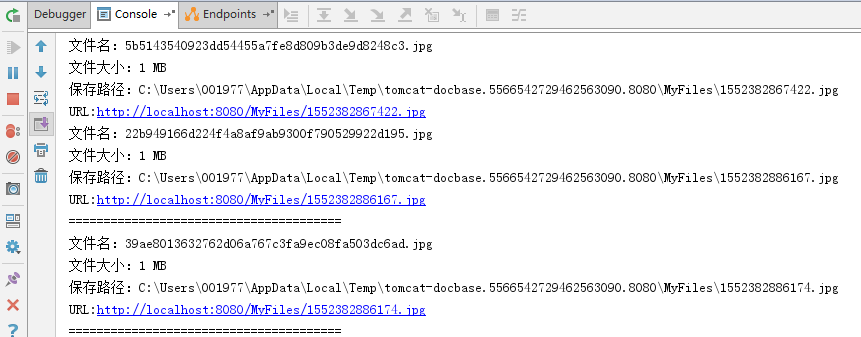
后台打印:
WebFlux情况(Spring5的新产品)
这种情况不同于SpringMVC,我只能以我目前开发的情况来说明。我们是前后端分离的项目,前端用vue+vuetify+VueX+Axios,大概思路就是搞一个按钮,当change事件发生就执行上传操作。
<v-btn dark small color="blue darken-1">上传文件

    <input type="file" id="pbFileInput" class="file-input" @change="uploadFile('pbFileInput')"/>

</v-btn>
..
// id 为文件域的id

uploadFile: function(id){

    let me = this;

    let formData = new window.FormData();

    formData.append('file',document.querySelector('#'+id).files[0])

    let options = {  // 设置axios的参数

        headers: {

            'Content-Type': 'multipart/form-data'

        }

    }

    me.$store.state.axios.post('/upload',formData, options)

        .then(function (response) {

            let data = response.data;

            if (data.code == 0){

                console.log(data);

                document.querySelector('#'+id).value = '';  // 解决上传第二次不能选择同一文件

            } else{

                console.log(data.msg)

            }

        })

        .catch(function (error) {

            console.log(error);

        });

}
后端(这个是借鉴网友的代码,还可以用)
    private static final String BASE_PATH = "/MyFiles/";

    @PostMapping(value = "/upload", consumes = MediaType.MULTIPART_FORM_DATA_VALUE)

    public Mono<BaseResponse<String>> requestBodyFlux(@RequestPart("file") FilePart filePart) throws IOException {

        String base = BASE_PATH;  // 存放在当前磁盘的根目录

        System.out.println(filePart.filename());

        Path path = Paths.get(base);

        if (!Files.exists(path)){

            Files.createDirectories(path);

        }

        Path file = Files.createFile(Paths.get(base + filePart.filename()));

        // 方法一

        AsynchronousFileChannel channel =

                AsynchronousFileChannel.open(file, StandardOpenOption.WRITE);

        DataBufferUtils.write(filePart.content(), channel, 0)

                .doOnComplete(() -> {

                    System.out.println("finish");

                })

                .subscribe();

        // 方法二

//        filePart.transferTo(file.toFile());

        System.out.println(file.toString());

        BaseResponse<String> response = new BaseResponse<>();

        response.setData(filePart.filename()); // 把文件名传回给前端

        return Mono.just(response);

    }
填坑:网友的代码也不是万能的哦
    @PostMapping(value = "/upload", consumes = MediaType.MULTIPART_FORM_DATA_VALUE)

    public Mono<BaseResponse<String>> requestBodyFlux(@RequestPart("file") FilePart filePart, @RequestHeader("uniqueId") String uniqueId) throws IOException {

        String base = baseConfiguration.getPbUploadPath();  // 存放在当前磁盘的根目录

        if (StringUtils.isEmpty(uniqueId)){

            uniqueId = randomNumber();   // 每个pb协议有个独立的文件夹名称

        }

        String filename = filePart.filename();

        log.info("=======================上传文件=======================");

        log.info(filename);

        log.info(uniqueId);

        Path path = Paths.get(org.apache.commons.lang3.StringUtils.appendIfMissing(base, "/") + uniqueId + "/");

        if (!Files.exists(path)){

            Files.createDirectories(path);

        }

        // 如果存在同名文件,先删除

        Path targetPath = Paths.get(org.apache.commons.lang3.StringUtils.appendIfMissing(base, "/") + uniqueId + "/" + filename);

        if (Files.exists(targetPath)){

            boolean b = Files.deleteIfExists(targetPath);

            log.info("已存在同名文件:" + filename + ",先删除:" + b);

        }

        // 再建立新的

        Path tempFile = Files.createFile(targetPath);

        // 方法一

        AsynchronousFileChannel channel =

                AsynchronousFileChannel.open(tempFile, StandardOpenOption.WRITE);

        DataBufferUtils.write(filePart.content(), channel, 0)

                .doOnComplete(() -> {

                    log.info("文件写入完毕...");

                    // 不关闭的话如果再上传同一个文件,会报错:java.nio.file.AccessDeniedException,因为资源被占用,无法删除

                    log.info("文件流关闭...");

                    try {

                        channel.close();

                    } catch (IOException e) {

                        e.printStackTrace();

                        log.info("文件流关闭失败...");

                    }

                })

                .subscribe();

        // 方法二

//        filePart.transferTo(tempFile.toFile());

        log.info(tempFile.toString());

        log.info("=======================--------=======================");

        BaseResponse<String> response = new BaseResponse<>();

        response.setData(filename + "," + uniqueId); // 把唯一id和文件名传回给前端

        return Mono.just(response);

    }
生成随机文件夹名字
    private String randomNumber(){

        long time = new Date().getTime();

        String s = time + "";

        Random random = new Random();

        for (int i = 0; i < 4; i++){

            s += random.nextInt(10);

        }

        return s;

    }
我已经测试这种方式可以行得通
SpringBoot文件上传(MVC情况和webFlux情况)的更多相关文章
- 补习系列(11)-springboot 文件上传原理
目录 一.文件上传原理 二.springboot 文件机制 临时文件 定制配置 三.示例代码 A. 单文件上传 B. 多文件上传 C. 文件上传异常 D. Bean 配置 四.文件下载 小结 一.文件 ...
- 【SpringBoot】07.SpringBoot文件上传
SpringBoot文件上传 1.编写html文件在classpath下的static中 <!DOCTYPE html> <html> <head> <met ...
- springboot文件上传下载简单使用
springboot的文件上传比较简单 一.使用默认的Resolver:StandardServletMultipartResolver controller package com.mydemo.w ...
- SpringBoot从入门到精通十一(SpringBoot文件上传的两种方法)
前言 在企业级项目开发过程中,上传文件是最常用到的功能.SpringBoot集成了SpringMVC,当然上传文件的方式跟SpringMVC没有什么出入. 本章目标 使用SpringBoot项目完成单 ...
- springboot文件上传报错
异常信息: org.springframework.web.multipart.MultipartException: Could not parse multipart servlet reques ...
- SpringBoot 文件上传临时文件路径问题
年后放假回来,一向运行OK的项目突然图片上传不了了,后台报错日志如下: java.io.IOException: The temporary upload location [/tmp/tomcat. ...
- springboot 文件上传大小配置
转自:https://blog.csdn.net/shi0299/article/details/69525848 springboot上传文件大小的配置有两种,一种是设置在配置文件里只有两行代码,一 ...
- SpringBoot文件上传下载
项目中经常会有上传和下载的需求,这篇文章简述一下springboot项目中实现简单的上传和下载. 新建springboot项目,前台页面使用的thymeleaf模板,其余的没有特别的配置,pom代码如 ...
- Springboot 文件上传(带进度条)
1. 相关依赖 pom.xml <project xmlns="http://maven.apache.org/POM/4.0.0" xmlns:xsi="http ...
随机推荐
- Linux常用查找命令
第一种:grep命令 示例: 第二种:find命令 示例: 第三种:locate命令 示例: 第四种:whereis命令 示例: 第五种:which命令 示例:
- (一) Keras 一元线性回归
视频学习来源 https://www.bilibili.com/video/av40787141?from=search&seid=17003307842787199553 笔记 环境为 an ...
- Android-蓝牙自动配对与隐藏对话框
一.概述 本次分析是基于Android7.0的源码. 二.自动配对分析过程 首先,我们分析一下源码的自动配对过程,packages/apps/Settings/src/com/android/sett ...
- 查看apk签名 和 keystore 的信息
原文出处:https://www.jianshu.com/p/90b698002215 1.keytool -printcert -file ***(把apk文件下的META- INF文件夹解压出来, ...
- python-重载
重载概念 重载是对继承的父类方法进行重新定义.重载可以重新定义方法还可以重新定义运算符.因为通过继承的类不一定能满足当前类的需求.在当前类中只需要修改部分内容而达到自己的需求. 重载特点 减少代码量和 ...
- c/c++ 模板 类型推断
模板类型的推断 下面的函数f是个模板函数,typename T.下表是,根据调用测的实参,推断出来的T的类型. 请注意下表的红字部分, f(T&& t)看起来是右值引用,但其实它会根据 ...
- 【spring源码分析】IOC容器初始化(二)
前言:在[spring源码分析]IOC容器初始化(一)文末中已经提出loadBeanDefinitions(DefaultListableBeanFactory)的重要性,本文将以此为切入点继续分析. ...
- UOJ #449. 【集训队作业2018】喂鸽子
UOJ #449. [集训队作业2018]喂鸽子 小Z是养鸽子的人.一天,小Z给鸽子们喂玉米吃.一共有n只鸽子,小Z每秒会等概率选择一只鸽子并给他一粒玉米.一只鸽子饱了当且仅当它吃了的玉米粒数量\(≥ ...
- 【续】5年后,我们为什么要从 Entity Framework 转到 Dapper 工具?
前言 上一篇文章收获了 140 多条评论,这是我们始料未及的. 向来有争议的话题都是公说公的理,婆说婆的理,Entity Framework的爱好者对此可以说是嗤之以鼻,不屑一顾,而Dapper爱好者 ...
- 原创|1分钟搞定 Nginx 版本的平滑升级与回滚
Nginx无论是对于运维.开发.还是测试来说,都是日常工作需要掌握的一个知识点,之前也写过不少关于Nginx相关的文章: Nginx服务介绍与安装 Nginx服务配置文件介绍 Nginx配置虚拟主机 ...