
offsetLeft 解析
前言:先看下w3c与之相关的介绍:
| element.offsetHeight | 返回元素的高度。 |
| element.offsetWidth | 返回元素的宽度。 |
| element.offsetLeft | 返回元素的水平偏移位置。 |
| element.offsetParent | 返回元素的偏移容器。 |
| element.offsetTop | 返回元素的垂直偏移位置。 |
1,简单来说就是偏移量,但它的参考对象到底是谁,我们慢慢来看.
<style>

body { margin:0;  }

.box1 { width:300px; height:300px; margin:100px; background:#333; overflow:hidden; }

.box2 { width:200px; height:200px; margin:100px; background:#666; overflow:hidden; }

.box3 { width:100px; height:100px; margin:100px; background:#999;}

</style>
<body>

<div class="box1">
  <div class="box2">
    <div class="box3">
    </div>
  </div>
</div>
 <script>
      var oBox1 = document.querySelector('.box1');
   var oBox2 = document.querySelector('.box2');
   var oBox3 = document.querySelector('.box3');
   console.log('box1: '+ oBox1.offsetLeft +','+ oBox1.offsetTop);
   console.log('box2: '+ oBox2.offsetLeft +','+ oBox2.offsetTop);
   console.log('box3: '+ oBox3.offsetLeft +','+ oBox3.offsetTop);
 </script>
</body>
效果如下:
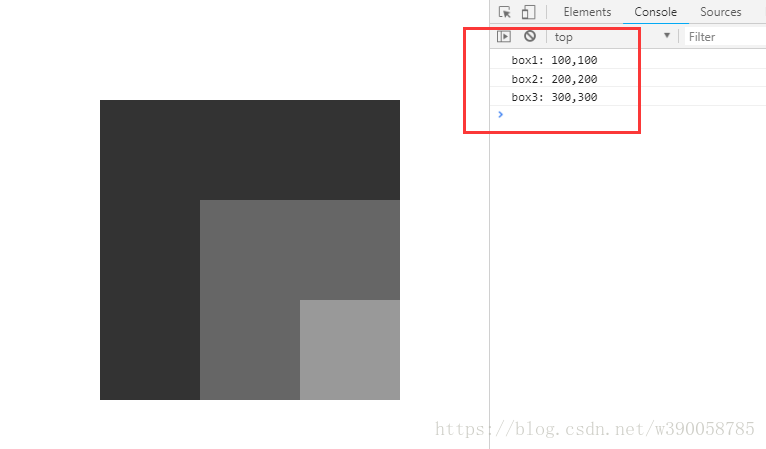
这个demo中可以看出在默认情况下每个box的偏移值都是以浏览器为参考对象的.
2.如果我们给父级加上定位呢?(box1添加相对定位)
<body>

<style>

body { margin:0;  }

.box1 { width:300px; height:300px; margin:100px; background:#333; overflow:hidden; position:relative;}  //box1设置相对定位

.box2 { width:200px; height:200px; margin:100px; background:#666; overflow:hidden; }

.box3 { width:100px; height:100px; margin:100px; background:#999;}

</style>

<div class="box1">

    <div class="box2">

        <div class="box3"></div>

    </div>

</div>

<script>

    var oBox1 = document.querySelector('.box1');

    var oBox2 = document.querySelector('.box2');

    var oBox3 = document.querySelector('.box3');

    console.log('box1: '+ oBox1.offsetLeft +','+ oBox1.offsetTop);

    console.log('box2: '+ oBox2.offsetLeft +','+ oBox2.offsetTop);

    console.log('box3: '+ oBox3.offsetLeft +','+ oBox3.offsetTop);

</script>

</body>
效果:
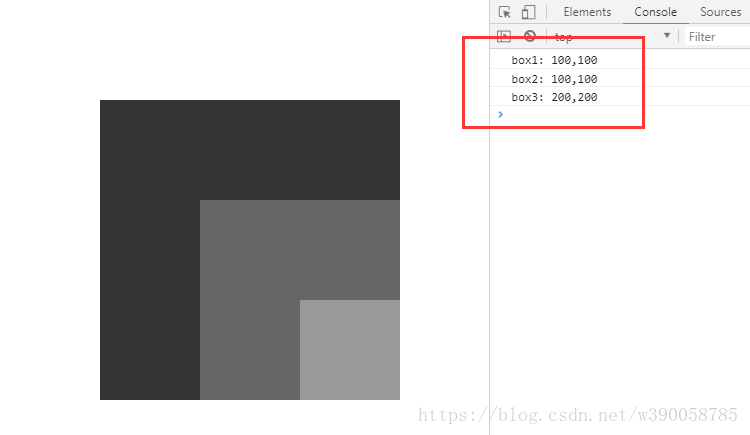
所以给父级添加定位之后,offset的偏移值就会变成相对于父级的偏移值.(除了position:static;外的所有定位,如fixed,relative,absolute都会使偏移值的参考对象变为父级))
3.在我们给父级添加定位之后,还想获取元素相对于浏览器窗口的偏移值怎么办?
思路很简单,就是把元素本身的偏移量跟所有上级定位元素的偏移量都加起来就可以了,问题又来了,假如我们不知道他有几个上级定位元素呢?
这就需要封装一个函数(用到了offsetParent :获取上一级定位元素对象):
function offset(obj,direction){        //传入对象 和 方向

    //将top,left首字母大写,并拼接成offsetTop,offsetLeft

    var offsetDir = 'offset'+ direction[0].toUpperCase()+direction.substring(1);

    var realNum = obj[offsetDir];

    var positionParent = obj.offsetParent;  //获取上一级定位元素对象

    while(positionParent != null){

    realNum += positionParent[offsetDir];

    positionParent = positionParent.offsetParent;

    }

    return realNum;

}
实际运用是这样的:
<style>

body { margin:0;  }

.box1 { width:300px; height:300px; margin:100px; background:#333; overflow:hidden; position:relative; }

.box2 { width:200px; height:200px; margin:100px; background:#666; overflow:hidden; position:relative; }

.box3 { width:100px; height:100px; margin:100px; background:#999;}

</style>

<body>

<div class="box1">

    <div class="box2">

        <div class="box3"></div>

    </div>

</div>

<script>

    var oBox1 = document.querySelector('.box1');

    var oBox2 = document.querySelector('.box2');

    var oBox3 = document.querySelector('.box3');

    function offset(obj,direction){

        //将top,left首字母大写,并拼接成offsetTop,offsetLeft

        var offsetDir = 'offset'+ direction[0].toUpperCase()+direction.substring(1);

        var realNum = obj[offsetDir];

        var positionParent = obj.offsetParent;  //获取上一级定位元素对象

        while(positionParent != null){

            realNum += positionParent[offsetDir];

            positionParent = positionParent.offsetParent;

        }

        return realNum;

    }

    console.log('box1: '+ offset(oBox1,'left') +','+ offset(oBox1,'top'));

    console.log('box2: '+ offset(oBox2,'left') +','+ offset(oBox2,'top'));

    console.log('box3: '+ offset(oBox3,'left') +','+ offset(oBox3,'top'));

</script>

</body>
运用到移动端拖拽事件(jquery):
 // 拖拽事件

  var x1;

  var x2;

  var x_c;  //指针划过的距离

  var xoffsetLeft;

  $('#ulListMoble').on('touchstart', function (e) {

    var touch = e.originalEvent.targetTouches[0];

    x1 = touch.pageX;

  });

  $('#ulListMoble').on('touchmove', function (e) {

    var touch = e.originalEvent.targetTouches[0];

    xoffsetLeft = $('#ulListMoble')[0].offsetLeft;

    x2 = touch.pageX;

    x_c = x1 - x2;

    xoffsetLeft -= x_c;

    // console.log(xoffsetLeft);

    if (xoffsetLeft < 0) {

      $('#ulListMoble').css({ "left": xoffsetLeft + "px" })

    }

    x1 = x2;

  });

})
offsetLeft 解析的更多相关文章
- 【JavaScript】全面解析offsetLeft、offsetTop
假设 obj 为某个 HTML 控件.obj.offsetLeft 指 obj 距离左方或上层控件的位置,整型,单位像素. obj.offsetRight 指 obj 距离右方或上层控件的位置,整型, ...
- js预解析及特效
预解析: // 作用域: // 域:空间.范围.区域…… // 作用:读.写 script 全局变量.全局函数 自上而下 函数 由里到外 {} 浏览器: “JS解析器” 1)“找一些东西” :var ...
- zepto.js 源码解析
http://www.runoob.com/w3cnote/zepto-js-source-analysis.html Zepto是一个轻量级的针对现代高级浏览器的JavaScript库, 它与jqu ...
- 前端面试题集锦及答案解析--HTML、 HTTP、web综合问题
前端需要注意哪些SEO 合理的title.description.keywords:搜索对着三项的权重逐个减小,title值强调重点即可,重要关键词出现不要超过2次,而且要靠前,不同页面title要有 ...
- 解析JS运动
解析JS运动 物体运动原理:通过改变物体的位置,而发生移动变化. 任何运动都是相对的,就像物理中的运动公式:s(要达到的)=s0(当前的样式值)+vt. 方法: 1.运动的物体使用绝对定位 ...
- Android 贝塞尔曲线解析
相信很多同学都知道"贝塞尔曲线"这个词,我们在很多地方都能经常看到.利用"贝塞尔曲线"可以做出很多好看的UI效果,本篇博客就让我们一起学习"贝塞尔曲线 ...
- JavaScript (JS)基础:BOM 浅析 (含window对象相关基本方法、属性解析)
① window对象(Math方法也属于window对象): window对象是JavaScript中的顶级对象,所有定义在全局作用域中的变量.函数都会变成window对象的属性和方法,window对 ...
- 【微信小程序】开发实战 之 「视图层」WXML & WXSS 全解析
在<微信小程序开发实战 之 「配置项」与「逻辑层」>中我们详细阐述了小程序开发的程序和页面各配置项与逻辑层的基础知识.下面我们继续解析小程序开发框架中的「视图层」部分.学习完这两篇文章的基 ...
- 【原】Android热更新开源项目Tinker源码解析系列之三:so热更新
本系列将从以下三个方面对Tinker进行源码解析: Android热更新开源项目Tinker源码解析系列之一:Dex热更新 Android热更新开源项目Tinker源码解析系列之二:资源文件热更新 A ...
随机推荐
- [Swift]LeetCode1033. 移动石子直到连续 | Moving Stones Until Consecutive
Three stones are on a number line at positions a, b, and c. Each turn, let's say the stones are curr ...
- [小技巧]ASP.NET Core中如何预压缩静态文件
原文地址:Pre-compressed static files with ASP.NET Core 作者:Gunnar Peipman 译者:Lamond Lu 译文:https://www.cnb ...
- 第13章 Base64 URL编码 - IdentityModel 中文文档(v1.0.0)
JWT令牌使用Base64 URL编码进行序列化. IdentityModel包括Base64Url帮助编码/解码的类: var text = "hello"; var b64ur ...
- Shiro详解
Shiro Shiro集成Spring 加入Spring和Shiro的jar包 配置Spring及SpringMVC 参照:官方给出的案例shiro\samples\spring Shiro集成Web ...
- MD5加密Util
目录 (1)需要导入的包 (2)MD5Util类 (3)使用举例 (1)需要导入的包 <dependency> <groupId>org.apache.commons</ ...
- 基于BootstarbTable实现加载更多的方式
在工作中,我们有时候会遇到一些需求实现每次在页面上显示的数据每次都是通过请求数据库端来实现,在不通过上一页,下一页的方式来实现我们要展示的数据,通过js请求每次加载10条或者任意数量的数据. 代码展示 ...
- 深入理解Java虚拟机-第1章-走进Java-读书笔记
第 1 章 走近 Java 前言 Java 的技术体系主要是由支撑 Java 程序运行的虚拟机.为各开发领域提供接口支持的 Java API.Java 编程语言及许许多多的第三方 Java 框架(如 ...
- Go基础(3)
demo1: package main import "fmt" func print() { for i := 1; i < 10; i++ { for j := 1; j ...
- 每日分享!~ JavaScript数组去重
数组去重 数组去重在很多面试的过程中,都是大题出现!网络上出现了很多数组去重的方式.多数的达到了12种以上. 今天我只给大家介绍两种我比较喜欢,比较认可!入手简单的-能解决自己的问题就可以了 好了 , ...
- Identity Server 4 - Hybrid Flow - 保护API资源
这个系列文章介绍的是Identity Server 4 的 Hybrid Flow, 前两篇文章介绍了如何保护MVC客户端, 本文介绍如何保护API资源. 保护MVC客户端的文章: https://w ...