
初学tensorflow遇到的Error——UnrecognizedFlagError: Unknown command line flag 'f'
最近在学习《tensorflow实战》时需要下载cifar10数据集,在cifar10目录下用到命令:
import cifar10,cifar10_input
cifar10.maybe_download_and_extract()
出错,具体错误信息
UnrecognizedFlagError                     Traceback (most recent call last)

<ipython-input-2-e6d19815ade8> in <module>()

     15     return var

     16

---> 17 cifar10.maybe_download_and_extract()

     18 images_train,labels_train = cifar10_input.disorted_inputs(data_dir=data_dir,batch_size=batch_size)

     19 images_test,labels_test = cifar10_input.inputs(eval_data=True,data_dir=data_dir,batch_size=batch_size)

~/ml/models/tutorials/image/cifar10/cifar10.py in maybe_download_and_extract()

    379 def maybe_download_and_extract():

    380   """Download and extract the tarball from Alex's website."""

--> 381   dest_directory = FLAGS.data_dir

    382   if not os.path.exists(dest_directory):

    383     os.makedirs(dest_directory)

~/anaconda3/lib/python3.6/site-packages/tensorflow/python/platform/flags.py in __getattr__(self, name)

     82     # a flag.

     83     if not wrapped.is_parsed():

---> 84       wrapped(_sys.argv)

     85     return wrapped.__getattr__(name)

     86

~/anaconda3/lib/python3.6/site-packages/absl/flags/_flagvalues.py in __call__(self, argv, known_only)

    628       suggestions = _helpers.get_flag_suggestions(name, list(self))

    629       raise _exceptions.UnrecognizedFlagError(

--> 630           name, value, suggestions=suggestions)

    631

    632     self.mark_as_parsed()

UnrecognizedFlagError: Unknown command line flag 'f'
把这个错误信息从头到尾读了一遍,什么玩意儿??
抓耳挠腮,谷歌走一波。
完全相符的结果不多,看了上面的解决方法貌似也都不太适合我,但是从https://github.com/tensorflow/tensorflow/issues/17702,看到
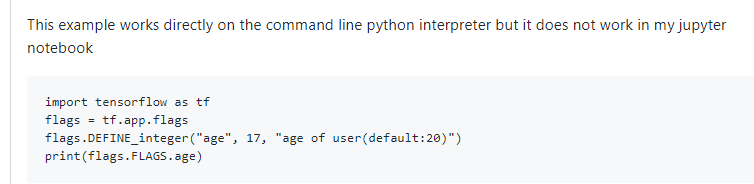
也就是说他的这段出错的代码在python命令行是可以运行的。
坑爹的jupyter?
不不不,jupyter还是很方便的,jupyter牛逼!
但是怎么解决呢,继续搜索,直到大神一句话醍醐灌顶

https://github.com/jupyter/notebook/issues/3327
大神原话可能不是这个意思,但是说者无心听者有意加上我英语渣:为什么非要在jupyter上跑这行代码?就一个下载功能,直接用脚本跑呗。于是…

problem solved ^_^。
以后不要太死心眼…
初学tensorflow遇到的Error——UnrecognizedFlagError: Unknown command line flag 'f'的更多相关文章
- Error running 'xxx': Command line is too long. Shorten command line for xxx
跑单元测试时,报错如下: Error running 'xxx': Command line is too long. Shorten command line for xxx 解决方案: 在项目所在 ...
- 运行springboot项目报错 Error running 'ResourceApplication': Command line is too long. Shorten comma
方法1 IDEA 运行报错:Error running '***': Command line is too long 技术标签: IDEA Error running 'Test': Com ...
- idea报错:Error running $classname: Command line is too long. Shorten command line for $classname.
Command line is too long 打印的变量太长了,超过了限制,这都会报错...我只想知道idea基于什么原理会报这个错... 解决 1.按照提示修改该类的配置,选择jar manif ...
- idea启动springboot项目报Error running 'ServiceStarter': Command line is too long. Shorten command line for ServiceStarter or also for Application
解决办法:在.idea文件夹下面的workspace.xml中的 <component name="PropertiesComponent">标签下面添加: <p ...
- idea 启动 Error running 'XxGatewayApplication': Command line is too long. Shorten command line for XxGatewayApplication or also for Spring Boot default
在idea workspace里 <component name="PropertiesComponent">标签下加入 <property name=" ...
- Error running 'App': Command line is too long. Shorten command line for App or also for Spring Boot default configuration.
找到标签 <component name="PropertiesComponent">.在标签里加一行 : <property name="dynam ...
- selenium运行chrome去掉command -line flag
每次驱动chrome浏览器都会出现这玩意,比较烦人··想办法去掉了它: ChromeOptions options = new ChromeOptions();options.addArguments ...
- Spring session redis ERR unknown command 'CONFIG'
部署线上服务启动报错 redis.clients.jedis.exceptions.JedisDataException: ERR unknown command 'CONFIG' Redis CON ...
- List of Chromium Command Line Switches(命令行开关集)——官方指定命令行更新网址
转自:http://peter.sh/experiments/chromium-command-line-switches/ There are lots of command lines which ...
随机推荐
- 限制TextBox只允许输入数字和字母
设置TextBox控件属性 ImeMode=Disable ShortcutsEnabled=False VB.NET Private Sub TextBox1_KeyDown(sender As O ...
- Centos 7.6搭建Tomcat 环境,发布Java项目
安装 JDK Tomcat 的安装依赖 JDK,在安装 Tomcat 之前需要先安装 Java JDK.输入命令 java -version,如果显示 JDK 版本,证明已经安装了 JDK java ...
- 数据库学习(MySQL):JDBC的简单增删改查实现
本文为原创,转载请注明出处: https://www.cnblogs.com/Tom-shushu/p/9171896.html 这里我们先在数据库建立一个userinfo表: CREATE TABL ...
- 总结安装webpack过程中遇到的错误及解决方案
1.安装不成功的报错: 解决方案:清除缓存 2.打包不成功: 解决方案:填写打包路径时的“__dirname”有两个下划线 3.打包报错: 解决方案:正确填写路径为“./style.css”
- 图像的膨胀与腐蚀——OpenCV与C++的具体实现
目录 1. 膨胀与腐蚀的原理 2. 膨胀的具体实现 1) OpenCV实现 2) C/C++实现 3) 验证与结果 3. 腐蚀的具体实现 1. 膨胀与腐蚀的原理 膨胀与腐蚀是数学形态学在图像处理中最基 ...
- 在SuperMap iDesktop中如何快速追加记录行?
SuperMap iDesktop 产品中,普通数据集右键查看属性表,无法编辑行.是因为要直接在属性表中添加行,只能是纯属性数据集才可用. 除了直接打开数据集,增加几何对象,还有什么办法可以快速追加记 ...
- Linux安装配置Mariadb
一.安装数据库Mariadb 参考:http://blog.51cto.com/12173069/2047746 从最新版本的linux系统开始,默认的是 Mariadb而不是mysql! 使用系统自 ...
- DVWA-XSS学习笔记
DVWA-XSS XSS概念:由于web应用程序对用户的输入过滤不严,通过html注入篡改网页,插入恶意脚本,从而在用户浏览网页时,控制用户浏览器的一种攻击. XSS类型: 反射型XSS:只是简单地把 ...
- go学习笔记(一)
- ASP.NET MVC 下自定义 JsonResult,使用 Json.NET 序列化 JSON
直接贴代码了: using System; using System.Web.Mvc; using Newtonsoft.Json; namespace MvcSample.Extensions { ...