
通过jQuery和C#分别实现对.NET Core Web Api的访问以及文件上传
建立.NET Core Web Api项目
建立请求模型
    public class UserInfo

    {

        public int Age { get; set; }

        public string Name { get; set; }

        public bool Sex { get; set; }

        public Guid Id { get; set; }

    }
建立控制器
using System;
using System.Collections.Generic;
using System.Linq;
using System.Threading.Tasks;
using Microsoft.AspNetCore.Http;
using Microsoft.AspNetCore.Mvc;
namespace AspNetCore.Api.Controllers
{
[Route("api/[controller]/[action]")]
[ApiController]
public class DefaultController : ControllerBase
{
/// <summary>
/// 用户信息
/// </summary>
public static UserInfo UserInfo = new UserInfo
{
Id = Guid.NewGuid(),
Age = 23,
Name = "Jon",
Sex = true
};
[HttpGet]
public IActionResult Test()
{
return new JsonResult("OK");
}
/// <summary>
/// API GET
/// </summary>
/// <returns></returns>
[HttpPost]
public ActionResult<UserInfo> GetUser([FromBody]UserInfo user)
{
return new JsonResult(user);
}
/// <summary>
/// API POST
/// </summary>
/// <returns></returns>
[HttpPost]
public ActionResult<UserInfo> Upload()
{
var files = Request.Form.Files;
return new JsonResult($"Read {string.Join(Environment.NewLine,files.Select(x=>x.FileName))} Success !");
}
}
}
建立.NET Core Web项目
建立控制器
using System;
using System.Collections.Generic;
using System.Diagnostics;
using System.Linq;
using System.Threading.Tasks;
using Microsoft.AspNetCore.Mvc;
using Microsoft.Extensions.Logging;
using AspNetCore.Web.Models;
using Microsoft.Extensions.Caching.Memory;
using System.IO;
using Microsoft.AspNetCore.Http;
using System.Threading;
using System.Net.Http;
using System.Net;
namespace AspNetCore.Web.Controllers
{
public class HomeController : Controller
{
private readonly ILogger<HomeController> _logger;
private readonly IMemoryCache _cache;
public HomeController(ILogger<HomeController> logger, IMemoryCache cache)
{
_logger = logger;
_cache = cache;
}
public IActionResult Index()
{
return View();
}
public IActionResult Privacy()
{
return View();
}
[ResponseCache(Duration = 0, Location = ResponseCacheLocation.None, NoStore = true)]
public IActionResult Error()
{
return View(new ErrorViewModel { RequestId = Activity.Current?.Id ?? HttpContext.TraceIdentifier });
}
/// <summary>
/// 上传文件
/// </summary>
/// <returns></returns>
[RequestSizeLimit(1_073_741_824)]
public IActionResult Upload()
{
var url = "http://localhost:9001/Api/Default/Upload";
var data = new MultipartFormDataContent();
if (Request.HasFormContentType)
{
var request = Request.Form.Files;
foreach (var item in request)
{
data.Add(new StreamContent(item.OpenReadStream()), item.Name, item.FileName);
}
foreach (var item in Request.Form)
{
data.Add(new StringContent(item.Value), item.Key);
}
}
string jsonString = string.Empty;
using (var client = new HttpClient(new HttpClientHandler() { AutomaticDecompression = DecompressionMethods.Deflate | DecompressionMethods.GZip }))
{
var taskResponse = client.PostAsync(url, data);
taskResponse.Wait();
if (taskResponse.IsCompletedSuccessfully)
{
var taskStream = taskResponse.Result.Content.ReadAsStreamAsync();
taskStream.Wait();
using (var reader = new StreamReader(taskStream.Result))
{
jsonString = reader.ReadToEnd();
}
}
}
return new JsonResult(jsonString);
}
/// <summary>
/// 保存文件
/// </summary>
/// <returns></returns>
[HttpPost]
[RequestSizeLimit(1_073_741_824)]
public async Task<IActionResult> Save()
{
Stopwatch sw = new Stopwatch();
sw.Start();
var form = await Request.ReadFormAsync();
int saveCount = 0;
long totalCount = form.Files.Sum(x => x.Length);
foreach (var item in form.Files)
{
var fileSavePath = Environment.CurrentDirectory + "\\Files\\" + item.Name;
using (FileStream fs = new FileStream(fileSavePath, FileMode.Create))
{
using (BinaryWriter bw = new BinaryWriter(fs))
{
using (BinaryReader br = new BinaryReader(item.OpenReadStream()))
{
var customReadLength = item.Length;
byte[] buffer = new byte[customReadLength];
int readCount = 0;
while ((readCount = br.Read(buffer, 0, buffer.Length)) > 0)
{
bw.Write(buffer, 0, readCount);
saveCount += readCount;
var progress = (saveCount * 1.0 / totalCount).ToString("0.00");
_cache.Set<string>("UploadSpeed", progress, DateTimeOffset.Now.AddMinutes(60));
Thread.Sleep(1000);
}
}
}
}
}
sw.Stop();
return new JsonResult($"Read {string.Join(Environment.NewLine, Request.Form.Files.Select(x => x.FileName))} Success !耗时:{sw.ElapsedMilliseconds}");
}
/// <summary>
/// 读取进度
/// </summary>
/// <returns></returns>
public IActionResult UploadProgress()
{
var progress = _cache.Get<string>("UploadSpeed");
return Json(progress);
}
}
}
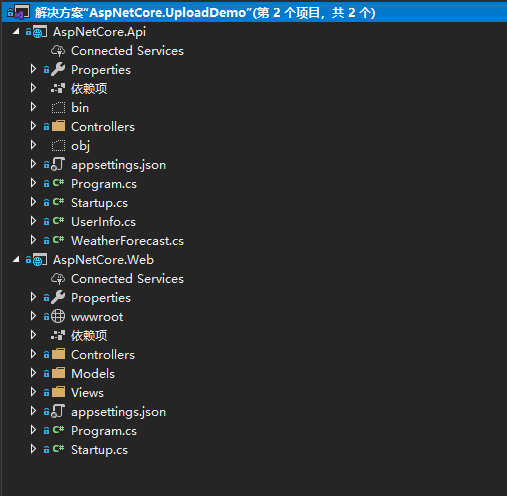
目录结构
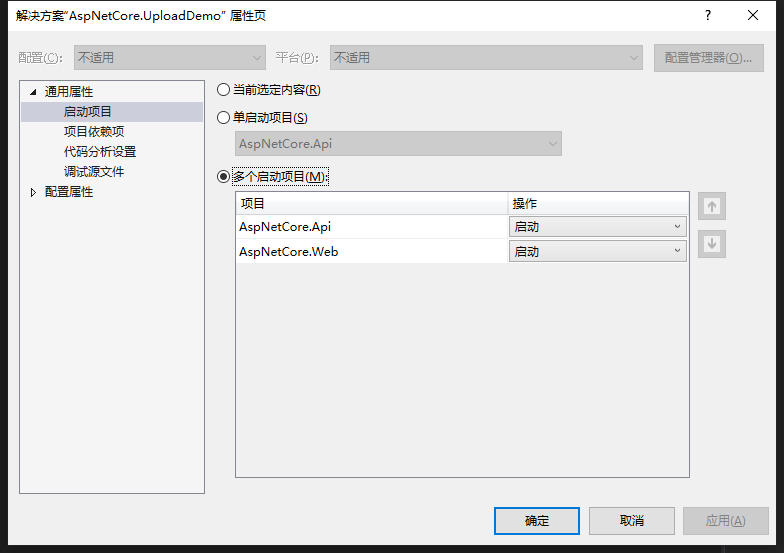
设置解决方案为多个项目启动
一、使用jQuery Ajax访问
(一)、表单传参( [FromForm])
数据类型:Object
ContenyType类型:application/x-www-form-urlencoded
var model = { name: "刘大大", age: 23, sex: true };
前台请求
        var model = { name: "刘大大", age: 23, sex: true };

        $.ajax({

            url: "http://localhost:9001/API/Default/FormCall",

            type: "POST",

            async: true,

            dataType: "json",

            data: model,

            contentType: "application/x-www-form-urlencoded",

            success: function (data) {

                console.log("data:");

                console.log(data);

            }

        });
(二)、JSON字符串[FromBdy]
数据类型:Json
ContenyType类型:application/json
var json = '{"name":"刘大大","age":23,"sex":true}';
也可以使用JSON.stringify(Object)将Object转换为JSON字符串
前端请求
        var model = { name: "刘大大", age: 23, sex: true };

        $.ajax({

            url: "http://localhost:9001/API/Default/BodyCall",

            type: "POST",

            async: true,

            dataType: "json",

            data: JSON.stringify(model),

            contentType: "application/json",

            success: function (data) {

                console.log("data:");

                console.log(data);

            }

        });
(三)、文件上传
建立FormData对象
数据类型:FromData
ContenyType类型false, //必须false才会避开jQuery对 formdata 的默认处理 processData类型: false, //必须false才会自动加上正确的Content-Type
html
<input type="file" multiple id="file" />
JS获取文件对象
        var file = document.getElementById("file");

        var files = file.files;

        var formData = new FormData();

        for (var i = 0; i < files.length; i++) {

            formData.append(files[i].name, files[i]);

        }

       formData.append("name", "刘大大");//可追加参数
AJAX请求
 $.ajax({

            url: "http://localhost:9001/API/Default/Upload",

            type: "POST",

            async: true,

            dataType: "json",

            data: formData,

            contentType: false,

            processData: false,

            success: function (data) {

                console.log(data);

            }

        });
完整HTML源码
<div class="text-center">

    <h1 class="display-4">Welcome</h1>

    <p>Learn about <a href="https://docs.microsoft.com/aspnet/core">building Web apps with ASP.NET Core</a>.</p>

</div>

<div>

    <input type="button" id="fromform" value="Form传参" /><hr />

    <input type="button" id="frombody" value="Body传参" /><hr />

    <input type="file" multiple id="file" name="上传文件" /><hr />

</div>

<script src="https://cdn.bootcss.com/jquery/3.3.0/jquery.js"></script>

<script>

    /**

     * FromForm

     * */

    var fromform = document.getElementById("fromform");

    $(fromform).click(function () {

        var url = 'http://localhost:9001/API/Default/FormCall';

        var model = { name: "刘大大", age: 23, sex: true };

        $.ajax({

            url: url,

            type: "POST",

            async: true,

            data: model,

            contentType: "application/x-www-form-urlencoded",

            success: function (data) {

                console.log(data);

                alert(JSON.stringify(data));

            },

            error: function (result) {

                console.log(result);

            }

        });

    });

    /**

     * FromBody

     * */

    $('#frombody').click(function () {

        var url = 'http://localhost:9001/API/Default/BodyCall';

        var json = '{"name":"刘大大","age":23,"sex":true}';

        $.ajax({

            url: url,

            type: "POST",

            async: true,

            data: json,

            contentType: "application/json",

            success: function (data) {

                console.log(data);

                alert(JSON.stringify(data));

            },

            error: function (result) {

                console.log(result);

            }

        });

    });

    /**

     * FormData

     * */

    var file = document.getElementById("file");

    file.onchange = function () {

        var file = document.getElementById("file");

        var files = file.files;

        var formData = new FormData();

        for (var i = 0; i < files.length; i++) {

            formData.append(files[i].name, files[i]);

        }

        formData.append("name", "刘大大");

        var isUploadByJs = true;

        var url = isUploadByJs ? 'http://localhost:9001/API/Default/Upload' : 'http://localhost:9002/Home/Upload';

        $.ajax({

            url: url,

            type: "POST",

            async: true,

            dataType: "json",

            data: formData,

            contentType: false, //必须false才会避开jQuery对 formdata 的默认处理

            processData: false, //必须false才会自动加上正确的Content-Type

            headers: { ReadTime: Date.now() },

            beforeSend: function (xhr) {

                xhr.setRequestHeader('Author', 'liudada');

            },

            success: function (data) {

                console.log(data);

                alert(JSON.stringify(data));

            },

            error: function (result) {

                console.log(result);

            }

        });

    }

</script>
二、使用C#后台访问
(一)、Get访问
 var url = "http://localhost:57954/API/Default/Test";

using (var client = new HttpClient(new HttpClientHandler() { AutomaticDecompression = DecompressionMethods.Deflate | DecompressionMethods.GZip }))

{

var taskResponse = client.GetAsync(url);

taskResponse.Wait();

if (taskResponse.IsCompletedSuccessfully)

{

var taskStream = taskResponse.Result.Content.ReadAsStreamAsync();

taskStream.Wait();

using (var reader = new StreamReader(taskStream.Result))

{

jsonString = reader.ReadToEnd();

}

}

}
(二)、Post访问
            var url = "http://localhost:57954/API/Default/BodyCall";

            var data = new {name="刘大大",age=23,sex=true };

            using (var client = new HttpClient(new HttpClientHandler() { AutomaticDecompression = DecompressionMethods.Deflate | DecompressionMethods.GZip }))

            {

                var jsonToSend = JsonConvert.SerializeObject(data, Formatting.None, new IsoDateTimeConverter());

                var body = new StringContent(jsonToSend, Encoding.UTF8, "application/json");

                var taskResponse = client.PostAsync(url, body);

                taskResponse.Wait();

                if (taskResponse.IsCompletedSuccessfully)

                {

                    var taskStream = taskResponse.Result.Content.ReadAsStreamAsync();

                    taskStream.Wait();

                    using (var reader = new StreamReader(taskStream.Result))

                    {

                        jsonString = reader.ReadToEnd();

                    }

                }

            }
(三)、上传文件
/// <summary>
/// 上传文件
/// </summary>
/// <returns></returns>
[RequestSizeLimit(1_073_741_824)]
public IActionResult Upload()
{
var url = "http://localhost:9001/Api/Default/Upload";
var data = new MultipartFormDataContent();
if (Request.HasFormContentType)
{
var request = Request.Form.Files;
foreach (var item in request)
{
data.Add(new StreamContent(item.OpenReadStream()), item.Name, item.FileName);
}
foreach (var item in Request.Form)
{
data.Add(new StringContent(item.Value), item.Key);
}
}
string jsonString = string.Empty;
using (var client = new HttpClient(new HttpClientHandler() { AutomaticDecompression = DecompressionMethods.Deflate | DecompressionMethods.GZip }))
{
var taskResponse = client.PostAsync(url, data);
taskResponse.Wait();
if (taskResponse.IsCompletedSuccessfully)
{
var taskStream = taskResponse.Result.Content.ReadAsStreamAsync();
taskStream.Wait();
using (var reader = new StreamReader(taskStream.Result))
{
jsonString = reader.ReadToEnd();
}
}
}
return new JsonResult(jsonString);
}
WebHelper
这里包含了WebRequest和HttpClient两种请求方式,以及包含了将Object对象序列化为HttpCotnent对象的方法。
/***************************************************************************************************************************************************

 * *文件名:WebHelper.cs

 * *创建人:Jon

 * *日 期 :2018年5月25日

 * *描 述 :实现HTTP协议中的GET、POST请求

 * *MVC使用HttpClient上传文件实例:

        public IActionResult Upload()

        {

            var url = "http://localhost:57954/API/Default/values";

            var data = new MultipartFormDataContent();

            if (Request.HasFormContentType)

            {

                var request = Request.Form.Files;

                foreach (var item in request)

                {

                    data.Add(new StreamContent(item.OpenReadStream()), item.Name, item.FileName);

                }

                foreach (var item in Request.Form)

                {

                    data.Add(new StringContent(item.Value), item.Key);

                }

            }

            WebHelper.PostByHttpClientFromHttpContent(url, data);

            return Json("OK");

        }

*****************************************************************************************************************************************************/

using Newtonsoft.Json;

using Newtonsoft.Json.Converters;

using Newtonsoft.Json.Linq;

using System;

using System.Collections.Generic;

using System.IO;

using System.Net;

using System.Net.Http;

using System.Net.Http.Headers;

using System.Text;

namespace Expansion.Helper

{

    public static class WebHelper

    {

        /// <summary>

        /// 通过WebRequest发起Get请求

        /// </summary>

        /// <param name="url">请求地址</param>

        /// <returns>JSON字符串</returns>

        public static string GetByWebRequest(string url)

        {

            string jsonString = string.Empty;

            var request = (HttpWebRequest)WebRequest.Create(url);

            request.Method = "GET";

            request.ContentType = "application/json";

            request.AutomaticDecompression = DecompressionMethods.Deflate | DecompressionMethods.GZip;

            var response = (HttpWebResponse)request.GetResponse();

            using (var stream = new StreamReader(response.GetResponseStream()))

            {

                jsonString = stream.ReadToEnd();

            }

            return jsonString;

        }

        /// <summary>

        /// 通过WebRequest发起Post请求

        /// </summary>

        /// <param name="url">请求地址</param>

        /// <param name="data">请求参数</param>

        /// <returns>JSON字符串</returns>

        public static string PostByWebRequest(string url, object data)

        {

            string jsonString = string.Empty;

            var request = (HttpWebRequest)WebRequest.Create(url);

            request.ContentType = "application/json";

            request.Method = "POST";

            request.Timeout = Int32.MaxValue;

            request.AutomaticDecompression = DecompressionMethods.Deflate | DecompressionMethods.GZip;

            var jsonToSend = JsonConvert.SerializeObject(data, Formatting.None, new IsoDateTimeConverter());

            byte[] btBodys = Encoding.UTF8.GetBytes(jsonToSend);

            request.ContentLength = btBodys.Length;

            request.GetRequestStream().Write(btBodys, 0, btBodys.Length);

            var response = (HttpWebResponse)request.GetResponse();

            using (var stream = new StreamReader(response.GetResponseStream()))

            {

                jsonString = stream.ReadToEnd();

            }

            return jsonString;

        }

        /// <summary>

        /// 通过HttpClient发起Get请求

        /// </summary>

        /// <param name="url">请求地址</param>

        /// <returns>JSON字符串</returns>

        public static string GetByHttpClient(string url)

        {

            string jsonString = string.Empty;

            using (var client = new HttpClient(new HttpClientHandler() { AutomaticDecompression = DecompressionMethods.Deflate | DecompressionMethods.GZip }))

            {

                var taskResponse = client.GetAsync(url);

                taskResponse.Wait();

                if (taskResponse.IsCompletedSuccessfully)

                {

                    var taskStream = taskResponse.Result.Content.ReadAsStreamAsync();

                    taskStream.Wait();

                    using (var reader = new StreamReader(taskStream.Result))

                    {

                        jsonString = reader.ReadToEnd();

                    }

                }

            }

            return jsonString;

        }

        /// <summary>

        /// 通过HttpClient发起Post请求

        /// </summary>

        /// <param name="url">请求地址</param>

        /// <param name="data">请求参数</param>

        /// <returns>JSON字符串</returns>

        public static string PostByHttpClient(string url, object data)

        {

            string jsonString = string.Empty;

            using (var client = new HttpClient(new HttpClientHandler() { AutomaticDecompression = DecompressionMethods.Deflate | DecompressionMethods.GZip }))

            {

                var jsonToSend = JsonConvert.SerializeObject(data, Formatting.None, new IsoDateTimeConverter());

                var body = new StringContent(jsonToSend, Encoding.UTF8, "application/json");

                var taskResponse = client.PostAsync(url, body);

                taskResponse.Wait();

                if (taskResponse.IsCompletedSuccessfully)

                {

                    var taskStream = taskResponse.Result.Content.ReadAsStreamAsync();

                    taskStream.Wait();

                    using (var reader = new StreamReader(taskStream.Result))

                    {

                        jsonString = reader.ReadToEnd();

                    }

                }

            }

            return jsonString;

        }

        /// <summary>

        /// 通过数据来自HttpContent的HttpClient发起Post请求

        /// </summary>

        /// <param name="url">请求地址</param>

        /// <param name="content">请求参数</param>

        /// <returns>JSON字符串</returns>

        public static string PostByHttpClientFromHttpContent(string url, HttpContent content)

        {

            string jsonString = string.Empty;

            using (var client = new HttpClient(new HttpClientHandler() { AutomaticDecompression = DecompressionMethods.Deflate | DecompressionMethods.GZip }))

            {

                var taskResponse = client.PostAsync(url, content);

                taskResponse.Wait();

                if (taskResponse.IsCompletedSuccessfully)

                {

                    var taskStream = taskResponse.Result.Content.ReadAsStreamAsync();

                    taskStream.Wait();

                    using (var reader = new StreamReader(taskStream.Result))

                    {

                        jsonString = reader.ReadToEnd();

                    }

                }

            }

            return jsonString;

        }

        /// <summary>

        /// Object转换为StreamContent

        /// </summary>

        /// <param name="data">请求参数</param>

        /// <returns>StreamContent</returns>

        public static HttpContent ToStreamContent(this object data)

        {

            var json = JsonConvert.SerializeObject(data, Formatting.None, new IsoDateTimeConverter());

            byte[] bytes = Encoding.UTF8.GetBytes(json);

            MemoryStream ms = new MemoryStream();

            ms.Write(bytes, 0, bytes.Length);

            ms.Position = 0;

            HttpContent streamContent = new StreamContent(ms);

            return streamContent;

        }

        /// <summary>

        /// Object转换为StringContent

        /// </summary>

        /// <param name="data">请求参数</param>

        /// <returns>StringContent</returns>

        public static HttpContent ToStringContent(this object data)

        {

            HttpContent stringContent = new StringContent(JsonConvert.SerializeObject(data));

            return stringContent;

        }

        /// <summary>

        /// Object转换为MultipartFormDataContent

        /// </summary>

        /// <param name="data"></param>

        /// <returns>MultipartFormDataContent</returns>

        public static HttpContent ToMultipartFormDataContent(this object data)

        {

            var json = JsonConvert.SerializeObject(data, Formatting.None, new IsoDateTimeConverter());

            var body = new StringContent(json, Encoding.UTF8, "application/json");

            var multipartFormDataContent = new MultipartFormDataContent();

            multipartFormDataContent.Add(body);

            return multipartFormDataContent;

        }

        /// <summary>

        /// Object转换为FormUrlEncodedContent

        /// </summary>

        /// <param name="data">请求参数</param>

        /// <returns>FormUrlEncodedContent</returns>

        public static HttpContent ToFormUrlEncodedContent(this object data)

        {

            var param = new List<KeyValuePair<string, string>>();

            var values = JObject.FromObject(data);

            foreach (var item in values)

            {

                param.Add(new KeyValuePair<string, string>(item.Key, item.Value.ToString()));

            }

            HttpContent formUrlEncodedContent = new FormUrlEncodedContent(param);

            return formUrlEncodedContent;

        }

        /// <summary>

        /// Object转换为ByteArrayContent

        /// </summary>

        /// <param name="data">请求参数</param>

        /// <returns>FormUrlEncodedContent</returns>

        public static HttpContent ToByteArrayContent(this object data)

        {

            var json = JsonConvert.SerializeObject(data, Formatting.None, new IsoDateTimeConverter());

            byte[] bytes = Encoding.UTF8.GetBytes(json);

            HttpContent byteArrayContent = new ByteArrayContent(bytes);

            return byteArrayContent;

        }

        /// <summary>

        /// Url编码

        /// </summary>

        /// <param name="content">内容</param>

        /// <param name="encode">编码类型</param>

        /// <returns></returns>

        private static string Encode(string content, Encoding encode = null)

        {

            if (encode == null) return content;

            return System.Web.HttpUtility.UrlEncode(content, Encoding.UTF8);

        }

        /// <summary>

        /// Url解码

        /// </summary>

        /// <param name="content">内容</param>

        /// <param name="encode">编码类型</param>

        /// <returns></returns>

        private static string Decode(string content, Encoding encode = null)

        {

            if (encode == null) return content;

            return System.Web.HttpUtility.UrlDecode(content, Encoding.UTF8);

        }

        /// <summary>

        /// 将键值对参数集合拼接为Url字符串

        /// </summary>

        /// <param name="paramArray">键值对集合</param>

        /// <param name="encode">转码类型</param>

        /// <returns></returns>

        private static string BuildParam(List<KeyValuePair<string, string>> paramArray, Encoding encode = null)

        {

            string url = "";

            if (encode == null) encode = Encoding.UTF8;

            if (paramArray != null && paramArray.Count > 0)

            {

                var parms = "";

                foreach (var item in paramArray)

                {

                    parms += string.Format("{0}={1}&", Encode(item.Key, encode), Encode(item.Value, encode));

                }

                if (parms != "")

                {

                    parms = parms.TrimEnd('&');

                }

                url += parms;

            }

            return url;

        }

    }

}
时间仓促,没能说的太详细,有时间再做补充。如本文中的有错误示范,欢迎指正
源码地址:https://github.com/lwc1st/AspNetCore.UploadDemo.git
通过jQuery和C#分别实现对.NET Core Web Api的访问以及文件上传的更多相关文章
- 一个简单的QQ隐藏图生成算法 通过jQuery和C#分别实现对.NET Core Web Api的访问以及文件上传
一个简单的QQ隐藏图生成算法 隐藏图不是什么新鲜的东西,具体表现在大部分社交软件中,预览图看到的是一张图,而点开后看到的又是另一张图.虽然很早就看到过这类图片,但是一直没有仔细研究过它的原理,今天 ...
- jquery文件上传控件 Uploadify
(转自 http://www.cnblogs.com/mofish/archive/2012/11/30/2796698.html) 基于jquery的文件上传控件,支持ajax无刷新上传,多个文件同 ...
- jquery文件上传控件 Uploadify 可以和ajax交互
http://www.cnblogs.com/mofish/archive/2012/11/30/2796698.html 原网址 基于jquery的文件上传控件,支持ajax无刷新上传,多个文件同 ...
- jquery文件上传控件 Uploadify(转)
原文:http://www.cnblogs.com/mofish/archive/2012/11/30/2796698.html 基于jquery的文件上传控件,支持ajax无刷新上传,多个文件同时上 ...
- jquery.uploadify文件上传组件
1.jquery.uploadify简介 在ASP.NET中上传的控件有很多,比如.NET自带的FileUpload,以及SWFUpload,Uploadify等等,尤其后面两个控件的用户体验比较好, ...
- 强大的支持多文件上传的jQuery文件上传插件Uploadify
支持多文件上传的jQuery文件上传插件Uploadify,目前此插件有两种版本即Flash版本和HTML5版本,对于HTML5版本会比较好的支持手机浏览器,避免苹果手机Safari浏览器不支持Fla ...
- jQuery文件上传插件Uploadify(转)
一款基于flash的文件上传,有进度条和支持大文件上传,且可以多文件上传队列. 这款在flash的基础上增加了html5的支持,所以在移动端也可以使用. 由于官方提供的版本是flash免费,html5 ...
- JQuery文件上传插件ajaxFileUpload在Asp.net MVC中的使用
0 ajaxFileUpload简介 ajaxFileUpload插件是一个非常简单的基于Jquery的异步上传文件的插件,使用过程中发现很多与这个同名的,基于原始版本基础之上修改过的插件,文件版本比 ...
- jQuery uploadify 文件上传
uploadify这个插件是基于js里面的jquery库写的.结合了ajax和flash,实现了这个多线程上传的功能.现在最新版为3.2.1. 在线实例 实例预览 Uploadify 在线实例Demo ...
随机推荐
- 【转载】Session的生命周期
http://www.cnblogs.com/binger/archive/2013/03/19/2970171.html 以前在学习的时候没怎么注意,今天又回过头来仔细研究研究了一下Session的 ...
- Day5_递归_二分法
递归调用: 在调用一个函数的过程中,直接或间接的调用函数本身. def func(): print('from func') 间接调用: def foo(): print('form foo') ba ...
- Python小游戏之 - 飞机大战美女 !
用Python写的"飞机大战美女"小游戏 源代码如下: # coding=utf-8 import os import random import pygame # 用一个常量来存 ...
- Golang中WaitGroup使用的一点坑
Golang中WaitGroup使用的一点坑 Golang 中的 WaitGroup 一直是同步 goroutine 的推荐实践.自己用了两年多也没遇到过什么问题.直到一天午睡后,同事扔过来一段奇怪的 ...
- mac上php版本切换
目标:Mac 环境下完成 php 版本之间的切换 在本地开发中很多时候我们需要多个版本的 php 开发环境.在公司中习惯用自己电脑开发的伙伴们,常常因为公司线上环境被迫更换php版本.但有不想降低自己 ...
- java中Collections.sort()方法实现集合排序
1.Integer/String泛型的List进行排序 List <Integer> integerlist = new ArrayList<Integer>(); //定 ...
- 表示一个文件的 File 类型
从本篇文章开始,我们将开启对 Java IO 系统的学习,本质上就是对文件的读写操作,听上去简单,其实并不容易.Java 的 IO 系统一直在完善和改进,设计了大量的类,也只有理解了这些类型被设计出来 ...
- Python测试远程端口连接时间
问题 最近自己服务器访问别人的服务器,有时候会报超时错误,有时候又能够正常访问别人服务器. 思路 最开始猜测是网络不稳定造成的,但是自己没有收集什么时候超时,什么时候能正常访问别人服务器的日志,搞网络 ...
- C++ 利用流来进行string和其他类的转换
通过这种方法可以实现任意转换,需要头文件 #include<string> #include<sstream> 期中sstream提供了我们的主角string流,下面给出int ...
- JS入门熟知
JS是面向对象的语言 封装 继承 多态 聚集(对象中具有引用其他对象的能力) JS使用中绝大多数情况不需要进行面向对象的设计,很多情况是使用已经设计好,准备好的对象,基于对象的语言. JS的使用(引入 ...