
压力测试工具ab - Apache HTTP server benchmarking tool
搞互联网开发,压力测试必不可少。压力测试的工具很多,我用过ab和JMeter,今天主要讲ab的用法。
1、ab是什么
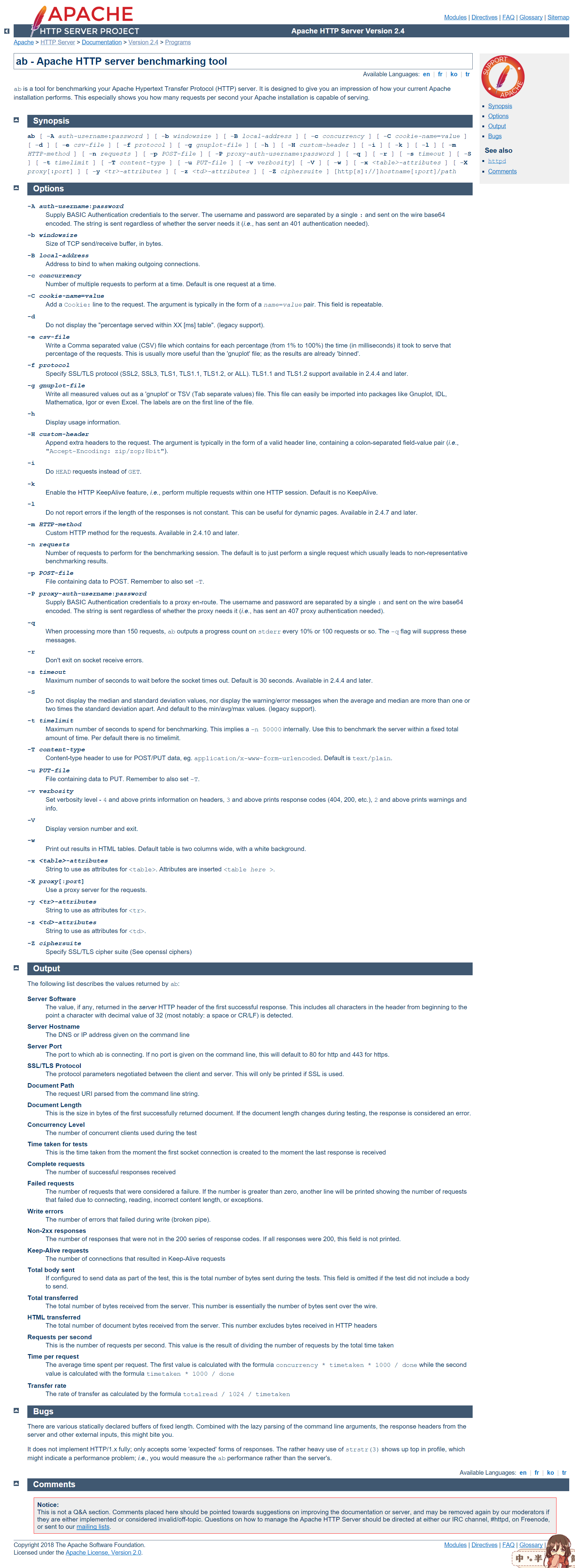
ab is a tool for benchmarking your Apache Hypertext Transfer Protocol (HTTP) server. It is designed to give you an impression of how your current Apache installation performs. This especially shows you how many requests per second your Apache installation is capable of serving.
2、官网
2.1、文档地址
http://httpd.apache.org/docs/2.4/programs/ab.html
2.2、如何找到文档
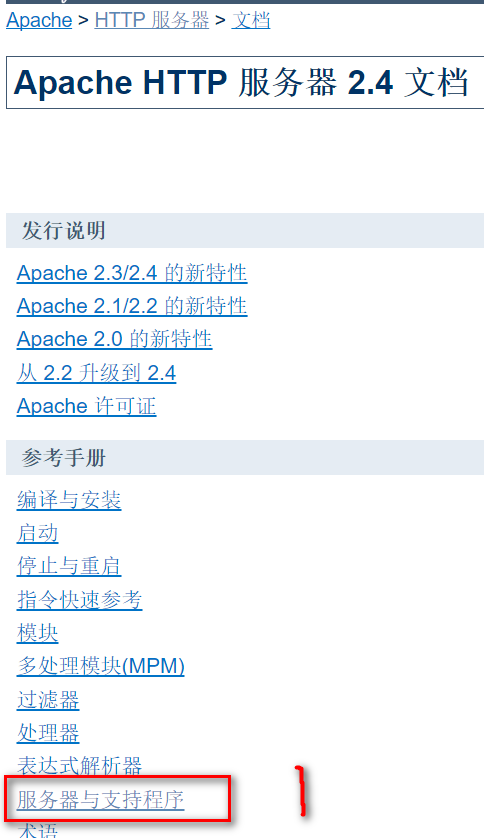
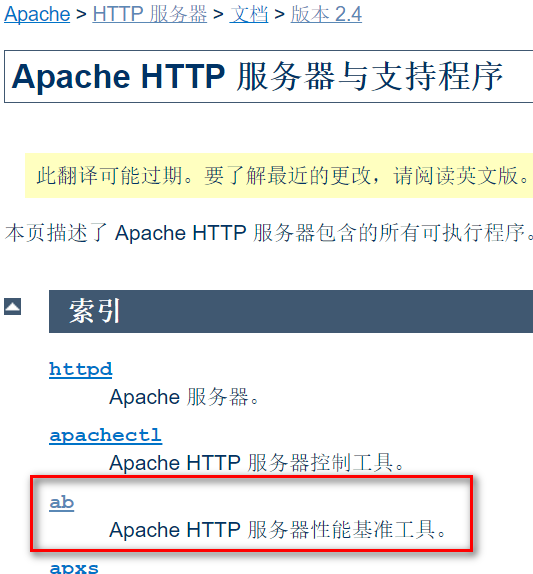
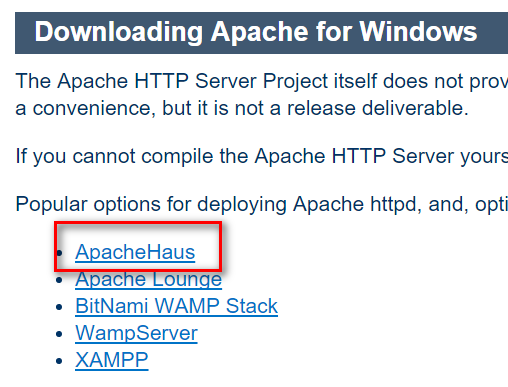
2.3、下载安装
3、用法
3.1、测试GET请求
D:\Apache24\bin>ab -n  -c  http://www.baidu.com/

This is ApacheBench, Version . <$Revision:  $>

Copyright  Adam Twiss, Zeus Technology Ltd, http://www.zeustech.net/

Licensed to The Apache Software Foundation, http://www.apache.org/

Benchmarking www.baidu.com (be patient)

Completed  requests

Completed  requests

Finished  requests

Server Software:        BWS/.

Server Hostname:        www.baidu.com

Server Port:

Document Path:          /

Document Length:         bytes

Concurrency Level:

Time taken for tests:   . seconds

Complete requests:

Failed requests:

   (Connect: , Receive: , Length: , Exceptions: )

Total transferred:       bytes

HTML transferred:        bytes

Requests per second:    . [#/sec] (mean)

Time per request:       . [ms] (mean)

Time per request:       . [ms] (mean, across all concurrent requests)

Transfer rate:          . [Kbytes/sec] received

Connection Times (ms)

              min  mean[+/-sd] median   max

Connect:              .

Processing:      .

Waiting:           .

Total:           .

Percentage of the requests served within a certain time (ms)

  %

  %

  %

  %

  %

  %

  %

  %

 %    (longest request)

D:\Apache24\bin>
D:\Apache24\bin>ab -n  -c  http://localhost:8080/coupon/getByMechantId.json?merchantId=10002

This is ApacheBench, Version 2.3 <$Revision:  $>

Copyright  Adam Twiss, Zeus Technology Ltd, http://www.zeustech.net/

Licensed to The Apache Software Foundation, http://www.apache.org/

Benchmarking localhost (be patient).....done

Server Software:

Server Hostname:        localhost

Server Port:

Document Path:          /coupon/getByMechantId.json?merchantId=

Document Length:         bytes

Concurrency Level:

Time taken for tests:   0.361 seconds

Complete requests:

Failed requests:

Total transferred:       bytes

HTML transferred:        bytes

Requests per second:    276.97 [#/sec] (mean)

Time per request:       180.527 [ms] (mean)

Time per request:       3.611 [ms] (mean, across all concurrent requests)

Transfer rate:          317.81 [Kbytes/sec] received

Connection Times (ms)

              min  mean[+/-sd] median   max

Connect:               0.4

Processing:         44.7

Waiting:            45.0

Total:              44.8

Percentage of the requests served within a certain time (ms)

  %

  %

  %

  %

  %

  %

  %

  %

 %     (longest request)

D:\Apache24\bin>
3.2、测试POST请求
D:\Apache24\bin>ab -n  -c  -p D:\data.json -T application/json http://localhost:8080/coupon/save.json

This is ApacheBench, Version 2.3 <$Revision:  $>

Copyright  Adam Twiss, Zeus Technology Ltd, http://www.zeustech.net/

Licensed to The Apache Software Foundation, http://www.apache.org/

Benchmarking localhost (be patient)

Completed  requests

Completed  requests

Completed  requests

Completed  requests

Completed  requests

Completed  requests

Completed  requests

Completed  requests

Completed  requests

Completed  requests

Finished  requests

Server Software:

Server Hostname:        localhost

Server Port:

Document Path:          /coupon/save.json

Document Length:         bytes

Concurrency Level:

Time taken for tests:   3.306 seconds

Complete requests:

Failed requests:

Total transferred:       bytes

Total body sent:

HTML transferred:        bytes

Requests per second:    302.52 [#/sec] (mean)

Time per request:       661.121 [ms] (mean)

Time per request:       3.306 [ms] (mean, across all concurrent requests)

Transfer rate:          56.43 [Kbytes/sec] received

                        127.92 kb/s sent

                        184.35 kb/s total

Connection Times (ms)

              min  mean[+/-sd] median   max

Connect:               0.5

Processing:       432.2

Waiting:          432.3

Total:            432.2

Percentage of the requests served within a certain time (ms)

  %

  %

  %

  %

  %

  %

  %

  %

 %    (longest request)

D:\Apache24\bin>
3.3、带Cookie
D:\Apache24\bin>ab -n -c -C token= -p D:\data.json -T application/json http://localhost:8080/coupon/save.json

data.json是这样的:
{

    "merchantId": ,

    "couponName": "我妈最美",

    "couponType": ,

    "parValue": ,

    "quantity": ,

    "releaseStartTime": "2018-05-13 00:00:00",

    "releaseEndTime": "2018-05-13 23:59:59",

    "limitType": ,

    "limitNum": ,

    "remark": "妈妈,您辛苦了!"

}
4、Linux下使用ab
yum install httpd-tools
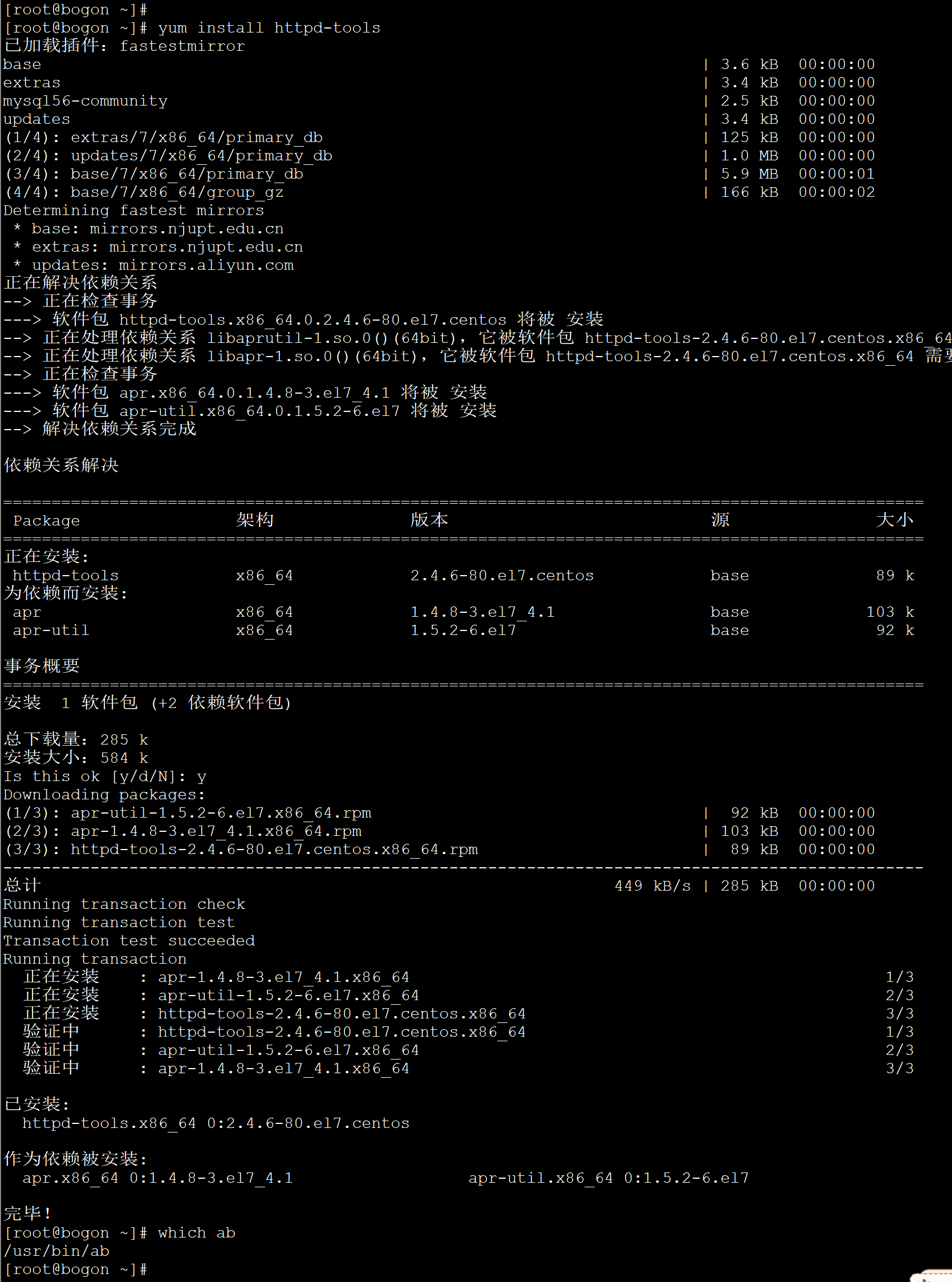
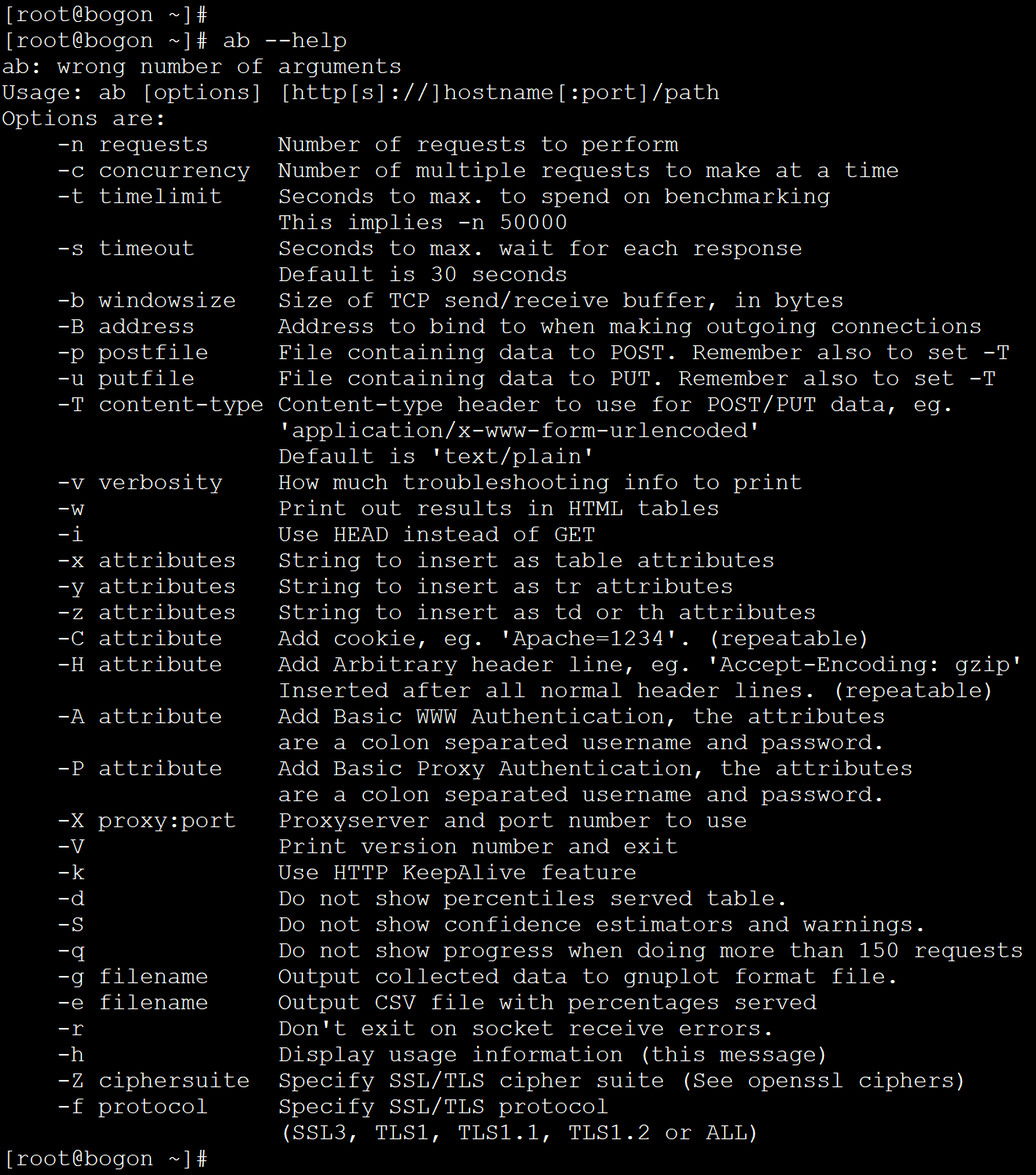
java -jar cjs-springboot-example.jar &
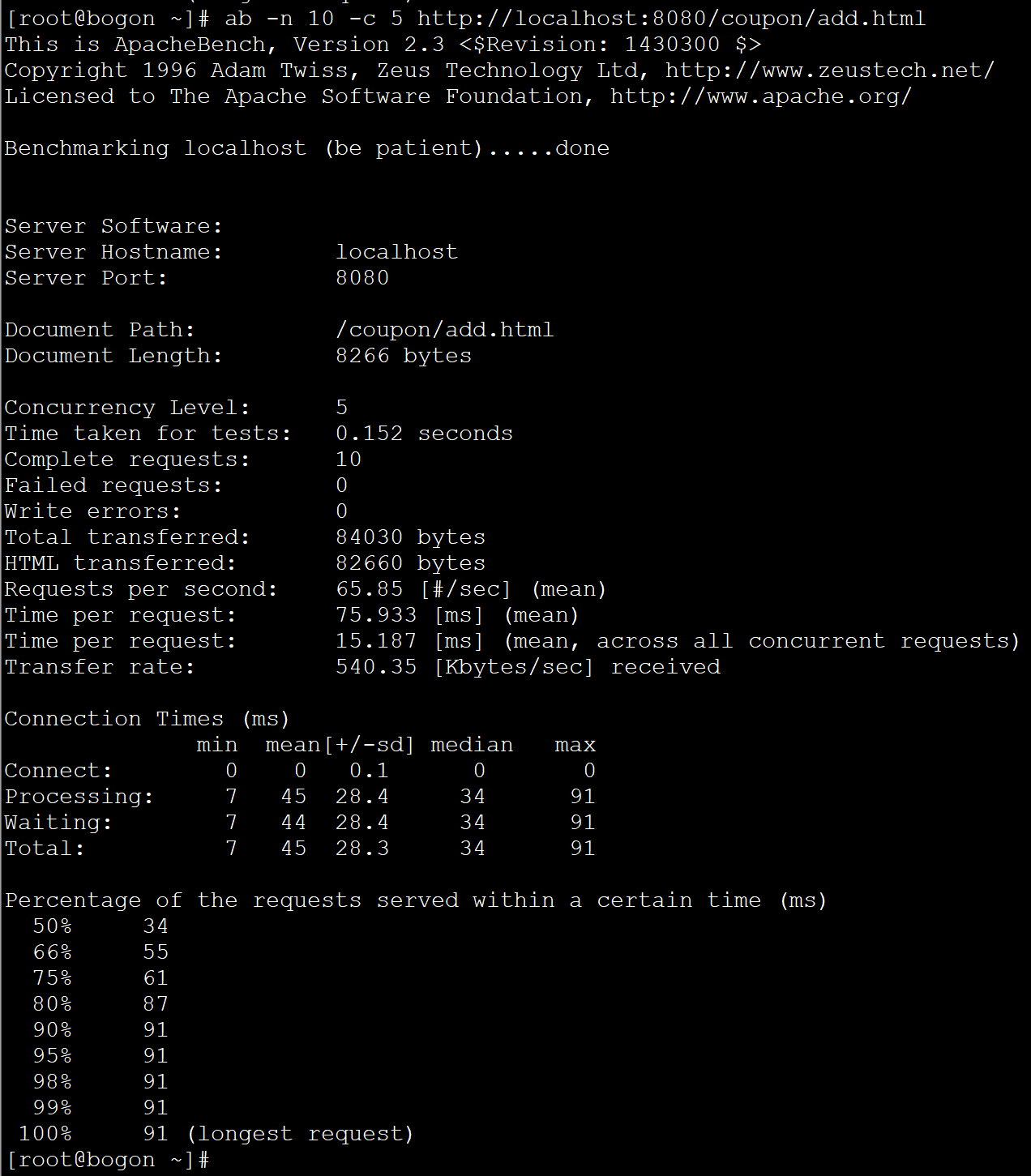
用法没变
5、代码
 package com.cjs.boot.controller;

 import com.cjs.boot.domain.entity.CouponInfo;

 import com.cjs.boot.response.RespResult;

 import com.cjs.boot.service.CouponInfoService;

 import org.springframework.beans.factory.annotation.Autowired;

 import org.springframework.stereotype.Controller;

 import org.springframework.validation.annotation.Validated;

 import org.springframework.web.bind.annotation.*;

 import org.springframework.web.servlet.ModelAndView;

 import javax.validation.constraints.NotNull;

 import java.util.List;

 @Controller

 @RequestMapping("/coupon")

 @Validated

 public class CouponController extends BaseController {

     @Autowired

     private CouponInfoService couponInfoService;

     @GetMapping("/detail.html")

     public ModelAndView detail(@NotNull(message = "ID不能为空") Long id) {

         ModelAndView modelAndView = new ModelAndView("coupon/detail");

         //  TODO 查询

         return modelAndView;

     }

     @GetMapping("/getByMechantId.json")

     @ResponseBody

     public RespResult<List<CouponInfo>> getByMechantId(Integer merchantId) {

         List<CouponInfo> list = couponInfoService.getByMerchantId(merchantId);

         return new RespResult<List<CouponInfo>>(list);

     }

     @GetMapping("/deleteByMechantId.json")

     @ResponseBody

     public RespResult<List<CouponInfo>> deleteByMerchantId(Integer merchantId) {

         couponInfoService.deleteByMerchantId(merchantId);

         return RespResult.success();

     }

     @GetMapping("/getById.json")

     @ResponseBody

     public RespResult<CouponInfo> getById(Long id) {

         CouponInfo couponInfo = couponInfoService.getById(id);

         return new RespResult<CouponInfo>(couponInfo);

     }

     @GetMapping("/deleteById.json")

     @ResponseBody

     public RespResult deleteById(Long id) {

         couponInfoService.deleteById(id);

         return RespResult.success();

     }

     @GetMapping("/add.html")

     public ModelAndView add() {

         return new ModelAndView("coupon/add");

     }

     @PostMapping("/save.json")

     @ResponseBody

     public RespResult save(@RequestBody CouponInfo couponInfo, @CookieValue(required = false) String token) {

         couponInfoService.save(couponInfo);

         return RespResult.success();

     }

 }
 package com.cjs.boot;

 import com.alibaba.fastjson.serializer.SerializerFeature;

 import com.alibaba.fastjson.support.config.FastJsonConfig;

 import com.alibaba.fastjson.support.spring.FastJsonHttpMessageConverter;

 import com.cjs.boot.event.BlackListListener;

 import org.springframework.boot.SpringApplication;

 import org.springframework.boot.autoconfigure.SpringBootApplication;

 import org.springframework.boot.autoconfigure.http.HttpMessageConverters;

 import org.springframework.boot.web.server.ErrorPage;

 import org.springframework.boot.web.server.ErrorPageRegistrar;

 import org.springframework.boot.web.server.ErrorPageRegistry;

 import org.springframework.cache.annotation.EnableCaching;

 import org.springframework.context.annotation.Bean;

 import org.springframework.http.HttpStatus;

 import org.springframework.http.MediaType;

 import org.springframework.scheduling.annotation.EnableAsync;

 import java.util.ArrayList;

 import java.util.List;

 //@MapperScan("com.cjs.boot.mapper")

 @EnableCaching

 @EnableAsync

 @SpringBootApplication

 public class CjsSpringbootExampleApplication {

     public static void main(String[] args) {

         SpringApplication.run(CjsSpringbootExampleApplication.class, args);

 //        SpringApplication springApplication = new SpringApplication(CjsSpringbootExampleApplication.class);

 //        springApplication.addListeners(new BlackListListener());

 //        springApplication.run(args);

     }

     @Bean

     public ErrorPageRegistrar errorPageRegistrar() {

         return new ErrorPageRegistrar() {

             @Override

             public void registerErrorPages(ErrorPageRegistry registry) {

                 registry.addErrorPages(new ErrorPage(HttpStatus.BAD_REQUEST, "/400.html"));

                 registry.addErrorPages(new ErrorPage(HttpStatus.FORBIDDEN, "/403.html"));

                 registry.addErrorPages(new ErrorPage(HttpStatus.NOT_FOUND, "/404.html"));

                 registry.addErrorPages(new ErrorPage(HttpStatus.INTERNAL_SERVER_ERROR, "/500.html"));

             }

         };

     }

     @Bean

     public HttpMessageConverters fastJsonHttpMessageConverters(){

         FastJsonHttpMessageConverter fastJsonHttpMessageConverter = new FastJsonHttpMessageConverter();

         FastJsonConfig fastJsonConfig = new FastJsonConfig();

         fastJsonConfig.setSerializerFeatures(SerializerFeature.PrettyFormat);

         List<MediaType> mediaTypes = new ArrayList<>();

         mediaTypes.add(MediaType.APPLICATION_FORM_URLENCODED);

         mediaTypes.add(MediaType.APPLICATION_JSON_UTF8);

         fastJsonHttpMessageConverter.setSupportedMediaTypes(mediaTypes);

         fastJsonHttpMessageConverter.setFastJsonConfig(fastJsonConfig);

         return new HttpMessageConverters(fastJsonHttpMessageConverter);

     }

 }
参考
https://www.cnblogs.com/EthanCai/archive/2014/05/11/3721656.html
https://blog.csdn.net/wx19900503/article/details/56847264
https://www.jianshu.com/p/e3793ae91a62
https://blog.csdn.net/dreamer2020/article/details/52904686
http://wetest.qq.com/
http://wetest.qq.com/gaps/
压力测试工具ab - Apache HTTP server benchmarking tool的更多相关文章
- Apache中压力测试工具ab的操作说明
1.压力测试工具ab(ApacheBench)的简单说明 1) 网站性能压力测试是性能调优过程中必不可少的一环.只有让服务器处在高压情况下才能真正体现出各种设置所暴露的问题.Apache中有个 ...
- Apache自带压力测试工具ab用法简介
ab命令原理 ab命令会创建很多的并发访问线程,模拟多个访问者同时对某一URL进行访问.它的测试目标是基于URL的,因此,既可以用来测试Apache的负载压力,也可以测试nginx.lighthttp ...
- apache自带压力测试工具ab的使用及解析
当你搭建了apache服务器并在上面部署了web网站,在网站运行前,为了使apache服务器的性能得到更好的应用,我们可以先对其进行压力测试.进行压力测试其实非常简单,我们也不用再额外下载安装什么测试 ...
- linux下web压力测试工具ab使用及详解
APACHE自带的测试工具AB(apache benchmark).在APACHE的bin目录下.格式: ./ab [options] [http://]hostname[:port]/path参数: ...
- 压力测试工具ab及centos下单独安装方法
压力测试工具Ab简介 Apache安装包中自带的压力测试工具 Apache Benchmark(简称ab) 简单易用,这里就采用 ab作为压力测试工具了. 1.独立安装 ab运行需要依赖apr-uti ...
- httpd的压力测试工具-ab工具使用案例
httpd的压力测试工具-ab工具使用案例 作者:尹正杰 版权声明:原创作品,谢绝转载!否则将追究法律责任. 一.httpd自带的工具程序 事实上,在我们安装完Apache之后,它默认就会给我们安 ...
- PHP测试与优化(1)-- Apache自带的压力测试工具ab(apache bench) - 简单使用
ab是apache自带的网站压力测试工具,能够测试网站在一定时间内的发生高并发时的反应. 使用 1.进入apache的bin文件夹 2.模拟并发级别为100,请求数为1000个的api数据请求数量测试 ...
- 压力测试工具Ab简介
Apache安装包中自带的压力测试工具 Apache Benchmark(简称ab) 简单易用,这里就采用 ab作为压力测试工具了. 1.独立安装 通过 yum-utils中的yumdownload ...
- 压力测试工具ab及centos下单独安装方法 nginx和tomcat静态资源的性能测试
Apache安装包中自带的压力测试工具Apache Benchmark(简称ab)简单易用,这里采用ab作为压国测试工具. 独立安装: ab运行需要信赖apr-util包: # yum install ...
随机推荐
- (NO.00001)iOS游戏SpeedBoy Lite成形记(十六)
接上篇,我们实现菜单窗口的弹出和关闭功能,首先在打开GameScene.m,添加必要的实例变量: __weak PopupLayer *_popupLayer; 再添加2个新方法: -(void)re ...
- Errors running builder 'Integrated External Tool Builder' on project xxx
出现这样的提示,表明你的项目的Builder项出了问题. 解决方法是: 右键项目选择"Properties",再选择"Builders",删除丢失的builde ...
- 手持机设备公司(WINCE/ANDROID/LINUX)
1.深圳扬创科技有限公司网址: http://www.yctek.com/ 2.无锡盈达聚力科技有限公司 点击打开链接 3.上海鲲博通信技术有限公司(主要为用WINCE开发导航产品) 点击打开链接 4 ...
- Auto Create Editable Copy Font(Unity3D开发之二十二)
猴子原创,欢迎转载.转载请注明: 转载自Cocos2Der-CSDN,谢谢! 原文地址: http://blog.csdn.net/cocos2der/article/details/48318879 ...
- Struts源码之ValueStack
/** * ValueStack allows multiple beans to be pushed in and dynamic EL expressions to be evaluated ag ...
- obj-c编程16:键值编码(KVC)
我们可以借助obj-c中的键值编码(以后简称KVC,Key-Value Coding)来存取类的属性,通过指定所要访问的属性名字符串标示符,可以使用存取器方法来获取或设置类的属性.下面的例子,借助于K ...
- solr研磨之性能调优
作者:战斗民族就是干 转载请注明地址:http://www.cnblogs.com/prayers/p/8982141.html 本篇文章我们来了解一下solr的性能方面的调优,分为Schema优化 ...
- mongodb3.6 (四)net 客户端如何连接、访问mongodb集群
前言 在是一篇文章mongodb如何做数据备灾 中已经介绍mongodb集群是如何工作,可能很多人都有这样一个疑问:客户端如何知道主服务挂了呢?这一篇文章将介绍如何在net中访问这个集群. 第一步.安 ...
- Oracle 10g DG 数据文件迁移
背景:某客户Oracle 10g 的DG由于空间不足,之前将部分数据文件迁移到其他目录,如今原目录扩容成功,要将之前迁移的数据文件再次迁移回来. 环境:Oracle 10.2.0.5 DG 单机 首先 ...
- CXF 5参考资料
下载 描述 名字 大小 下载方法 本教程示例应用程序的源代码 CXF_Spring_Survey_Src.war 10 KB HTTP 关于下载方法的信息 学习 Apache CXF 的官方站点:提供 ...