
学习ML.NET(1): 构建流水线
ML.NET使用LearningPipeline类定义执行期望的机器学习任务所需的步骤,让机器学习的流程变得直观。
下面用鸢尾花瓣预测快速入门的示例代码讲解流水线是如何工作的。
using Microsoft.ML;
using Microsoft.ML.Data;
using Microsoft.ML.Runtime.Api;
using Microsoft.ML.Trainers;
using Microsoft.ML.Transforms;
using System;

namespace myApp
{
    class Program
    {
        // STEP 1: Define your data structures

        // IrisData is used to provide training data, and as
        // input for prediction operations
        // - First 4 properties are inputs/features used to predict the label
        // - Label is what you are predicting, and is only set when training
        public class IrisData
        {
            [Column("0")]
            public float SepalLength;

            [Column("1")]
            public float SepalWidth;

            [Column("2")]
            public float PetalLength;

            [Column("3")]
            public float PetalWidth;

            [Column("4")]
            [ColumnName("Label")]
            public string Label;
        }

        // IrisPrediction is the result returned from prediction operations
        public class IrisPrediction
        {
            [ColumnName("PredictedLabel")]
            public string PredictedLabels;
        }

        static void Main(string[] args)
        {
            // STEP 2: Create a pipeline and load your data
            var pipeline = new LearningPipeline();

            // If working in Visual Studio, make sure the 'Copy to Output Directory'
            // property of iris-data.txt is set to 'Copy always'
            string dataPath = "iris-data.txt";
            pipeline.Add(new TextLoader(dataPath).CreateFrom<IrisData>(separator: ','));

            // STEP 3: Transform your data
            // Assign numeric values to text in the "Label" column, because only
            // numbers can be processed during model training
            pipeline.Add(new Dictionarizer("Label"));

            // Puts all features into a vector
            pipeline.Add(new ColumnConcatenator("Features", "SepalLength", "SepalWidth", "PetalLength", "PetalWidth"));

            // STEP 4: Add learner
            // Add a learning algorithm to the pipeline.
            // This is a classification scenario (What type of iris is this?)
            pipeline.Add(new StochasticDualCoordinateAscentClassifier());

            // Convert the Label back into original text (after converting to number in step 3)
            pipeline.Add(new PredictedLabelColumnOriginalValueConverter() { PredictedLabelColumn = "PredictedLabel" });

            // STEP 5: Train your model based on the data set
            var model = pipeline.Train<IrisData, IrisPrediction>();

            // STEP 6: Use your model to make a prediction
            // You can change these numbers to test different predictions
            var prediction = model.Predict(new IrisData()
            {
                SepalLength = 3.3f,
                SepalWidth = 1.6f,
                PetalLength = 0.2f,
                PetalWidth = 5.1f,
            });

            Console.WriteLine($"Predicted flower type is: {prediction.PredictedLabels}");
        }
    }
}
创建工作流实例
首先,创建LearningPipeline实例
var pipeline = new LearningPipeline();
添加步骤
然后,调用LearningPipeline实例的Add方法向流水线添加步骤,每个步骤都继承自ILearningPipelineItem接口。
一个基本的工作流包括以下几个步骤,其中,蓝色部分是可选的。
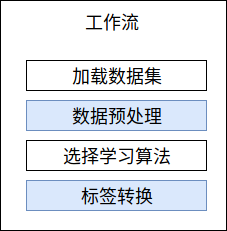
- 加载数据集
继承自ILearningPipelineLoader接口。
一个工作流必须包含至少1个加载数据集步骤。
//使用TextLoader加载数据
string dataPath = "iris-data.txt";
pipeline.Add(new TextLoader(dataPath).CreateFrom<IrisData>(separator: ','));
- 数据预处理
继承自CommonInputs.ITransformInput接口。
一个工作流可以包含0到多个数据预处理步骤,用于将已加载的数据集标准化,示例代码中就包含2了个数据预处理步骤。
//由于Label文本数据,算法不能识别数据,需要将其转换为字典
pipeline.Add(new Dictionarizer("Label"));

//算法只能从Features列获取数据,需要数据中的多列连接到Features列中
pipeline.Add(new ColumnConcatenator("Features", "SepalLength", "SepalWidth", "PetalLength", "PetalWidth"));
- 选择学习算法
继承自CommonInputs.ITrainerInput接口。
一个工作流必须且只能包含1个学习算法。
//使用线性分类器
pipeline.Add(new StochasticDualCoordinateAscentClassifier());
- 标签转换
继承自CommonInputs.ITransformInput接口。
一个工作流可以包含0到多个标签转换步骤,用于将预测得到的标签转换成方便识别的数据。
//将Label从字典转换成文本数据
pipeline.Add(new PredictedLabelColumnOriginalValueConverter() { PredictedLabelColumn = "PredictedLabel" });
执行工作流
最后,调用LearningPipeline实例的Train方法,就可以执行工作流得到预测模型。
var model = pipeline.Train<IrisData, IrisPrediction>();
学习ML.NET(1): 构建流水线的更多相关文章
- ArcGIS案例学习笔记2_2_模型构建器和山顶点提取批处理
ArcGIS案例学习笔记2_2_模型构建器和山顶点提取批处理 计划时间:第二天下午 背景:数据量大,工程大 目的:自动化,批处理,定制业务流程,不写程序 教程:Pdf/343 数据:chap8/ex5 ...
- Jenkins + Pipeline 构建流水线发布
Jenkins + Pipeline 构建流水线发布 利用Jenkins的Pipeline配置发布流水线 参考: https://jenkins.io/doc/pipeline/tour/depl ...
- Maven学习3-使用Maven构建项目
转自:http://www.cnblogs.com/xdp-gacl/p/4240930.html maven作为一个高度自动化构建工具,本身提供了构建项目的功能,下面就来体验一下使用maven构建项 ...
- Maven学习8-使用Maven构建多模块项目
在平时的Javaweb项目开发中为了便于后期的维护,我们一般会进行分层开发,最常见的就是分为domain(域模型层).dao(数据库访问 层).service(业务逻辑层).web(表现层),这样分层 ...
- 学习cordic算法所得(流水线结构、Verilog标准)
最近学习cordic算法,并利用FPGA实现,在整个学习过程中,对cordic算法原理.FPGA中流水线设计.Verilog标准有了更加深刻的理解. 首先,cordic算法的基本思想是通过一系列固定的 ...
- 用深度学习(DNN)构建推荐系统 - Deep Neural Networks for YouTube Recommendations论文精读
虽然国内必须FQ才能登录YouTube,但想必大家都知道这个网站.基本上算是世界范围内视频领域的最大的网站了,坐拥10亿量级的用户,网站内的视频推荐自然是一个非常重要的功能.本文就focus在YouT ...
- 2.5 Apache Axis2 快速学习手册之JiBx 构建Web Service
5. 使用JiBX生成服务(通过JIBX 命令将wsdl 生成 services ) 要使用JiBX数据绑定生成和部署服务,请执行以下步骤. 通过在Axis2_HOME / samples / qui ...
- Docker技术入门与实战 第二版-学习笔记-2-镜像构建
3.利用 commit 理解镜像构成 在之前的例子中,我们所使用的都是来自于 Docker Hub 的镜像. 直接使用这些镜像是可以满足一定的需求,而当这些镜像无法直接满足需求时,我们就需要定制这些镜 ...
- docker学习笔记:简单构建Dockerfile【Docker for Windows】
参考与入门推荐:https://www.cnblogs.com/ECJTUACM-873284962/p/9789130.html#autoid-0-0-9 最近学习docker,写一个简单构建Doc ...
随机推荐
- Scrapy爬虫入门
1.安装Scrapy 打开Anaconda Prompt,执行:pip install Scrapy执行安装! 注意:要是安装过程中抛出: error: Microsoft Visual C++ 14 ...
- 系统运维|IIS的日志设置
摘要: 1.服务器告警,磁盘资源不足 2.检查发现是IIS日志没有清理并且设置有误.在E盘占用了200G的空间 3.原则上IIS日志不能放在C盘,避免C盘写满了导致操作系统异常 4.附上IIS日志按天 ...
- STL set简单用法
set的常见用法详解 set翻译为集合,是一个内部自动有序并且不含重复元素的容器. 可以用于去掉重复元素,或者元素过大,或者不能散列的情况,set只保留元素本身而不考虑它的个数. 头文件:#inclu ...
- asp.net mvc项目使用spring.net发布到IIS后,在访问提示错误 Could not load type from string value 'DALMsSql.DBSessionFactory,DALMsSql'.
asp.net mvc项目使用spring.net发布到IIS后,在访问提示错误 Could not load type from string value 'DALMsSql.DBSessionFa ...
- zTree异步加载展开第一级节点
在 setting 中的 callback 中加上 onAsyncSuccess:onAsyncSuccess 回调函数 , 然后实现回调函数 var isFirst = true;function ...
- MATLAB三维作图——隐函数
MATLAB三维作图——隐函数 作者:凯鲁嘎吉 - 博客园http://www.cnblogs.com/kailugaji/ 对于三维隐函数,没有显式表达式,无法通过Matlab现成的3-D画图函数 ...
- map的使用注意事项
map是无序的,每次打印出来的map都会不一样,它不能通过index获取,而必须通过key获取 map的长度是不固定的,也就是和slice一样,也是一种引用类型 内置的len函数同样适用于map,返回 ...
- 月球美容计划之最小生成树(MST)
寒假学的两个算法,普里姆,克鲁斯卡尔最终弄明确了.能够发总结了 先说说普里姆,它的本质就是贪心.先从随意一个点開始,找到最短边,然后不断更新更新len数组,然后再选取最短边并标记经过的点,直到全部的点 ...
- bzoj5093:[Lydsy1711月赛]图的价值
题目 首先考虑到这是一张有标号的图,每一个点的地位是相等的,因此我们只需要求出一个点的价值和乘上\(n\)就好了 考虑一个点有多少种情况下度数为\(i\) 显然我们可以让除了这个点的剩下的\(n-1\ ...
- day14 Python集合关系运算交,差,并集
low逼写法,没用集合 python_1 = ['charon','pluto','ran'] linux_1 = ['ran','xuexue','ting'] python_and_linux = ...