
在 CentOS7 上安装 Zookeeper服务
1、创建 /usr/local/services/zookeeper 文件夹:
mkdir -p /usr/local/services/zookeeper
2、进入到 /usr/local/services/zookeeper 目录中:
cd /usr/local/services/zookeeper
3、下载 zookeeper-3.4.9.tar.gz:
wget https://archive.apache.org/dist/zookeeper/zookeeper-3.4.9/zookeeper-3.4.9.tar.gz
4、解压缩 zookeeper-3.4.9.tar.gz:
tar -zxvf zookeeper-3.4.9.tar.gz
5、进入到 /usr/local/services/zookeeper/zookeeper-3.4.9/conf 目录中:
cd zookeeper-3.4.9/conf/
6、复制 zoo_sample.cfg 文件的并命名为为 zoo.cfg:
cp zoo_sample.cfg zoo.cfg
7、用 vim 打开 zoo.cfg 文件并修改其内容为如下:
# The number of milliseconds of each tick

# zookeeper 定义的基准时间间隔,单位:毫秒

tickTime=

# The number of ticks that the initial

# synchronization phase can take

initLimit=

# The number of ticks that can pass between

# sending a request and getting an acknowledgement

syncLimit=

# the directory where the snapshot is stored.

# do not use /tmp for storage, /tmp here is just

# example sakes.

# dataDir=/tmp/zookeeper

# 数据文件夹

dataDir=/usr/local/services/zookeeper/zookeeper-3.4./data

# 日志文件夹

dataLogDir=/usr/local/services/zookeeper/zookeeper-3.4./logs

# the port at which the clients will connect

# 客户端访问 zookeeper 的端口号

clientPort=

# the maximum number of client connections.

# increase this if you need to handle more clients

#maxClientCnxns=

#

# Be sure to read the maintenance section of the

# administrator guide before turning on autopurge.

#

# http://zookeeper.apache.org/doc/current/zookeeperAdmin.html#sc_maintenance

#

# The number of snapshots to retain in dataDir

#autopurge.snapRetainCount=

# Purge task interval in hours

# Set to "" to disable auto purge feature

#autopurge.purgeInterval=
8、保存并关闭 zoo.cfg 文件:
9、进入到 /usr/local/services/zookeeper/zookeeper-3.4.9/bin 目录中:
cd ../bin/
10、用 vim 打开 /etc/ 目录下的配置文件 profile:
vim /etc/profile
并在其尾部追加如下内容:
#idea - zookeeper-3.4. config start - --

export ZOOKEEPER_HOME=/usr/local/services/zookeeper/zookeeper-3.4./

export PATH=$ZOOKEEPER_HOME/bin:$PATH

export PATH

#idea - zookeeper-3.4. config end - --
11、使 /etc/ 目录下的 profile 文件即可生效:
source /etc/profile
12、启动 zookeeper 服务:
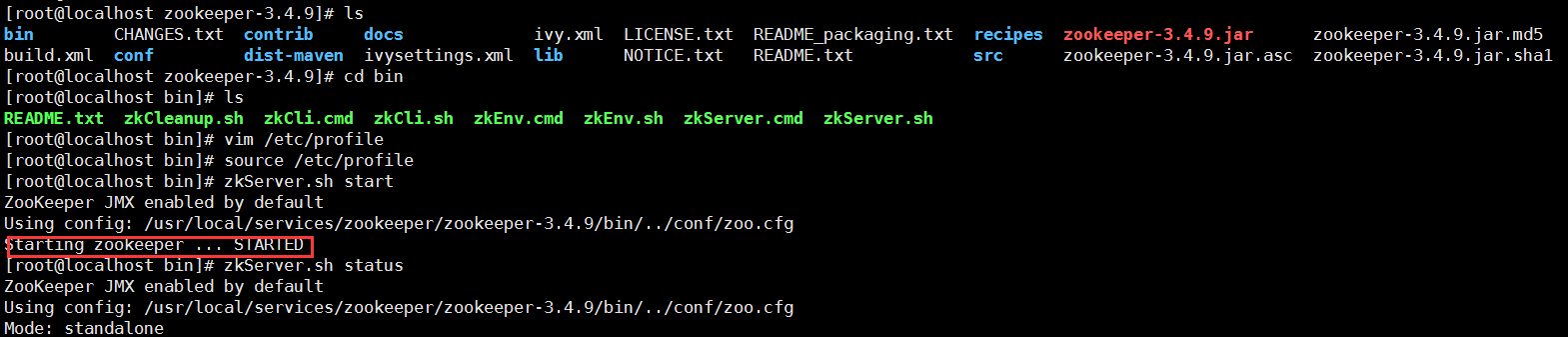
zkServer.sh start
如打印如下信息则表明启动成功:
ZooKeeper JMX enabled by default
Using config: /usr/local/services/zookeeper/zookeeper-3.4.9/bin/../conf/zoo.cfg
Starting zookeeper ... STARTED
13、查询 zookeeper 状态:
zkServer.sh status
14、关闭 zookeeper 服务:
zkServer.sh stop
如打印如下信息则表明成功关闭:
ZooKeeper JMX enabled by default
Using config: /usr/local/services/zookeeper/zookeeper-3.4.9/bin/../conf/zoo.cfg
Stopping zookeeper ... STOPPED
15、重启 zookeeper 服务:
zkServer.sh restart
如打印如下信息则表明重启成功:
ZooKeeper JMX enabled by default
Using config: /usr/local/services/zookeeper/zookeeper-3.4.9/bin/../conf/zoo.cfg
ZooKeeper JMX enabled by default
Using config: /usr/local/services/zookeeper/zookeeper-3.4.9/bin/../conf/zoo.cfg
Stopping zookeeper ... STOPPED
ZooKeeper JMX enabled by default
Using config: /usr/local/services/zookeeper/zookeeper-3.4.9/bin/../conf/zoo.cfg
Starting zookeeper ... STARTED
实际操作如下:
集群配置:

在 CentOS7 上安装 Zookeeper服务的更多相关文章
- 如何在Centos7上安装zookeeper 多实例
一.如何在Centos7上安装zookeeper 多实例 cd /usr/local/src/ wget https://mirrors.tuna.tsinghua.edu.cn/apache/zoo ...
- centos7上安装zookeeper
centos7上安装zookeeper 1 准备工作 1.准备服务器,本次安装采用 centos7系统.内存2G.存储60G的虚拟机服务器一台: 2.服务器安装java环境: 参考文章<cent ...
- 在 CentOS7 上部署 zookeeper 服务
在 CentOS7 上部署 zookeeper 服务 1 用 SecureCRT 或 XShell 等 Linux 客户端工具连接至 CentOS7 服务器: 2 进入到 /usr/local/too ...
- CentOS7上安装FTP服务
---------------------------------------------------------------------------------------------------- ...
- 在CentOS7上安装和使用ZooKeeper最新版本(V3.4.12)
0.ZooKeeper文档 http://zookeeper.apache.org/doc/r3.4.11/zookeeperOver.html 1.准备 在CentOS7上安装zookeeper时, ...
- 在 CentOS7 上安装 zookeeper-3.4.9 服务
在 CentOS7 上安装 zookeeper-3.4.9 服务 1.创建 /usr/local/services/zookeeper 文件夹: mkdir -p /usr/local/service ...
- Linux上安装Zookeeper以及一些注意事项
最近打算出一个系列,介绍Dubbo的使用. 分布式应用现在已经越来越广泛,Spring Could也是一个不错的一站式解决方案,不过据我了解国内目前貌似使用阿里Dubbo的公司比较多,一方面这个框架也 ...
- centos7下安装zookeeper&zookeeper集群的搭建
一.centos7下安装zookeeper 1.zookeeper 下载地址 https://mirrors.tuna.tsinghua.edu.cn/apache/zookeeper/ 2.安装步骤 ...
- 在 CentOS7 上安装 MongoDB
在 CentOS7 上安装 MongoDB 1 通过 SecureCRT 连接至 CentOS7 服务器: 2 进入到 /usr/local/ 目录: cd /usr/local 3 在当前目录下创建 ...
随机推荐
- npm安装package.json中的模块依赖
npm 一键安装 package.json里的依赖时有2种情况: 1.package.json不存在时 运行命令: npm init可自动创建package.json文件 2.package.json ...
- Ubuntu下创建新用户后,不能使用管理员用户下安装的Anaconda
解决办法: 将管理员用户下Anaconda的安装环境添加到新用户下的环境变量里,具体操作: 系统切换到新用户下: vim .bashrc #添加Anaconda的环境变量 source .bashrc ...
- Spring-Cloud-Ribbon学习笔记(一):入门
简介 Spring Cloud Ribbon是一个基于Http和TCP的客户端负载均衡工具,它是基于Netflix Ribbon实现的.它不像服务注册中心.配置中心.API网关那样独立部署,但是它几乎 ...
- 125、Android样式的开发(转载)
Android样式的开发:drawable汇总篇 http://android.jobbole.com/82117/Android样式的开发:layer-list篇 http://android.jo ...
- C# 如何通过mailto标签和SMTP协议两种方式发送邮件
本文主要讲解如何通过如现mailto标签和SMTP协议两种方式发送邮件,下面就直入主题 方法一.通过mailto标签发送邮件 通过mailto不是正真意义上的发送邮件,它只是会自动调用我们本地默认的邮 ...
- Netty5+Jboss(Marshalling)完成对象序列化传输
TCP在网络通讯的时候,通常在解决TCP粘包.拆包问题的时候,一般会用以下几种方式: 1. 消息定长 例如每个报文的大小固定为200个字节,如果不够,空位补空格: 2. 在消息尾部添加特殊字符进行分割 ...
- Java课程课后作业02之动手动脑
一.编写一个方法,使用以上算法生成指定数目(比如1000个)的随机整数 数学算法原理: 可以使用的方法:Math中的random类以及random类,区别:Math中的random类只能用于生成随机数 ...
- 在node环境使用axios发送文件
yarn add form-data (async () => { const l = console.log; const axios = require("axios") ...
- linux的基本操作(文件压缩与打包)
文件的压缩与打包 在windows下我们接触最多的压缩文件就是.rar格式的了.但在linux下这样的格式是不能识别的,它有自己所特有的压缩工具.但有一种文件在windows和linux下都能使用那就 ...
- JavaScript 运行机制详解
一.为什么JavaScript是单线程? JavaScript语言的一大特点就是单线程,也就是说,同一个时间只能做一件事.那么,为什么JavaScript不能有多个线程呢?这样能提高效率啊. Java ...