
【easyui】关于easyui Datagrid一些样式记录
此篇文章主要记录在使用datagrid中常见的修改样式方式以及样式效果配图!!!!
一丶存在选中框的时候标题栏合并显示序号字段。
代码展示:
  onLoadSuccess: function (data) {

                     //调整 按钮div与datagrid之间的3px间距

                     $('#j_contentButton').css('height', '43px');

                     //修改全选按钮

                     $(".datagrid-header-check").html("序号");

                     $(".datagrid-header-check").parent().prev().html("");

                     $(".datagrid-header-check").attr("style", "width:79px !important;font-weight: 700;height: 40px; line-height: 40px;font-size: 15px;")

                 },
效果图展示:

二丶不存在选中框的时候标题栏合并显示序号字段。
代码展示:
     onLoadSuccess: function (data) {

                    //修改全选按钮

                    $(".datagrid-header-rownumber").html("序号");

                    $(".datagrid-header-rownumber").parent().next().html("");

                },
效果图展示:

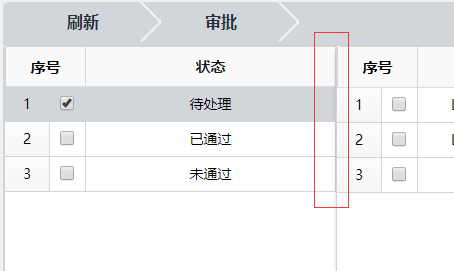
三丶左右布局时去除间隔空隙注意第5行 他才是关键其余只是为了展示效果
代码展示:
 j_dgReceive = $("#j_dgReceive").datagrid({

                 iconCls: 'icon-save',

                 fit: true,  // 自动适应父容器大小

                 fitColumns: false, //自动收缩列的大小

                 scrollbarSize: ,

                 rownumbers: true, //显示列号

                 nowrap: true,     //如果为true,则在同一行中显示数据

                 animate: false,

                 border: false,   //有边框

                 singleSelect: true,//多选

                 idField: 'id',  //标识字段

                 pagination: true,//数据表格控件底部显示分页工具栏

                 pageSize: ,

                 pageList: [, , , , , , , ],

                 url: '/FeeManage_Areas/FeeStatistics/GetBJbyCondition',

                 queryParams: {

                     childId: childId,

                 },
效果图展示:
四丶实现单元格可编辑效果
代码展示:
 {

                         title: '退费金额', field: 'refundMoney', align: 'center', width: , sortable: true,

                         editor: {

                             type: 'validatebox',

                             options: {

                                 validType: 'checkDecN',

                                 onBeforeValidate: function () {

                                     $(this).attr('maxlength', );

                                     $(this).on("keyup", function (event) {

                                         var ary = this.value.match(/(\d+(\.\d{,})?)/);

                                         this.value = ary == null ? '' : ary[];

                                     });

                                 }

                             }

                         },

                     },
效果图展示:

五丶合并单元格跨行款列标题布局
代码展示:
  //活动列

                 columns: [[

                     { title: '园区名称', field: 'parkName', rowspan: , align: 'center', width: , sortable: true, },

                     { title: '姓名', field: 'childName', rowspan: , align: 'center', width: , sortable: true },

                     { title: '年级', field: 'gradeNo', rowspan: , align: 'center', width: , sortable: true, },

                     { title: '班级', field: 'classNo', rowspan: , align: 'center', width: , sortable: true, },

                     { title: '保教费', colspan: , align: 'center', },

                     { title: '学平险', colspan: , align: 'center', },

                     { title: '餐费', colspan: , align: 'center', },

                     { title: '休园管理费', colspan: , align: 'center', },

                     { title: '押金', colspan: , align: 'center', },

                     { title: '自定义费用', colspan: , align: 'center', },

                     { title: '幼儿缴费总额', field: 'childTotalReceive', rowspan: , align: 'center', width: , sortable: true, },

                     { title: '幼儿退费总额', field: 'childTotalRefund', rowspan: , align: 'center', width: , sortable: true, },

                 ], [

                     //保教费

                     { title: '缴费总额', field: 'bjfTotalReceive', align: 'center', width: , sortable: true, },

                     { title: '退费总额', field: 'bjfTotalRefund', align: 'center', width: , sortable: true, },

                     //学平险

                     { title: '缴费总额', field: 'xpxTotalReceive', align: 'center', width: , sortable: true, },

                     { title: '退费总额', field: 'xpxTotalRefund', align: 'center', width: , sortable: true, },

                     //餐费

                     { title: '缴费总额', field: 'cfTotalReceive', align: 'center', width: , sortable: true, },

                     { title: '退费总额', field: 'cfTotalRefund', align: 'center', width: , sortable: true, },

                     //休园管理费

                     { title: '缴费总额', field: 'xyglfTotalReceive', align: 'center', width: , sortable: true, },

                     { title: '退费总额', field: 'xyglfTotalRefund', align: 'center', width: , sortable: true, },

                     //押金

                     { title: '缴费总额', field: 'yjTotalReceive', align: 'center', width: , sortable: true, },

                     { title: '退费总额', field: 'yjTotalRefund', align: 'center', width: , sortable: true, },

                     //自定义

                     { title: '缴费总额', field: 'zdyTotalReceive', align: 'center', width: , sortable: true, },

                     { title: '退费总额', field: 'zdyTotalRefund', align: 'center', width: , sortable: true, },

                 ]],
效果图展示:

六丶修改选中框样式
代码展示:
//冻结列

                frozenColumns: [[

                    {

                        title: '', field: 'printFlag', align: 'center', sortable: true, width: ,

                        formatter: function (value, row, index) {

                            if (value == ) {

                                return "<span class='item-selected' onclick='specificUtil.CheckOrUnCheck(" + index + ",\"" + row.id + "\")'></span>";

                            } else {

                                return "<span class='item-unselected' onclick='specificUtil.CheckOrUnCheck(" + index + ",\"" + row.id + "\")'></span>";

                            }

                        },

                    },

                    { title: '主键', field: 'id', sortable: true, align: 'center', width: , hidden: true, },

                ]],

 //3.选中或取消选中

        CheckOrUnCheck: function (index, rowId) {

            var rows = $("#j_dgExamine").datagrid("getRows");

            if (initClick != undefined) {

                var row = rows[index];

                //提交数据

                $.ajax({

                    type: 'POST',

                    url: '/Welfare_Areas/WelfareExamine/AccMark',

                    data: {

                        accId: rowId

                    },

                    dataType: 'json',

                    cache: false,

                    success: function (jsonData) {

                        myUitls.procAjaxMsg(jsonData, function () {

                            row.printFlag = row.printFlag == "" ? "" : "";

                            if (row.printFlag == "") {

                                $("#j_dgExamine").datagrid("updateRow", {

                                    index: index,

                                    row: row

                                })

                                $("#j_dgExamine").datagrid('beginEdit', index);

                            }

                            else {

                                $("#j_dgExamine").datagrid('endEdit', index);

                                $("#j_dgExamine").datagrid('cancelEdit', index);

                            }

                            $(".datagrid-editable-input").attr("maxlength", )

                        }, function () {

                            myUitls.alertMsg(jsonData.Msg, '提示', null);

                            //取消确定按钮聚焦效果

                            myUitls.cancleFocus();

                            return;

                        });

                    }

                });

            }

        },
样式代码:
/*有叉号样式*/

.item-selected {

    width: 18px;

    height: 18px;

    float: right;

    text-align: center;

    background-image: url(../../../../images/area/Common/select_sel2.png);

    cursor: pointer;

}

/*无叉号样式*/

.item-unselected {

    width: 18px;

    height: 18px;

    float: right;

    text-align: center;

    background-image: url(../../../../images/area/Common/select_nor2.png);

    cursor: pointer;

}
onLoadSuccess: function (data) {
$(".datagrid-header-rownumber").html("序号");
$(".datagrid-header-rownumber").parent().next().css("display","none");
$(".datagrid-header-rownumber").attr("style", "width:65px !important;height:40px;line-height:40px;font-weight: 700;font-size: 14px;")
},
效果展示:

【easyui】关于easyui Datagrid一些样式记录的更多相关文章
- 关于easyui Datagrid一些样式记录
此篇文章主要记录在使用datagrid中常见的修改样式方式以及样式效果配图!!!! 一丶存在选中框的时候标题栏合并显示序号字段. 代码展示: onLoadSuccess: function (data ...
- easyui的datagrid的使用记录
datagrid是在 table的基础上变化而来的, 而不是在div的基础上来的. 从div来变成 datagrid,样式的设置还是是比较麻烦的. dg=datagrid 的标题 来源于 column ...
- Easyui datagrid 实现表格记录拖拽
datagrid 实现表格记录拖拽 by:授客 QQ:1033553122 测试环境 jquery-easyui-1.5.3 jquery-easyui-datagrid-dnd 下载地址: http ...
- [转]easyui常用控件及样式API中文收藏
[转]easyui常用控件及样式收藏 2013-05-06 23:01 30612人阅读 评论(0) 收藏 举报 分类: java ee(5) 目录(?)[+] CSS类定义: div easyu ...
- EasyUi控件Datagrid
很久没有打开我的博客园,刚刚大概扫了一眼我之前写的笔记,关于Devexpress那篇居然有四千多的浏览记录,不知道对浏览过的博友有没有起到一点点作用.当然我写笔记仅仅只是给自己留个记忆,如果歪打正着帮 ...
- jQuery EasyUI教程之datagrid应用(三)
今天继续之前的整理,上篇整理了datagrid的数据显示及其分页功能 获取数据库数据显示在datagrid中:jQuery EasyUI教程之datagrid应用(一) datagrid实现分页功能: ...
- jQuery EasyUI教程之datagrid应用(二)
上次写到了让数据库数据在网页datagrid显示,我们只是单纯的实现了显示,仔细看的话显示的信息并没有达到我们理想的效果,这里我们丰富一下: 上次显示的结果是这样的 点击查看上篇:jQuery Eas ...
- jQuery EasyUI教程之datagrid应用(一)
最近一段时间都在做人事系统的项目,主要用到了EasyUI,数据库操作,然后抽点时间整理一下EasyUI的内容. 这里我们就以一个简洁的电话簿软件为基础,具体地说一下datagrid应用吧 datagr ...
- easyUI中点击datagrid列标题排序
easyUI中点击datagrid的排序有两种,一种是本地的,一种是服务器的.本地的只能排序当前页,而服务器的可以对全部页进行排序.这里主要是分享下服务器排序. 1.为datagrid添加属性remo ...
随机推荐
- C++ MFC棋牌类小游戏day4
根据昨天的计划,今天开始做下面的内容. 1.鼠标点击事件 2.点击坐标进行处理.(坐标转换) 3.判断选中的位置是否有效. 4.确定选中的棋子,设置棋子的状态和棋子所在坐标的状态. 5.判断移动是否有 ...
- 获取Lambda表达式内表达式的值
随着Linq的盛行,对于Linq和Lmabda表达式的使用也越来越多,Lambda表达式在.net framework 3.5中提出来,Lambda表达式是一个匿名方法,通常在LINQ中被用来创建委托 ...
- verilog HDL-并行语句之assign
线网型数据对象: 是verilog hdl常用数据对象之一,起到电路节点之间的互联作用,类似于电路板上的导线. wire是verilog hdl默认的线网型数据对象. 线网型数据对象的读操作在代码任何 ...
- Spring 使用xml配置aop
1.xml文件需要引入aop命名空间 2.xml内容: <?xml version="1.0" encoding="UTF-8"?> <bea ...
- MySQL 基础--字符类型
##=====================================================================================## MySQL支持的字符 ...
- 记一次安装VS2015后启动失败的修复过程
安装过程没有提示任何问题,然而启动vs时提示没有安装 .Net Framework 4.6,那就安装吧,但是安装 4.6 时却提示 Windows Moudle Installer 服务没有启动,于是 ...
- 696. Count Binary Substrings
Give a string s, count the number of non-empty (contiguous) substrings that have the same number of ...
- solr 高亮springdatasolr
@Autowired private SolrTemplate solrTemplate; @Override public Map<String, Object> search(Map ...
- Servlet案例4:用户注册
数据库准备: CREATE DATABASE web; USE web; CREATE TABLE `user` ( `uid` ) NOT NULL, `username` ) DEFAULT NU ...
- LeetCode:149_Max Points on a line | 寻找一条直线上最多点的数量 | Hard
题目:Max Points on a line Given n points on a 2D plane, find the maximum number of points that lie on ...