
关于easyui Datagrid一些样式记录
此篇文章主要记录在使用datagrid中常见的修改样式方式以及样式效果配图!!!!
一丶存在选中框的时候标题栏合并显示序号字段。
代码展示:
  onLoadSuccess: function (data) {

                     //调整 按钮div与datagrid之间的3px间距

                     $('#j_contentButton').css('height', '43px');

                     //修改全选按钮

                     $(".datagrid-header-check").html("序号");

                     $(".datagrid-header-check").parent().prev().html("");

                     $(".datagrid-header-check").attr("style", "width:79px !important;font-weight: 700;height: 40px; line-height: 40px;font-size: 15px;")

                 },
效果图展示:

二丶不存在选中框的时候标题栏合并显示序号字段。
代码展示:
     onLoadSuccess: function (data) {

                    //修改全选按钮

                    $(".datagrid-header-rownumber").html("序号");

                    $(".datagrid-header-rownumber").parent().next().html("");

                },
效果图展示:

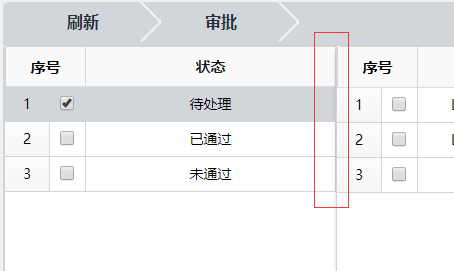
三丶左右布局时去除间隔空隙注意第5行 他才是关键其余只是为了展示效果
代码展示:
 j_dgReceive = $("#j_dgReceive").datagrid({

                 iconCls: 'icon-save',

                 fit: true,  // 自动适应父容器大小

                 fitColumns: false, //自动收缩列的大小

                 scrollbarSize: ,

                 rownumbers: true, //显示列号

                 nowrap: true,     //如果为true,则在同一行中显示数据

                 animate: false,

                 border: false,   //有边框

                 singleSelect: true,//多选

                 idField: 'id',  //标识字段

                 pagination: true,//数据表格控件底部显示分页工具栏

                 pageSize: ,

                 pageList: [, , , , , , , ],

                 url: '/FeeManage_Areas/FeeStatistics/GetBJbyCondition',

                 queryParams: {

                     childId: childId,

                 },
效果图展示:
四丶实现单元格可编辑效果
代码展示:
 {

                         title: '退费金额', field: 'refundMoney', align: 'center', width: , sortable: true,

                         editor: {

                             type: 'validatebox',

                             options: {

                                 validType: 'checkDecN',

                                 onBeforeValidate: function () {

                                     $(this).attr('maxlength', );

                                     $(this).on("keyup", function (event) {

                                         var ary = this.value.match(/(\d+(\.\d{,})?)/);

                                         this.value = ary == null ? '' : ary[];

                                     });

                                 }

                             }

                         },

                     },
效果图展示:

五丶合并单元格跨行款列标题布局
代码展示:
  //活动列

                 columns: [[

                     { title: '园区名称', field: 'parkName', rowspan: , align: 'center', width: , sortable: true, },

                     { title: '姓名', field: 'childName', rowspan: , align: 'center', width: , sortable: true },

                     { title: '年级', field: 'gradeNo', rowspan: , align: 'center', width: , sortable: true, },

                     { title: '班级', field: 'classNo', rowspan: , align: 'center', width: , sortable: true, },

                     { title: '保教费', colspan: , align: 'center', },

                     { title: '学平险', colspan: , align: 'center', },

                     { title: '餐费', colspan: , align: 'center', },

                     { title: '休园管理费', colspan: , align: 'center', },

                     { title: '押金', colspan: , align: 'center', },

                     { title: '自定义费用', colspan: , align: 'center', },

                     { title: '幼儿缴费总额', field: 'childTotalReceive', rowspan: , align: 'center', width: , sortable: true, },

                     { title: '幼儿退费总额', field: 'childTotalRefund', rowspan: , align: 'center', width: , sortable: true, },

                 ], [

                     //保教费

                     { title: '缴费总额', field: 'bjfTotalReceive', align: 'center', width: , sortable: true, },

                     { title: '退费总额', field: 'bjfTotalRefund', align: 'center', width: , sortable: true, },

                     //学平险

                     { title: '缴费总额', field: 'xpxTotalReceive', align: 'center', width: , sortable: true, },

                     { title: '退费总额', field: 'xpxTotalRefund', align: 'center', width: , sortable: true, },

                     //餐费

                     { title: '缴费总额', field: 'cfTotalReceive', align: 'center', width: , sortable: true, },

                     { title: '退费总额', field: 'cfTotalRefund', align: 'center', width: , sortable: true, },

                     //休园管理费

                     { title: '缴费总额', field: 'xyglfTotalReceive', align: 'center', width: , sortable: true, },

                     { title: '退费总额', field: 'xyglfTotalRefund', align: 'center', width: , sortable: true, },

                     //押金

                     { title: '缴费总额', field: 'yjTotalReceive', align: 'center', width: , sortable: true, },

                     { title: '退费总额', field: 'yjTotalRefund', align: 'center', width: , sortable: true, },

                     //自定义

                     { title: '缴费总额', field: 'zdyTotalReceive', align: 'center', width: , sortable: true, },

                     { title: '退费总额', field: 'zdyTotalRefund', align: 'center', width: , sortable: true, },

                 ]],
效果图展示:

六丶修改选中框样式
代码展示:
//冻结列

                frozenColumns: [[

                    {

                        title: '', field: 'printFlag', align: 'center', sortable: true, width: ,

                        formatter: function (value, row, index) {

                            if (value == ) {

                                return "<span class='item-selected' onclick='specificUtil.CheckOrUnCheck(" + index + ",\"" + row.id + "\")'></span>";

                            } else {

                                return "<span class='item-unselected' onclick='specificUtil.CheckOrUnCheck(" + index + ",\"" + row.id + "\")'></span>";

                            }

                        },

                    },

                    { title: '主键', field: 'id', sortable: true, align: 'center', width: , hidden: true, },

                ]],

 //3.选中或取消选中

        CheckOrUnCheck: function (index, rowId) {

            var rows = $("#j_dgExamine").datagrid("getRows");

            if (initClick != undefined) {

                var row = rows[index];

                //提交数据

                $.ajax({

                    type: 'POST',

                    url: '/Welfare_Areas/WelfareExamine/AccMark',

                    data: {

                        accId: rowId

                    },

                    dataType: 'json',

                    cache: false,

                    success: function (jsonData) {

                        myUitls.procAjaxMsg(jsonData, function () {

                            row.printFlag = row.printFlag == "" ? "" : "";

                            if (row.printFlag == "") {

                                $("#j_dgExamine").datagrid("updateRow", {

                                    index: index,

                                    row: row

                                })

                                $("#j_dgExamine").datagrid('beginEdit', index);

                            }

                            else {

                                $("#j_dgExamine").datagrid('endEdit', index);

                                $("#j_dgExamine").datagrid('cancelEdit', index);

                            }

                            $(".datagrid-editable-input").attr("maxlength", )

                        }, function () {

                            myUitls.alertMsg(jsonData.Msg, '提示', null);

                            //取消确定按钮聚焦效果

                            myUitls.cancleFocus();

                            return;

                        });

                    }

                });

            }

        },
样式代码:
/*有叉号样式*/

.item-selected {

    width: 18px;

    height: 18px;

    float: right;

    text-align: center;

    background-image: url(../../../../images/area/Common/select_sel2.png);

    cursor: pointer;

}

/*无叉号样式*/

.item-unselected {

    width: 18px;

    height: 18px;

    float: right;

    text-align: center;

    background-image: url(../../../../images/area/Common/select_nor2.png);

    cursor: pointer;

}
onLoadSuccess: function (data) {
$(".datagrid-header-rownumber").html("序号");
$(".datagrid-header-rownumber").parent().next().css("display","none");
$(".datagrid-header-rownumber").attr("style", "width:65px !important;height:40px;line-height:40px;font-weight: 700;font-size: 14px;")
},
效果展示:

关于easyui Datagrid一些样式记录的更多相关文章
- 【easyui】关于easyui Datagrid一些样式记录
此篇文章主要记录在使用datagrid中常见的修改样式方式以及样式效果配图!!!! 一丶存在选中框的时候标题栏合并显示序号字段. 代码展示: onLoadSuccess: function (data ...
- Easyui datagrid 实现表格记录拖拽
datagrid 实现表格记录拖拽 by:授客 QQ:1033553122 测试环境 jquery-easyui-1.5.3 jquery-easyui-datagrid-dnd 下载地址: http ...
- EasyUI - DataGrid 组建 - [ 样式功能 ]
效果显示: 同上次博文效果. html代码: 同上次博文代码. js代码: align: 'center',//标题和内容居中 resizable: false,//不允许改变大小 //hidden: ...
- 去掉easyui datagrid内部虚线的方式。
去掉easyui datagrid内部虚线的方式.easyui datagrid的样式是统一写在样式文件中的,如果想要统一替换可以找对应的datagird样式文件中的以下部分.如果想要改 ...
- easyui的datagrid的使用记录
datagrid是在 table的基础上变化而来的, 而不是在div的基础上来的. 从div来变成 datagrid,样式的设置还是是比较麻烦的. dg=datagrid 的标题 来源于 column ...
- EasyUI datagrid 删除的时候无法正确找到重复记录row index的问题
EasyUI datagrid 删除的时候无法正确找到重复记录row index的问题: 如果无法正确找到重复记录的row index,就需要进行注意添加的时候所进行的 操作:如果添加的时候就是添加的 ...
- 浅谈jQuery easyui datagrid操作单元格样式
今天项目上遇到问题,就是表格风格统一的问题,由于用了2个不同的框架,所以如果要大修比较麻烦,考虑到修改表格样式工作量会少很多,所以考虑修改jQuery easyui datagrid数据网格的样式. ...
- EasyUI datagrid优化
easyui datagrid 在IE上加载速度慢, 150行数据就无法忍受了. firefox加载速度还可以. jquery easyui datagrid使用参考 http://www.cnblo ...
- 实现easyui datagrid在没有数据时显示相关提示内容
本示例实现easyui datagrid加载/查询数据时,如果没有相关记录,则在datagrid中显示没有相关记录的提示信息,效果如下图所示 本实例要实现如下图所示的效果: 本示例easyui版本为1 ...
随机推荐
- Ionic APP-Web SPA开发进阶(一)AngularJS全栈工程狮进阶
AngularJS全栈工程狮进阶 前言 学习了一段时间AngularJS,开始接触移动端APP开发.为了响应公司开发需求,采用"Hybrid"混血开发方法.采用Ionic前端框架, ...
- python,os操作文件,文件路径(上一级目录)
python获取文件上一级目录:取文件所在目录的上一级目录 os.path.abspath(os.path.join(os.path.dirname('settings.py'),os.path.pa ...
- STL - vector容器
1Vector容器简介 vector是将元素置于一个动态数组中加以管理的容器. vector可以随机存取元素(支持索引值直接存取, 用[]操作符或at()方法,这个等下会详讲). vector尾部添加 ...
- mysql进阶(十五) mysql批量删除大量数据
mysql批量删除大量数据 假设有一个表(syslogs)有1000万条记录,需要在业务不停止的情况下删除其中statusid=1的所有记录,差不多有600万条, 直接执行 DELETE FROM s ...
- Android实训案例(七)——四大组件之一Service初步了解,实现通话录音功能,抽调接口
Service Service的神奇之处,在于他不需要界面,一切的操作都在后台操作,所以很多全局性(手机助手,语音助手)之类的应用很长需要这个,我们今天也来玩玩 我们新建一个工程--ServiceDe ...
- OpenCV 直线检测
/*------------------------------------------------------------------------------------------*\ This ...
- 如何调整DOS窗口的宽高
运行->cmd->dos窗口上沿点右键->默认值所选字体字体: 新宋体大小: 13窗口大小宽度: 100高度: 40屏幕缓冲区大小宽度: 100高度: 300 在这里还可以设置依他常 ...
- Leetocde_290_Word Pattern
本文是在学习中的总结,欢迎转载但请注明出处:http://blog.csdn.net/pistolove/article/details/49717803 Given a pattern and a ...
- Xcode使用心得01:断点中断问题和调整编译目标
在obj-c系列博文里,我们粗浅的介绍了obj-c的一些语法以及F库中的一些标准类的使用,但是实际编写拿得出手的APP还是得老老实实在os x上用Xcode写啊!最近上网无意中发现还有支持os x和i ...
- app ionic1 微信 微博 分享功能的实现
微信分享 1.登录微信开放平台注册账户 2.创建一个移动应用 (app) 审核过后会有一个appid 之后安装插件的时候会用到 3.在这个应用上面填写 包名 和 签名 就可以了 包名和签名的 ...