
vtkTubeFilter实例
filter that generates tubes around lines
vtkTubeFilter is a filter that generates a tube around each input line. The tubes are made up of triangle strips and rotate around the tube with the rotation of the line normals. (If no normals are present, they are computed automatically.) The radius of the tube can be set to vary with scalar or vector value. If the radius varies with scalar value the radius is linearly adjusted. If the radius varies with vector value, a mass flux preserving variation is used. The number of sides for the tube also can be specified. You can also specify which of the sides are visible. This is useful for generating interesting striping effects. Other options include the ability to cap the tube and generate texture coordinates. Texture coordinates can be used with an associated texture map to create interesting effects such as marking the tube with stripes corresponding to length or time.
This filter is typically used to create thick or dramatic lines. Another common use is to combine this filter with vtkStreamLine to generate streamtubes.
- Warning:
- The number of tube sides must be greater than 3. If you wish to use fewer sides (i.e., a ribbon), use vtkRibbonFilter.
- The input line must not have duplicate points, or normals at points that are parallel to the incoming/outgoing line segments. (Duplicate points can be removed with vtkCleanPolyData.) If a line does not meet this criteria, then that line is not tubed.
- See also:
- vtkRibbonFilter vtkStreamLine
在本例中,先创建一个螺旋线,然后用vtkTubeFilter使线的半径随着螺旋放生变化。
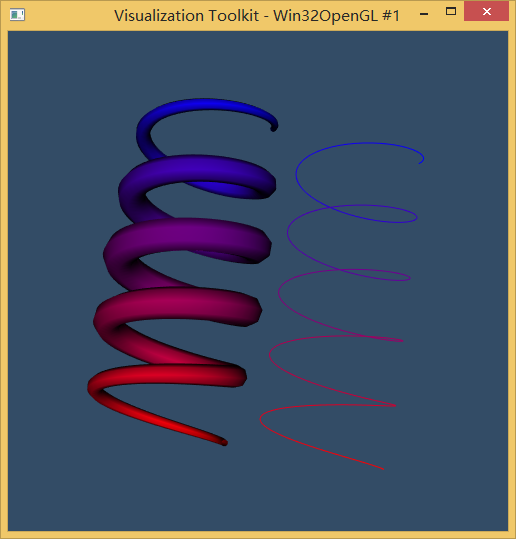
 #ifndef INITIAL_OPENGL

 #define INITIAL_OPENGL

 #include <vtkAutoInit.h>

 VTK_MODULE_INIT(vtkRenderingOpenGL)

 VTK_MODULE_INIT(vtkInteractionStyle)

 #endif

 #include <iostream>

 using namespace std;

 // VTK: Spiral with vtkTubeFilter

 // Varying tube radius and independent RGB colors with an unsignedCharArray

 // Contributed by Marcus Thamson

 #include <vtkPolyData.h>

 #include <vtkPoints.h>

 #include <vtkCellArray.h>

 #include <vtkDoubleArray.h>

 #include <vtkPolyData.h>

 #include <vtkPointData.h>

 #include <vtkCell.h>

 #include <vtkCellData.h>

 #include <vtkDataSet.h>

 #include <vtkDataSetAttributes.h>

 #include <vtkProperty.h>

 #include <vtkSmartPointer.h>

 #include <vtkTubeFilter.h>

 #include <vtkDataSetMapper.h>

 #include <vtkPolyDataMapper.h>

 #include <vtkActor.h>

 #include <vtkRenderer.h>

 #include <vtkRenderWindow.h>

 #include <vtkRenderWindowInteractor.h>

 #include <vtkCamera.h>

 #include <vtkInteractorStyleTrackballCamera.h>

 #include <vtkMath.h>

 int main()

 {

     //螺旋管道;

     double vx,vy,vz;

     unsigned int nv=;//vertices的个数

     unsigned int nCyc=;//螺旋的旋转周数

     double rT1=0.1,rT2=0.5;//管道的起点和终点半径

     double rs=;   //螺旋半径

     double h=; //高度

     unsigned int nTv=;//管道上的每个vertex,曲面数量

     unsigned int i;

     //创建用于螺旋管的points和cells

     vtkSmartPointer<vtkPoints>points=vtkSmartPointer<vtkPoints>::New();

     double pi=vtkMath::Pi();

     for(i=;i<nv;i++)

     {

         //螺旋坐标

         vx=rs*cos(*pi*nCyc*i/(nv-));

         vy=rs*sin(*pi*nCyc*i/(nv-));

         vz=h*i/nv;

         points->InsertPoint(i,vx,vy,vz);

     }

     vtkSmartPointer<vtkCellArray> lines=vtkSmartPointer<vtkCellArray>::New();

     lines->InsertNextCell(nv);

     for(i=;i<nv;i++)

     {

         lines->InsertCellPoint(i);

     }

     vtkSmartPointer<vtkPolyData>polyData=vtkSmartPointer<vtkPolyData>::New();

     polyData->SetPoints(points);

     polyData->SetLines(lines);

     //半径随着正弦函数曲线变化

     vtkSmartPointer<vtkDoubleArray> tubeRadius=vtkSmartPointer<vtkDoubleArray>::New();

     tubeRadius->SetName("TubeRadius");//

     tubeRadius->SetNumberOfTuples(nv);

     for(i=;i<nv;i++)

     {

         tubeRadius->SetTuple1(i,

                              rT1+(rT2-rT1)*sin(pi*i/(nv-)));

     }

     polyData->GetPointData()->AddArray(tubeRadius);

     polyData->GetPointData()->SetActiveScalars("TubeRadius");

     //RBG 数组(也许也可以添加Alpha通道)

     //颜色从蓝-->到红

     vtkSmartPointer<vtkUnsignedCharArray>colors=vtkSmartPointer<vtkUnsignedCharArray>::New();

     colors->SetName("Colors");//为该数组起名为"Colors"

     colors->SetNumberOfComponents();

     colors->SetNumberOfTuples(nv);

     for(i=;i<nv;i++)

     {

         colors->InsertTuple3(i,

                              int(*i/(nv-)),

                              ,

                              int(*(nv--i)/(nv-)));

     }

     polyData->GetPointData()->AddArray(colors);//添加颜色属性标量scalar

     //创建未经vtkTubeFilter处理的螺旋线Actor

     vtkSmartPointer<vtkPolyDataMapper>mapperSpiral=vtkSmartPointer<vtkPolyDataMapper>::New();

     mapperSpiral->SetInputData(polyData);

     mapperSpiral->ScalarVisibilityOn();

     mapperSpiral->SetScalarModeToUsePointFieldData();//使用FieldData为对象上色

     mapperSpiral->SelectColorArray("Colors");

     vtkSmartPointer<vtkActor> actorSpiral=vtkSmartPointer<vtkActor>::New();

     actorSpiral->SetMapper(mapperSpiral);

     //管道筛选器

     vtkSmartPointer<vtkTubeFilter> tube=vtkSmartPointer<vtkTubeFilter>::New();

     tube->SetInputData(polyData);

     tube->SetNumberOfSides(nTv);

     tube->SetVaryRadiusToVaryRadiusByAbsoluteScalar();

     vtkSmartPointer<vtkPolyDataMapper>mapper=vtkSmartPointer<vtkPolyDataMapper>::New();

     mapper->SetInputConnection(tube->GetOutputPort());

     mapper->ScalarVisibilityOn();

     mapper->SetScalarModeToUsePointFieldData();//使用FieldData为对象上色

     mapper->SelectColorArray("Colors");

     vtkSmartPointer<vtkActor> actor=vtkSmartPointer<vtkActor>::New();

     actor->SetMapper(mapper);

     vtkSmartPointer<vtkRenderer>renderer=vtkSmartPointer<vtkRenderer>::New();

     renderer->AddActor(actor);

 //    actorSpiral->SetPosition(5,0,0);

     actorSpiral->AddPosition(,,);

     renderer->AddActor(actorSpiral);//添加未经vtkTubeFilter处理的螺旋线Actor

     renderer->SetBackground(0.2,0.3,0.4);

     //设定一个倾斜的视角

     renderer->GetActiveCamera()->Azimuth();

     renderer->GetActiveCamera()->Elevation();

     renderer->ResetCamera();

     vtkSmartPointer<vtkRenderWindow>renWin=vtkSmartPointer<vtkRenderWindow>::New();

     vtkSmartPointer<vtkRenderWindowInteractor>iren=vtkSmartPointer<vtkRenderWindowInteractor>::New();

     vtkSmartPointer<vtkInteractorStyleTrackballCamera>style=vtkSmartPointer<vtkInteractorStyleTrackballCamera>::New();

     renWin->AddRenderer(renderer);

     renWin->SetSize(,);

     renWin->Render();

     iren->SetRenderWindow(renWin);

     iren->SetInteractorStyle(style);

     iren->Start();

     return ;

 }
vtkTubeFilter实例的更多相关文章
- 最近学习工作流 推荐一个activiti 的教程文档
全文地址:http://www.mossle.com/docs/activiti/ Activiti 5.15 用户手册 Table of Contents 1. 简介 协议 下载 源码 必要的软件 ...
- js-静态、原型、实例属性
本篇来说一下js中的属性: 1.静态属性 2.原型属性 3.实例属性 静态属性: function klass(){} var obj=new klass(); klass.count=0; klas ...
- ZIP压缩算法详细分析及解压实例解释
最近自己实现了一个ZIP压缩数据的解压程序,觉得有必要把ZIP压缩格式进行一下详细总结,数据压缩是一门通信原理和计算机科学都会涉及到的学科,在通信原理中,一般称为信源编码,在计算机科学里,一般称为数据 ...
- EntityFramework Core 1.1是如何创建DbContext实例的呢?
前言 上一篇我们简单讲述了在EF Core1.1中如何进行迁移,本文我们来讲讲EF Core1.1中那些不为人知的事,细抠细节,从我做起. 显式创建DbContext实例 通过带OnConfiguri ...
- redis集成到Springmvc中及使用实例
redis是现在主流的缓存工具了,因为使用简单.高效且对服务器要求较小,用于大数据量下的缓存 spring也提供了对redis的支持: org.springframework.data.redis.c ...
- 流程开发Activiti 与SpringMVC整合实例
流程(Activiti) 流程是完成一系列有序动作的概述.每一个节点动作的结果将对后面的具体操作步骤产生影响.信息化系统中流程的功能完全等同于纸上办公的层级审批,尤其在oa系统中各类电子流提现较为明显 ...
- UWP开发之Template10实践:本地文件与照相机文件操作的MVVM实例(图文付原代码)
前面[UWP开发之Mvvmlight实践五:SuspensionManager中断挂起以及复原处理]章节已经提到过Template10,为了认识MvvmLight的区别特做了此实例. 原代码地址:ht ...
- echarts+php+mysql 绘图实例
最近在学习php+mysql,因为之前画图表都是直接在echart的实例demo中修改数据,便想着两相结合练习一下,通过ajax调用后台数据画图表. 我使用的是echart3,相比较第二版,echar ...
- 【HanLP】HanLP中文自然语言处理工具实例演练
HanLP中文自然语言处理工具实例演练 作者:白宁超 2016年11月25日13:45:13 摘要:HanLP是hankcs个人完成一系列模型与算法组成的Java工具包,目标是普及自然语言处理在生产环 ...
随机推荐
- MySQL的查询计划中ken_len的值计算
本文首先介绍了MySQL的查询计划中ken_len的含义:然后介绍了key_len的计算方法:最后通过一个伪造的例子,来说明如何通过key_len来查看联合索引有多少列被使用. key_len的含义 ...
- After the exam
离散数学考完啦!!!自我感觉还行,或许得不到高分,但是过的话是没问题了.(但愿成绩出来后不打脸) 持续了两周的复习,告一段落了.那么,今天就休息休息吧. 今天阴有雨,走过的地儿都是湿漉漉.滑溜溜的.这 ...
- [转]用Middleware给ASP.NET Core Web API添加自己的授权验证
本文转自:http://www.cnblogs.com/catcher1994/p/6021046.html Web API,是一个能让前后端分离.解放前后端生产力的好东西.不过大部分公司应该都没能做 ...
- Geeklink引领智慧新生活!
煤油灯成为古董,管道天然气进入厨房,电脑挤进生活,手机代替书信成为通讯的主要工具-这些变化无不提醒我们,时代在变迁,科技在发展.而最近朋友圈和电视又在播报智能家居的生活方式-智能家电能实现怎样的情景功 ...
- 【译】什么是 web 框架?
Web 应用框架,或者简单的说是“Web 框架”,其实是建立 web 应用的一种方式.从简单的博客系统到复杂的富 AJAX 应用,web 上每个页面都是通过写代码来生成的.我发现很多人都热衷于学习 w ...
- JavaScript的two-sum问题解法
一个很常见的问题,找出一个数组中和为给定值的两个数的下标.为了简单一般会注明解只有一个之类的. 最容易想到的方法是循环遍历,这里就不说了. 在JS中比较优雅的方式是利用JS的对象作为hash的方式: ...
- 每天成长一点---WEB前端学习入门笔记
WEB前端学习入门笔记 从今天开始,本人就要学习WEB前端了. 经过老师的建议,说到他每天都会记录下来新的知识点,每天都是在围绕着这些问题来度过,很有必要每天抽出半个小时来写一个知识总结,及时对一天工 ...
- [LeetCode] Regular Expression Matching 正则表达式匹配
Implement regular expression matching with support for '.' and '*'. '.' Matches any single character ...
- c#线程带参数
c#线程带参数 ThreadStart threadStart = delegate { LoadPicture(ds.Tables[0]); }; Thread thread = new Threa ...
- 【Mysql】 局域网远程连接问题
设置了 user 表 的 host为‘%’ 为什么局域网还是连接不上: 新建查询-->分别执行 1.GRANT ALL PRIVILEGES ON *.* TO'root'@'%' IDENTI ...