
SQL Server 中用DBCC Opentran语句查看未关闭的事务(转载)
从SQL Server 2008开始,可以使用DBCC Opentran语句查看数据库中最早一个没有被关闭的事务,下面这篇文章讲述了如何使用DBCC Opentran语句。
An Open transaction may simply be something that has not finished yet, or someone issued a BEGIN TRAN without a corresponding COMMIT or ROLLBACK. Or as we will see at the end, replication is having issues.
You can use this against any database with minimal syntax and get back solid information very quickly.
--connect to sample db

use MyDatabase

go

--as generic as this command gets and still runs:

DBCC OPENTRAN
Result if nothing is open:
No active open transactions.

DBCC execution completed. If DBCC printed error messages, contact your system administrator.
If I start and execute a DML (insert, update or delete) transaction with BEGIN TRAN and leave out the corresponding COMMIT, I get:
Transaction information for database ‘SmallData_BigLog’.

Oldest active transaction:

SPID (server process ID): 64 <———–

UID (user ID) : -1

Name : user_transaction

LSN : (637:4620:1)

Start time : Apr 1 2017 4:59:02:307PM

SID : 0x0105000000000005150000004893a0845595b6fef515cd5de9030000

DBCC execution completed. If DBCC printed error messages, contact your system administrator.
Now, if I open a second transaction (in a new query window) and execute any DML statement without the COMMIT, and then run DBCC OPENTRAN again, I get:
Transaction information for database ‘SmallData_BigLog’.

Oldest active transaction:

SPID (server process ID): 64 <———–

UID (user ID) : -1

Name : user_transaction

LSN : (637:4620:1)

Start time : Apr 1 2017 4:59:02:307PM

SID : 0x0105000000000005150000004893a0845595b6fef515cd5de9030000

DBCC execution completed. If DBCC printed error messages, contact your system administrator.
Yes…the same output, as this is just showing the ONE oldest transaction.
I can run a query to show that there are two SPIDs with open transactions:
--

SELECT spid, blocked,[dbid],last_batch,open_tran

FROM master.sys.sysprocesses

WHERE open_tran <> 0
Result:
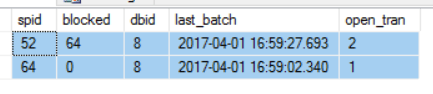
If I COMMIT spid 64 and re-run DBCC OPENTRAN, the SPID changes to the second transaction I started:
Transaction information for database ‘SmallData_BigLog’.

Oldest active transaction:

SPID (server process ID): 52  <———–

UID (user ID) : -1

Name : user_transaction

LSN : (637:9603:1)

Start time : Apr 1 2017 5:11:20:830PM

SID : 0x0105000000000005150000004893a0845595b6fef515cd5de9030000

DBCC execution completed. If DBCC printed error messages, contact your system administrator.
If I COMMIT spid 52 and re-run DBCC OPENTRAN along with checking sysprocesses for open_tran <> 0 I get:
No active open transactions.

DBCC execution completed. If DBCC printed error messages, contact your system administrator.

spid blocked dbid last_batch open_tran

—— ——- —— ———————– ———

(0 row(s) affected)
Now, all of that was just running DBCC OPENTRAN by itself. There are additional options:
--specify dbname, dbid or 0 for the current database

DBCC OPENTRAN (SmallData_BigLog)
You will get results in the same format as the previous examples.
You can suppress all messages, regardless of if a transaction is open or not (but I have no idea why this would help you…)
DBCC OPENTRAN (0) with no_infomsgs
Result:
Command(s) completed successfully.
If you needed to periodically capture the oldest transaction, in order to review later, use WITH TABLERESULTS:
-- TableResults only shows the oldest open tran

-- useful running in a loop to load the oldest

-- tran over time.

--create a temp table

CREATE TABLE #OpenTranStatus (

ActiveTransaction varchar(25),

Details sql_variant

);

-- Execute the command, putting the results in the table.

INSERT INTO #OpenTranStatus

EXEC ('DBCC OPENTRAN (SmallData_BigLog) with tableresults')

SELECT * FROM #OpenTranStatus

DROP TABLE #OpenTranStatus
In the above, you could create a user table instead of a temp table of course…it depends on your needs.
One more particularly useful item you may see when running DBCC OPENTRAN by itself:
Transaction information for database ‘Music’.

Replicated Transaction Information:

Oldest distributed LSN : (37:143:3)

Oldest non-distributed LSN : (37:144:1)

DBCC execution completed. If DBCC printed error messages, contact your system administrator.
If your database is participating in Replication as a Publisher, this may show up when running OPENTRAN, but it doesn’t necessarily mean that the transaction is actually open. I set this up and stopped the Replication Log Reader and Distribution agent jobs. I then added some data to a published table (article) and ran DBCC OPENTRAN to get the above result. Note that there are two lines with LSN information in them (no SPIDs)
I then ran the Log Reader Agent job and got back:
Transaction information for database ‘Music’.

Replicated Transaction Information:

Oldest distributed LSN : (37:157:3)

Oldest non-distributed LSN : (0:0:0)

DBCC execution completed. If DBCC printed error messages, contact your system administrator.
I have verified that new records I inserted have been read by the log reader, AND distributed to the subscriber(s). This means that while you are seeing
Oldest distributed LSN : (37:157:3)
There is not an error…just info.
If you have non-distributed LSNs, there is something to troubleshoot in the replication process which is way outside the scope of this post. A non-distributed replicated transaction/LSN CAN cause some huge Log file growth, and need to be investigated. If this happens frequently, use the TABLERESULTS option to log to a regular table and alert on it.
Hopefully this gives you some insight into various ways to use DBCC OPENTRAN as well as use cases for the various options. 90% of the time I run this, it is due to application transactions timing out, or log file growth issues.
自我总结:
一般使用DBCC Opentran语句,最常用的场景是数据库对象(例如表)被一个事务长久地锁住了,但是你不知道是哪一个事务锁住了数据库对象,就可以使用DBCC Opentran语句查看当前最早开启事务的SPID,如果确认该事务是因为误操作或者应用程序Bug,所以一直没有被提交或回滚,那么可以使用KILL语句强制结束该事务的SPID,从而人工干预结束事务。
SQL Server 中用DBCC Opentran语句查看未关闭的事务(转载)的更多相关文章
- SQL Server 2000 ——DBCC命令
http://blog.163.com/ruifeng_00/blog/static/6904584200971291923462/ 一.定义 微软当初从SYBASE将DBCC是作为数据库一致性检 ...
- 玩转SQL Server复制回路の变更数据类型、未分区表转为分区表
玩转SQL Server复制回路の变更数据类型.未分区表转为分区表 复制的应用: 初级应用:读写分离.数据库备份 高级应用:搬迁大型数据库(跨机房).变更数据类型.未分区表转为分区表 京东的复制专家 ...
- 在SQL Server中用好模糊查询指令LIKE
简介:like在sql中的使用 在SQL Server中用好模糊查询指令LIKE 查询是SQL Server中重要的功能,而在查询中将Like用上,可以搜索到一些意想不到的结果和效果,like的神奇之 ...
- 在SQL Server中用好模糊查询指令LIKE (转载)
like在sql中的使用:在SQL Server中用好模糊查询指令LIKE:查询是SQL Server中重要的功能,而在查询中将Like用上,可以搜索到一些意想不到的结果和效果,like的神奇 一.一 ...
- SQL SERVER 2005 DBCC IND命令说明
每天笑一笑,烦恼少一倍 轻松一笑!狗狗被调戏:http://947kan.com/video/player-52952-0-0.html ------------------------------- ...
- PowerDesigner反向数据库时遇到[Microsoft][ODBC SQL Server Driver][SQL Server]无法预定义语句。SQLSTATE = 37错误解决方法
逆向工程中,有时会出现如下错误 ... [Microsoft][ODBC SQL Server Driver][SQL Server]无法预定义语句 SQLSTATE = 37000 解决方案: 1. ...
- SQL Server Profiler监控执行语句
SQL Server Profiler监控执行语句,这个功能主要用在实时的监控对数据库执行了什么操作,从而及时有效的跟踪系统的运行. 常规配置选项,名称.模板.保存到文件(可以复用). 事件选择,可以 ...
- SQL Server FOR XML PATH 语句的应用---列转行
经常在论坛看到高手使用了 for xml path,由于是搜索一下,记录了详细的使用方法.在SQL Server中利用 FOR XML PATH 语句能够把查询的数据生成XML数据,下面是它的一些应用 ...
- SQL Server中的流控制语句
begin···end 该语句定义sql代码块,通常在if和while语句中使用 declare @num int ; ; begin ; print 'hello word' end if···el ...
随机推荐
- webpack单独打包一个less文件
需要将btn.less文件用webpack打包后,放到项目中.在网上百度了各种,遇到了很多问题,现在我将整个步骤整理如下: 1.建一个空的文件夹,命名为init_webpack,在该文件夹下运行: 这 ...
- linux网络 skb_buff
sbk_buff中的data_len指的是尾部带的page数据的长度,len指的是总共的data的长度,len-data_len是第一个线性buf的数据长度. sk_buff->len:表示当前 ...
- [20171106]配置客户端连接注意.txt
[20171106]配置客户端连接注意.txt --//在配置客户端连接时一般建议使用Net Manager工具,windows下调用执行Net Manager.--//linux下执行 netmgr ...
- 安全之路 —— C/C++实现利用添加注册表项实现文件自启动
简介 添加注册表项是实现文件自启动的经典方法之一,但因为操作注册表项是一个敏感操作,被报毒可能性较大,但即便如此,这个方法还是值得一学的,因为后期大部分编程都涉及到注册表操作. 最常使用到的注册表项有 ...
- js入门-文本框输入特定内容控制另一个文本框
在填写表单时,有时需要某些文本框隐藏,当一文本框输入特定内容时才会显示隐藏的文本框,这一功能可以用onchange事件或oninput事件实现.下面对比下两种方法实现的区别: onchange()定义 ...
- 4.9Python数据类型(5)列表(新版)
前言 列表是一种python类似数组的数据结构,操作灵活,可存储多种类型的数据. 目录 1.列表的基础知识 2.列表的增删改查并操作 3.列表的其他操作 4.基本方法表 (一)列表的基础知识 1.说明 ...
- java操作elasticsearch实现基本的增删改查操作
一.在进行java操作elasticsearch之前,请确认好集群的名称及对应的ES节点ip和端口 1.查看ES的集群名称 #进入elasticsearch.yml配置文件/opt/elasticse ...
- 今天遇到一件开心事,在eclipse编写的代码在命令窗口中编译后无法运行,提示 “错误: 找不到或无法加载主类”
java中带package和不带package的编译运行方式是不同的. 首先来了解一下package的概念:简单定义为,package是一个为了方便管理组织java文件的目录结构,并防止不同java文 ...
- .whl文件打开方式 Python
wheel文件本质上就是zip或者rar,只不过他更加方便python的安装以及使用.在之前的图片中我们只要使用pip install wheel 就可以安装wheel. 在安装了wheel之后我们可 ...
- Ubuntu18.04安装Tensorflow+cuda+cuDNN
本文写的比较简单,期间遇到的一些小麻烦,自己不认为成为阻碍,所以没有详细写. 如有疑问可以联系QQ:2922530320 Pycharm Pycharm使用Anaconda Pycharm 在新建项目 ...