
ux.form.field.Year 只能选年的时间扩展
效果如图,亲测6.2.1版本可用,用法同时间选择控件
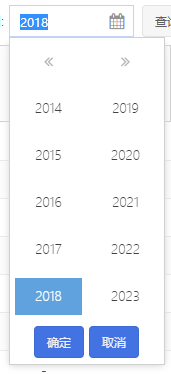
//只选择年的控件
Ext.define('ux.picker.Year', {
extend: 'Ext.Component',
alias: 'widget.uxYearpicker',
alternateClassName: 'ux.uxYearpicker',
cls: 'uxYearpicker',
isYearPicker: true, focusable: true, childEls: [
'bodyEl', 'prevEl', 'nextEl', 'yearEl'
], renderTpl: [
'<div id="{id}-bodyEl" data-ref="bodyEl" class="{baseCls}-body">',
'<div id="{id}-yearEl" data-ref="yearEl" class="{baseCls}-years">',
'<div class="{baseCls}-yearnav">',
'<div class="{baseCls}-yearnav-button-ct">',
'<a id="{id}-prevEl" data-ref="prevEl" class="{baseCls}-yearnav-button {baseCls}-yearnav-prev" hidefocus="on" role="button"></a>',
'</div>',
'<div class="{baseCls}-yearnav-button-ct">',
'<a id="{id}-nextEl" data-ref="nextEl" class="{baseCls}-yearnav-button {baseCls}-yearnav-next" hidefocus="on" role="button"></a>',
'</div>',
'</div>',
'<tpl for="years">',
'<div class="{parent.baseCls}-item {parent.baseCls}-year">',
'<a hidefocus="on" class="{parent.baseCls}-item-inner" role="button">{.}</a>',
'</div>',
'</tpl>',
'</div>',
'<div class="' + Ext.baseCSSPrefix + 'clear"></div>',
'<tpl if="showButtons">',
'<div class="{baseCls}-buttons">{%',
'var me=values.$comp, okBtn=me.okBtn, cancelBtn=me.cancelBtn;',
'okBtn.ownerLayout = cancelBtn.ownerLayout = me.componentLayout;',
'okBtn.ownerCt = cancelBtn.ownerCt = me;',
'Ext.DomHelper.generateMarkup(okBtn.getRenderTree(), out);',
'Ext.DomHelper.generateMarkup(cancelBtn.getRenderTree(), out);',
'%}</div>',
'</tpl>',
'</div>'
], //<locale>
/**
* @cfg {String} okText The text to display on the ok button.
*/
okText: '确定',
//</locale> //<locale>
/**
* @cfg {String} cancelText The text to display on the cancel button.
*/
cancelText: '取消',
//</locale> /**
* @cfg {String} [baseCls='x-monthpicker']
* The base CSS class to apply to the picker element.
*/
baseCls: Ext.baseCSSPrefix + 'monthpicker', /**
* @cfg {Boolean} showButtons True to show ok and cancel buttons below the picker.
*/
showButtons: true, /**
* @cfg {String} [selectedCls='x-monthpicker-selected'] The class to be added to selected items in the picker.
*/ /**
* @cfg {Date/Number[]} value The default value to set. See {@link #setValue}
*/ /**
* @cfg {String}
* The {@link Ext.button.Button#ui} to use for the month picker's footer buttons.
*/
footerButtonUI: 'default', measureWidth: 35,
measureMaxHeight: 20, // used when attached to date picker which isnt showing buttons
smallCls: Ext.baseCSSPrefix + 'monthpicker-small', /**
* @private
*/
totalYears: 10,
yearOffset: 5, // 10 years in total, 2 per row
monthOffset: 6, // 12 months, 2 per row
alignOnScroll: false, /**
* @event cancelclick
* Fires when the cancel button is pressed.
* @param {Ext.picker.Month} this
*/ /**
* @event monthclick
* Fires when a month is clicked.
* @param {Ext.picker.Month} this
* @param {Array} value The current value
*/ /**
* @event monthdblclick
* Fires when a month is clicked.
* @param {Ext.picker.Month} this
* @param {Array} value The current value
*/ /**
* @event okclick
* Fires when the ok button is pressed.
* @param {Ext.picker.Month} this
* @param {Array} value The current value
*/ /**
* @event select
* Fires when a month/year is selected.
* @param {Ext.picker.Month} this
* @param {Array} value The current value
*/ /**
* @event yearclick
* Fires when a year is clicked.
* @param {Ext.picker.Month} this
* @param {Array} value The current value
*/ /**
* @event yeardblclick
* Fires when a year is clicked.
* @param {Ext.picker.Month} this
* @param {Array} value The current value
*/ /**
* @inheritdoc
* @private
*/
initComponent: function () {
var me = this; me.selectedCls = me.baseCls + '-selected'; if (me.small) {
me.addCls(me.smallCls);
}
me.setValue(me.value);
me.activeYear = me.getYear(new Date().getFullYear() - 4, -4); if (me.showButtons) {
me.okBtn = new Ext.button.Button({
ui: me.footerButtonUI,
text: me.okText,
handler: me.onOkClick,
scope: me
});
me.cancelBtn = new Ext.button.Button({
ui: me.footerButtonUI,
text: me.cancelText,
handler: me.onCancelClick,
scope: me
});
} this.callParent();
}, /**
* @inheritdoc
* @private
*/
beforeRender: function () {
var me = this; if (me.padding && !me.width) {
me.cacheWidth();
} me.callParent(); Ext.apply(me.renderData, {
years: me.getYears(),
showButtons: me.showButtons
});
}, cacheWidth: function () {
var me = this,
padding = me.parseBox(me.padding),
widthEl = Ext.getBody().createChild({
cls: me.baseCls + ' ' + me.borderBoxCls,
style: 'position:absolute;top:-1000px;left:-1000px;',
html: ' ' // required for opera 11.64 to measure a width
}); me.self.prototype.width = widthEl.getWidth() + padding.left + padding.right;
widthEl.destroy();
}, /**
* @inheritdoc
* @private
*/
afterRender: function () {
var me = this,
body = me.bodyEl; me.callParent(); me.el.on('mousedown', me.onElClick, me, {
translate: false
}); body.on({
scope: me,
click: 'onBodyClick',
dblclick: 'onBodyClick'
}); // keep a reference to the year/month elements since we'll be re-using them
me.years = body.select('.' + me.baseCls + '-year a'); me.backRepeater = new Ext.util.ClickRepeater(me.prevEl, {
handler: Ext.Function.bind(me.adjustYear, me, [-me.totalYears])
}); me.prevEl.addClsOnOver(me.baseCls + '-yearnav-prev-over');
me.nextRepeater = new Ext.util.ClickRepeater(me.nextEl, {
handler: Ext.Function.bind(me.adjustYear, me, [me.totalYears])
});
me.nextEl.addClsOnOver(me.baseCls + '-yearnav-next-over');
me.updateBody(); }, /**
* Set the value for the picker.
* @param {Date/Number[]} value The value to set. It can be a Date object, where the month/year will be extracted, or
* it can be an array, with the month as the first index and the year as the second.
* @return {Ext.picker.Month} this
*/
setValue: function (value) {
var me = this,
active = me.activeYear,
year; if (!value) {
me.value = [null, null];
} else if (Ext.isDate(value)) {
me.value = [value.getMonth(), value.getFullYear()];
} else {
me.value = [value[0], value[1]];
} if (me.rendered) {
year = me.value[1];
if (year !== null) {
if ((year < active || year > active + me.yearOffset)) {
me.activeYear = year - me.yearOffset + 1;
}
}
me.updateBody();
} return me;
}, /**
* Gets the selected value. It is returned as an array [month, year]. It may
* be a partial value, for example [null, 2010]. The month is returned as
* 0 based.
* @return {Number[]} The selected value
*/
getValue: function () {
return this.value;
}, /**
* Checks whether the picker has a selection
* @return {Boolean} Returns true if both a month and year have been selected
*/
hasSelection: function () {
var value = this.value;
return value[0] !== null && value[1] !== null;
}, /**
* Get an array of years to be pushed in the template. It is not in strict
* numerical order because we want to show them in columns.
* @private
* @return {Number[]} An array of years
*/
getYears: function () {
var me = this,
offset = me.yearOffset,
start = me.activeYear, // put the "active" year on the left
end = start + offset,
i = start,
years = []; for (; i < end; ++i) {
years.push(i, i + offset);
} return years;
}, /**
* Update the years in the body based on any change
* @private
*/
updateBody: function () {
var me = this,
years = me.years,
yearNumbers = me.getYears(),
cls = me.selectedCls,
value = me.getYear(null),
year,
yearItems, y, yLen, el; if (me.rendered) {
years.removeCls(cls); yearItems = years.elements;
yLen = yearItems.length; for (y = 0; y < yLen; y++) {
el = Ext.fly(yearItems[y]); year = yearNumbers[y];
el.dom.innerHTML = year;
if (year === value) {
el.addCls(cls);
}
}
}
}, /**
* Gets the current year value, or the default.
* @private
* @param {Number} defaultValue The default value to use if the year is not defined.
* @param {Number} offset A number to offset the value by
* @return {Number} The year value
*/
getYear: function (defaultValue, offset) {
var year = this.value[1];
offset = offset || 0;
return year === null ? defaultValue : year + offset;
}, onElClick: function (e) {
e.stopEvent();
}, /**
* React to clicks on the body
* @private
*/
onBodyClick: function (e, t) {
var me = this,
isDouble = e.type === 'dblclick'; if (e.getTarget('.' + me.baseCls + '-year')) {
e.stopEvent();
me.onYearClick(t, isDouble);
}
}, /**
* Modify the year display by passing an offset.
* @param {Number} [offset=10] The offset to move by.
*/
adjustYear: function (offset) {
if (typeof offset !== 'number') {
offset = this.totalYears;
}
this.activeYear += offset;
this.updateBody();
}, /**
* React to the ok button being pressed
* @private
*/
onOkClick: function () {
this.fireEvent('okclick', this, this.value);
}, /**
* React to the cancel button being pressed
* @private
*/
onCancelClick: function () {
this.fireEvent('cancelclick', this);
}, /**
* React to a year being clicked
* @private
* @param {HTMLElement} target The element that was clicked
* @param {Boolean} isDouble True if the event was a doubleclick
*/
onYearClick: function (target, isDouble) {
var me = this;
me.value[1] = me.activeYear + me.resolveOffset(me.years.indexOf(target), me.yearOffset);
me.updateBody();
me.fireEvent('year' + (isDouble ? 'dbl' : '') + 'click', me, me.value);
me.fireEvent('select', me, me.value); }, /**
* Returns an offsetted number based on the position in the collection. Since our collections aren't
* numerically ordered, this function helps to normalize those differences.
* @private
* @param {Object} index
* @param {Object} offset
* @return {Number} The correctly offsetted number
*/
resolveOffset: function (index, offset) {
if (index % 2 === 0) {
return (index / 2);
}
return offset + Math.floor(index / 2);
}, /**
* @inheritdoc
* @private
*/
beforeDestroy: function () {
var me = this;
me.years = me.months = null;
Ext.destroyMembers(me, 'backRepeater', 'nextRepeater', 'okBtn', 'cancelBtn');
me.callParent();
}, onDestroy: function () {
Ext.destroyMembers(this, 'okBtn', 'cancelBtn');
this.callParent();
}, privates: {
// Do the job of a container layout at this point even though we are not a Container.
// TODO: Refactor as a Container.
finishRenderChildren: function () {
var me = this; this.callParent(arguments); if (this.showButtons) {
me.okBtn.finishRender();
me.cancelBtn.finishRender();
}
}
}
});
 //只选择年的控件

 Ext.define('ux.form.field.Year', {

     extend: 'Ext.form.field.Date',

     alias: 'widget.uxYearfield',

     xtype: 'uxYearfield',

     requires: ['ux.picker.Year'],

     format: 'Y',

     selectYear: new Date(),

     createPicker: function () {

         var me = this;

         return new ux.picker.Year({

             value: new Date(),

             renderTo: document.body,

             floating: true,

             hidden: true,

             focusOnShow: true,

             listeners: {

                 scope: me,

                 select: me.onSelect,

                 cancelclick: me.onCancelClick,

                 okclick: me.onOKClick,

                 yeardblclick: me.onOKClick,

                 monthdblclick: me.onOKClick

             }

         });

     },

     onCancelClick: function () {

         var me = this;

         me.selectYear = null;

         me.collapse();

     },

     onOKClick: function () {

         var me = this;

         if (me.selectYear) {

             me.setValue(me.selectYear);

             me.fireEvent('select', me, me.selectYear);

         }

         me.collapse();

     },

     onSelect: function (m, d) {

         var me = this;

         me.selectYear = new Date((d[0] + 1) + '/1/' + d[1]);

     }

 });
ux.form.field.Year 只能选年的时间扩展的更多相关文章
- ux.form.field.Month 只能选年、月的时间扩展
效果如图,亲测6.2.1版本可用,用法同时间选择控件 //月弹窗扩展 //只选月 Ext.define('ux.picker.Month', { extend: 'Ext.picker.Month', ...
- ux.form.field.SearchField 列表、树形菜单查询扩展
//支持bind绑定store //列表搜索扩展,支持本地查询 //支持树形菜单本地一级菜单查询 Ext.define('ux.form.field.SearchField', { extend: ' ...
- ux.form.field.KindEditor 所见所得编辑器
注意需要引入KindEditor相关资源 //所见所得编辑器 Ext.define('ux.form.field.KindEditor', { extend: 'Ext.form.field.Text ...
- ux.form.field.Verify 验证码控件
//验证码控件 Ext.define('ux.form.field.Verify', { extend: 'Ext.container.Container', alias: ['widget.fiel ...
- ux.form.field.TreePicker 扩展,修复火狐不能展开bug
/** * A Picker field that contains a tree panel on its popup, enabling selection of tree nodes. * 动态 ...
- ux.form.field.Password 密码与非密码状态切换
效果如图: 扩展源码: //扩展 //密码按钮扩展 //支持在密码与非密码之间切换 Ext.define('ux.form.field.Password', { extend: 'Ext.form.f ...
- ux.form.field.GridDate 支持快速选择日期的日期控件
效果如图,亲测6.2.1版本可用 /** *支持快速选择日期的日期控件 */ Ext.define('ux.form.field.GridDate', { extend: 'Ext.form.fiel ...
- Wdatepick控件只能选当前时间以前的时间
WdatePicker限制只能选当天,只能选以前的时间 (1)WdatePicker限制只能选以前的时间(不能选当天): onfocus="WdatePicker({startDate:'% ...
- 一款不错的多选下拉列表利器—— Ext.ux.form.SuperBoxSelect
在B/S系统中,下拉列表(select/dropdownlist/combobox)的应用随处可见,为了增强用户体验,开发人员也常常会做一些带联想功能的下拉列表, 特别是数据项比较多的时候,用户筛选起 ...
随机推荐
- C_求两个日期相隔的天数(闰年)
#include <stdio.h> #include <math.h> int leap_year(int year){ == || (year%== && ...
- JAVA自学笔记17
JAVA自学笔记17 1.Map接口 1)概述 将键映射到值的对象,一个映射不能包含重复的键,每个键最多只能映射到一个值.可以存储键值对的元素 2)与Collection接口的不同: ①Map是双列的 ...
- insert /*+append*/为什么会提高性能
在上一篇的blog中 做了下使用,在归档和非归档下,做数据插入http://blog.csdn.net/guogang83/article/details/9219479.结论是在非归档模式下表设置为 ...
- IDEA调试SpringMvc项目时,出错:java.lang.ClassNotFoundException: org.springframework.web.context.ContextLoaderListener,解决办法
具体报错信息如下图所示: 解决方法:File > Project Structure > Artifacts > 在右侧Output Layout右击项目名,选择Put into O ...
- 树莓派raspberry pi配置无线路由器AP
raspi-config进入系统配置面板 进行 Expand Filesystem 扩展文件系统否则备份系统的时候备份文件会急速膨胀. (1)配置网络环境nano /etc/network/inte ...
- 使用多个项目生成Xml文件来显示帮助文档
终于到这了,我们首先将Product单独作为一个项目 WebAPI2PostMan.WebModel 并引用他,查看文档如下. 你会发现,你的注释也就是属性的描述没有了.打开App_Data/XmlD ...
- 【Linux】关于ffmpeg的一些常见用法
一.FFmpeg简介 FFmpeg是一款非常快速的视频和音频转换器, 是开源项目 FFmpeg (Fast Forward moving pictures expert group) 的命令行程序. ...
- Docker的学习
学习地址:http://blog.51cto.com/lizhenliang 和 他的视频 一 Docker 的介绍和安装 二 镜像管理 三 容器管理 四 管理应用程序数据 五 使用Docker知 ...
- Django Http请求生命周期
day54 请求响应Http 1.发送Http请求 2.服务器接收,根据请求头中的的url在路由关系表中进行匹配(从上到下) 3.匹配成功后,执行指定的views函数 4.业务处理 URL----&g ...
- MySQL利用xtrabackup在线修复或新增从库
如果数据库的数据量很大,表大小有几十个G,利用mysqldump导出备份会消耗非常长的时间,会对数据库产生不稳定风险,这时可以利用xtrabackup工具在线复制主库文件,利用复制出来的主库文件可以修 ...