
android selector shape 使用
先上效果图
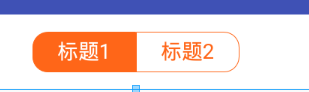
message_toolbar_left_bg_selector
<?xml version="1.0" encoding="utf-8"?>

<selector xmlns:android="http://schemas.android.com/apk/res/android">

    <item android:state_selected="true">

        <shape>

            <size android:width="69.0dp" android:height="27dp" />

            <!-- 线的宽度,颜色灰色 -->

            <stroke android:width="0.5dp" android:color="@color/orange"></stroke>

            <!-- 矩形的圆角半径 -->

            <corners android:bottomLeftRadius="10.0dp" android:bottomRightRadius="0.0dp" android:topLeftRadius="10.0dp" android:topRightRadius="0.0dp" />

            <solid android:color="@color/orange" />

        </shape>

    </item>

    <item android:state_pressed="true">

        <shape>

            <size android:width="69.0dp" android:height="27dp" />

            <!-- 线的宽度,颜色灰色 -->

            <stroke android:width="0.5dp" android:color="@color/orange"></stroke>

            <!-- 矩形的圆角半径 -->

            <corners android:bottomLeftRadius="10.0dp" android:bottomRightRadius="0.0dp" android:topLeftRadius="10.0dp" android:topRightRadius="0.0dp" />

            <solid android:color="@color/orange" />

        </shape>

    </item>

    <item android:state_checked="true">

        <shape>

            <size android:width="69.0dp" android:height="27dp" />

            <!-- 线的宽度,颜色灰色 -->

            <stroke android:width="0.5dp" android:color="@color/orange"></stroke>

            <!-- 矩形的圆角半径 -->

            <corners android:bottomLeftRadius="10.0dp" android:bottomRightRadius="0.0dp" android:topLeftRadius="10.0dp" android:topRightRadius="0.0dp" />

            <solid android:color="@color/orange" />

        </shape>

    </item>

    <item>

        <shape>

            <size android:width="69.0dp" android:height="27dp" />

            <!-- 线的宽度,颜色灰色 -->

            <stroke android:width="0.5dp" android:color="@color/orange"></stroke>

            <!-- 矩形的圆角半径 -->

            <corners android:bottomLeftRadius="10.0dp" android:bottomRightRadius="0.0dp" android:topLeftRadius="10.0dp" android:topRightRadius="0.0dp" />

            <solid android:color="@color/white"/></shape>

    </item>

</selector>
message_toolbar_right_bg_selector
<?xml version="1.0" encoding="utf-8"?>

<selector xmlns:android="http://schemas.android.com/apk/res/android">

    <item android:state_selected="true">

        <shape>

            <size android:width="69.0dp" android:height="27dp" />

            <!-- 线的宽度,颜色灰色 -->

            <stroke android:width="0.5dp" android:color="@color/orange"></stroke>

            <!-- 矩形的圆角半径 -->

            <!-- 矩形的圆角半径 -->

            <corners android:bottomLeftRadius="0.0dp" android:bottomRightRadius="10.0dp" android:topLeftRadius="0.0dp" android:topRightRadius="10.0dp" />

            <solid android:color="@color/orange" />

        </shape>

    </item>

    <item android:state_pressed="true">

        <shape>

            <size android:width="69.0dp" android:height="27dp" />

            <!-- 线的宽度,颜色灰色 -->

            <stroke android:width="0.5dp" android:color="@color/orange"></stroke>

            <!-- 矩形的圆角半径 -->

            <!-- 矩形的圆角半径 -->

            <corners android:bottomLeftRadius="0.0dp" android:bottomRightRadius="10.0dp" android:topLeftRadius="0.0dp" android:topRightRadius="10.0dp" />

            <solid android:color="@color/orange" />

        </shape>

    </item>

    <item android:state_checked="true">

        <shape>

            <size android:width="69.0dp" android:height="27dp" />

            <!-- 线的宽度,颜色灰色 -->

            <stroke android:width="0.5dp" android:color="@color/orange"></stroke>

            <!-- 矩形的圆角半径 -->

            <!-- 矩形的圆角半径 -->

            <corners android:bottomLeftRadius="0.0dp" android:bottomRightRadius="10.0dp" android:topLeftRadius="0.0dp" android:topRightRadius="10.0dp" />

            <solid android:color="@color/orange" />

        </shape>

    </item>

    <item>

        <shape>

            <size android:width="69.0dp" android:height="27dp" />

            <!-- 线的宽度,颜色灰色 -->

            <stroke android:width="0.5dp" android:color="@color/orange"></stroke>

            <!-- 矩形的圆角半径 -->

            <corners android:bottomLeftRadius="0.0dp" android:bottomRightRadius="10.0dp" android:topLeftRadius="0.0dp" android:topRightRadius="10.0dp" />

            <solid android:color="@color/white" />

        </shape>

    </item>

</selector>
布局界面
 <RadioGroup

            android:id="@id/rg_group"

            android:layout_width="138.0dp"

            android:layout_height="27.0dp"

            android:layout_centerInParent="true"

            android:orientation="horizontal">

            <RadioButton

                android:id="@id/rbtn_message"

                android:layout_width="match_parent"

                android:layout_height="match_parent"

                android:layout_weight="1"

                android:button="@null"

                android:checked="true"

                android:gravity="center"

                android:background="@drawable/message_toolbar_left_bg_selector"

                android:text="标题1"

                android:textColor="@color/message_toolbar_font_color" />

            <RadioButton

                android:id="@id/rbtn_chat_room"

                android:layout_width="match_parent"

                android:layout_height="match_parent"

                android:layout_weight="1"

                android:button="@null"

                android:gravity="center"

                android:background="@drawable/message_toolbar_right_bg_selector"

                android:text="标题2"

                android:textColor="@color/message_toolbar_font_color" />

        </RadioGroup>
android selector shape 使用的更多相关文章
- android selector 开始自定义样式
Selector的结构描述: <?xml version="1.0" encoding="utf-8"?> <selector xmlns:a ...
- android selector(转)
Selector的结构描述: <?xml version="1.0" encoding="utf-8"?> <selector xmlns:a ...
- Android UI设计系统-android selector 开始自定义样式
Selector的结构描述: <?xml version="1.0" encoding="utf-8"?> <selector xmlns:a ...
- Android 使用shape定义不同控件的的颜色、背景色、边框色
Android 使用shape定义不同控件的的颜色.背景色.边框色 设置按钮的右边框和底边框颜色为红色,边框大小为3dp: 在drawable新建一个 buttonstyle.xml的文件,内容如下: ...
- Android学好Shape不再依赖美工
原创 2014年03月27日 15:33:41 标签: Android Shape用法 20427 先上图 其实以上效果没有让美工提供任何图片 只要学会Shape你就能实现 想怎么样就怎么样 下面介绍 ...
- 【转】【Android】Android Drawable Shape 组合画田字格
使用layer-list组合多个Shap <?xml version="1.0" encoding="utf-8"?> <layer-list ...
- selector + shape
selector_shape.xml<?xml version="1.0" encoding="utf-8"?> <selector xmln ...
- android中shape 的使用
android 开发中 对于 shape 和 selector的使用,一直都不是很熟练, 记录一下.便于以后参考. 举个项目中例子图 对于上面的2个radiobutton ,背景我们可以让美工做一个. ...
- Drawable实战解析:Android XML shape 标签使用详解(apk瘦身,减少内存好帮手)
Android XML shape 标签使用详解 一个android开发者肯定懂得使用 xml 定义一个 Drawable,比如定义一个 rect 或者 circle 作为一个 View 的背景. ...
随机推荐
- 第7天【find命令、if语句、磁盘管理、文件系统管理】
find命令详解(01)_recv Find及文件特殊权限: 文件查找工具: Find Find [OPTON]…[查找路径] [查找条件] [处理动作] 查找路径:指定具体目标路径,默认为当前路径 ...
- Eclipse 手动增加linker library
多个cu文件nvcc -cubin -m64 -lcudadevrt -lcublas_device -gencode arch=compute_35,code=sm_35 -o test.cubin ...
- Linux c 获取cpu使用率
部分代码改编自来自http://blog.csdn.net/primeprime/article/details/41458731 主要的原理就是获取top -n 1 | grep Cpu执行的结果, ...
- sqlalchemy 获取表结构。
from sqlalchemy.engine import reflection insp = reflection.Inspector.from_engine(engine) colums=insp ...
- js运行机制
情况一 script标签里面的运行顺序是同步的 遇到settimeout的时候就会变异步,最后执行 执行顺序为1342 情况二 只输出a 情况三 输出4444 异步队列插入的时间和执行时间 for循环 ...
- nopcommerce 4.1 学习2 -插件之挂件
先了解下nop4.1的一些插件有哪些类型: 1.支付插件 Nop.Plugin.Payments.PayPalStandard Nop.Plugin.Payments.CheckMoneyOrd ...
- jquery常用实例
$("#returnTop").click(function () { var speed=200;//滑动的速度 $('body,html').animate({ scrollT ...
- 为何放弃Eclipse,选择IntelliJ IDEA,看完终于明白了
如果你初次用idea,毫无目的的度娘如何使用IDEA 浪费的将会是大量的时间.一套让你花时间,少走弯路的视频教程(下载地址:https://pan.baidu.com/s/1gfeX3hD) ...
- itextsharp报错PdfReader not opened with owner password
itextSharp读取Pdf时报错:PdfReader not opened with owner password 报错原因:pdf文件被用户加密了. 解决办法:在创建pdfReader实例后,加 ...
- 剑指Offer 34. 第一个只出现一次的字符 (字符串)
题目描述 在一个字符串(0<=字符串长度<=10000,全部由字母组成)中找到第一个只出现一次的字符,并返回它的位置, 如果没有则返回 -1(需要区分大小写). 题目地址 https:// ...