
Drawable实战解析:Android XML shape 标签使用详解(apk瘦身,减少内存好帮手)
Android XML shape 标签使用详解
一个android开发者肯定懂得使用 xml 定义一个 Drawable,比如定义一个 rect 或者 circle 作为一个 View 的背景。但是,也肯定也有人在能使用 Drawable 的地方选择使用一张 png 图(或者是一张 .9 图)作为 View 的背景,因为后者把问题交给 UI 设计人员去了,省事。当然,使用图片这种在项目中也很常见,如果不考虑 apk 大小,内存占用问题的话,是没有任何问题的。如果要给 apk 瘦身,减少内存占用,那么本文 Drawable 的价值就提现出来了。首先提出几个问题?
备注:本文所说的 Drawable 都特指 shape 标签定义的 Drawable
- shape 标签定义的 Drawable 是哪种类型的 Drawable?
- 使用 Drawable 有什么好处?
- 什么情况下选择使用 Drawable,而不是使用一张图,反之呢?
- shape 标签能定义多少种类型的 Drawable?(这是本文的重点,方便我这种懒惰的程序员直接拷贝代码修改)
本文需要先了解shape标签的基本用法,关于Android shape标签的各个属性详解请移步:
Android GradientDrawable(shape标签定义) 静态使用和动态使用(圆角,渐变实现)
首先给出GitHub地址,后续有新的内容会持续加入
Github地址:https://github.com/PopFisher/AndroidDrawClassic
下面依次回答上面几个问题
shape标签定义的Drawable是哪种类型的Drawable?
shape 标签定义的 Drawable 类型对应 GradientDrawable
这里可能会认为是 ShapeDrawale ,我一开始也是这样认为的,因为我看到官方文档上说 ShapeDrawable 也是使用 shape 标签定义的,可是去看 GradientDrawable 的时候也是同样的解释,简直懵逼了,后面经过代码实际检验,shape 标签定义的 Drawable 能直接强制转换为 GradientDrawable,而不能转换为 ShapeDrawable,这个时候只能认为是 ShapeDrawable 的文档解释有点问题了,可能文档错了吧。
ShapeDrawable 与 GradientDrawale 确实有很多相似之处,具体情况后续单独写文章来说明,本文不涉及 ShapeDrawable 的其他内容。
使用Drawable有什么好处?
- 很方便得到一个矩形,圆,椭圆,圆环,很容易维护和修改
- 很方便实现圆角,渐变(线性渐变,径向渐变,扫描渐变)
- 代替图片作为 View 的背景,减少 apk 的体积(减少 apk 体积最明显最有效的步骤就是去掉图片)
- 大图片耗内存,使用 Drawable 节省内存,Android 本身对 Drawable 做了很好的优化(内存优化需要考虑)
什么情况下选择使用Drawable,而不是使用一张图,反之呢?
- 理论上能用 Drawable 的地方就用 Drawable
- 如果能够通过 shape 标签就能定义的几何图形就能满足需求,就不用图片来表示
- 渐变类型的背景也尽量使用 shape 来实现
- 不规则的,复杂的图形还是只能使用图片,比如要一个表示手机的图标,一个人的头像
- 有些特殊拉升效果需要使用 .9.png 图片(尽可能的小吧,越小越省内存)
shape标签能定义多少种类型的Drawable?
shape 可以定义四种类型的几何图形,由 android:shape 属性指定
line --> 线
rectangle --> 矩形(圆角矩形)
oval --> 椭圆,圆
ring --> 圆环
shape 可以定义边框属性
有边框,无边框,虚线边框,实线边框
shape 可以实现矩形圆角效果
可以指定其中一个角或者多个角设置圆角效果
指定圆角半径设置圆角的大小
shape 可以实现三种渐变,由子标签 gradient 实现
linear --> 线性渐变(水平,垂直,对角线三个渐变)
sweep --> 扫描渐变(只支持顺时针方向,其实颜色反过来就跟逆时针一样的了)
radial --> 径向渐变(由指定的中心点开始向外渐变,指定半径)
xml 实现只支持三个颜色,startColor,CenterColor,endColor
更多更详细关于 shape 的介绍请移步 Android GradientDrawable(shape标签定义) 静态使用和动态使用(圆角,渐变实现)
由上面的组合可以定义很多 Drawable,下面依次进行介绍:
线(实线+虚线)
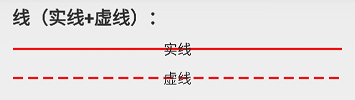
实线:line_solid.xml
<?xml version="1.0" encoding="utf-8"?>

<!-- 实线 -->

<shape xmlns:android="http://schemas.android.com/apk/res/android"

	android:shape="line"

	android:useLevel="true">

<stroke

    android:width="2dp"

    android:color="#ffff0000" />

</shape>
虚线:line_dashed.xml
<?xml version="1.0" encoding="utf-8"?>

<!--虚线

    设置类型会line

    需要关闭硬件加速虚线才能绘制出来,布局文件中使用的时候需要设置android:layerType="software"

    android:width 线宽,布局文件中的View的高度需要比这个值大才可以绘制出来

    android:dashWidth 每段破折线的长度

    android:dashGap="5dp"每段破折线之间的间隔-->

<shape xmlns:android="http://schemas.android.com/apk/res/android"

    android:shape="line"

    android:useLevel="true">

    <stroke

        android:width="2dp"

        android:dashGap="5dp"

        android:dashWidth="10dp"

        android:color="#ffff0000" />

</shape>
矩形(边框+填充)
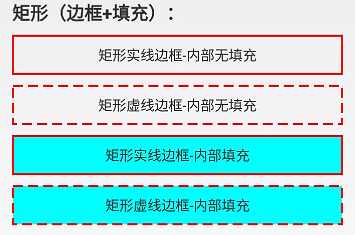
矩形实线边框内部无填充:rect_solid_border.xml
<?xml version="1.0" encoding="utf-8"?>

<!-- 实线边框 -->

<shape xmlns:android="http://schemas.android.com/apk/res/android"

    android:shape="rectangle"

    android:useLevel="true">

    <stroke

        android:width="2dp"

        android:color="#ffff0000" />

</shape>
矩形虚线边框内部无填充:rect_dashed_border.xml
<?xml version="1.0" encoding="utf-8"?>

<!-- 虚线边框 -->

<shape xmlns:android="http://schemas.android.com/apk/res/android"

    android:shape="rectangle"

    android:useLevel="true">

    <stroke

        android:width="2dp"

        android:color="#ffff0000"

        android:dashGap="5dp"

        android:dashWidth="10dp" />

</shape>
矩形实线边框-内部填充:rect_solid_border_and_fill.xml
<?xml version="1.0" encoding="utf-8"?>

<!-- 实线边框+内部填充 -->

<shape xmlns:android="http://schemas.android.com/apk/res/android"

    android:shape="rectangle"

    android:useLevel="true">

    <stroke

        android:width="2dp"

        android:color="#ffff0000" />

    <solid android:color="#ff00ffff" />

</shape>
矩形虚线边框-内部填充:rect_dashed_border_and_fill.xml
<?xml version="1.0" encoding="utf-8"?>

<!-- 虚线边框+内部填充 -->

<shape xmlns:android="http://schemas.android.com/apk/res/android"

    android:shape="rectangle"

    android:useLevel="true">

    <stroke

        android:width="2dp"

        android:color="#ffff0000"

        android:dashGap="5dp"

        android:dashWidth="10dp" />

    <solid android:color="#ff00ffff" />

</shape>
圆角矩形
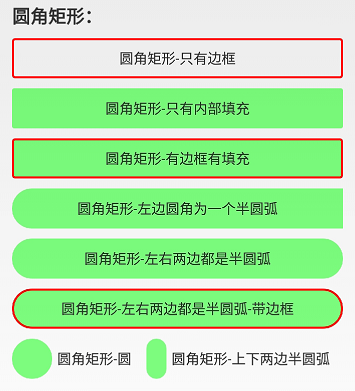
圆角矩形-只有边框:rect_rounded_border.xml
<?xml version="1.0" encoding="utf-8"?>

<!-- 矩形边框圆角 -->

<shape xmlns:android="http://schemas.android.com/apk/res/android"

    android:shape="rectangle"

    android:useLevel="true">

    <size android:height="100dp"

        android:width="100dp"/>

    <stroke

        android:width="2dp"

        android:color="#ffff0000" />

    <corners android:bottomLeftRadius="2dp"

        android:bottomRightRadius="2dp"

        android:topLeftRadius="2dp"

        android:topRightRadius="2dp" />

</shape>
圆角矩形-只有内部填充:rect_rounded_fill.xml
<?xml version="1.0" encoding="utf-8"?>

<!-- 圆角矩形 -->

<shape xmlns:android="http://schemas.android.com/apk/res/android"

    android:shape="rectangle"

    android:useLevel="true">

    <size android:height="100dp"

        android:width="100dp"/>

    <solid android:color="#8000ff00" />

    <corners android:bottomLeftRadius="2dp"

        android:bottomRightRadius="2dp"

        android:topLeftRadius="2dp"

        android:topRightRadius="2dp" />

</shape>
圆角矩形-有边框有填充:rect_rounded_border_and_fill.xml
<?xml version="1.0" encoding="utf-8"?>

<!-- 矩形边框+填充 圆角 -->

<shape xmlns:android="http://schemas.android.com/apk/res/android"

    android:shape="rectangle"

    android:useLevel="true">

    <size android:height="100dp"

        android:width="100dp"/>

    <stroke

        android:width="2dp"

        android:color="#ffff0000" />

    <solid android:color="#8000ff00" />

    <corners android:bottomLeftRadius="2dp"

        android:bottomRightRadius="2dp"

        android:topLeftRadius="2dp"

        android:topRightRadius="2dp" />

</shape>
圆角矩形-左边圆角为一个半圆弧:rect_rounded_left_arc.xml
<?xml version="1.0" encoding="utf-8"?>

<!-- 矩形圆角+左右两边为一个圆弧 -->

<shape xmlns:android="http://schemas.android.com/apk/res/android"

    android:shape="rectangle"

    android:useLevel="true">

    <size

        android:width="50dp"

        android:height="10dp" />

    <solid android:color="#8000ff00" />

    <!-- 圆角半径是高度的一般就是一个圆弧了 -->

    <corners

        android:bottomLeftRadius="20dp"

        android:topLeftRadius="20dp" />

</shape>
圆角矩形-左右两边都是半圆弧:rect_rounded_left_right_arc.xml
<?xml version="1.0" encoding="utf-8"?>

<!-- 矩形圆角+左右两边为一个圆弧 -->

<shape xmlns:android="http://schemas.android.com/apk/res/android"

    android:shape="rectangle"

    android:useLevel="true">

    <size

        android:width="50dp"

        android:height="10dp" />

    <solid android:color="#8000ff00" />

    <!-- 圆角半径是高度的一般就是一个圆弧了 -->

    <corners android:radius="20dp" />

</shape>
圆角矩形-左右两边都是半圆弧-带边框:rect_rounded_left_right_arc_border.xml
<?xml version="1.0" encoding="utf-8"?>

<!-- 矩形圆角+左右两边为一个圆弧 -->

<shape xmlns:android="http://schemas.android.com/apk/res/android"

    android:shape="rectangle"

    android:useLevel="true">

    <size

        android:width="50dp"

        android:height="10dp" />

    <stroke android:color="#ffff0000"

        android:width="2dp"/>

    <solid android:color="#8000ff00" />

    <!-- 圆角半径是高度的一般就是一个圆弧了 -->

    <corners android:radius="20dp" />

</shape>
圆角矩形-圆:rect_rounded_arc.xml
<?xml version="1.0" encoding="utf-8"?>

<!-- 矩形圆角+圆出一个圆弧 -->

<shape xmlns:android="http://schemas.android.com/apk/res/android"

    android:shape="rectangle"

    android:useLevel="true">

    <size android:height="10dp"

        android:width="10dp"/>

    <solid android:color="#8000ff00" />

    <corners android:radius="20dp" />

</shape>
圆角矩形-上下两边半圆弧:rect_rounded_top_bottom_arc.xml
<?xml version="1.0" encoding="utf-8"?>

<!-- 矩形圆角+左右两边为一个圆弧 -->

<shape xmlns:android="http://schemas.android.com/apk/res/android"

    android:shape="rectangle"

    android:useLevel="true">

    <size

        android:width="10dp"

        android:height="60dp" />

    <solid android:color="#8000ff00" />

    <!-- 圆角半径是高度的一般就是一个圆弧了 -->

    <corners android:radius="10dp" />

</shape>
渐变效果(以矩形为例)
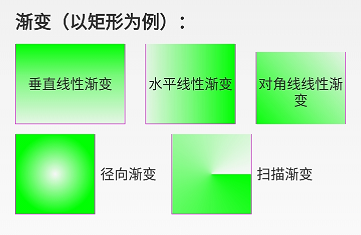
垂直线性渐变:rect_gradient_linear_vertical.xml
<?xml version="1.0" encoding="utf-8"?>

<!-- 矩形内部填充-线性垂直渐变 -->

<shape xmlns:android="http://schemas.android.com/apk/res/android"

    android:shape="rectangle"

    android:useLevel="true">

    <size

        android:width="@dimen/shape_size"

        android:height="@dimen/shape_size" />

    <stroke

        android:width="1px"

        android:color="#ffff00ff" />

    <!-- 调整angle实现水平渐变,垂直渐变或者对角渐变 -->

    <gradient

        android:angle="-45"

        android:centerX="0.5"

        android:centerY="0.4"

        android:centerColor="#8000ff00"

        android:endColor="#1000ff00"

        android:startColor="#ff00ff00"

        android:type="linear" />

</shape>
水平线性渐变:rect_gradient_linear_horizon.xml
<?xml version="1.0" encoding="utf-8"?>

<!-- 矩形内部填充-线性水平渐变 -->

<shape xmlns:android="http://schemas.android.com/apk/res/android"

    android:shape="rectangle"

    android:useLevel="true">

    <size

        android:width="@dimen/shape_size"

        android:height="@dimen/shape_size" />

    <stroke

        android:width="1px"

        android:color="#ffff00ff" />

    <!-- 调整angle实现水平渐变,垂直渐变或者对角渐变 -->

    <gradient

        android:angle="0"

        android:centerX="0.5"

        android:centerY="0.5"

        android:centerColor="#8000ff00"

        android:endColor="#ff00ff00"

        android:startColor="#1000ff00"

        android:type="linear" />

</shape>
对角线线性渐变:rect_gradient_linear_diagonal.xml
<?xml version="1.0" encoding="utf-8"?>

<!-- 矩形内部填充-线性对角线渐变 -->

<shape xmlns:android="http://schemas.android.com/apk/res/android"

    android:shape="rectangle"

    android:useLevel="true">

    <size

        android:width="@dimen/shape_size"

        android:height="@dimen/shape_size" />

    <stroke

        android:width="1px"

        android:color="#ffff00ff" />

    <!-- 调整angle实现水平渐变,垂直渐变或者对角渐变 -->

    <gradient

        android:angle="45"

        android:centerX="0.5"

        android:centerY="0.5"

        android:centerColor="#8000ff00"

        android:endColor="#1000ff00"

        android:startColor="#ff00ff00"

        android:type="linear" />

</shape>
径向渐变:rect_gradient_radial.xml
<?xml version="1.0" encoding="utf-8"?>

<!-- 矩形内部填充-径向渐变,一般不用在rect上,用到圆或者椭圆上 -->

<shape xmlns:android="http://schemas.android.com/apk/res/android"

    android:shape="rectangle"

    android:useLevel="true">

    <size

        android:width="@dimen/shape_size"

        android:height="@dimen/shape_size" />

    <stroke

        android:width="1px"

        android:color="#ffff00ff" />

    <!-- 径向渐变angle无效 -->

    <gradient

        android:angle="0"

        android:centerX="0.5"

        android:centerY="0.5"

        android:startColor="#0000ff00"

        android:endColor="#ff00ff00"

        android:gradientRadius="40dp"

        android:type="radial" />

</shape>
扫描渐变:rect_gradient_sweep.xml
<?xml version="1.0" encoding="utf-8"?>

<!-- 矩形内部填充-扫描渐变 -->

<shape xmlns:android="http://schemas.android.com/apk/res/android"

    android:shape="rectangle"

    android:useLevel="true">

    <!--如果布局中没有设置View的大小,会size设置的大小为默认值-->

    <size

        android:width="20dp"

        android:height="20dp" />

    <stroke

        android:width="1px"

        android:color="#ffff00ff" />

    <!--调整angle不能实现角度变化

        centerX,centerY是中心点的位置,这里用的是百分比值(0-1)

        在rect中gradientRadius无效-->

    <gradient

        android:angle="0"

        android:centerX="0.5"

        android:centerY="0.5"

        android:startColor="#ff00ff00"

        android:gradientRadius="20dp"

        android:type="sweep" />

</shape>
圆(边框+填充+渐变)
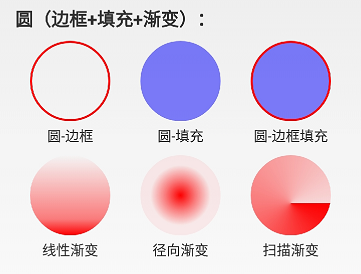
圆-边框:circle_border.xml
<?xml version="1.0" encoding="utf-8"?>

<!-- 圆形边框 -->

<shape xmlns:android="http://schemas.android.com/apk/res/android"

    android:shape="oval"

    android:useLevel="true">

    <size

        android:width="80dp"

        android:height="80dp" />

    <stroke

        android:width="2dp"

        android:color="#ffff0000" />

</shape>
圆-填充:circle_fill.xml
<?xml version="1.0" encoding="utf-8"?>

<!-- 圆形边框 + 填充 -->

<shape xmlns:android="http://schemas.android.com/apk/res/android"

    android:shape="oval"

    android:useLevel="true">

    <size

        android:width="80dp"

        android:height="80dp" />

    <solid android:color="#800000ff" />

</shape>
圆-边框填充:circle_border_and_fill.xml
<?xml version="1.0" encoding="utf-8"?>

<!-- 圆形边框 + 填充 -->

<shape xmlns:android="http://schemas.android.com/apk/res/android"

    android:shape="oval"

    android:useLevel="true">

    <size

        android:width="80dp"

        android:height="80dp" />

    <stroke

        android:width="2dp"

        android:color="#ffff0000" />

    <solid android:color="#800000ff" />

</shape>
线性渐变:circle_gradient_linear.xml
<?xml version="1.0" encoding="utf-8"?>

<!-- 圆形内部填充-线性渐变 -->

<shape xmlns:android="http://schemas.android.com/apk/res/android"

    android:shape="oval"

    android:useLevel="true">

    <size

        android:width="@dimen/shape_size"

        android:height="@dimen/shape_size" />

    <!-- angle调整渐变角度,只能是45的倍数,centerX, centerY是百分百(0-1) -->

    <gradient

        android:angle="-90"

        android:centerX="0.5"

        android:centerY="0.8"

        android:centerColor="#80ff0000"

        android:endColor="#ffff0000"

        android:startColor="#00ff0000"

        android:type="linear" />

</shape>
径向渐变:circle_gradient_radial.xml
<?xml version="1.0" encoding="utf-8"?>

<!-- 圆形内部填充-径向渐变 -->

<shape xmlns:android="http://schemas.android.com/apk/res/android"

    android:shape="oval"

    android:useLevel="true">

    <size

        android:width="40dp"

        android:height="40dp" />

    <!-- centerX, centerY是百分百(0-1) -->

    <gradient

        android:centerX="0.5"

        android:centerY="0.5"

        android:startColor="#ffff0000"

        android:centerColor="#80ff0000"

        android:endColor="#10ff0000"

        android:gradientRadius="30dp"

        android:type="radial" />

</shape>
扫描渐变:circle_gradient_sweep.xml
<?xml version="1.0" encoding="utf-8"?>

<!-- 圆形内部填充-扫描渐变 -->

<shape xmlns:android="http://schemas.android.com/apk/res/android"

    android:shape="oval"

    android:useLevel="true">

    <size

        android:width="@dimen/shape_size"

        android:height="@dimen/shape_size" />

    <!-- sweep类型angle,gradientRadius无效,centerX, centerY是百分百(0-1) -->

    <gradient

        android:centerX="0.5"

        android:centerY="0.6"

        android:startColor="#ffff0000"

        android:centerColor="#80ff0000"

        android:endColor="#20ff0000"

        android:gradientRadius="20dp"

        android:type="sweep" />

</shape>
椭圆(边框+填充+渐变)
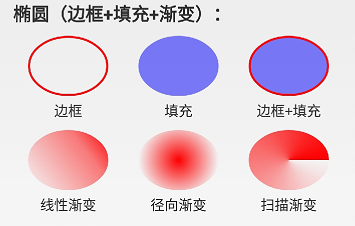
边框:oval_border.xml
<?xml version="1.0" encoding="utf-8"?>

<!-- 椭圆边框 -->

<shape xmlns:android="http://schemas.android.com/apk/res/android"

    android:shape="oval"

    android:useLevel="true">

    <stroke

        android:width="2dp"

        android:color="#ffff0000" />

</shape>
填充:oval_fill.xml
<?xml version="1.0" encoding="utf-8"?>

<!-- 椭圆填充-->

<shape xmlns:android="http://schemas.android.com/apk/res/android"

    android:shape="oval"

    android:useLevel="true">

    <solid android:color="#800000ff" />

</shape>
边框+填充:oval_border_and_fill.xml
<?xml version="1.0" encoding="utf-8"?>

<!-- 椭圆边框 + 填充-->

<shape xmlns:android="http://schemas.android.com/apk/res/android"

    android:shape="oval"

    android:useLevel="true">

    <stroke

        android:width="2dp"

        android:color="#ffff0000" />

    <solid android:color="#800000ff" />

</shape>
线性渐变:oval_gradient_linear.xml
<?xml version="1.0" encoding="utf-8"?>

<!-- 椭圆内部填充-线性渐变 -->

<shape xmlns:android="http://schemas.android.com/apk/res/android"

    android:shape="oval"

    android:useLevel="true" >

    <size

        android:width="80dp"

        android:height="60dp" />

    <gradient

        android:angle="45"

        android:centerX="0.5"

        android:centerY="0.7"

        android:centerColor="#80ff0000"

        android:endColor="#ffff0000"

        android:startColor="#00ff0000"

        android:type="linear" />

</shape>
径向渐变:oval_gradient_radial.xml
<?xml version="1.0" encoding="utf-8"?>

<!-- 椭圆内部填充-径向渐变 -->

<shape xmlns:android="http://schemas.android.com/apk/res/android"

    android:shape="oval"

    android:useLevel="true" >

    <size

        android:width="80dp"

        android:height="60dp" />

    <gradient

        android:centerX="0.5"

        android:centerY="0.5"

        android:centerColor="#80ff0000"

        android:endColor="#00ff0000"

        android:startColor="#ffff0000"

        android:gradientRadius="40dp"

        android:type="radial" />

</shape>
扫描渐变:oval_gradient_sweep.xml
<?xml version="1.0" encoding="utf-8"?>

<!-- 椭圆内部填充-扫描渐变 -->

<shape xmlns:android="http://schemas.android.com/apk/res/android"

    android:shape="oval"

    android:useLevel="true" >

    <size

        android:width="80dp"

        android:height="60dp" />

    <gradient

        android:centerX="0.5"

        android:centerY="0.5"

        android:centerColor="#80ff0000"

        android:endColor="#ffff0000"

        android:startColor="#00ff0000"

        android:type="sweep" />

</shape>
圆环(边框+填充+渐变)
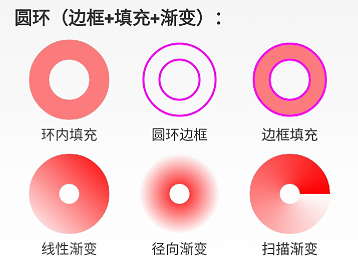
环内填充:ring_fill.xml
<?xml version="1.0" encoding="utf-8"?><!-- 圆环 -->

<shape xmlns:android="http://schemas.android.com/apk/res/android"

    android:innerRadiusRatio="4"

    android:shape="ring"

    android:thicknessRatio="4"

    android:useLevel="false">

    <!--android:useLevel="false"必须是false-->

    <size

        android:width="80dp"

        android:height="80dp" />

    <solid android:color="#80ff0000" />

</shape>
圆环边框:ring_border.xml
<?xml version="1.0" encoding="utf-8"?>

<!-- 圆环-仅有边框 -->

<shape xmlns:android="http://schemas.android.com/apk/res/android"

    android:innerRadius="20dp"

    android:shape="ring"

    android:thickness="16dp"

    android:useLevel="false">

    <!--android:useLevel="false"必须是false-->

    <size

        android:width="80dp"

        android:height="80dp" />

    <stroke

        android:width="2dp"

        android:color="#ffff00ff" />

</shape>
边框+填充:ring_border_and_fill.xml
<?xml version="1.0" encoding="utf-8"?>

<!-- 圆环 -->

<shape xmlns:android="http://schemas.android.com/apk/res/android"

    android:innerRadius="20dp"

    android:shape="ring"

    android:thickness="16dp"

    android:useLevel="false">

    <!--android:useLevel="false"必须是false-->

    <size

        android:width="80dp"

        android:height="80dp" />

    <solid android:color="#80ff0000" />

    <stroke

        android:width="2dp"

        android:color="#ffff00ff" />

</shape>
线性渐变:ring_gradient_linear.xml
<?xml version="1.0" encoding="utf-8"?>

<!-- 圆环-线性渐变 -->

<shape xmlns:android="http://schemas.android.com/apk/res/android"

    android:shape="ring"

    android:innerRadius="10dp"

    android:thickness="30dp"

    android:useLevel="false">

    <!--android:useLevel="false"必须是false-->

    <size

        android:width="80dp"

        android:height="80dp" />

    <gradient

        android:angle="45"

        android:centerColor="#80ff0000"

        android:endColor="#ffff0000"

        android:startColor="#00ff0000"

        android:type="linear" />

</shape>
径向渐变:ring_gradient_radial.xml
<?xml version="1.0" encoding="utf-8"?>

<!-- 圆环-径向渐变渐变 -->

<shape xmlns:android="http://schemas.android.com/apk/res/android"

    android:shape="ring"

    android:innerRadius="10dp"

    android:thickness="30dp"

    android:useLevel="false">

    <!--android:useLevel="false"必须是false-->

    <size

        android:width="80dp"

        android:height="80dp" />

    <!--设置径向渐变半径,渐变从圆心开始-->

    <gradient

        android:centerX="0.5"

        android:centerY="0.5"

        android:centerColor="#80ff0000"

        android:endColor="#00ff0000"

        android:startColor="#ffff0000"

        android:gradientRadius="40dp"

        android:type="radial" />

</shape>
扫描渐变:ring_gradient_sweep.xml
<?xml version="1.0" encoding="utf-8"?>

<!-- 圆环-线性渐变 -->

<shape xmlns:android="http://schemas.android.com/apk/res/android"

    android:shape="ring"

    android:innerRadius="10dp"

    android:thickness="30dp"

    android:useLevel="false">

    <!--android:useLevel="false"必须是false-->

    <size

        android:width="80dp"

        android:height="80dp" />

    <!--扫描渐变shape不能设置角度-->

    <gradient

        android:centerColor="#80ff0000"

        android:endColor="#ffff0000"

        android:startColor="#00ff0000"

        android:type="sweep" />

</shape>
总结
熟练掌握好 shape 标签的使用,能够构建出多种多样的 Drawable,这些 Drawable 可以直接作为背景设置给 View,代码通过 R.drawable 方式使用,xml 文件通过 @drawable/name 使用。跟图片的使用一模一样,关键是使用系统 Drawable 可以减少 apk 的体积,减少内存占用等好处,所以,不要觉得简单就不系统学习,越简单的东西越要熟练掌握。后面还会陆续出一些 Drawable 的文章,比如除了shape标签定义的 Drawable,其他还有哪些 xml 标签能定义 Drawable? Drawable怎么通过代码的方式创建并使用?
Drawable实战解析:Android XML shape 标签使用详解(apk瘦身,减少内存好帮手)的更多相关文章
- Android XML shape 标签使用详解(apk瘦身,减少内存好帮手)
Android XML shape 标签使用详解 一个android开发者肯定懂得使用 xml 定义一个 Drawable,比如定义一个 rect 或者 circle 作为一个 View 的背景. ...
- android中include标签使用详解
android中include标签是为了便于控件的覆用的一个很好解决方案. 但是也有一些需要注意的地方,下面是本人在项目中碰到过的一个问题,做此记录,便于以后查看. include标签用法. ...
- JSP web.xml <jsp-config>标签使用详解
<jsp-config> 包括 <taglib> 和 <jsp-property-group> 两个子元素.其中<taglib> 元素在JSP 1.2 ...
- Android GradientDrawable(shape标签定义) 静态使用和动态使用(圆角,渐变实现)
Android GradientDrawable使用优势: 1. 快速实现一些基本图形(线,矩形,圆,椭圆,圆环) 2. 快速实现一些圆角,渐变,阴影等效果 3. 代替图片设置为View的背景 4. ...
- android shape的使用详解以及常用效果(渐变色、分割线、边框、半透明阴影效果等)
shape使用.渐变色.分割线.边框.半透明.半透明阴影效果. 首先简单了解一下shape中常见的属性.(详细介绍参看 api文档 ) 转载请注明:Rflyee_大飞: http://blog.cs ...
- Android APK 瘦身 - JOOX Music项目实战
导语 JOOX Music是腾讯海外布局的一个音乐产品,2014年发布以来已经成为5个国家和地区排名第一的音乐App.东南亚是JOOX Music的主要发行地区,由于JOOX Music所面对的市场存 ...
- HTML标签----图文详解
国庆节快乐,还在加班的童鞋,良辰必有重谢! 本文主要内容 头标签 排版标签:<p> <br> <hr> <center> ...
- Android高效率编码-第三方SDK详解系列(一)——百度地图,绘制,覆盖物,导航,定位,细腻分解!
Android高效率编码-第三方SDK详解系列(一)--百度地图,绘制,覆盖物,导航,定位,细腻分解! 这是一个系列,但是我也不确定具体会更新多少期,最近很忙,主要还是效率的问题,所以一些有效的东西还 ...
- Android注解支持Support Annotations详解
###注解支持(Support Annotations)Android support library从19.1版本开始引入了一个新的注解库,它包含很多有用的元注解,你能用它们修饰你的代码,帮助你发现 ...
随机推荐
- Android指纹解锁
Android6.0及以上系统支持指纹识别解锁功能:项目中用到,特此抽离出来,备忘. 功能是这样的:在用户将app切换到后台运行(超过一定的时长,比方说30秒),再进入程序中的时候就会弹出指纹识别的界 ...
- RabbitMq应用二
在应用一中,基本的消息队列使用已经完成了,在实际项目中,一定会出现各种各样的需求和问题,rabbitmq内置的很多强大机制和功能会帮助我们解决很多的问题,下面就一个一个的一起学习一下. 消息响应机制 ...
- 复杂的 Hash 函数组合有意义吗?
很久以前看到一篇文章,讲某个大网站储存用户口令时,会经过十分复杂的处理.怎么个复杂记不得了,大概就是先 Hash,结果加上一些特殊字符再 Hash,结果再加上些字符.再倒序.再怎么怎么的.再 Hash ...
- ASP.NET Aries 入门开发教程4:查询区的下拉配置
背景: 今天去深圳溜达了一天,刚回来,看到首页都是微软大法好,看来离.NET的春天就差3个月了~~ 回到正题,这篇的教程讲解下拉配置. 查询区的下拉配置: 1:查询框怎么配置成下拉? 在配置表头:格式 ...
- C#4.0泛型的协变,逆变深入剖析
C#4.0中有一个新特性:协变与逆变.可能很多人在开发过程中不常用到,但是深入的了解他们,肯定是有好处的. 协变和逆变体现在泛型的接口和委托上面,也就是对泛型参数的声明,可以声明为协变,或者逆变.什么 ...
- OpenGL超级宝典笔记----渲染管线
在OpenGL中任何事物都在3D空间中,但是屏幕和窗口是一个2D像素阵列,所以OpenGL的大部分工作都是关于如何把3D坐标转变为适应你屏幕的2D像素.3D坐标转为2D坐标的处理过程是由OpenGL的 ...
- 通过AngularJS实现前端与后台的数据对接(一)——预备工作篇
最近,笔者在做一个项目:使用AngularJS,从而实现前端与后台的数据对接.笔者这是第一次做前端与后台的数据对接的工作,因此遇到了许多问题.笔者在这些问题中,总结了一些如何实现前端与后台的数据对接的 ...
- iOS:以前笔记,未整理版。太多了,先放着吧。。。。。。。
1. -(void)timetick { _d = 0; NSTimer *newtime =[NSTimer scheduledTimerWithTimeInterval:1 target:self ...
- SQLServer 各版本区别
SQLServer 2012 新特性 通过AlwaysOn实现各种高可用级别 通过列存储索引技术实现超快速的查询,其中星型链接查询及相似查询的性能提升幅度可高达100倍,同时支持超快速的全文查询 通过 ...
- 《CPU的工作过程》
本文转载自inter官方网址:https://software.intel.com/zh-cn/articles/book-Processor-Architecture_CPU_work_proces ...