
【Unity】通用的Debugger日志模块
模块代码整理自 http://gad.qq.com/lore/catalog/10007
Debugger类。提供打印日志的静态方法。
using System;

using System.IO;

namespace UnityEngine

{

    /// <summary>

    /// 系统日志模块

    /// </summary>

    public class Debugger

    {

        public static bool EnableLog;           // 是否启用日志,仅可控制普通级别的日志的启用与关闭,LogError和LogWarn都是始终启用的。

        public static bool EnableTime = true;

        public static bool EnableSave = false;  // 是否允许保存日志,即把日志写入到文件中

        public static bool EnableStack = false;

        public static string LogFileDir = Application.persistentDataPath + "/DebuggerLog/";

        public static string LogFileName = "";

        public static string Prefix = "> ";     // 用于与Unity默认的系统日志做区分。本日志系统输出的日志头部都会带上这个标记。

        public static StreamWriter LogFileWriter = null;

        public static bool UseUnityEngine;

        private static string GetLogText(string tag, string message)

        {

            string str = "";

            if (EnableTime)

            {

                str = DateTime.Now.ToString("HH:mm:ss.fff") + " ";

            }

            return (str + tag + "::" + message);

        }

        private static string GetLogTime()

        {

            string str = "";

            if (EnableTime)

            {

                str = DateTime.Now.ToString("HH:mm:ss.fff") + " ";

            }

            return str;

        }

        public static void Log(object message)

        {

            if (!Debugger.EnableLog)

                return;

            string str = GetLogTime() + message;

            Debug.Log(Prefix + str, null);

            LogToFile("[I]" + str, false);

        }

        public static void Log(object message, Object context)

        {

            if (!Debugger.EnableLog)

                return;

            string str = GetLogTime() + message;

            Debug.Log(Prefix + str, context);

            LogToFile("[I]" + str, false);

        }

        public static void Log(string tag, string message)

        {

            if (!Debugger.EnableLog)

                return;

            message = GetLogText(tag, message);

            Debug.Log(Prefix + message, null);

            LogToFile("[I]" + message, false);

        }

        public static void Log(string tag, string format, params object[] args)

        {

            if (!Debugger.EnableLog)

                return;

            string logText = GetLogText(tag, string.Format(format, args));

            Debug.Log(Prefix + logText, null);

            LogToFile("[I]" + logText, false);

        }

        public static void LogError(object message)

        {

            string str = GetLogTime() + message;

            Debug.Log(Prefix + str, null);

            LogToFile("[E]" + str, true);

        }

        public static void LogError(object message, Object context)

        {

            string str = GetLogTime() + message;

            Debug.Log(Prefix + str, context);

            LogToFile("[E]" + str, true);

        }

        public static void LogError(string tag, string message)

        {

            message = GetLogText(tag, message);

            Debug.Log(Prefix + message, null);

            LogToFile("[E]" + message, true);

        }

        public static void LogError(string tag, string format, params object[] args)

        {

            string logText = GetLogText(tag, string.Format(format, args));

            Debug.Log(Prefix + logText, null);

            LogToFile("[E]" + logText, true);

        }

        /// <summary>

        /// 将日志写入到文件中

        /// </summary>

        /// <param name="message"></param>

        /// <param name="EnableStack"></param>

        private static void LogToFile(string message, bool EnableStack = false)

        {

            if (!Debugger.EnableSave)

                return;

            if (LogFileWriter == null)

            {

                LogFileName = DateTime.Now.GetDateTimeFormats('s')[].ToString();

                LogFileName = LogFileName.Replace("-", "_");

                LogFileName = LogFileName.Replace(":", "_");

                LogFileName = LogFileName.Replace(" ", "");

                LogFileName = LogFileName + ".log";

                if (string.IsNullOrEmpty(LogFileDir))

                {

                    try

                    {

                        if (UseUnityEngine)

                        {

                            LogFileDir = Application.persistentDataPath + "/DebuggerLog/";

                        }

                        else

                        {

                            LogFileDir = AppDomain.CurrentDomain.BaseDirectory + "/DebuggerLog/";

                        }

                    }

                    catch (Exception exception)

                    {

                        Debug.Log(Prefix + "获取 Application.persistentDataPath 报错!" + exception.Message, null);

                        return;

                    }

                }

                string path = LogFileDir + LogFileName;

                try

                {

                    if (!Directory.Exists(LogFileDir))

                    {

                        Directory.CreateDirectory(LogFileDir);

                    }

                    LogFileWriter = File.AppendText(path);

                    LogFileWriter.AutoFlush = true;

                }

                catch (Exception exception2)

                {

                    LogFileWriter = null;

                    Debug.Log("LogToCache() " + exception2.Message + exception2.StackTrace, null);

                    return;

                }

            }

            if (LogFileWriter != null)

            {

                try

                {

                    LogFileWriter.WriteLine(message);

                    if ((EnableStack || Debugger.EnableStack) && UseUnityEngine)

                    {

                        LogFileWriter.WriteLine(StackTraceUtility.ExtractStackTrace());

                    }

                }

                catch (Exception)

                {

                }

            }

        }

        public static void LogWarning(object message)

        {

            string str = GetLogTime() + message;

            Debug.Log(Prefix + str, null);

            LogToFile("[W]" + str, false);

        }

        public static void LogWarning(object message, Object context)

        {

            string str = GetLogTime() + message;

            Debug.Log(Prefix + str, context);

            LogToFile("[W]" + str, false);

        }

        public static void LogWarning(string tag, string message)

        {

            message = GetLogText(tag, message);

            Debug.Log(Prefix + message, null);

            LogToFile("[W]" + message, false);

        }

        public static void LogWarning(string tag, string format, params object[] args)

        {

            string logText = GetLogText(tag, string.Format(format, args));

            Debug.Log(Prefix + logText, null);

            LogToFile("[W]" + logText, false);

        }

    }

}
DebuggerExtension类。采用C#的扩展方法特性,使所有System.Object子类获得了打印日志的函数功能。
using System.Diagnostics;

using System.Reflection;

using UnityEngine;

namespace UnityEngine

{

    /// <summary>

    /// 日志模块的扩展类

    /// </summary>

    public static class DebuggerExtension

    {

        /// <summary>

        /// LogTag是调用打印日志的类中自定义的常量字符串,通常情况下LogTag是类名。

        /// 用LogTag可以直观地看出这条日志是哪个类输出的。

        /// </summary>

        /// <param name="obj"></param>

        /// <returns></returns>

        private static string GetLogTag(object obj)

        {

            FieldInfo field = obj.GetType().GetField("LOG_TAG");

            if (field != null)

            {

                return (string)field.GetValue(obj);

            }

            return obj.GetType().Name;

        }

        [Conditional("EnableLog")]

        public static void Log(this object obj, string message)

        {

            if (Debugger.EnableLog)

            {

                Debugger.Log(GetLogTag(obj), message);

            }

        }

        [Conditional("EnableLog")]

        public static void Log(this object obj, string format, params object[] args)

        {

            if (Debugger.EnableLog)

            {

                string message = string.Format(format, args);

                Debugger.Log(GetLogTag(obj), message);

            }

        }

        public static void LogError(this object obj, string message)

        {

            Debugger.LogError(GetLogTag(obj), message);

        }

        public static void LogError(this object obj, string format, params object[] args)

        {

            string message = string.Format(format, args);

            Debugger.LogError(GetLogTag(obj), message);

        }

        public static void LogWarning(this object obj, string message)

        {

            Debugger.LogWarning(GetLogTag(obj), message);

        }

        public static void LogWarning(this object obj, string format, params object[] args)

        {

            string message = string.Format(format, args);

            Debugger.LogWarning(GetLogTag(obj), message);

        }

    }

}
Example测试日志模块。
using UnityEngine;

public class Example_Debugger : MonoBehaviour

{

    void Start()

    {

        Debug.Log("这是Unity默认的日志!");

        Debugger.EnableLog = true;

        Debugger.EnableTime = true;

        Debugger.Log("Debugger.Log");

        Debugger.LogWarning("Debugger.LogWarning");

        Debugger.LogError("Debugger.LogError");

        Debugger.Log("Example_Debugger", "格式化日志: {0}", );

        Debugger.Log("日志保存路径:", Debugger.LogFileDir);

        this.Log("日志扩展类中的方法。该方法需要在Unity编辑器中添加宏命令EnableLog才能被编译!");

    }

}
运行效果:
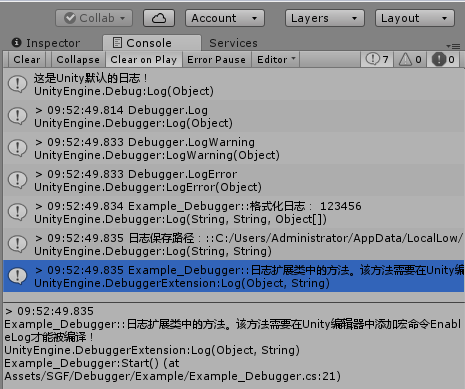
注意,DebuggerExtension类采用了[Conditional]特性条件编译,被[Conditional]标记的函数需要在Unity编辑器中开启命令宏才能被编译,参考这里。
建议将Debugger类和DebuggerExtension类都编译到Debugger.dll中,再放入Unity工程Asset目录下使用。因为如果将Debuger类放到主工程里,在Unity的日志输出窗口Console中点击日志,会跳转到Debuger类中的代码,而我们真正想要跳转到的是调用了Debuger的地方。
【Unity】通用的Debugger日志模块的更多相关文章
- 【腾讯Bugly干货分享】微信mars 的高性能日志模块 xlog
本文来自于腾讯bugly开发者社区,未经作者同意,请勿转载,原文地址:http://dev.qq.com/topic/581c2c46bef1702a2db3ae53 Dev Club 是一个交流移动 ...
- 搭建一套自己实用的.net架构(2)【日志模块-log4net】
先谈谈简单的模块,日志.在系统中日志模块是必须的,什么系统日志,操作日志,调试日志.这里用的是log4net. 对log4net还不熟悉的小伙伴们赶快去搜索基础教程哦, 我这里就不温故了. 那么有人要 ...
- 【腾讯Bugly干货分享】微信终端跨平台组件 mars 系列(一) - 高性能日志模块xlog
本文来自于腾讯bugly开发者社区,非经作者同意,请勿转载,原文地址:http://dev.qq.com/topic/57ff5932cde42f1f03de29b1 本文来源: 微信客户端开发团队 ...
- step by step 之餐饮管理系统五(Util模块)------附上篇日志模块源码
这段时间一直在修改日志模块,现在基本上写好了,也把注释什么的都加上了,昨天邮件发送给mark的园友一直报失败,老是退回来,真是报歉,如下图所示:
- step by step 之餐饮管理系统四(日志模块实现)
三天前基本上把数据库表设计的文档写好,今天想到了一个问题,还要再加几个表,一个是log表,用来记录系统日志,另外再加几个字典表,一些需要配置的数据但又不好放在像xml文件里面的数据可以放在这些字典表里 ...
- 像素迷踪,当Unity的Frame Debugger力不从心时
http://www.manew.com/thread-92382-1-1.html 从版本5开始,Unity包含了一个全新的可视化帧调试工具,Frame Debugger.该工具能帮你解决很多图形方 ...
- nginx日志模块、事件模块
日志模块 1.access_log指令 语法: access_log path [format [buffer=size [flush=time]]]; access_log logs/access. ...
- python基础编程:生成器、迭代器、time模块、序列化模块、反序列化模块、日志模块
目录: 生成器 迭代器 模块 time 序列化 反序列化 日志 一.生成器 列表生成式: a = [1,2,3,3,4,5,6,7,8,9,10] a = [i+1 for i in a ] prin ...
- Python 日志模块 logging通过配置文件方式使用
vim logger_config.ini[loggers]keys=root,infoLogger,errorlogger [logger_root]level=DEBUGhandlers=info ...
随机推荐
- jquery中,使用append增加新元素时,新增元素的绑定监听事件失效的解决办法
$("outerSelector").on("eventType","innerSelector",function(){}); 举例:如果 ...
- [Python] dict对象的keys()和values()返回的值,是否总是保证一一对应?
搜dict的key, value顺序, 中文没搜到想要的结果. 英文答案链接:python-dictionary-are-keys-and-values-always-the-same-order 在 ...
- 【三边定位】 演示程序V0.1
忙于工作,这个小东西一直没有空去弄, 最近简单修改了些算法, 精度还有待提高. 贴一张图片 坐上角的坐标是鼠标点(31,17),后面location 是三边定位算出来的(31,19),后面跟的erro ...
- 考前停课集训 Day4 雷
Day 4 今天Rating掉了两百多 为什么呢 因为是真实力打的 倒数第三 没什么好说的了 这才是我的真实水平 强的人一如既往强 作弊的人一落千丈. 只有我.是的,只有我. 被老师嘲讽了,哎,您真的 ...
- async与await线程分配研究
using System; using System.Collections.Generic; using System.Linq; using System.Text; using System.T ...
- Java 构造器 遇到多个构造器时要考虑用构建器
静态工厂和构造器有个共同的局限性:它们都不能很好地扩展到大量的可选参数. 当一个类中有若干个必选属性和多个可选属性时,采用重叠构造器模式.JavaBeans模式或者Builder模式,但各有优劣. 当 ...
- 和textrank4ZH代码一模一样的算法详细解读
前不久做了有关自动文摘的学习,采用方法是TextRank算法,整理和大家分享. 一. 关于自动文摘 利用计算机将大量的文本进行处理,产生简洁.精炼内容的过程就是文本摘要,人们可通过阅读摘要来把握文本主 ...
- “百度杯”CTF比赛 九月场---123
右键查看源代码 然后构造user.php,显示空白,源码也是空白,既然上边说用户名,密码了,参考大佬的博客,放文件user.php.bak这是备份文件,一打开上边全是用户名,有戏,爆破 添加字典,也就 ...
- 关于UITableView的一些老是忘记的小杂碎
1:如何取消单元格的选中状态 简简单单的一句 [TableView deselectRowAtIndexPath:[TableView indexPathForSelectedRow] animate ...
- C_求两个日期相隔的天数(闰年)
#include <stdio.h> #include <math.h> int leap_year(int year){ == || (year%== && ...