
ABP框架系列之二十八:(Handling-Exceptions-异常处理)
Introduction
This document is for ASP.NET MVC and Web API. If you're interested in ASP.NET Core, see ASP.NET Core documentation.
In a web application, exceptions are usually handled in MVC Controller actions and Web API Controller actions. When an exception occurs, application user somehow informed about the error and optionally reason of the error.
在Web应用程序中,异常通常是在MVC控制器操作和Web API控制器操作中处理的。当异常发生时,应用程序用户被告知错误和错误的可选原因。
If an error occured in a regular HTTP request, an error page is shown. If an error occured in an AJAX request, server sends error information to the client and then client handles and shows the error to the user.
如果在常规HTTP请求中出现错误,则显示错误页面。如果Ajax请求中出现错误,服务器向客户端发送错误信息,然后客户端处理并向用户显示错误。
Handling exceptions in all web request is a tedious and repeating work. ASP.NET Boilerplate automates this. You almost never need to explicitly handle any exception. ASP.NET Boilerplate handles all exceptions, logs them and returns appropriate and formatted response to the client. Also, handles these response in the client and show error messages to the user.
处理所有Web请求中的异常是一项单调乏味的重复工作。ASP.NET样板自动化这个。您几乎从不需要显式地处理任何异常。ASP.NET样板处理所有的异常,日志,返回适当格式的响应到客户端。此外,在客户机中处理这些响应并向用户显示错误消息。
Enabling Error Handling
To enable error handling for ASP.NET MVC Controllers, customErrors mode must be enabled for ASP.NET MVC applications.
<customErrors mode="On" />
It also can be 'RemoteOnly' if you do not want to handler errors in local computer. Note that this is only required for ASP.NET MVC Controllers, not needed for Web API Controllers.
If you have already handling exceptions in a global filter then it may hide exceptions and ABP's exception handling may not work as you expected. So, if you do that, do it carefully.
它也可以“remoteonly”如果你不想在本地计算机处理程序错误。请注意,这仅仅是ASP.NET所需的MVC控制器,Web API控制器不需要。
如果您已经在全局筛选器中处理异常,则它可能隐藏异常,而ABP的异常处理可能不象您预期的那样工作。所以,如果你这样做,要小心。
Non-Ajax Requests
If request is not AJAX, an error page is shown.
Showing Exceptions
Here, there is an MVC controller action which throws an arbitrary exception:
这里有一个MVC控制器动作,它抛出一个任意异常:
public ActionResult Index()

{

    throw new Exception("A sample exception message...");

}
Surely, this exception could be thrown by another method that is called from this action. ASP.NET Boilerplate handles this exception, logs it and shows 'Error.cshtml' view. You can customize this view to show the error. An example Error view (default Error view in ASP.NET Boilerplate templates):
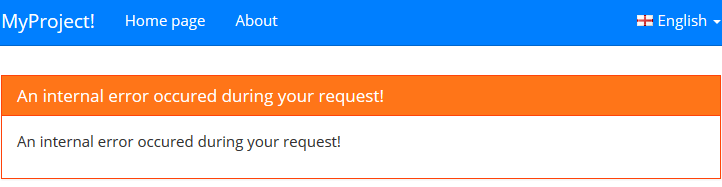

ASP.NET Boilerplate hides details of the exception from users and shows a standard (and localizable) error message, unless you explicitly throw a UserFriendlyException.
UserFriendlyException
UserFriendlyException is a special type of exception that is directly shown to the user. See the sample below:
public ActionResult Index()

{

    throw new UserFriendlyException("Ooppps! There is a problem!", "You are trying to see a product that is deleted...");

}
ASP.NET Boilerplate logs it but does not hide exception in this time:
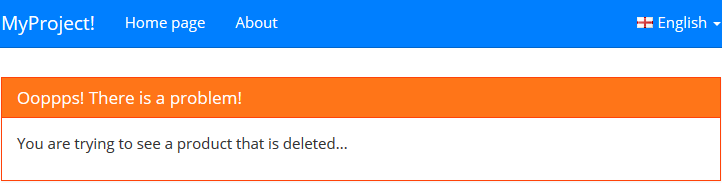

So, if you want to show a special error message to users, just throw a UserFriendlyException (or an exception derived from it).
Error Model
ASP.NET Boilerplate passes an ErrorViewModel object as model to the Error view:
public class ErrorViewModel

{

    public AbpErrorInfo ErrorInfo { get; set; }

    public Exception Exception { get; set; }

}
ErrorInfo contains detailed informations about the error that can be shown to the user. Exception object is the thrown exception. You can check it and show additional informations if you want. For example, we can show validation errors if it's an AbpValidationException:


AJAX Requests
If return type of MVC action is JsonResult (or Task<JsonResult for async actions), ASP.NET Boilerplate returns a JSON object to the client on exceptions. Sample return object for an error:
{

  "targetUrl": null,

  "result": null,

  "success": false,

  "error": {

    "message": "An internal error occured during your request!",

    "details": "..."

  },

  "unAuthorizedRequest": false

}
success: false indicates that there is an error. error object provides error message and details.
When you use ASP.NET Boilerplate's infrastructure to make AJAX request in client side, it automatically handles this JSON object and shows error message to the user using message API. See AJAX API for more information.
Exception Event
When ASP.NET Boilerplare handles any exception, it triggers AbpHandledExceptionData event that can be registered to be informed (See eventbus documentation for more information about Event Bus). Example:
public class MyExceptionHandler : IEventHandler<AbpHandledExceptionData>, ITransientDependency

{

    public void HandleEvent(AbpHandledExceptionData eventData)

    {

        //TODO: Check eventData.Exception!

    }

}
If you put this example class into your application (generally into your Web project), HandleEvent method will be called for all exceptions handled by ASP.NET Boilerplate. So, you can investigate the Exception object in detail.
ABP框架系列之二十八:(Handling-Exceptions-异常处理)的更多相关文章
- ABP框架系列之二十:(Dependency-Injection-依赖注入)
What is Dependency Injection If you already know Dependency Injection concept, Constructor and Prope ...
- ABP框架系列之二十六:(EventBus-Domain-Events-领域事件)
In C#, a class can define own events and other classes can register it to be notified when something ...
- ABP框架系列之二十二:(Dynamic-Web-API-动态WebApi)
Building Dynamic Web API Controllers This document is for ASP.NET Web API. If you're interested in A ...
- ABP框架系列之二十四:(Email-Sending-EF-电子邮件发送)
Introduction Email sending is a pretty common task for almost every application. ASP.NET Boilerplate ...
- ABP框架系列之二十五:(Embedded-Resource-Files-嵌入式资源文件)
Introduction ASP.NET Boilerplate provides an easy way of using embedded Razor views (.cshtml files) ...
- ABP框架系列之二十九:(Hangfire-Integration-延迟集成)
Introduction Hangfire is a compherensive background job manager. You can integrate ASP.NET Boilerpla ...
- ABP源码分析二十八:ABP.MemoryDB
这个模块简单,且无实际作用.一般实际项目中都有用数据库做持久化,用了数据库就无法用这个MemoryDB 模块了.原因在于ABP限制了UnitOfWork的类型只能有一个(前文以作介绍),一般用了数据库 ...
- ABP框架系列之二十七:(Feature-Management-特征管理)
Introduction Most SaaS (multi-tenant) applications have editions (packages) those have different fea ...
- ABP框架系列之二:(Entity Framework Core-实体核心框架)
Introduction(介绍) Abp.EntityFrameworkCore nuget package is used to integrate to Entity Framework (EF) ...
随机推荐
- [UE4]Text Box
Text Box:文本输入控件. 一.新建一个名为testTextBox的UserWidget,添加一个名为“EditableTextBox_0”的TextBox到默认容器Canvas Panel 二 ...
- 常用HDFS操作命令
前一段时间频繁使用HDFS,又收集到了一些命令,在这儿分享出来,大数据的框架及设计原理方面的理论文章暂时还没有时间总结,后面有时间逐渐整理发出来. 注:在使用命令时,可以使用 hadoop fs,如果 ...
- SYSAUX表空间清理
最近zabbix告警某业务sysaux表空间使用率超过95%,使用sql查看sysaux表空间设置了32G,32G的表空间竟然使用了95%.一般来讲除开业务数据存放的表空间,DBA要着重关注SYSTE ...
- 简谈OSI七层模型(网络层)
七层模型,亦称OSI(Open System Interconnection)参考模型,是参考模型是国际标准化组织(ISO)制定的一个用于计算机或通信系统间互联的标准体系. 它是一个七层的.抽象的模型 ...
- JS高级-异步
单线程 只有一个线程,同一时间只能做一件事 原因:避免DOM渲染的冲突 浏览器需要渲染DOM JS可以修改DOM结果 JS执行的时候,浏览器DOM渲染会暂停 两段JS也不能同时执行(修改DOM就冲突) ...
- pycharm 调试django项目时,debug断点没反应???
入门python.django框架时,使用pycharm断点调试时,发现打的断点没反应,不起作用!上网上稍微一查,90%的都差不多,需要新建一个python程序,重新配置一遍,的确可以成功! 操作链接 ...
- WPF dev 获取gridControl筛选后的数据
GridControl.DataController.GetAllFilteredAndSortedRows();
- Android SDK + Appium 环境搭建
一.JDK 安装 说明:JDK是包含了JAVA的运行环境(JVM+Java系统类库)和JAVA工具,所以必须最先安装. 链接: https://pan.baidu.com/s/1NfNK_K7vukF ...
- mybatis xml中返回map 参看aiwanpai
<!-- 指定日期活动被创建次数查询结果数据集--> <resultMap id="countPlayTimesMap" type="HashMap&q ...
- Permanent Space 和 Heap Space
JVM堆内存 JVM堆内存分为2块:Permanent Space 和 Heap Space. Permanent 即 持久代(Permanent Generation),主要存放的是Java类定 ...