
ABP框架系列之二十五:(Embedded-Resource-Files-嵌入式资源文件)
Introduction
ASP.NET Boilerplate provides an easy way of using embedded Razor views (.cshtml files) and other resources (css, js, img... files) in your web application. You can use this feature to create plugins/modules that contains UI functionality.
Create Embedded Files
First, we should create a file and mark it as embedded resource. Any assembly can contain embedded resource files. The progress changes based on your project format.
xproj/project.json Format
Assume that we have a project, named EmbeddedPlugIn, as shown below:
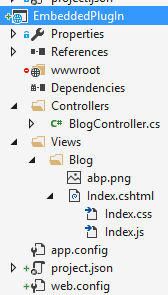

To make all files embedded resource under Views folder, we can add such a configuration to project.json:
  "buildOptions": {

    "embed": {

      "include": [

        "Views/**/*.*"

      ]

    }

  }
csproj Format
Assume that we have a project, named EmbeddedPlugIn, as shown below:
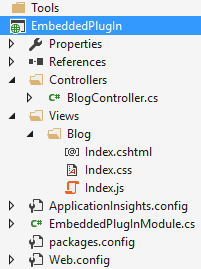

I select Index.cshtml file, go to properties window (F4 as shortcut) and change it's Build Action to Embedded Resource.
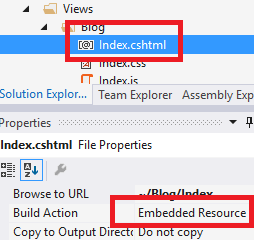

You should change build action to embedded resource for all files you want to use in a web application.
Add To Embedded Resource Manager
Once we embed our files into the assembly, we can use startup configuration to add them to embedded resource manager. You can add such a line to PreInitialize method of your module:
Configuration.EmbeddedResources.Sources.Add(

    new EmbeddedResourceSet(

        "/Views/",

        Assembly.GetExecutingAssembly(),

        "EmbeddedPlugIn.Views"

    )

);
Let's explain parameters:
- First parameter defines root folder for files (like http://yourdomain.com/Views/ here). It matches to root namespace.
- Second parameter defines the Assembly contains files. This code should be located in the assembly containing embedded files. Otherwise, you should change this parameter accordingly.
- And the last one defines root namespace of files in the assembly. This is the default namespace (generally, the assembly name) plus 'folders in the assembly' joined by a dot.
第一个参数定义了根文件夹文件(如http://yourdomain.com/views/这里)。它与根命名空间相匹配。
第二个参数定义程序集包含文件。此代码应该位于包含嵌入式文件的程序集中。否则,您应该相应地更改此参数。
最后一个定义了程序集中文件的根命名空间。这是默认的命名空间(通常是程序集名称)加上“在程序集中的文件夹”由一个点连接。
Consume Embedded Views(嵌入式视图)
For .cshtml files, it's straightforward to return them from a Controller Action. BlogController in the EmbeddedPlugIn assembly is shown below:
using Abp.AspNetCore.Mvc.Controllers;

using Microsoft.AspNetCore.Mvc;

namespace EmbeddedPlugIn.Controllers

{

    public class BlogController : AbpController

    {

        public ActionResult Index()

        {

            return View();

        }

    }

}
As you see, it's same as regular controllers and works as expected.
Consume Embedded Resources
To consume embedded resources (js, css, img...), we can just use them in our views as we normally do:
@section Styles {

    <link href="~/Views/Blog/Index.css" rel="stylesheet" />

}

@section Scripts

{

    <script src="~/Views/Blog/Index.js"></script>

}

<h2 id="BlogTitle">Blog plugin!</h2>
I assumes that the main application has Styles and Scripts sections. We can also use othe files (like images) as normally we do.
ASP.NET Core Configuration
ASP.NET MVC 5.x projects will automatically integrate to embedded resource manager throught Owin (if your startup file contains app.UseAbp() as expected). For ASP.NET Core projects, we should manually addapp.UseEmbeddedFiles() to the Startup class, just after app.UseStaticFiles(), as shown below:
app.UseStaticFiles();

app.UseEmbeddedFiles(); //Allows to expose embedded files to the web!
Ignored Files
Normally, all files in the embedded resource manager can be directly consumed by clients as if they were static files. You can ignore some file extensions for security and other purposes. .cshtml and .config files are ignored by default (for direct requests from clients). You can add more extensions in PreInitialize of your module as shown below:
Configuration.Modules.AbpWebCommon().EmbeddedResources.IgnoredFileExtensions.Add("exe");
Override Embedded Files
One important feature of embedded resource files is that they can be overrided by higher modules. That means you can create a file with same name in the same folder in your web application to override an embedded file (your file in the web application does not require to be embedded resource, because static files have priority over embedded files). Thus, you can override css, js or view files of your modules/plugins in the application. Also, if module A depends on module B and module A defines an embedded resource with the same path, it can override an embedded resource file of module B.
嵌入式资源文件的一个重要特征是,它们可以超越上级模块。这意味着您可以在Web应用程序的同一文件夹中创建具有相同名称的文件,以覆盖嵌入式文件(Web应用程序中的文件不需要嵌入资源,因为静态文件具有优先于嵌入式文件的权限)。因此,您可以覆盖应用程序中的模块/插件的CSS、js或查看文件。另外,如果A模块依赖于模块B,模块A定义了具有相同路径的嵌入式资源,它可以覆盖模块B的嵌入式资源文件。
Notice that: For ASP.NET Core projects, you should put overriding files to the wwwroot folder as the root path.
ABP框架系列之二十五:(Embedded-Resource-Files-嵌入式资源文件)的更多相关文章
- ABP框架系列之二十:(Dependency-Injection-依赖注入)
What is Dependency Injection If you already know Dependency Injection concept, Constructor and Prope ...
- ABP框架系列之二十四:(Email-Sending-EF-电子邮件发送)
Introduction Email sending is a pretty common task for almost every application. ASP.NET Boilerplate ...
- ABP框架系列之二十六:(EventBus-Domain-Events-领域事件)
In C#, a class can define own events and other classes can register it to be notified when something ...
- ABP框架系列之二十二:(Dynamic-Web-API-动态WebApi)
Building Dynamic Web API Controllers This document is for ASP.NET Web API. If you're interested in A ...
- ABP框架系列之二十八:(Handling-Exceptions-异常处理)
Introduction This document is for ASP.NET MVC and Web API. If you're interested in ASP.NET Core, see ...
- ABP框架系列之二十九:(Hangfire-Integration-延迟集成)
Introduction Hangfire is a compherensive background job manager. You can integrate ASP.NET Boilerpla ...
- ABP源码分析二十五:EventBus
IEventData/EventData: 封装了EventData信息,触发event的源对象和时间 IEventBus/EventBus: 定义和实现了了一系列注册,注销和触发事件处理函数的方法. ...
- (转) Spring框架笔记(二十五)——NamedParameterJdbcTemplate与具名参数(转)
在经典的 JDBC 用法中, SQL 参数是用占位符 ? 表示,并且受到位置的限制. 定位参数的问题在于, 一旦参数的顺序发生变化, 就必须改变参数绑定. 在 Spring JDBC 框架中, 绑定 ...
- 【Android Studio安装部署系列】二十五、Android studio使用NDK生成so文件和arr文件
版权声明:本文为HaiyuKing原创文章,转载请注明出处! 概述 Android Studio使用ndk的简单步骤. NDK环境搭建 下载NDK 下载链接:https://developer.and ...
随机推荐
- LeetCode【83. 删除排序链表中的重复元素】
我最开始的程序是 但是结果
- Activiti图表bpmn对应的xml文件
当我们绘制了一个bpmn图表,实质是创建了一个xml文件, 右键bpmn文件open with xml edit <?xml version="1.0" encodin ...
- Chapter3 复杂度分析(上):如何分析,统计算法的执行效率和资源消耗
数据结构解决的问题:“快” + “省”,即为时间,空间复杂度分析 1:为什么需要复杂度分析? 因为通过统计手段分析的结果受到两个因素的影响,一:测试结果非常依赖测试环境,二:测试结果受数据规模的影响很 ...
- (Python基础)2 or 3?
对于大部分初学者来说,该选择Python2.x还是Python3.x?我想这个问题都是普遍初学者的疑问.我的回答当然是学Python3.x的啦.因为下面有段官方原话是这样子说的 ,大概意思呢就是Pyt ...
- 给tableView设置背景图片
经常遇到要给tableView设置背景图片的问题,但如果直接设置背景 backgroundView的话,背景图不会显示,原因是 tableView上的cell默认是不透明的颜色,所以解决方法是 让 ...
- 26.python常用端口号
MySQL默认端口 3306 Redis默认端口 6379 MongoDB默认端口 27017 django端口 8000 flask端口 5000 pyspider服务端口 5000(由flask开 ...
- py目录
Python开发[第二篇]:初识Python Python开发[第三篇]:Python基本数据类型 Python开发[第四篇]:Python基础之函数 &&[4.1]算法递归 冒泡 ...
- Linq(高级查询)
一.条件查 public List<Users> ss(string ids) { List<Users> ulist=new List<Users>(); 声明使 ...
- leetcode979
搞不定这种递归计算,可能我的头脑是“线性”的,这种一层一层的,想起来太费劲了,想的头发都没了.以后希望能有AI来写这种程序吧,AI不怕掉头发! class Solution(object): def ...
- python 爬虫启航2.0
文章解析: 1.正则表达式解析 2.beautifulsoup,BeautifulSoup是一个复杂的树形结构,她的每一个节点都是一个python对象,获取网页的内容就是一个提取对象内容的过程,它的提 ...