
HTML 1.1页面js修改文字颜色
昨天的报告页面,想要实现根据不同文字内容改变字体颜色,效果图:
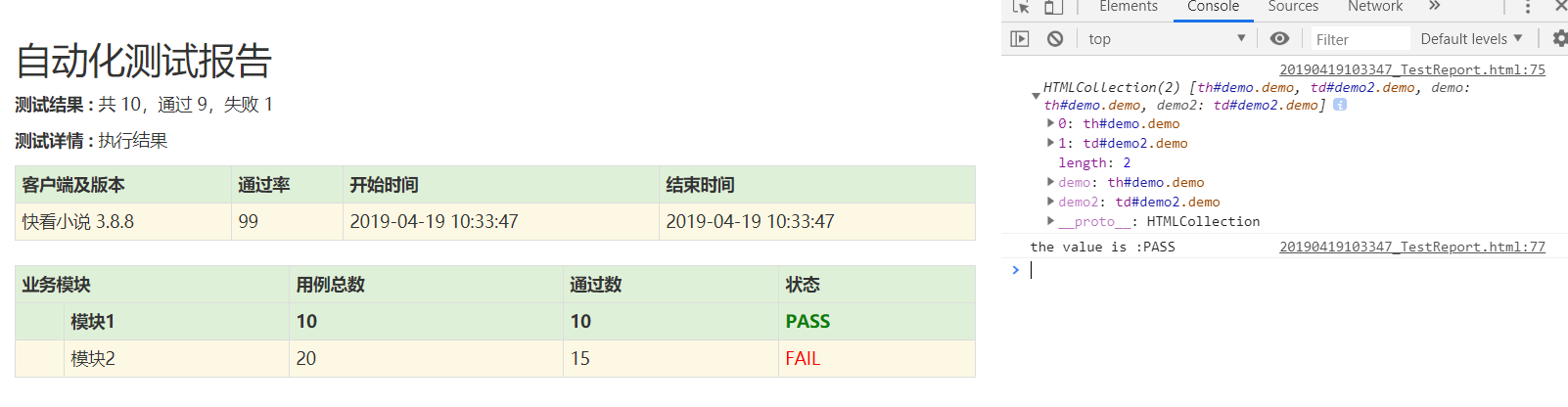
调试了半天出不来效果,最后请教了前端,上代码:
         <!DOCTYPE html>

         <html lang="en">

         <head>

             <meta charset="UTF-8">

             <title>自动化测试报告</title>

             <link href="http://libs.baidu.com/bootstrap/3.0.3/css/bootstrap.min.css" rel="stylesheet">

             <h2 style="font-family: Microsoft YaHei">自动化测试报告</h2>

             <p class='attribute'><strong>测试结果 : </strong> 共 10,通过 9,失败 1</p>

             <style type="text/css" media="screen">

             body  { font-family: Microsoft YaHei,Tahoma,arial,helvetica,sans-serif;padding: 20px;}

         </style>

         </head>

         <body>

             <table id='result_table' class="table table-condensed table-bordered table-hover">

                 <colgroup>

                     <col align='left' />

                     <col align='right' />

                     <col align='right' />

                     <col align='right' />

                 </colgroup>

                 <tr id='header_row' class="text-center success" style="font-weight: bold;font-size: 14px;">

                     <th>客户端及版本</th>

                     <th>通过率</th>

                     <th>开始时间</th>

                     <th>结束时间</th>

                 </tr>

         <tr class='failClass warning'>

             <td>快看小说 3.8.8</td>

             <td>99</td>

             <td>2019-04-19 10:33:47</td>

             <td>2019-04-19 10:33:47</td>

         </tr>

             <!-- 执行模块 -->

             <p class='attribute'><strong>测试详情 : </strong> 执行结果</p>

             <table id='result_table' class="table table-condensed table-bordered table-hover">

                 <colgroup>

                    <col align='left' />

                    <col align='right' />

                    <col align='right' />

                    <col align='right' />

                    <col align='right' />

                 </colgroup>

                 <tr id='header_row' class="text-center success" style="font-weight: bold;font-size: 14px;">

                     <th colspan="2">业务模块</th>

                     <th>用例总数</th>

                     <th>通过数</th>

                     <th>状态</th>

                 </tr>

         <tr id='header_row' class="text-center success" style="font-weight: bold;font-size: 14px;">

             <th></th>

             <th>模块1</th>

             <th>10</th>

             <th>10</th>

             <th class='demo' id="demo" >PASS</th>

         </tr>

         <tr class='failClass warning'>

             <td></td>

             <td>模块2</td>

             <td>20</td>

             <td>15</td>

             <td class='demo'  id="demo2">FAIL</td>

         </tr>

             </table>

             <script type="text/javascript">

                 //change color

                 //取都用demo的多组

                 var eles = document.getElementsByClassName('demo');

                 console.log(eles);

                 var x=document.getElementById("demo").innerText;

                 console.log("the value is :"+x);

                 //每组都应用样式

                 for(var i = 0; i < eles.length; i++){

                     if(eles[i].innerText == 'PASS'){

                         eles[i].style.color = 'green';

                     }else{

                         eles[i].style.color = 'red';

                     }

                 }

             </script>

         </body>

         </html>
感悟:我不太会用开发IDE,但是这次前端ll同学,用IDE几下就敲了很多代码,看来我也要赶快使用工具了。
页面样式修改:
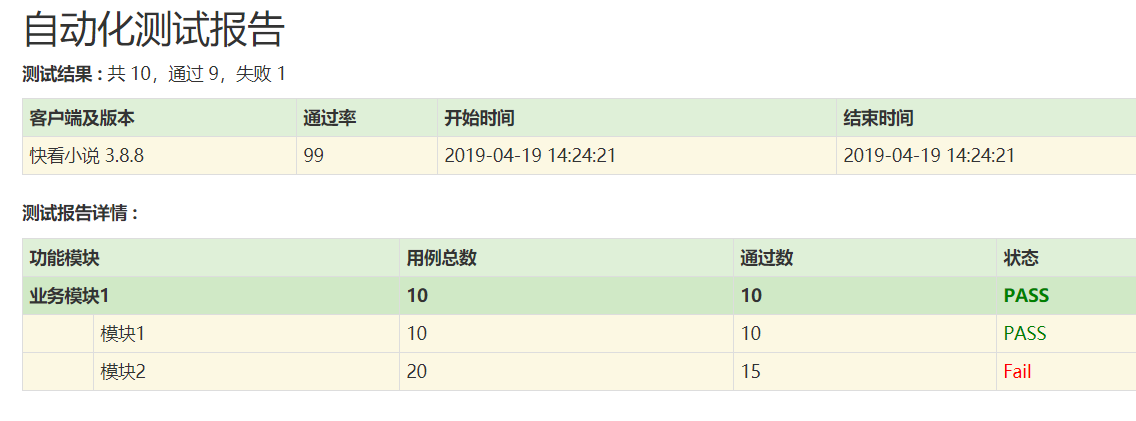
代码:
         <!DOCTYPE html>

         <html lang="en">

         <head>

             <meta charset="UTF-8">

             <title>自动化测试报告</title>

             <link href="http://libs.baidu.com/bootstrap/3.0.3/css/bootstrap.min.css" rel="stylesheet">

             <h2 style="font-family: Microsoft YaHei">自动化测试报告</h2>

             <p class='attribute'><strong>测试结果 : </strong> 共 10,通过 9,失败 1</p>

             <style type="text/css" media="screen">

         body  { font-family: Microsoft YaHei,Tahoma,arial,helvetica,sans-serif;padding: 20px;}

         </style>

         </head>

         <body>

             <table id='result_table' class="table table-condensed table-bordered table-hover">

                 <colgroup>

                     <col align='left' />

                     <col align='right' />

                     <col align='right' />

                     <col align='right' />

                 </colgroup>

                 <tr id='header_row' class="text-center success" style="font-weight: bold;font-size: 14px;">

                     <th>客户端及版本</th>

                     <th>通过率</th>

                     <th>开始时间</th>

                     <th>结束时间</th>

                 </tr>

         <tr class='failClass warning'>

             <td>快看小说 3.8.8</td>

             <td>99</td>

             <td>2019-04-19 13:53:35</td>

             <td>2019-04-19 13:53:35</td>

         </tr>

             </table>

             <!-- 执行模块 -->

             <p class='attribute'><strong>测试报告详情 : </strong> </p>

             <table id='result_table' class="table table-condensed table-bordered table-hover">

                 <colgroup>

                    <col align='left' />

                    <col align='right' />

                    <col align='right' />

                    <col align='right' />

                    <col align='right' />

                 </colgroup>

                 <tr id='header_row' class="text-center success" style="font-weight: bold;font-size: 14px;">

                     <th colspan="2">功能模块</th>

                     <th>用例总数</th>

                     <th>通过数</th>

                     <th>状态</th>

                 </tr>

                 <tr id='header_row' class="text-center success" style="font-weight: bold;font-size: 14px;">

                     <th colspan="2">业务模块1</th>

                     <th>30</th>

                     <th>15</th>

                     <th class='demo' id="demo">FAIL</th>

                 </tr>

                 <tr class='failClass warning'>

                     <th></th>

                     <th>模块1</th>

                     <th>10</th>

                     <th>10</th>

                     <th class='demo' id="demo1">PASS</th>

                 </tr>

                 <tr class='failClass warning'>

                     <td></td>

                     <td>模块2</td>

                     <td>20</td>

                     <td>15</td>

                     <td class='demo'  id="demo2">Fail</td>

                 </tr>

             </table>

             <script type="text/javascript">

                 //change color

                 //取都用demo的多组

                 var eles = document.getElementsByClassName('demo');

                 console.log(eles);

                 //var x=document.getElementById("demo").innerText;

                 //console.log("the value is :"+x);

                 //每组都应用样式

                 for(var i = 0; i < eles.length; i++){

                     if(eles[i].innerText == 'PASS'){

                         eles[i].style.color = 'green';

                     }else{

                         eles[i].style.color = 'red';

                     }

                 }

             </script>

         </body>

         </html>
HTML 1.1页面js修改文字颜色的更多相关文章
- NumberPicker设置宽度,设置文字颜色
修改宽度 wheel = (NumberPicker) findViewById(R.id.info_wheel_province); wheel.setLayoutParams(new Linear ...
- Aspose.Word 操作word复杂表格 拆分单元格 复制行 插入行 文字颜色
private void button3_Click(object sender, EventArgs e) { object savePathWord =&q ...
- input placeholder 文字颜色修改
placeholder 文字颜色修改 input::-webkit-input-placeholder{ color:red; } input::-moz-placeholder{ /* Mozill ...
- 尝试在你浏览器的Console(F12)中运行一下,你会发现页面被不同的颜色块高亮了(css调试中学到的js)
现在到处都是JavaScript,每天都能知道点新东西.一旦你入了门,你总能从这里或是那里领悟到很多知识. 一旦我发现一些有意思的东西,我喜欢去感觉他们的源代码,看一看它是怎么办到的. 今天我想分享A ...
- js修改url参数,无刷新更换页面url
一.js修改地址栏URL参数 function changeURLPar(destiny, par, par_value) { var pattern = par + '=([^&]*)'; ...
- Swift - 修改导航栏的样式(文字颜色,背景颜色,背景图片)
默认情况,导航栏UINavigationController的样式如下,如果想要使用代码修改样式也是比较简单的. 1,修改导航栏背景色 1 2 3 //修改导航栏背景色 self.navigation ...
- 修改static控件背景颜色和文字颜色
当 static 控件或具有 ES_READONLY 风格的 edit 控件被绘制时,会向父窗口发送 WM_CTLCOLORSTATIC 消息.如果我们在窗口过程中处理该消息,就必须返回一个画刷句柄, ...
- js文字颜色闪烁
<!DOCTYPE html PUBLIC "-//W3C//DTD XHTML 1.0 Transitional//EN" "http://www.w3.org/ ...
- 动态修改ViewPagerIndicator CustomTabPageIndicator Tab标签文字颜色
ViewPagerIndicator 的CustomTabPageIndicator 默认是没有Tab选中修改TextView颜色特效的. 可以通过以下方式实现: 新建viewpager_title_ ...
随机推荐
- ArcGIS Engine 创建索引(属性索引)——提高查询效率
转自原文 ArcGIS Engine 创建索引(属性索引)——提高查询效率 众所周知,建立索引可以提高查询的效率,当对FeatureClass中的某一列频繁的查找,且数据量比较大时,建立索引是非常有必 ...
- OpenCV使用GPU
在使用OpenCV2.4.x的时候,以为不用重新编译可以直接使用GPU模块,不过在我使用的时候,发现使用getCudaEnabledDeviceCount()的时候,总是获得是0,于是重新编译Open ...
- PHP array_intersect_ukey()
定义和用法 array_intersect_ukey() 函数用回调函数比较键名来计算数组的交集. array_intersect_ukey() 返回一个数组,该数组包含了所有出现在 array1 中 ...
- 设计模式实例(Lua)笔记之五(Bridge模式)
1.描写叙述 今天我要说说我自己,梦想中的我自己,我身价过亿,有两个大公司,一个是房地产公司,一个是服装制造业,这两个公司都非常赚钱,天天帮我在累加財富,事实上是什么公司我倒是不关心,我关心的是是不是 ...
- 查询结果多个合并一个GROUP_CONCAT(EmployeeName)
一个课程多个教师,查询结果单条显示,其中课程与教师关系是一一对应存入表中
- jenkins配置邮箱遇到的问题
错误一:发送测试邮件测试配置没有填写接收者的邮箱 原因:没有写接收者的邮箱 2.写了接受者的邮箱 密码错误 解决办法:qq邮箱>设置>账户,发送短信后点我已发送,就会接收到密码 3.发送时 ...
- jenkins下载插件失败解决办法
- 卸载了 TortoiseGit,问题太多
电脑里面同一时候安装TortoiseGit 和 TortoiseSVN,使用tortoiseGIT来跟踪git项目,有一个非常无语的问题,git status显示都是clean的.可是目录图标却始终显 ...
- <LeetCode OJ> 226. Invert Binary Tree
226. Invert Binary Tree Total Accepted: 57653 Total Submissions: 136144 Difficulty: Easy Invert a bi ...
- bzoj 1029 [ JSOI 2007 ] 建筑抢修 —— 贪心
题目:https://www.lydsy.com/JudgeOnline/problem.php?id=1029 想不出来贪心... 首先把任务按结束时间排序: 因为任务一定是越提前做越好,所以从头开 ...