
JdbcTemplate简单介绍
转自:http://www.php.cn/java-article-368819.html
一、关于JdbcTemplate
JdbcTemplate是最基本的Spring JDBC模板,这个模板支持简单的JDBC数据库访问功能以及基于索引参数的查询。
Spring数据访问模板:在数据库操作过程中,有很大一部分重复工作,比如事务控制、管理资源以及处理异常等,Spring的模板类处理这些固定部分。同时,应用程序相关的数据访问在回调的实现中处理,包括语句、绑定参数以及整理结果等。这样一来,我们只需关心自己的数据访问逻辑即可。
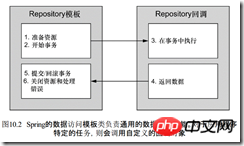
Spring的JDBC框架承担了资源管理和异常处理的工作,从而简化了JDBC代码,我们只需要编写从数据库读写数据的必需代码就万事大吉了。
二、Spring JdbcTemplate实例
我们的学习目标就是动手写一个demo,实现对Category的CRUD操作。
1.创建表
mysql新建数据库store,然后执行如下sql:
|
1
2
3
4
|
create table Category (Id int not null,Name varchar(80) null,constraint pk_category primary key (Id));INSERT INTO category(id,Name) VALUES (1,'女装');INSERT INTO category(id,Name) VALUES (2,'美妆');INSERT INTO category(id,Name) VALUES (3,'书籍'); |
db_store.sql
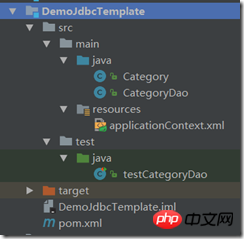
2.我用的IDE是IdeaIU,通过maven构建项目,通过xml配置spring。完成后的代码结构为:
3.创建实体类Category
|
1
2
3
4
5
6
7
8
9
10
11
12
13
14
15
16
17
18
19
20
21
22
23
24
25
26
|
public class Category{ private int cateId; private String cateName; public int getCateId() { return cateId; } public void setCateId(int cateId) { this.cateId = cateId; } public String getCateName() { return cateName; } public void setCateName(String cateName) { this.cateName = cateName; } @Override public String toString() { return "id="+cateId+" name="+cateName; }} |
4.修改pom.xml,引入相关依赖。
|
1
2
3
4
5
6
7
8
9
10
11
12
13
14
15
|
<dependencies> <dependency> <groupId>junit</groupId> <artifactId>junit</artifactId> <version>4.12</version> </dependency> <!-- Mysql数据库链接jar包 --> <dependency> <groupId>mysql</groupId> <artifactId>mysql-connector-java</artifactId> <version>5.1.21</version> <scope>runtime</scope> </dependency></dependencies> |
5.配置applicationContext.xml
需要配置dataSource作为jdbcTemplate的数据源。然后配置CategoryDao bean,构造注入了jdbcTemplate对象。完整的applicationContext.xml如下:
|
1
2
3
4
5
6
7
8
9
10
11
12
13
14
15
16
17
18
19
|
<?xml version="1.0" encoding="UTF-8"?><beans xmlns="http://www.springframework.org/schema/beans" xmlns:xsi="http://www.w3.org/2001/XMLSchema-instance" xsi:schemaLocation="http://www.springframework.org/schema/beans "> <bean id="dataSource" class="org.springframework.jdbc.datasource.DriverManagerDataSource"> <property name="driverClassName" value="com.mysql.jdbc.Driver"></property> <property name="url" value="jdbc:mysql://localhost:3306/store"></property> <property name="username" value="root"></property> <property name="password" value="root"></property> </bean> <bean id="jdbcTemplate" class="org.springframework.jdbc.core.JdbcTemplate"> <property name="dataSource" ref="dataSource"></property> </bean> <bean id="categoryDao" class="CategoryDao"> <constructor-arg ref="jdbcTemplate"></constructor-arg> </bean></beans> |
6.数据访问实现类CategoryDao
CategoryDao构造函数包含了参数jdbcTemplate,然后实现了常用的数据访问操作。可以看到,我们只要关注具体的sql语句就可以了。另外,在getById()和getAll()方法中使用了lambda语法。
|
1
2
3
4
5
6
7
8
9
10
11
12
13
14
15
16
17
18
19
20
21
22
23
24
25
26
27
28
29
30
31
32
33
34
35
36
37
38
39
40
41
42
43
44
45
46
47
48
49
50
51
52
53
54
55
56
57
58
59
60
61
|
import org.springframework.jdbc.core.JdbcTemplate;import org.springframework.jdbc.core.RowMapper;import java.sql.ResultSet;import java.sql.SQLException;import java.util.List;import java.util.Map;/** * Created by 陈敬 on 2017/6/6. */public class CategoryDao { private JdbcTemplate jdbcTemplate; public CategoryDao(JdbcTemplate jdbcTemplate) { this.jdbcTemplate = jdbcTemplate; } public int add(Category category) { String sql = "INSERT INTO category(id,name)VALUES(?,?)"; return jdbcTemplate.update(sql, category.getCateId(), category.getCateName()); } public int update(Category category) { String sql = "UPDATE Category SET Name=? WHERE Id=?"; return jdbcTemplate.update(sql, category.getCateName(), category.getCateId()); } public int delete(int id) { String sql = "DELETE FROM Category WHERE Id=?"; return jdbcTemplate.update(sql, id); } public int count(){ String sql="SELECT COUNT(0) FROM Category"; return jdbcTemplate.queryForObject(sql,Integer.class); } public Category getById(int id) { String sql = "SELECT Id,Name FROM Category WHERE Id=?"; return jdbcTemplate.queryForObject(sql, (ResultSet rs, int rowNumber) -> { Category category = new Category(); category.setCateId(rs.getInt("Id")); category.setCateName(rs.getString("Name")); return category; }, id); } public List<Category> getAll(){ String sql="SELECT Id,Name FROM Category"; List<Category> result=jdbcTemplate.query(sql, (resultSet, i) -> { Category category = new Category(); category.setCateId(resultSet.getInt("Id")); category.setCateName(resultSet.getString("Name")); return category; }); return result; }} |
7.测试
|
1
2
3
4
5
6
7
8
9
10
11
12
13
14
15
16
17
18
19
20
21
22
23
24
25
26
27
28
29
30
31
32
33
34
35
36
37
38
39
40
41
42
43
44
45
46
47
48
49
50
51
52
53
54
55
|
@ContextConfiguration(locations = "classpath:applicationContext.xml")@RunWith(SpringJUnit4ClassRunner.class)public class testCategoryDao { @Autowired private CategoryDao categoryDao; @Test public void testAdd() { Category category = new Category(); category.setCateId(4); category.setCateName("母婴"); int result = categoryDao.add(category); System.out.println(result); } @Test public void testUpdate() { Category category = new Category(); category.setCateId(4); category.setCateName("男装"); int result = categoryDao.update(category); System.out.println(result); } @Test public void testGetById() { int id = 4; Category category = categoryDao.getById(id); System.out.println(category.toString()); } @Test public void testGetAll() { List<Category> categories = categoryDao.getAll(); for (Category item : categories) { System.out.println(item); } } @Test public void testCount() { int count = categoryDao.count(); System.out.println(count); } @Test public void testDelete() { int id = 4; int result = categoryDao.delete(id); System.out.println(result); }} |
JdbcTemplate简单介绍的更多相关文章
- 第一次玩博客,今天被安利了一个很方便JDBC的基于Spring框架的一个叫SimpleInsert的类,现在就来简单介绍一下
首先先对这段代码的简单介绍,我之前在需要操作JDBC的时候总是会因为经常要重新写SQL语句感到很麻烦.所以就能拿则拿不能拿的就简单地封装了一下. 首先是Insert.Spring框架的JDBC包里面的 ...
- SpringBoot2.x入门教程:引入jdbc模块与JdbcTemplate简单使用
这是公众号<Throwable文摘>发布的第23篇原创文章,收录于专辑<SpringBoot2.x入门>. 前提 这篇文章是<SpringBoot2.x入门>专辑的 ...
- [原创]关于mybatis中一级缓存和二级缓存的简单介绍
关于mybatis中一级缓存和二级缓存的简单介绍 mybatis的一级缓存: MyBatis会在表示会话的SqlSession对象中建立一个简单的缓存,将每次查询到的结果结果缓存起来,当下次查询的时候 ...
- 利用Python进行数据分析(7) pandas基础: Series和DataFrame的简单介绍
一.pandas 是什么 pandas 是基于 NumPy 的一个 Python 数据分析包,主要目的是为了数据分析.它提供了大量高级的数据结构和对数据处理的方法. pandas 有两个主要的数据结构 ...
- 利用Python进行数据分析(4) NumPy基础: ndarray简单介绍
一.NumPy 是什么 NumPy 是 Python 科学计算的基础包,它专为进行严格的数字处理而产生.在之前的随笔里已有更加详细的介绍,这里不再赘述. 利用 Python 进行数据分析(一)简单介绍 ...
- yii2的权限管理系统RBAC简单介绍
这里有几个概念 权限: 指用户是否可以执行哪些操作,如:编辑.发布.查看回帖 角色 比如:VIP用户组, 高级会员组,中级会员组,初级会员组 VIP用户组:发帖.回帖.删帖.浏览权限 高级会员组:发帖 ...
- angular1.x的简单介绍(二)
首先还是要强调一下DI,DI(Denpendency Injection)伸手获得,主要解决模块间的耦合关系.那么模块是又什么组成的呢?在我看来,模块的最小单位是类,多个类的组合就是模块.关于在根模块 ...
- Linux的简单介绍和常用命令的介绍
Linux的简单介绍和常用命令的介绍 本说明以Ubuntu系统为例 Ubuntu系统的安装自行百度,或者参考http://www.cnblogs.com/CoderJYF/p/6091068.html ...
- iOS-iOS开发简单介绍
概览 终于到了真正接触IOS应用程序的时刻了,之前我们花了很多时间去讨论C语言.ObjC等知识,对于很多朋友而言开发IOS第一天就想直接看到成果,看到可以运行的IOS程序.但是这里我想强调一下,前面的 ...
随机推荐
- TYVJ 1935 拆点网络流
思路: 就是一个多重匹配 把每个防御塔拆成 拆成第j次 发射的导弹 跑个网络流 //By SiriusRen #include <cmath> #include <queue> ...
- 外连接OUTER JOIN(三十五)
外连接OUTER JOIN LEFT [OUTER] JOIN,左外连接 显示左表的全部记录及右表符合连接条件的记录 下面我们来演示一下,操作命令及部分结果如下: SELECT goods_id, ...
- pig安装配置
pig的安装配置很简单,只需要配置一下环境变量和指向hadoop conf的环境变量就行了 1.上传 2.解压 3.配置环境变量 Pig工作模式 本地模式:只需要配置PATH环境变量${PIG_HOM ...
- SQL函数-str()
1 str()函数用于将数值类型数据转换未字符类型. 2 str()函数语法 select str(数字类型的表达式[,表达式总长度][,小数点后面的位数]) 表达式总长度和小数点后面的位数为可选择参 ...
- 2017 ACM-ICPC 亚洲区(南宁赛区)网络赛 (B,F,L,M)
B. Train Seats Reservation You are given a list of train stations, say from the station 1 to the sta ...
- 封装TensorFlow神经网络
为了参加今年的软件杯设计大赛,这几个月学习了很多新知识.现在大赛的第二轮作品优化已经提交,开始对这四个月所学知识做一些总结与记录. 用TensorFlow搭建神经网络.TensorFlow将神经网络的 ...
- spring在web.xml中的配置
在实际项目中spring的配置文件applicationcontext.xml是通过spring提供的加载机制,自动加载的容器中去,在web项目中,配置文件加载到web容器中进行解析,目前,sprin ...
- 【Linux环境编程】获取网卡的实时网速
在windows以下.我们能够看到360或者是qq安全卫士的"安全球".上面显示实时的网速情况.那么在linux里面怎样获取网卡的实时网速?事实上原理非常easy,读取须要获取网速 ...
- Alcatraz:管理Xcode插件
简单介绍 Alcatraz是一个帮你管理Xcode插件.模版以及颜色配置的工具. 它能够直接集成到Xcode的图形界面中,让你感觉就像在使用Xcode自带的功能一样. 安装和删除 使用例如以下的命令行 ...
- Spark Tachyon实战应用(配置启动环境、运行spark和运行mapreduce)
Tachyon实战应用 配置及启动环境 修改spark-env.sh 启动HDFS 启动Tachyon Tachyon上运行Spark 添加core-site.xml 启动Spark集群 读取文件并保 ...