
Exercise: PCA in 2D
Step 0: Load data
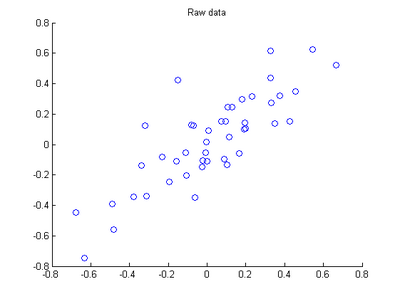
The starter code contains code to load 45 2D data points. When plotted using the scatter function, the results should look like the following:
Step 1: Implement PCA
In this step, you will implement PCA to obtain xrot, the matrix in which the data is "rotated" to the basis comprising
made up of the principal components
Step 1a: Finding the PCA basis
Find
and
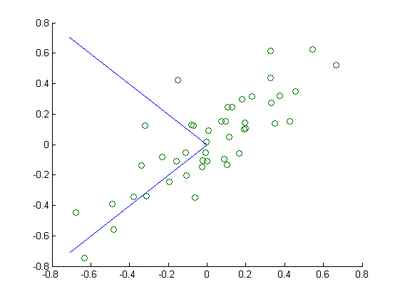
, and draw two lines in your figure to show the resulting basis on top of the given data points.
Step 1b: Check xRot
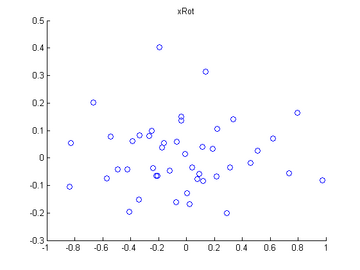
Compute xRot, and use the scatter function to check that xRot looks as it should, which should be something like the following:
Step 2: Dimension reduce and replot
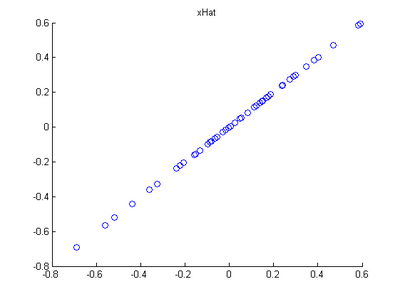
In the next step, set k, the number of components to retain, to be 1
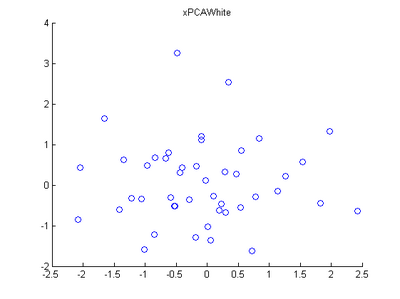
Step 3: PCA Whitening
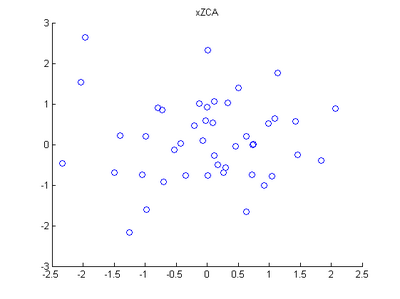
Step 4: ZCA Whitening
Code
close all

%%================================================================

%% Step : Load data

%  We have provided the code to load data from pcaData.txt into x.

%  x is a  *  matrix, where the kth column x(:,k) corresponds to

%  the kth data point.Here we provide the code to load natural image data into x.

%  You do not need to change the code below.

x = load('pcaData.txt','-ascii'); % 载入数据

figure();

scatter(x(, :), x(, :)); % 用圆圈绘制出数据分布

title('Raw data');

%%================================================================

%% Step 1a: Implement PCA to obtain U

%  Implement PCA to obtain the rotation matrix U, which is the eigenbasis

%  sigma.

% -------------------- YOUR CODE HERE --------------------

u = zeros(size(x, )); % You need to compute this

[n m]=size(x);

% x=x-repmat(mean(x,),,m);  %预处理,均值为零 —— 2维,每一维减去该维上的均值

sigma=(1.0/m)*x*x'; % 协方差矩阵

[u s v]=svd(sigma);

% --------------------------------------------------------

hold on

plot([ u(,)], [ u(,)]); % 画第一条线

plot([ u(,)], [ u(,)]); % 画第二条线

scatter(x(, :), x(, :));

hold off

%%================================================================

%% Step 1b: Compute xRot, the projection on to the eigenbasis

%  Now, compute xRot by projecting the data on to the basis defined

%  by U. Visualize the points by performing a scatter plot.

% -------------------- YOUR CODE HERE --------------------

xRot = zeros(size(x)); % You need to compute this

xRot=u'*x;

% --------------------------------------------------------

% Visualise the covariance matrix. You should see a line across the

% diagonal against a blue background.

figure();

scatter(xRot(, :), xRot(, :));

title('xRot');

%%================================================================

%% Step : Reduce the number of dimensions from  to .

%  Compute xRot again (this time projecting to  dimension).

%  Then, compute xHat by projecting the xRot back onto the original axes

%  to see the effect of dimension reduction

% -------------------- YOUR CODE HERE --------------------

k = ; % Use k =  and project the data onto the first eigenbasis

xHat = zeros(size(x)); % You need to compute this

xHat = u*([u(:,),zeros(n,)]'*x); % 降维

% 使特征点落在特征向量所指的方向上而不是原坐标系上

% --------------------------------------------------------

figure();

scatter(xHat(, :), xHat(, :));

title('xHat');

%%================================================================

%% Step : PCA Whitening

%  Complute xPCAWhite and plot the results.

epsilon = 1e-;

% -------------------- YOUR CODE HERE --------------------

xPCAWhite = zeros(size(x)); % You need to compute this

xPCAWhite = diag(./sqrt(diag(s)+epsilon))*u'*x;  % 每个特征除以对应的特征向量,以使每个特征有一致的方差

% --------------------------------------------------------

figure();

scatter(xPCAWhite(, :), xPCAWhite(, :));

title('xPCAWhite');

%%================================================================

%% Step : ZCA Whitening

%  Complute xZCAWhite and plot the results.

% -------------------- YOUR CODE HERE --------------------

xZCAWhite = zeros(size(x)); % You need to compute this

xZCAWhite = u*diag(./sqrt(diag(s)+epsilon))*u'*x;

% --------------------------------------------------------

figure();

scatter(xZCAWhite(, :), xZCAWhite(, :));

title('xZCAWhite');

%% Congratulations! When you have reached this point, you are done!

%  You can now move onto the next PCA exercise. :)
Exercise: PCA in 2D的更多相关文章
- 【DeepLearning】Exercise:PCA in 2D
Exercise:PCA in 2D 习题的链接:Exercise:PCA in 2D pca_2d.m close all %%=================================== ...
- 【DeepLearning】Exercise:PCA and Whitening
Exercise:PCA and Whitening 习题链接:Exercise:PCA and Whitening pca_gen.m %%============================= ...
- Deep Learning 4_深度学习UFLDL教程:PCA in 2D_Exercise(斯坦福大学深度学习教程)
前言 本节练习的主要内容:PCA,PCA Whitening以及ZCA Whitening在2D数据上的使用,2D的数据集是45个数据点,每个数据点是2维的.要注意区别比较二维数据与二维图像的不同,特 ...
- UFLDL教程笔记及练习答案二(预处理:主成分分析和白化)
首先将本节主要内容记录下来.然后给出课后习题的答案. 笔记: :首先我想推导用SVD求解PCA的合理性. PCA原理:如果样本数据X∈Rm×n.当中m是样本数量,n是样本的维数.PCA降维的目的就是为 ...
- Deep Learning 教程(斯坦福深度学习研究团队)
http://www.zhizihua.com/blog/post/602.html 说明:本教程将阐述无监督特征学习和深度学习的主要观点.通过学习,你也将实现多个功能学习/深度学习算法,能看到它们为 ...
- [Scikit-learn] 4.3 Preprocessing data
数据分析的重难点,就这么来了,欢迎欢迎,热烈欢迎. 4. Dataset transformations 4.3. Preprocessing data 4.3.1. Standardization, ...
- UFLDL教程之(三)PCA and Whitening exercise
Exercise:PCA and Whitening 第0步:数据准备 UFLDL下载的文件中,包含数据集IMAGES_RAW,它是一个512*512*10的矩阵,也就是10幅512*512的图像 ( ...
- PCA and kmeans MATLAB实现
MATLAB基础知识 l Imread: 读取图片信息: l axis:轴缩放:axis([xmin xmax ymin ymax zmin zmax cmin cmax]) 设置 x.y 和 ...
- Deep Learning 5_深度学习UFLDL教程:PCA and Whitening_Exercise(斯坦福大学深度学习教程)
前言 本文是基于Exercise:PCA and Whitening的练习. 理论知识见:UFLDL教程. 实验内容:从10张512*512自然图像中随机选取10000个12*12的图像块(patch ...
随机推荐
- CentOS6.9下ssh密钥登录配置步骤(免密码登录)和ssh-keygen 命令常用参数
密钥登录步骤(免密码登录)ssh登录提供两种认证方式:口令(密码)认证方式和密钥认证方式.其中口令(密码)认证方式是我们最常用的一种,出于安全方面的考虑,介绍密钥认证方式登录到linux/unix的方 ...
- caioj 1074 动态规划入门(中链式1:最小交换合并问题)
经典的石子合并问题!!! 设f[i][j]为从i到j的最大值 然后我们先枚举区间大小,然后枚举起点终点来更新 f[i][j] = min(f[i][k] + f[k+1][j] + sum(i, j) ...
- 使用npm上传npm包
npm是一个node的包管理仓库,一个网站,也是一条命令.如何给node里增加npm包呢?只需三步就搞定. 第一步:在开始里边打开cmd进入自己的项目中,在项目目录中输入 npm init 回车会有一 ...
- 【习题 8-20 UVA-1620】Lazy Susan
[链接] 我是链接,点我呀:) [题意] 在这里输入题意 [题解] 会发现,如果把连续4个数字进行一次翻转的话. 假设这连续的4个数字的逆序数为x; 那么翻转过后,逆序数就会变成6-x; (最多6个逆 ...
- Java 学习(12):重写(Override)与重载(Overload) & 多态
目录 --- 重写 --- 重载 --- 多态 重写(Override) 重写是子类对父类的允许访问的方法的实现过程进行重新编写, 返回值和形参都不能改变.即外壳不变,核心重写! 重写的好处在于子类可 ...
- codevs——T2806 红与黑
http://codevs.cn/problem/2806/ 时间限制: 1 s 空间限制: 64000 KB 题目等级 : 白银 Silver 题解 题目描述 Descriptio ...
- Map和Collection详解
Collection -----List -----LinkedList 非同步 ----ArrayList 非同 ...
- zico源代码分析(一) 数据接收和存储部分
zorka和zico的代码地址:https://github.com/jitlogic 由于zico是zorka的collecter端,所以在介绍zico之前首先说一下zorka和数据结构化存储和传输 ...
- DevExpress控件的安装及画图控件的使用
近期须要绘制纵断面图,而AE自带的又不是非常好,查找资料后使用DevExpress控件中的画图控件实现了纵断面的绘制.Dev控件是须要付费的.这里我们使用破解版的哈. 安装包及破解文件上传至我的网盘了 ...
- Vue总结(一)
vue总结 构建用户界面的渐进式框架 渐进式:用到什么功能即可使用转么的框架子模块. 两个核心点 向应的数据绑定 当时图发生改变->自动跟新视图,利用Object.defindProperty中 ...