
Netty原理和使用
性能主题
Netty原理和使用
Netty是一个高性能 事件驱动的异步的非堵塞的IO(NIO)框架,用于建立TCP等底层的连接,基于Netty可以建立高性能的Http服务器。支持HTTP、 WebSocket 、Protobuf、
Binary
TCP |和UDP,Netty已经被很多高性能项目作为其Socket底层基础,如HornetQ Infinispan Vert.x
Play Framework
Finangle和
Cassandra。其竞争对手是:Apache MINA和
Grizzly。
传统堵塞的IO读取如下:
InputStream is = new FileInputStream("input.bin");
int byte = is.read(); // 当前线程等待结果到达直至错误
而使用NIO如下:
while (true) {
selector.select(); // 从多个通道请求事件
Iterator it = selector.selectedKeys().iterator();
while (it.hasNext()) {
SelectorKey key = (SelectionKey) it.next();
handleKey(key);
it.remove();
}
}
堵塞与非堵塞原理
传统硬件的堵塞如下,从内存中读取数据,然后写到磁盘,而CPU一直等到磁盘写完成,磁盘的写操作是慢的,这段时间CPU被堵塞不能发挥效率。
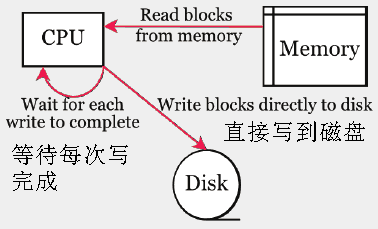
使用非堵塞的DMA如下图:CPU只是发出写操作这样的指令,做一些初始化工作,DMA具体执行,从内存中读取数据,然后写到磁盘,当完成写后发出一个中断事件给CPU。这段时间CPU是空闲的,可以做别的事情。这个原理称为Zero.copy零拷贝。

Netty底层基于上述Java NIO的零拷贝原理实现:

比较
- Tomcat是一个Web服务器,它是采取一个请求一个线程,当有1000客户端时,会耗费很多内存。通常一个线程将花费
256kb到1mb的stack空间。 - Node.js是一个线程服务于所有请求,在错误处理上有限制
- Netty是一个线程服务于很多请求,如下图,当从Java NIO获得一个Selector事件,将激活通道Channel。

演示
Netty的使用代码如下:
Channel channel = ...
ChannelFuture cf = channel.write(data);
cf.addListener(
new ChannelFutureListener() {
@Override
public void operationComplete(ChannelFuture future) throws Exception {
if(!future.isSuccess() {
future.cause().printStacktrace();
...
}
...
}
});
...
cf.sync();
通过引入观察者监听,当有数据时,将自动激活监听者中的代码运行。
我们使用Netty建立一个服务器代码:
public class EchoServer {
private final int port;
public EchoServer(int port) {
this.port = port;
}
public void run() throws Exception {
// Configure the server.
EventLoopGroup bossGroup = new NioEventLoopGroup();
EventLoopGroup workerGroup = new NioEventLoopGroup();
try {
ServerBootstrap b = new ServerBootstrap();
b.group(bossGroup, workerGroup).channel(NioServerSocketChannel.class).option(ChannelOption.SO_BACKLOG, 100)
.handler(new LoggingHandler(LogLevel.INFO)).childHandler(new ChannelInitializer<SocketChannel>() {
@Override
public void initChannel(SocketChannel ch) throws Exception {
ch.pipeline().addLast(
// new LoggingHandler(LogLevel.INFO),
new EchoServerHandler());
}
});
// Start the server.
ChannelFuture f = b.bind(port).sync();
// Wait until the server socket is closed.
f.channel().closeFuture().sync();
} finally {
// Shut down all event loops to terminate all threads.
bossGroup.shutdownGracefully();
workerGroup.shutdownGracefully();
}
}
}
这段代码调用:在9999端口启动
new EchoServer(9999).run();
我们需要完成的代码是EchoServerHandler:
public class EchoServerHandler extends ChannelInboundHandlerAdapter {
private static final Logger logger = Logger.getLogger(EchoServerHandler.class.getName());
@Override
public void channelRead(ChannelHandlerContext ctx, Object msg) throws Exception {
ctx.write(msg);
}
@Override
public void channelReadComplete(ChannelHandlerContext ctx) throws Exception {
ctx.flush();
}
@Override
public void exceptionCaught(ChannelHandlerContext ctx, Throwable cause) {
// Close the connection when an exception is raised.
logger.log(Level.WARNING, "Unexpected exception from downstream.", cause);
ctx.close();
}
}
原理
一个Netty服务器的原理如下:
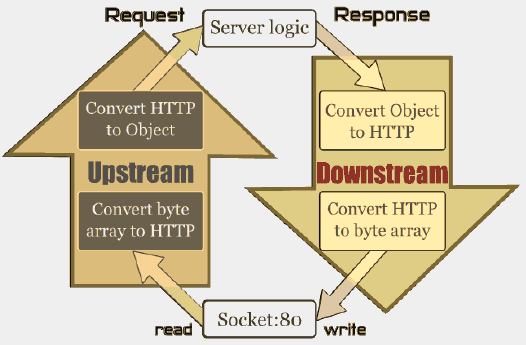
图中每次请求的读取是通过UpStream来实现,然后激活我们的服务逻辑如EchoServerHandler,而服务器向外写数据,也就是响应是通过DownStream实现的。每个通道Channel包含一对UpStream和DownStream,以及我们的handlers(EchoServerHandler),如下图,这些都是通过channel pipeline封装起来的,数据流在管道里流动,每个Socket对应一个ChannelPipeline。
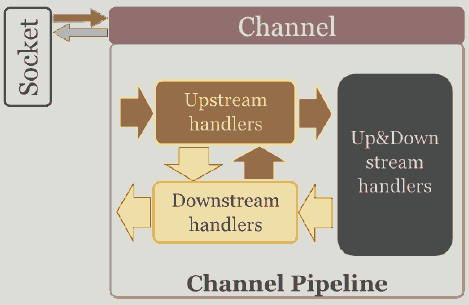
CHANNELPIPELINE是关键,它类似Unix的管道,有以下作用:
- 为每个Channel 保留 ChannelHandlers ,如EchoServerHandler
- 所有的事件都要通过它
- 不断地修改:类似unix的SH管道: echo "Netty is shit...." | sed -e 's/is /is the /'
- 一个Channel对应一个
ChannelPipeline - 包含协议编码解码 安全验证SSL/TLS和应用逻辑
客户端代码
前面我们演示了服务器端代码,下面是客户端代码:
public class EchoClient {
private final String host;
private final int port;
private final int firstMessageSize;
public EchoClient(String host, int port, int firstMessageSize) {
this.host = host;
this.port = port;
this.firstMessageSize = firstMessageSize;
}
public void run() throws Exception {
// Configure the client.
EventLoopGroup group = new NioEventLoopGroup();
try {
Bootstrap b = new Bootstrap();
b.group(group).channel(NioSocketChannel.class).option(ChannelOption.TCP_NODELAY, true).handler(new ChannelInitializer<SocketChannel>() {
@Override
public void initChannel(SocketChannel ch) throws Exception {
ch.pipeline().addLast(
// new LoggingHandler(LogLevel.INFO),
new EchoClientHandler(firstMessageSize));
}
});
// Start the client.
ChannelFuture f = b.connect(host, port).sync();
// Wait until the connection is closed.
f.channel().closeFuture().sync();
} finally {
// Shut down the event loop to terminate all threads.
group.shutdownGracefully();
}
}
}
客户端的应用逻辑EchoClientHandler:
public class EchoClientHandler extends ChannelInboundHandlerAdapter {
private static final Logger logger = Logger.getLogger(EchoClientHandler.class.getName());
private final ByteBuf firstMessage;
/**
* Creates a client-side handler.
*/
public EchoClientHandler(int firstMessageSize) {
if (firstMessageSize <= 0) {
throw new IllegalArgumentException("firstMessageSize: " + firstMessageSize);
}
firstMessage = Unpooled.buffer(firstMessageSize);
for (int i = 0; i < firstMessage.capacity(); i++) {
firstMessage.writeByte((byte) i);
}
}
@Override
public void channelActive(ChannelHandlerContext ctx) {
ctx.writeAndFlush(firstMessage);
System.out.print("active");
}
@Override
public void channelRead(ChannelHandlerContext ctx, Object msg) throws Exception {
ctx.write(msg);
System.out.print("read");
}
@Override
public void channelReadComplete(ChannelHandlerContext ctx) throws Exception {
ctx.flush();
System.out.print("readok");
}
@Override
public void exceptionCaught(ChannelHandlerContext ctx, Throwable cause) {
// Close the connection when an exception is raised.
logger.log(Level.WARNING, "Unexpected exception from downstream.", cause);
ctx.close();
}
}
原文地址:https://www.jdon.com/concurrent/netty.html
Netty原理和使用的更多相关文章
- 《深入探索Netty原理及源码分析》文集小结
<深入探索Netty原理及源码分析>文集小结 https://www.jianshu.com/p/239a196152de
- Netty原理架构解析
Netty原理架构解析 转载自:http://www.sohu.com/a/272879207_463994本文转载关于Netty的原理架构解析,方便之后巩固复习 Netty是一个异步事件驱动的网络应 ...
- 【Netty】最透彻的Netty原理架构解析
这可能是目前最透彻的Netty原理架构解析 本文基于 Netty 4.1 展开介绍相关理论模型,使用场景,基本组件.整体架构,知其然且知其所以然,希望给大家在实际开发实践.学习开源项目方面提供参考. ...
- 这可能是目前最透彻的Netty原理架构解析
https://juejin.im/post/5be00763e51d453d4a5cf289 本文基于 Netty 4.1 展开介绍相关理论模型,使用场景,基本组件.整体架构,知其然且知其所以然,希 ...
- 每日扫盲(四):java之Netty原理和使用
转自:https://www.jdon.com/concurrent/netty.html Netty是一个高性能 事件驱动的异步的非堵塞的IO(NIO)框架,用于建立TCP等底层的连接,基于Nett ...
- netty原理解析
netty主要采用的是reactor模式(事件)驱动模型,以下主要对reactor进行总结: C/S架构可以抽象为如下模型: C就是Client(客户端),上面的B是Browser(浏览器) S就是S ...
- Netty原理分析
Netty是一个高性能.异步事件驱动的NIO框架,它提供了对TCP.UDP和文件传输的支持,作为一个异步NIO框架,Netty的所有IO操作都是异步非阻塞的,通过Future-Listener机制,用 ...
- Netty原理剖析
1. Netty简介 Netty是一个高性能.异步事件驱动的NIO框架,基于JAVA NIO提供的API实现.它提供了对TCP.UDP和文件传输的支持,作为一个异步NIO框架,Netty的所有IO操作 ...
- netty 原理
netty 实现 1. 各组件之间的关系 每个ServerBootstrap与一个事件循环对象(一个线程)都会与一个Channel绑定,如NioServerSocketChannel 2. 如何绑定 ...
随机推荐
- 2017国家集训队作业[arc082d]Sandglass
2017国家集训队作业[arc082d]Sandglass 题意: 有一个沙漏,初始时\(A\)瓶在上方,两个瓶子的最大容量都为\(X\)克,沙子流动的速度为\(1g\)每单位时间.给出\(K\) ...
- MD基本语法介绍
Markdown基本语法介绍 前言 文本编辑器一般用的有富文本编辑器(也就是Word)和md了,但是wold太过于花里胡哨很多功能都用不上,所以就选择md了,简单实用,一对于我来说一般就用标题和列表就 ...
- windows安装memcached
http://www.cnblogs.com/wujuntian/p/4791220.html
- day 5 集合
# -*- coding: utf_8 _*_# Author:Vi#集合是无序的 list_1 = [1,2,3,2,3,5,7]list_1 = set(list_1)#将列表转变成集合list_ ...
- WPF通用管理框架 项目客户端基础结构介绍
介绍 首先, 粗糙的展示一下目前的结构设计理念, 因为这几天一直在忙于工作, 所以跟进有些缓慢, 整体的设计是支持多种服务模式.目前只针对MSSQL做数据库接口, ORM选型则用的是微软的EF(PS: ...
- worktools-git 工具的使用总结(2)
1.创建分支 git branch son parent //创建分支,是在master 分支的基础上创建 :~/myGit$ git st # On branch master nothing to ...
- 1.3 Quick Start中 Step 8: Use Kafka Streams to process data官网剖析(博主推荐)
不多说,直接上干货! 一切来源于官网 http://kafka.apache.org/documentation/ Step 8: Use Kafka Streams to process data ...
- COGS——T 1265. [NOIP2012] 同余方程
http://cogs.pro/cogs/problem/problem.php?pid=1265 ★☆ 输入文件:mod.in 输出文件:mod.out 简单对比时间限制:1 s 内 ...
- actionbar-displayOptions 属性分析
displayOptions 这个属性主要是控制这actionbar 上返回按钮.标题等的显示.它作为 actionBarStyle 的一个item,如下 <style name="A ...
- html只能有一个id,并且id的值只能是一个
1.如果有相同的ID,javascript只会取第一个具有该ID的标签. 2.如果id值有两个,JS只会取到第一个,并不会像class类一样,类名并列就可以同时取到.